
pengenalan
This manual provides essential instructions for the safe operation, maintenance, and troubleshooting of your roborock QV 35S Robot Vacuum and Mop. Please read this manual thoroughly before using the product and retain it for future reference.

Rajah 1: The roborock QV 35S Robot Vacuum and Mop with its multifunction docking station and companion app interface.
Maklumat Keselamatan Penting
Sentiasa ikuti langkah berjaga-jaga keselamatan asas apabila menggunakan peralatan elektrik untuk mengurangkan risiko kebakaran, renjatan elektrik dan kecederaan.
- Baca semua arahan sebelum menggunakan perkakas.
- Jangan benarkan kanak-kanak mengendalikan robot. Awasi kanak-kanak dan haiwan peliharaan semasa robot beroperasi.
- Pastikan vol dayatage sepadan dengan voltage ditanda pada dok pengecasan.
- Do not use the robot in environments with open flames or fragile objects.
- Jauhkan rambut, pakaian longgar, jari dan semua bahagian badan daripada bukaan dan bahagian yang bergerak.
- Only use the charging dock provided by the manufacturer.
Kandungan Pakej
Sahkan bahawa semua komponen terdapat dalam pakej:
- roborock QV 35S Robot Vacuum and Mop
- Stesen dok pelbagai fungsi
- Mop Pads (two rotating)
- Kabel Kuasa
- Manual Pengguna
Persediaan
1. Docking Station Placement
Place the multifunction docking station on a hard, level surface against a wall. Ensure there is at least 0.5 meters (1.6 feet) of clear space on both sides and 1.5 meters (4.9 feet) in front of the dock for optimal robot navigation. Connect the power cable to the dock and plug it into a power outlet.
2. Pengecasan Awal
Place the robot onto the charging contacts of the docking station. The robot will automatically power on and begin charging. Allow the robot to fully charge before its first use.
3. Sambungan Apl
Download the roborock app from your mobile device's app store. Open the app and follow the on-screen instructions to add your roborock QV 35S. A 2.4 GHz Wi-Fi network is required for app connection.

Rajah 2: The roborock app provides comprehensive control and customization options for your robot.
Arahan Operasi
1. Pemetaan Awal
For the first cleaning cycle, allow the robot to map your home. The PreciSense LiDAR navigation system will scan 360° to create detailed maps for efficient route planning. The robot supports up to 4 floor maps, automatically switching between them for multi-story homes.

Rajah 3: The robot utilizes LiDAR technology for precise navigation and mapping, enabling efficient cleaning routes.
2. Mod Pembersihan
The roborock QV 35S offers various cleaning modes accessible via the app:
- Vakum Sahaja: Untuk penyingkiran serpihan kering.
- Mop Sahaja: Untuk pembersihan basah lantai keras.
- Vakum & Mop: Vakum dan mop serentak.
- Pembersihan Tersuai: Define specific rooms or zones for cleaning.
3. Suction and Mopping Features
The robot features 10,000 Pa HyperForce suction for deep cleaning and dual spinning mops that rotate at up to 200 RPM. The mops can lift 10 mm to avoid wetting carpets during cleaning. Water flow can be adjusted in 30 levels via the app.

Rajah 4: The robot's powerful 10,000 Pa HyperForce suction effectively removes debris from various surfaces.

Rajah 5: Dual spinning mops provide effective wet cleaning, with an automatic lift feature for carpets.
4. Obstacle Avoidance
The reactive technical obstacle avoidance system uses structured light to detect and navigate around obstacles, even in cluttered environments. The robot can suggest "No-Go Zones" for areas where it might get stuck, such as under chairs or tables.
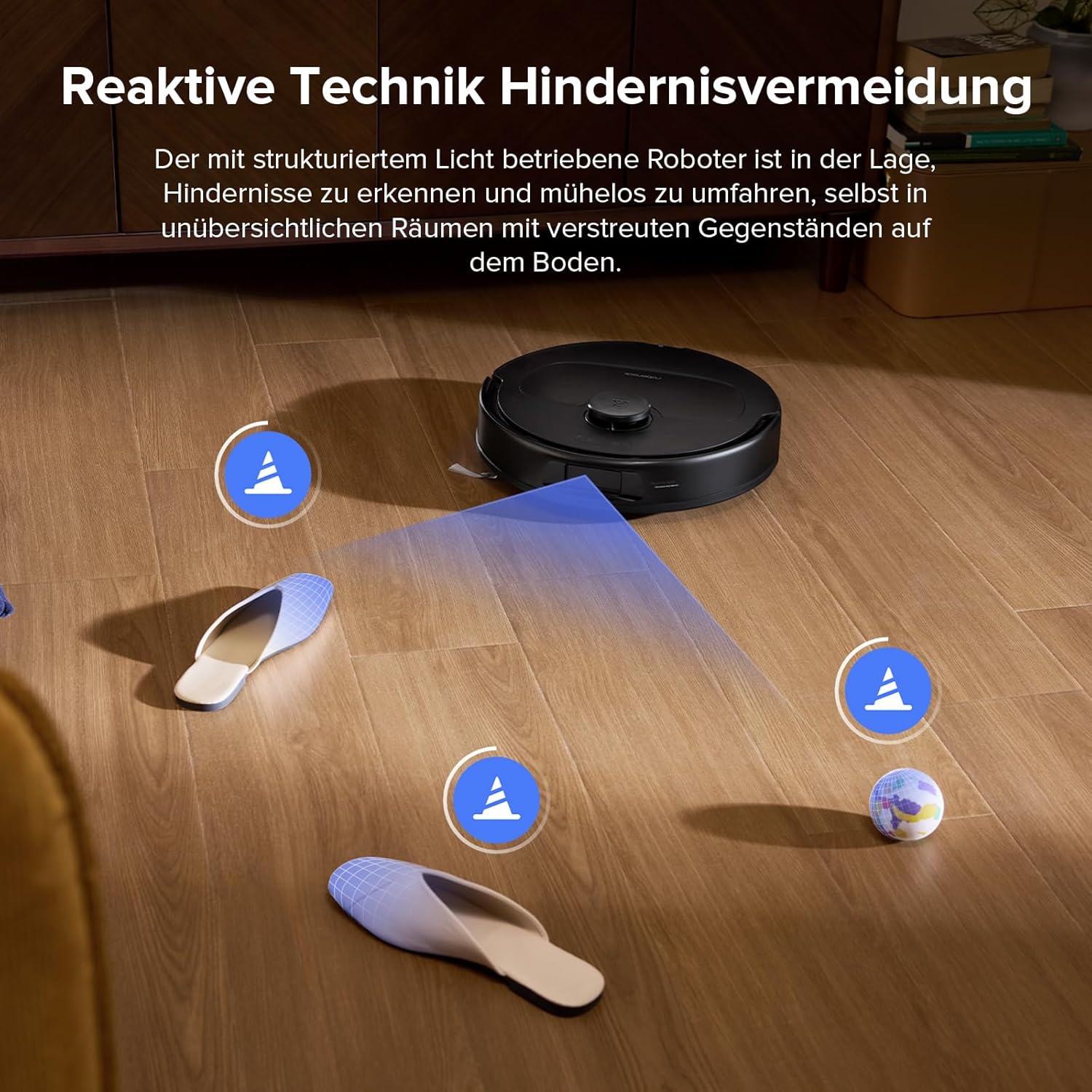
Rajah 6: The robot's advanced sensors enable it to identify and bypass common household obstacles.
Penyelenggaraan
1. Multifunction Dock Maintenance
The multifunction dock automatically washes and dries the mop pads, refills the water tank, and empties the dustbin. The dustbag in the dock can hold debris for over 7 weeks. Regularly check and empty the dustbag as needed. The entire docking station is detachable for easy and thorough cleaning to prevent sludge and dirt buildup.

Rajah 7: The multifunction dock simplifies maintenance with automated cleaning and emptying features.
2. Pembersihan Berus Utama dan Berus Sisi
The robot features a dual anti-tangle system with a rubberized floating main brush and a unique arc-shaped side brush. While designed to prevent tangles, it is recommended to periodically check and clean the brushes, especially if you have pets with long hair. Remove any hair or debris wrapped around the brushes. The improved side brush is SGS-certified for a 0% entanglement rate.
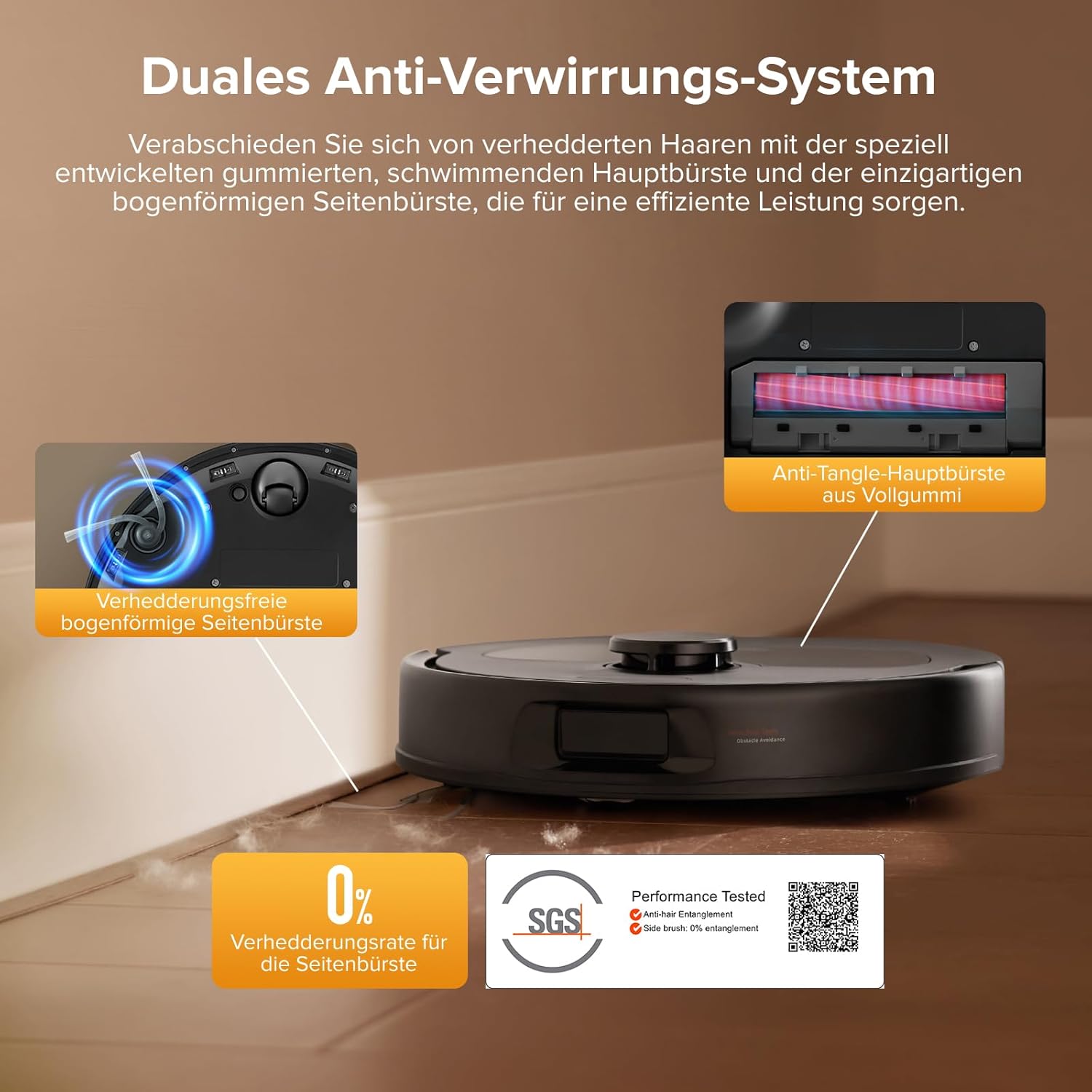
Rajah 8: The anti-tangle brush system minimizes hair entanglement, but periodic inspection is advised. SGS Certification Details
3. Mop Pad Cleaning
The mop pads are automatically washed and dried by the docking station. For optimal performance, it is recommended to occasionally remove and hand-wash the mop pads with water to remove any accumulated dirt or residue.
4. Pembersihan Penapis
The robot's internal filter should be cleaned regularly. Tap out dust and rinse with water. Ensure the filter is completely dry before reinserting it into the robot.
Menyelesaikan masalah
| Masalah | Kemungkinan Punca | Penyelesaian |
|---|---|---|
| Robot not connecting to Wi-Fi. | Kata laluan Wi-Fi yang salah, rangkaian 5GHz atau isyarat lemah. | Ensure you are using a 2.4 GHz Wi-Fi network. Verify the password. Move the robot closer to the router. |
| Robot kerap tersangkut. | Small obstacles, loose cables, or tight spaces. | Clear the area of small objects and cables. Use the app to define "No-Go Zones" for problematic areas. |
| Prestasi sedutan yang lemah. | Full dustbin, clogged filter, or tangled main brush. | Empty the dustbin. Clean or replace the filter. Remove any hair or debris from the main brush. |
| Pad mop tidak membersihkan dengan berkesan. | Dirty mop pads, insufficient water flow, or empty water tank. | Ensure mop pads are clean. Adjust water flow settings in the app. Refill the water tank. |
| Robot displays "move to new location and restart" error. | Robot is in an unfamiliar or problematic location, or a sensor issue. | Manually move the robot to a clear, open area and restart it. If the issue persists, clean all sensors and ensure no obstructions. |
Spesifikasi
- Jenama: roborock
- model: QV 35S
- warna: Roborock Qv 35s Black
- Robot Dimensions (L x W x H): Kira-kira 35 x 35 x 9.65 cm (13.8 x 13.8 x 3.8 inci)
- Dock Dimensions (L x W x H): 35 x 48.7 x 52.1 cm (13.8 x 19.2 x 20.5 inci)
- Berat Barang: 16 Kilograms (including dock)
- Kuasa sedutan: 10,000 Pa HyperForce
- Mopping System: Dual Spinning Mops (up to 200 RPM), 10mm Auto Mop Lift
- Navigasi: PreciSense LiDAR Navigation & Mapping
- Mengelakkan halangan: Reactive Technical Obstacle Avoidance (structured light)
- Kawalan Apl: Yes (roborock app, requires 2.4 GHz Wi-Fi)
- Kawalan Suara: Compatible with Amazon Echo, Google Home
- Ciri Khas: 360-degree rotation, removable container, pet hair suction, advanced custom cleaning, precise laser mapping, automatic shutdown.
- Komponen yang Disertakan: Docking station, water tank, mop pads, two rotating brushes.
Waranti dan Sokongan
For warranty information, technical support, or service inquiries, please refer to the official roborock webtapak atau hubungi perkhidmatan pelanggan mereka secara langsung.
You can find more information and support on the official roborock store page: roborock Official Store