
1. Pengenalan
This manual provides detailed instructions for the installation, operation, and maintenance of the TMEZON MZ-VDP-NE160 4-wire doorbell camera. This outdoor station is designed to work seamlessly with compatible TMEZON videophone monitors, such as the MZ-IP-V728TW, to provide secure and convenient visitor management for your property.
2. Maklumat Keselamatan
Please read and understand all safety instructions before installing or operating this device. Failure to follow these instructions may result in electric shock, fire, or damage to the product.
- Keselamatan Elektrik: Installation should be performed by a qualified electrician or technician. Ensure power is disconnected before any wiring work.
- Pendedahan Air: While designed for outdoor use, avoid direct high-pressure water jets. Ensure all connections are properly sealed.
- Suhu: Do not expose the device to extreme temperatures outside its operating range.
- Pembersihan: Gunakan kain lembut dan kering untuk pembersihan. Jangan gunakan pembersih atau pelarut yang melelas.
3. Kandungan Pakej
Sahkan bahawa semua komponen terdapat dalam pakej:
- 1 x TMEZON MZ-VDP-NE160 Doorbell Camera Unit
- Skru Pemasangan dan Palam Dinding
- Penyambung Pendawaian
- Manual Pengguna (dokumen ini)
4. Produk Lebihview
The TMEZON MZ-VDP-NE160 is an outdoor doorbell camera unit. It features a camera for video surveillance, a microphone for audio input, a speaker for audio output, and a call button to initiate communication with the indoor monitor.
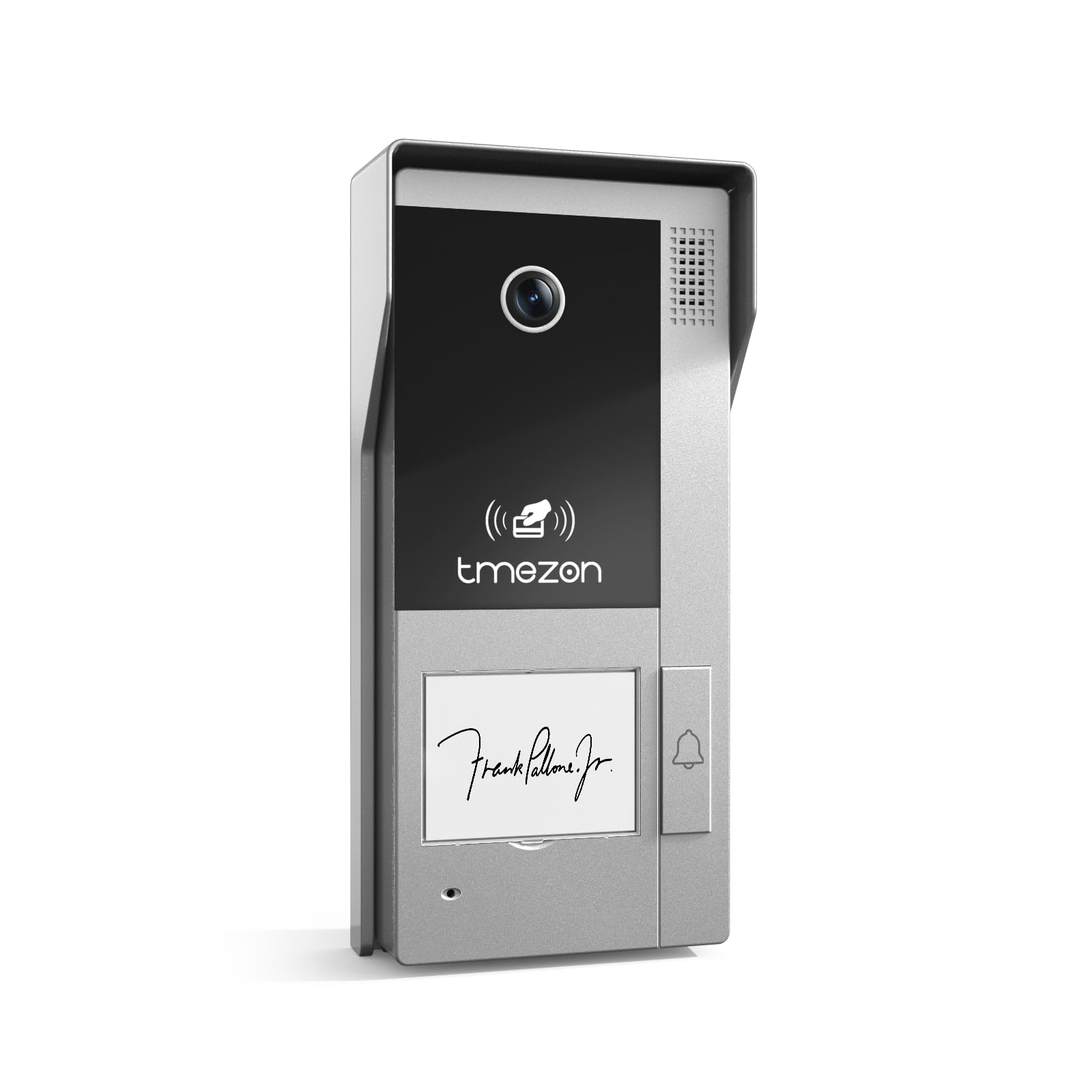
Rajah 1: Depan view of the TMEZON MZ-VDP-NE160 doorbell camera, showing the camera lens, call button, microphone, and speaker grille.
Komponen utama termasuk:
- Kanta Kamera: Captures video feed.
- Butang panggilan: Activates the indoor monitor and initiates communication.
- mikrofon: Captures audio from visitors.
- Penceramah: Allows two-way audio communication.
- Wiring Terminal (Rear): For connecting the 4-wire cable to the indoor monitor and power supply.
5. Persediaan dan Pemasangan
The MZ-VDP-NE160 is a 4-wire system. Proper wiring is crucial for correct operation. It is recommended to consult a professional for installation if you are unfamiliar with electrical wiring.
5.1 Lokasi Pemasangan
- Choose a location near your entrance, typically at a height of 1.4 to 1.6 meters (4.6 to 5.2 feet) from the ground, ensuring a clear view daripada pelawat.
- Avoid direct sunlight or strong light sources that could cause glare on the camera.
- Pastikan permukaan pemasangan rata dan stabil.
5.2 Gambarajah Pendawaian (Umum)
The doorbell camera connects to the indoor monitor (e.g., MZ-IP-V728TW) using a 4-wire cable. The typical connections are:
- Kawat 1: Audio
- Kawat 2: Video
- Kawat 3: Tanah (GND)
- Kawat 4: Kuasa (DC 12V)
Note: Refer to the specific wiring diagram provided with your indoor monitor for precise connection details. Ensure polarity is correct for power connections.
5.3 Langkah Pemasangan
- Putuskan Kuasa: Before starting, ensure all power to the existing doorbell system and the indoor monitor is turned off at the circuit breaker.
- Pendakap Pelekap: Secure the mounting bracket (if applicable, or the unit directly) to the wall using the provided screws and wall plugs.
- Sambungan wayar: Connect the 4-wire cable from the indoor monitor to the corresponding terminals on the rear of the MZ-VDP-NE160 doorbell camera. Ensure connections are secure.
- Unit Selamat: Attach the doorbell camera unit to the mounting bracket or directly to the wall, ensuring it is firmly in place.
- Pulihkan Kuasa: Once all connections are made and secured, restore power to the system.
- Sistem Ujian: Test the doorbell functionality by pressing the call button and verifying communication with the indoor monitor.
6. Arahan Operasi
The TMEZON MZ-VDP-NE160 doorbell camera operates in conjunction with your TMEZON indoor monitor.
- Visitor Call: When a visitor presses the call button on the MZ-VDP-NE160, the indoor monitor will ring and display the video feed from the doorbell camera.
- Komunikasi Dua Hala: On the indoor monitor, you can answer the call to engage in two-way audio communication with the visitor.
- Door Release (if connected): If an electronic door lock is connected to your indoor monitor system, you can typically unlock the door from the indoor monitor during a call.
- Pemantauan: Some indoor monitors allow you to manually view the live video feed from the doorbell camera at any time, even without a visitor pressing the button.
7. Penyelenggaraan
Regular maintenance helps ensure the longevity and optimal performance of your doorbell camera.
- Pembersihan: Periodically wipe the camera lens and the front panel with a soft, slightly damp cloth to remove dust and dirt. Do not use harsh chemicals or abrasive materials.
- Periksa Sambungan: Annually, inspect the wiring connections for any signs of corrosion or loosening. Ensure the unit is securely mounted.
- Kemas Kini Perisian: While this specific unit does not have user-updatable software, ensure your indoor monitor's firmware is up to date for best compatibility and features.
8. Penyelesaian masalah
If you encounter issues with your MZ-VDP-NE160 doorbell camera, refer to the following common problems and solutions:
| Masalah | Kemungkinan Punca | Penyelesaian |
|---|---|---|
| No video/audio on indoor monitor |
|
|
| Call button not responding |
|
|
| Kualiti video yang teruk |
|
|
If the problem persists after attempting these solutions, please contact TMEZON customer support.
9. Spesifikasi
| Ciri | Perincian |
|---|---|
| Model | MZ-VDP-NE160 |
| Jenama | TMEZON |
| Dimensi Produk (L x W x H) | 1 x 1 x 1 cm |
| Jenis Pendawaian | Sistem 4-Wayar |
| Vol Operasitage | 240 Volts (System dependent, typically 12V DC for the unit itself, 240V might refer to power supply input) |
| Penggunaan Kuasa | 5 Watt |
| warna | Kelabu |
| Komponen yang Disertakan | Unit loceng pintu |
10. Waranti dan Sokongan
For warranty information and technical support, please refer to the documentation provided with your complete TMEZON videophone system or visit the official TMEZON webtapak. Simpan resit pembelian anda sebagai bukti pembelian untuk tuntutan waranti.
For direct assistance, you may contact TMEZON customer service through their official channels.