
1. Produk Lebihview
The CPTEA B108 is a versatile 2-in-1 Bluetooth 5.4 audio adapter designed to seamlessly switch between transmitter (TX) and receiver (RX) modes. It enables wireless audio connectivity for a wide range of devices, offering enhanced sound quality and stable connections.
- Mod TX: Connects non-Bluetooth audio sources (e.g., TVs, PCs, gym equipment, airplane entertainment systems) to Bluetooth headphones or speakers.
- Mod RX: Transforms wired audio devices (e.g., home stereos, car audio systems, wired speakers) into Bluetooth-enabled receivers, allowing wireless streaming from smartphones or tablets.
- Bluetooth 5.4: Provides faster pairing, a more stable connection, and low-latency audio transmission for an optimal listening experience.
- Gandingan Peranti Dwi: Supports simultaneous connection to two Bluetooth headphones in TX mode or two smartphones in RX mode.
- Hayat Bateri yang Panjang: Offers up to 24 hours of continuous use on a single charge, with quick Type-C charging.
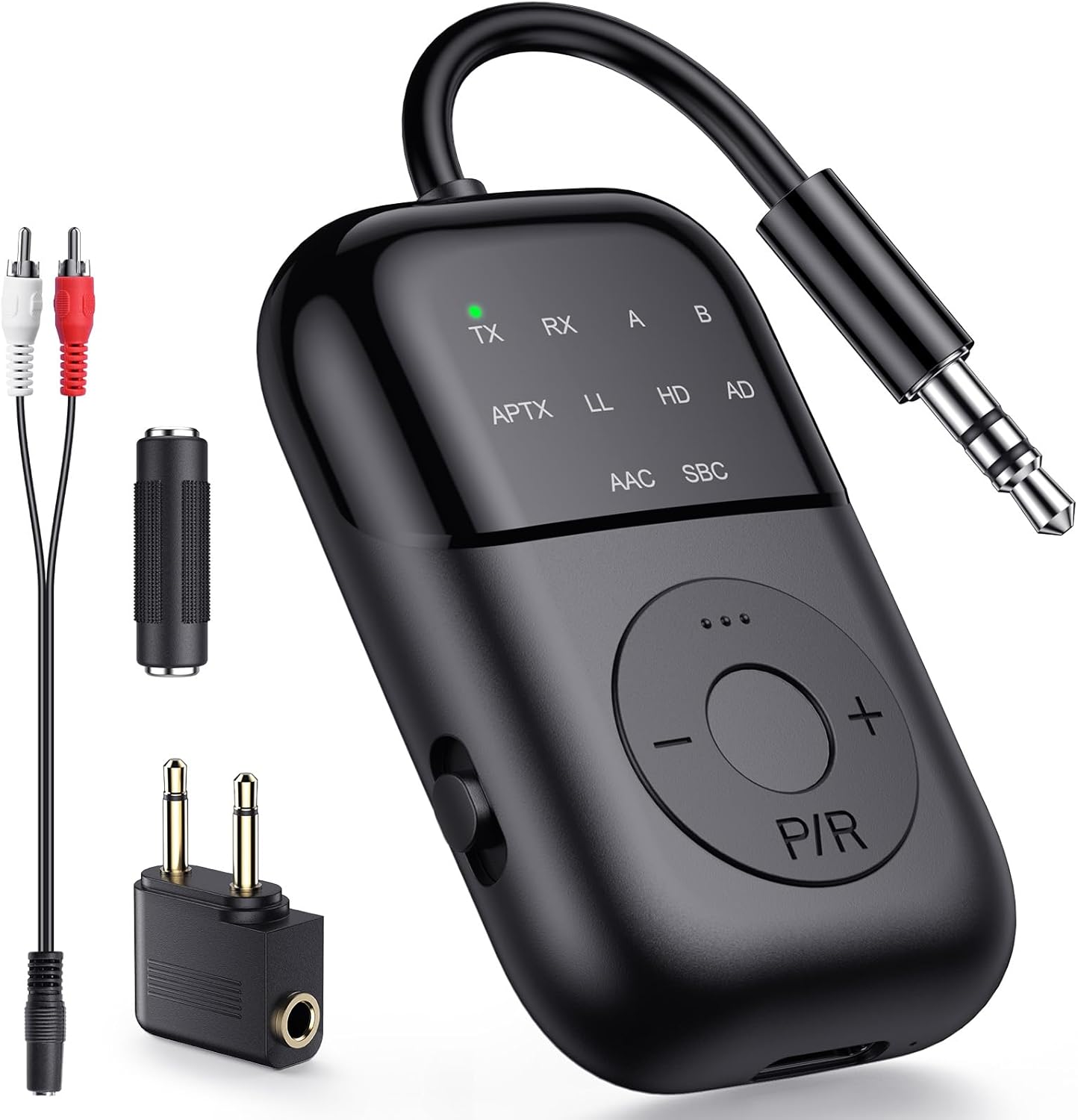
Image 1.1: The CPTEA B108 Bluetooth 2-in-1 Audio Transmitter Receiver and its accessories.
Video 1.2: Cepat selesaiview of the CPTEA B108's features and various applications in both Transmitter and Receiver modes.
2. Kandungan Pakej
Sila sahkan bahawa semua item terdapat dalam pakej anda:
- CPTEA B108 Bluetooth 2-in-1 Audio Transmitter Receiver
- Kabel Audio 3.5mm
- Kabel Audio RCA
- Kabel Pengecasan Jenis-C
- Airplane Audio Adapter
- Manual Pengguna

Image 2.1: All items included in the CPTEA B108 product package.
3. Reka Letak Peranti
Familiarize yourself with the buttons and ports on your B108 device:

Imej 3.1: Depan view of the B108 device highlighting its controls and indicators.
- Suis TX/RX: Toggles between Transmitter and Receiver modes.
- P/R Button: Power On/Off, Play/Pause, Pairing, and Reset function.
- +/- Butang: Volume Up/Down, Next/Previous Track.
- Penunjuk LED: Display current mode (TX/RX), pairing status (flashing), connection status (solid), and audio codec (APTX, LL, HD, AD, AAC, SBC).
- Bicu Audio 3.5mm: Untuk menyambung ke sumber audio atau peranti output.
- Port Pengecasan Jenis-C: Untuk mengecas peranti.
4. Bermula
4.1 Mengecas Peranti
Before first use, fully charge your CPTEA B108. Use the included Type-C charging cable to connect the device to a USB power source. The LED indicator will show charging status and turn off when fully charged.
- Masa Pengecasan: Kira-kira 2 jam untuk pengecasan penuh.
- Battery Life: Up to 20 hours in TX mode, up to 15 hours in RX mode.

Image 4.1: Charging the B108 via Type-C cable and its battery performance.
4.2 Hidupkan/Mati Kuasa
- Hidupkan kuasa: Tekan dan tahan butang P/R button for 3 seconds. The LED indicators will light up.
- Matikan: Tekan dan tahan butang P/R button for 3 seconds. The LED indicators will turn off.
4.3 Pemilihan Mod (TX/RX)
The B108 features a physical switch to easily select between Transmitter (TX) and Receiver (RX) modes.

Image 4.2: The TX/RX mode selection switch on the side of the B108.
- Luncurkan suis ke TX for Transmitter mode.
- Luncurkan suis ke RX for Receiver mode.
5. Mod Operasi
5.1 Mod Pemancar (TX)
In TX mode, the B108 transmits audio wirelessly from non-Bluetooth devices to your Bluetooth headphones or speakers.
- Luncurkan suis mod ke TX. The TX LED will flash, indicating pairing mode.
- Connect the B108 to your audio source (e.g., TV, PC, gym equipment, airplane entertainment) using the 3.5mm audio cable or RCA cable.
- Letakkan fon kepala atau pembesar suara Bluetooth anda ke dalam mod berpasangan.
- The B108 will automatically search for and connect to nearby Bluetooth audio devices. Once connected, the TX and A (or B for second device) LEDs will stay solid.
- For optimal low-latency audio, use aptX-LL supported headphones.
Video 5.1: Detailed instructions on connecting headphones using the B108 in Transmitter mode.

Imej 5.1: Selesaiview of Transmitter (TX) mode applications.

Image 5.2: Using the B108 to stream TV audio wirelessly to headphones.

Image 5.3: The B108 enabling wireless audio for in-flight entertainment.
5.2 Mod Penerima (RX)
In RX mode, the B108 receives audio wirelessly from your Bluetooth-enabled devices (e.g., smartphone, tablet, PC) and outputs it to wired speakers or car stereos.
- Luncurkan suis mod ke RX. The RX LED will flash, indicating pairing mode.
- Connect the B108 to your wired audio system (e.g., car stereo, home speakers) using the 3.5mm audio cable.
- On your smartphone or other Bluetooth device, search for "B108" in the Bluetooth settings and pair.
- Once connected, the RX LED will stay solid. You can now stream audio wirelessly.

Imej 5.4: Selesaiview of Receiver (RX) mode applications.

Image 5.5: Using the B108 to enable Bluetooth audio in a car stereo.
5.3 Dual Headphone Pairing (TX Mode)
The B108 can connect to two Bluetooth headphones simultaneously in TX mode, allowing two people to share audio from a single source.
- Ensure the B108 is in TX mode and connected to your audio source.
- Pair the first Bluetooth headphone with the B108. Once connected, turn off the first headphone.
- Pair the second Bluetooth headphone with the B108.
- Turn on the first headphone. The B108 will automatically reconnect to both headphones. The TX, A, and B LEDs will stay solid.

Image 5.6: Connecting two headphones simultaneously to the B108.
6. Penyelesaian masalah
If you encounter issues with your CPTEA B108, please refer to the following common solutions:
- Tiada Bunyi:
- Ensure the B108 is correctly connected to the audio source/output device.
- Check the audio output settings on your source device (e.g., TV audio output).
- Verify that the B108 is paired and connected to your headphones/speakers.
- Adjust the volume on both the B108 and your connected audio device.
- Audio Delay (Latency):
- For the lowest latency, ensure your headphones or speakers support aptX-LL (Low Latency) codec. The B108 supports aptX-LL.
- Only One Earbud Connected:
- If using true wireless earbuds, ensure both earbuds are connected to each other first before pairing with the B108.
- Menetapkan semula Peranti:
- To clear all pairing records and reset the B108, hold the P/R button for 8 seconds. All LED lights will flash, indicating a successful reset.
7. Spesifikasi
| Ciri | Perincian |
|---|---|
| Nombor Model | B108 |
| Versi Bluetooth | 5.4 |
| Teknologi Ketersambungan | Bluetooth |
| Mod Pengendalian | Pemancar (TX) dan Penerima (RX) |
| Codec Audio Disokong | APTX, LL, HD, AD, AAC, SBC |
| Sumber Kuasa | Dikuasakan Bateri (termasuk bateri 1 A) |
| Hayat Bateri (Mod TX) | Sehingga 20 jam |
| Hayat Bateri (Mod RX) | Sehingga 15 jam |
| Port Pengecasan | Jenis-C |
| Berat Barang | 3.2 auns |
| Dimensi Pakej | 5.39 x 4.57 x 0.75 inci |
| Ciri Khas | Latensi Rendah |
8. Maklumat Keselamatan
Sila baca dan patuhi garis panduan keselamatan ini untuk memastikan operasi yang selamat dan memanjangkan hayat peranti anda:
- Pengendalian Bateri: Keep the device away from excessive heat and moisture. Do not expose it to temperatures above 140°F (60°C). Dispose of the battery in accordance with local regulations.
- Amaran Gangguan: This device may interfere with other wireless devices. Follow manufacturer's instructions to minimize potential interference.
- Do not disassemble, modify, or attempt to repair the device yourself. Contact customer support for assistance.
- Elakkan daripada menjatuhkan atau meletakkan peranti kepada kesan yang kuat.
9. Waranti dan Sokongan
The CPTEA B108 comes with a 2-year warranty. For warranty claims, technical support, or any questions regarding your device, please contact CPTEA customer service through the retailer where you purchased the product or visit the official CPTEA webtapak.
Note: Some customer reviews mention a 2-year warranty. Please refer to your product packaging or the manufacturer's official webtapak untuk maklumat waranti yang paling tepat dan terkini.