
1. Pengenalan
The Oilsky M1 MP3 Player is a portable digital music player designed for high-quality audio playback. It features Bluetooth 5.4 for stable wireless connections, a 2.4-inch touchscreen for easy navigation, and a built-in speaker. With 128GB of internal storage and support for an additional 128GB Micro SD card, it can store a vast library of music, audiobooks, and other media. This manual provides detailed instructions on how to set up, operate, and maintain your device.
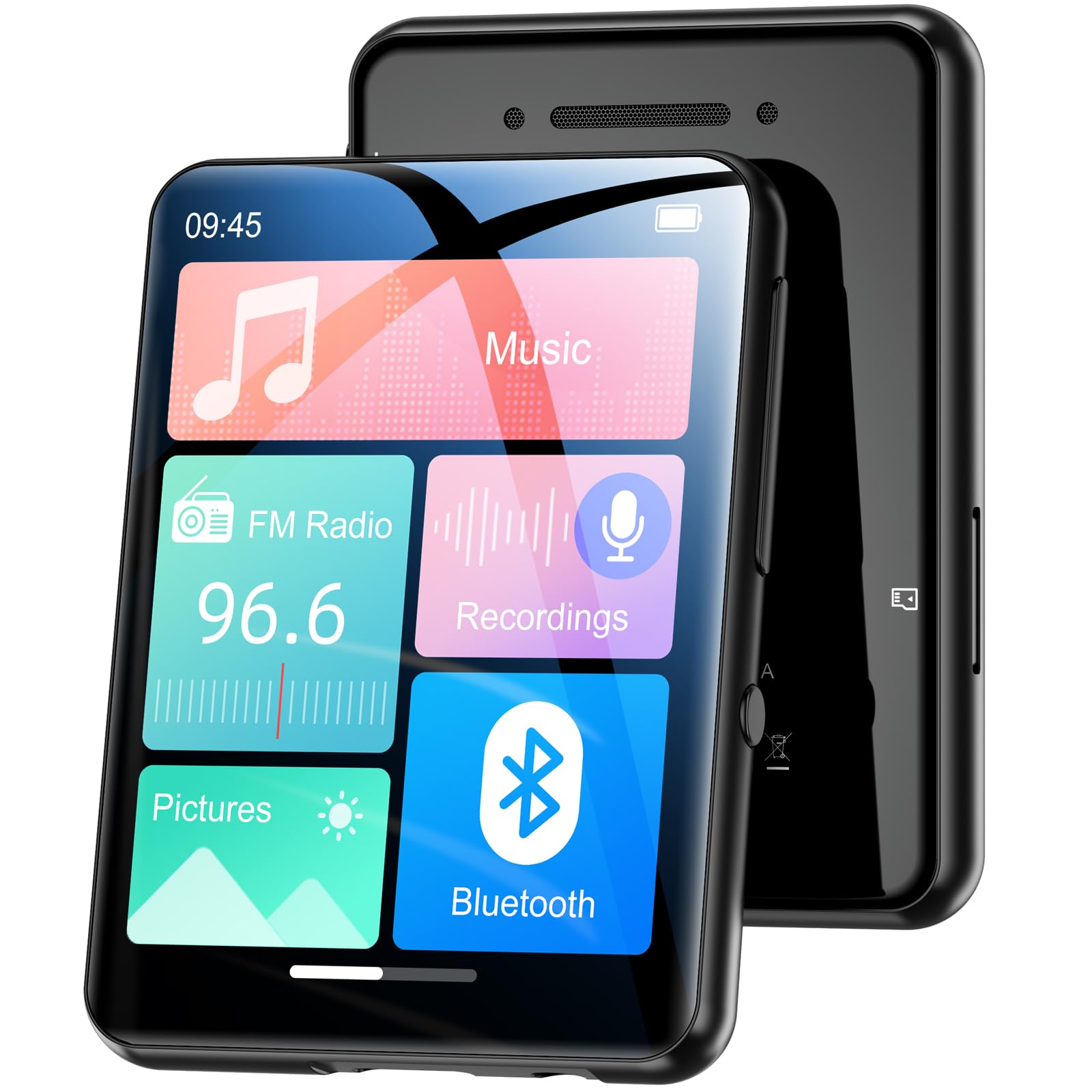
Imej 1.1: Depan view of the Oilsky M1 MP3 Player, showcasinreka bentuk padat dan antara muka skrin sentuhnya.
2. Apa yang ada di dalam Kotak
Sila semak kandungan pakej semasa membuka kotak untuk memastikan semua item ada:
- 1x Oilsky M1 MP3 Player
- 1x Kabel Pengecasan USB
- 1x Wired Headphones
- 1x Manual Pengguna (dokumen ini)
- 1x Sarung Pelindung
- 1x Lanyard

Image 2.1: All included accessories and the MP3 player laid out, including the USB cable, headphones, protective case, and lanyard.
3. Persediaan
3.1 Mengecas Peranti
Before first use, fully charge the MP3 player. Connect the provided USB cable to the player's charging port and the other end to a USB power adapter (not included) or a computer's USB port. The device takes approximately 2 hours to fully charge, providing up to 50 hours of music playback.
3.2 Menghidupkan/Mematikan
- Untuk Menghidupkan: Tekan dan tahan butang kuasa sehingga layar menyala.
- Untuk Mematikan: Tekan dan tahan butang kuasa sehingga pilihan mati kuasa muncul pada skrin, kemudian sahkan.
3.3 Memasukkan Kad SD Mikro
The Oilsky M1 has 128GB of built-in memory and supports Micro SD cards up to an additional 128GB (not included). To expand storage:
- Cari slot kad Micro SD di sisi pemain.
- Gently insert the Micro SD card into the slot with the gold contacts facing down until it clicks into place.
- Untuk mengeluarkannya, tolak kad ke dalam sehingga ia terkeluar.

Image 3.1: Visual representation of the 128GB internal memory and the option to expand storage with a Micro SD card.
3.4 Tetapan Bahasa
The device supports English, German, French, Italian, Spanish, and 29 other languages. To change the language:
- Go to the 'Settings' menu.
- Pilih 'Bahasa'.
- Pilih bahasa pilihan anda daripada senarai.
4. Arahan Operasi
The Oilsky M1 features a 2.4-inch full touchscreen for intuitive control. Navigate through menus by swiping and tapping.

Image 4.1: A hand interacting with the full touchscreen interface of the MP3 player, demonstrating ease of use.
4.1 Main balik Muzik
The player supports various audio formats including MP3, WMA, APE, FLAC, WAV, and AAC, providing high-fidelity sound with digital noise reduction. You can organize music by title, folder, artist, or album.
- Transferring Music: Connect the player to your computer using the USB cable. The player will appear as a removable disk. Drag and drop your music files into the 'Music' folder on the device or Micro SD card.
- Bermain Muzik: From the main menu, tap 'Music'. You can browse by 'All Songs', 'Artists', 'Albums', 'Folders', etc. Tap a song to begin playback.
- Kawalan: Use the on-screen controls for play/pause, next/previous track, and volume adjustment.

Image 4.2: A user enjoying music with headphones connected to the Oilsky M1 MP3 Player, highlighting the high-quality sound experience.

Image 4.3: Display illustrating the multiple audio formats supported by the MP3 player, including MP3, WMA, APE, FLAC, WAV, and AAC.
4.2 Sambungan Bluetooth
The player features Bluetooth 5.4 for connecting to Bluetooth headphones and speakers. It includes a memory function that automatically reconnects to previously paired devices. Note: The player cannot connect to mobile phones or car Bluetooth systems.
- Daripada menu utama, ketik 'Bluetooth'.
- Turn on Bluetooth. The player will scan for nearby devices.
- Pilih fon kepala atau pembesar suara Bluetooth yang anda inginkan daripada senarai untuk dipasangkan.

Image 4.4: The MP3 player screen showing the Bluetooth connection icon, indicating stable and fast Bluetooth 5.4 connectivity to external audio devices.
4.3 Radio FM
Untuk menggunakan fungsi radio FM:
- Connect the wired headphones (they act as an antenna).
- From the main menu, tap 'FM Radio'.
- Use the on-screen controls to scan for stations or manually tune.
4.4 Perakam Suara
The player includes a built-in microphone for digital voice recording.
- From the main menu, tap 'Recordings'.
- Tap the record icon to start and stop recording.
- Recordings are saved and can be played back from this menu.

Image 4.5: The MP3 player displaying its voice recording interface, useful for capturing notes or conversations.
4.5 Pembaca E-Buku
The player supports TXT format e-books.
- Pindahkan TXT files to the 'E-book' folder on the device.
- From the main menu, tap 'E-book' to access your library.
4.6 Foto Viewer
View Imej JPEG/BMP files pada skrin 2.4 inci.
- Transfer image files to the 'Pictures' folder.
- From the main menu, tap 'Pictures' to browse your photos.
4.7 Fungsi Penggera
Set alarms using your favorite music as the ringtone.
- From the main menu, tap 'Alarm'.
- Configure alarm time, repeat settings, and select a music file for the alarm sound.

Image 4.6: The MP3 player displaying an alarm clock icon, indicating its alarm function capability.
5. Penyelenggaraan
5.1 Pembersihan
- Lap peranti dengan kain lembut dan kering.
- Do not use liquid cleaners or aerosols, as they may damage the device.
5.2 Penjagaan Bateri
- Elakkan daripada mendedahkan peranti kepada suhu yang melampau.
- Cas peranti secara berkala, walaupun tidak digunakan, untuk mengekalkan kesihatan bateri.
5.3 Penyimpanan
When not in use for extended periods, store the player in a cool, dry place, away from direct sunlight and moisture.
6. Penyelesaian masalah
| Masalah | Penyelesaian yang Mungkin |
|---|---|
| Peranti tidak dihidupkan. | Ensure the device is fully charged. If the battery is depleted, it may take a few minutes of charging before it can power on. |
| Bluetooth headphones/speaker won't connect. | Ensure Bluetooth is enabled on both devices. Make sure the headphones/speaker are in pairing mode. Confirm the MP3 player is not attempting to connect to a mobile phone or car system, as this is not supported. |
| Tidak boleh memindahkan files kepada pemain. | Check the USB cable connection. Ensure the player is properly recognized by your computer. Try a different USB port or cable. |
| Music playback is distorted or silent. | Check headphone connection or Bluetooth connection. Ensure volume is not muted and is set to an audible level. Verify the audio file format disokong. |
| Skrin tidak bertindak balas. | Perform a soft reset by pressing and holding the power button for 10-15 seconds. If the issue persists, ensure the device is charged. |
7. Spesifikasi
| Ciri | Perincian |
|---|---|
| Jenama | Oilsky |
| Nombor Model | M1 |
| Ciri Khas | Touchscreen, Built-in Speaker, Digital Noise Reduction |
| Teknologi Ketersambungan | Bluetooth 5.4, USB |
| Storan Dalaman | 128 GB |
| Storan Boleh Dikembangkan | Kad SD mikro sehingga 128 GB |
| warna | Hitam |
| Saiz Skrin | 2.4 Inci |
| Peranti Serasi | Bluetooth Speakers, Bluetooth Headphones, Personal Computers |
| Format Audio yang Disokong | MP3, WMA, APE, FLAC, WAV, AAC |
| Format E-buku yang Disokong | TXT |
| Format Gambar yang Disokong | JPEG, BMP |
| Hayat Bateri | Sehingga 50 Jam |
| Masa Mengecas | Lebih kurang 2 Jam |
| Berat Barang | 65 Gram |
| Dimensi Item (D x W x H) | 1 cm x 5 cm x 7 cm |
8. Waranti dan Sokongan
8.1 Polisi Waranti
Oilsky offers a one-year return policy for this product. This warranty covers manufacturing defects and issues arising from normal use.
8.2 Sokongan Pelanggan
Our team is dedicated to providing prompt, attentive, and high-quality support. We guarantee a response within 24 hours for any inquiries or issues you may have.
For assistance, please contact us through the platform where you purchased the product or refer to the contact information provided on the official Oilsky webtapak.
We are committed to ensuring your satisfaction with your Oilsky M1 MP3 Player.