
1. Introduction and Compatibility
This manual provides detailed instructions for the installation, operation, and maintenance of your Surakey Android 13 Car Stereo Radio. Please read this manual thoroughly before installation and use to ensure proper function and safety.
Nota Keserasian Penting: This car stereo is designed for Dodge Ram 1500 and 3500 models from 2013 to 2019. Before purchasing or installing, it is crucial to verify compatibility with your specific vehicle's year and model. We recommend carefully measuring your dashboard and comparing it with the product dimensions. If uncertain, please provide a complete image of the plugs on the back of your center console and the on-board main unit to your supplier for confirmation and to determine if any additional wiring harnesses or adapters are required.

Figure 1.1: Dashboard compatibility examples. Ensure your vehicle's dashboard matches the compatible design for proper fitment.
2. Produk Lebihview dan Komponen Termasuk
The Surakey Android 13 Car Stereo Radio features a 9.7-inch touch screen, offering advanced navigation, entertainment, and connectivity options for your vehicle.
2.1 Ciri Utama:
- 9.7-inch HD 2.5D Tempered Glass Mirror Touch Screen
- Sistem Operasi Android 13
- Wireless & Wired Apple CarPlay and Android Auto
- Built-in GPS Navigation
- Integrated Wi-Fi Connectivity
- Bluetooth with A2DP, Hands-Free Calling, and Phone Book
- FM/RDS Radio Tuner
- DSP Function for High-Fidelity Audio
- Support for AHD Backup Camera Input
- Keserasian Kawalan Roda Stereng
- Double USB Interface
- Multi-language Support (up to 40 national languages)
2.2 Kandungan Pakej:
Sila semak bahawa semua komponen berikut disertakan dalam pakej anda:
- Surakey Android Car Stereo Unit
- Kabel Kuasa
- Kabel Input/Output RCA
- Kabel USB (x2)
- Kabel Input Kamera
- Kabel Penyesuai Radio
- Antena GPS
- Manual Arahan
- External Microphone ('Wheat head')
- Kotak Canbus
- Car Compass

Rajah 2.1: Dimensi produk dan aksesori yang disertakan.
3. Persediaan dan Pemasangan
Professional installation is highly recommended for this product. Incorrect wiring or installation can damage the unit or your vehicle's electrical system. Always disconnect the vehicle's battery before beginning installation.
3.1 Pemeriksaan Pra-Pemasangan:
- Pastikan penyalaan kenderaan dimatikan dan bateri diputuskan.
- Confirm dashboard compatibility and dimensions.
- Identify all existing wiring harnesses in your vehicle.
3.2 Sambungan Pendawaian:
Refer to the wiring diagram provided in the included instruction manual for specific connections. General connections include:
- Kabel kuasa: Connect to vehicle's power, ground, and accessory wires.
- Input/Output RCA: Untuk luaran amppengangkat, subwufer atau output video.
- Kabel USB: Connect to the unit for media playback, phone charging, and CarPlay/Android Auto (wired).
- Input Kamera: Connect your AHD backup camera here.
- Radio Adapter Cable: Sambungkan ke antena kenderaan.
- Antena GPS: Lekapkan di lokasi yang jelas view langit untuk penerimaan isyarat yang optimum.
- Mikrofon Luaran: Plug in for improved hands-free call quality.
- Kotak Canbus: Connect as per vehicle-specific instructions for steering wheel controls and other vehicle data integration.

Rajah 3.1: Belakang view of the car stereo unit with wiring connections.
3.3 Selepas Pemasangan:
- Sambung semula bateri kenderaan.
- Turn on the ignition and power on the stereo.
- Perform initial setup and test all functions (radio, Bluetooth, GPS, etc.).
4. Arahan Operasi
This section details the primary functions and how to operate your Surakey Android 13 Car Stereo.
4.1 Power On/Off and Basic Interface:
- Tekan butang kuasa untuk menghidupkan atau mematikan unit.
- The 9.7-inch capacitive touch screen allows for easy navigation through the Android interface.
4.2 Apple CarPlay & Android Auto:
The unit supports both wireless and wired Apple CarPlay (for iOS devices) and Android Auto (for Android devices).
- Untuk Apple CarPlay: Connect your iPhone via Bluetooth for wireless connection or via USB for wired connection. Use the ZLINK APP on the stereo. This integrates your iOS device for navigation, calls, messages, and music.
- Untuk Android Auto: Connect your Android phone via Bluetooth for wireless connection or via USB for wired connection. Ensure the Android Auto APP is installed on your phone. This integrates your Android device for navigation, calls, messages, and music.

Figure 4.1: Apple CarPlay connection example.
4.3 Navigasi GPS:
The unit comes with built-in offline maps. For online navigation, connect to Wi-Fi to use Google Maps or other navigation applications downloaded from the Play Store.
4.4 Wi-Fi Connectivity:
Connect the stereo to a Wi-Fi hotspot (e.g., from your smartphone) to access online features, download apps, and use online maps.
4.5 Bluetooth Functionality:
Pair your smartphone via Bluetooth for hands-free calling, Bluetooth music streaming (A2DP), and automatic phonebook loading.
4.6 FM/RDS Radio:
Access the FM radio tuner. The RDS function displays station information where available. You can save up to 18 preset stations.
4.7 Steering Wheel Controls:
If properly connected via the Canbus box, you can control various functions of the stereo directly from your vehicle's steering wheel controls for convenience and safety.
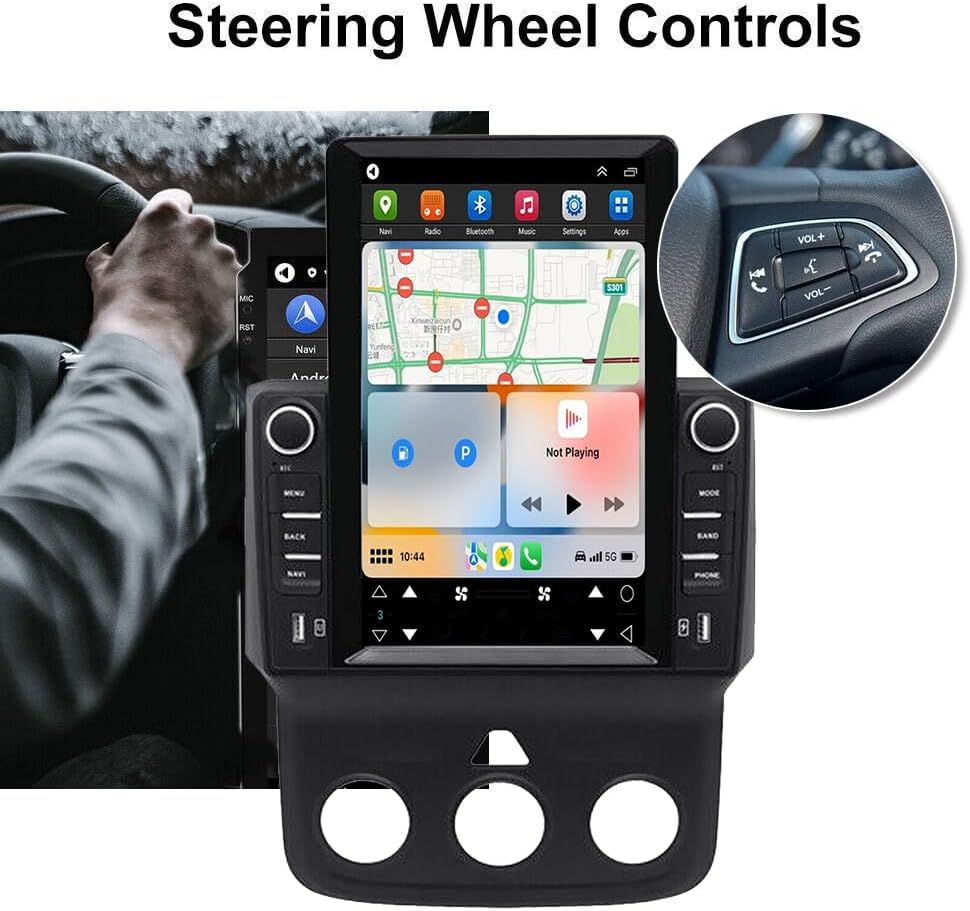
Rajah 4.2: Integrasi kawalan stereng.
4.8 DSP Function:
The Digital Sound Processor (DSP) ensures high-fidelity audio reproduction, closely matching the original sound quality.
4.9 Rear Camera Input:
Connect an AHD backup camera to the CVBS input. The display will automatically switch to the camera view apabila terbalik.
4.10 File Manager & Apps:
Yang terbina dalam file manager allows you to browse, download, install, and delete Android applications. You can access the Google Play Store (with Wi-Fi connected) to expand the stereo's functionality.
4.11 Tetapan Masa:
The date and time can be set automatically via network or GPS, or adjusted manually through the system settings.
5. Penyelenggaraan
Penyelenggaraan yang betul memastikan jangka hayat dan prestasi optimum stereo kereta anda.
- Membersihkan Skrin: Gunakan kain lembut yang tidak berbulu untuk mengelap skrin sentuh dengan lembut. Untuk calitan degil, sedikit dampen kain dengan air atau pembersih selamat skrin. Elakkan bahan kimia yang keras atau bahan yang melelas.
- Kemas Kini Perisian: Periodically check for system software updates to ensure optimal performance and access to new features. Updates can usually be found in the system settings menu.
- Suhu: Avoid exposing the unit to extreme temperatures for extended periods. The operating temperature range is -20℃ to 75℃.
- Sambungan: Pastikan semua kabel disambungkan dengan selamat. Sambungan yang longgar boleh menyebabkan masalah terputus-putus.
6. Penyelesaian masalah
Bahagian ini membincangkan isu-isu biasa yang mungkin anda hadapi. Jika anda mengalami masalah yang tidak disenaraikan di sini, sila hubungi khidmat pelanggan.
- Tiada Kuasa:
- Periksa semua sambungan kuasa dan fius.
- Pastikan bateri kenderaan dicas.
- Tiada Bunyi:
- Sahkan sambungan pembesar suara.
- Periksa tahap kelantangan dan tetapan bisu.
- Pastikan sumber audio yang betul dipilih.
- Kehilangan Isyarat GPS:
- Pastikan antena GPS dipasang dengan betul dan mempunyai jelas view dari langit.
- Check antenna cable connection.
- Isu Sambungan Bluetooth:
- Pastikan Bluetooth diaktifkan pada stereo dan telefon anda.
- Padamkan gandingan sebelumnya dan cuba gandingkan lagi.
- Mulakan semula kedua-dua peranti.
- CarPlay/Android Auto Tidak Bersambung:
- For wired connection, try a different USB cable.
- For wireless, ensure Bluetooth and Wi-Fi are enabled on your phone.
- Verify the correct app (ZLINK for CarPlay, Android Auto app for Android Auto) is running.
- Unit Freezes or Responds Slowly:
- Perform a soft reset (refer to the specific reset procedure in the included manual, or hold the power button for 10 seconds).
- Tutup aplikasi latar belakang yang tidak diperlukan.
Kata Kunci Tetapan Kilang: If prompted for a factory setting keyword, try 8888 or 3368.
7. Spesifikasi
| Ciri | Spesifikasi |
|---|---|
| Sistem | Android 13 |
| Chipset | 8227L-DEMO |
| Saiz Skrin | 9.7 inci |
| Resolusi Skrin | 1024x768 |
| Memori (RAM+ROM) | 2GB RAM + 32GB ROM |
| Cip Radio | MT6625 |
| Output Kuasa | 4x45W |
| Suhu Kerja | -20 ℃ hingga 75 ℃ |
| kuasa Ampcip penguat | TDA7388 |
| Jalur Radio | FM/RDS |
| Output Video | Disokong |
| Membalikkan Input | CVBS |
| Mikrofon Luaran | Disokong |
| Skrin Pisah | Disokong |
| Peta | Peta luar talian terbina dalam (internet diperlukan untuk muat turun data) |
| Wi-Fi | Disokong |
| Antaramuka USB | USB berganda |
| Format Audio | APE/FLAC/WAV/MP3/WMA dsb. |
| Format Video | MKV/RMVB/AVI/MP4/MDV dsb. |
| Format Gambar | PNG/JPEG/JPG/GIF/WBMP/BNP dsb. |
| Kata Kunci Tetapan Kilang | 8888 atau 3368 |
| Bahasa yang Disokong | Chinese/English/French/Italian/Korean/Japanese/Arabic/Spanish/Portuguese/Russian/Turkish/Vietnamese/Hebrew/Polish/German (up to 40 national languages) |
| Jenis Perkhidmatan Kenderaan | Lori |
| Teknologi Ketersambungan | USB |
| Jenis Peta | Amerika Utara |
| Mod Keluaran Audio | Stereo |
| Jenis Skrin Sentuh | Kapasitif |
| Jenis Paparan | Skrin Sentuh |
| Input Antara Muka Manusia | Skrin sentuh |
| Kaedah Kawalan | Sentuh |
| Sistem Navigasi Satelit yang Disokong | GPS |
| Berat Barang | 1875 Gram |
| Nombor Model | JIAQI-QA1572X-WYQ-2412 |
8. Waranti dan Sokongan
For warranty information and technical support, please refer to the specific warranty card included with your product or contact your retailer. Keep your purchase receipt as proof of purchase.