1. Pengenalan
Terima kasih kerana membeliasing the Kinglucky Wireless Bluetooth Speaker (Model: BTM-V1). This speaker is designed to provide high-fidelity audio with versatile playback options and a unique aesthetic. Featuring a vibrant LED screen and a stable stand, it seamlessly integrates into various home environments, including living rooms, bedrooms, offices, and kitchens. This manual provides detailed instructions for setup, operation, maintenance, and troubleshooting to ensure optimal performance and longevity of your device.
2. Apa yang ada di dalam Kotak
Sila semak kandungan pakej anda untuk memastikan semua item ada:
- Kinglucky Wireless Bluetooth Speaker (BTM-V1) x1
- Kabel Pengecas (Jenis-C) x1
- Manual Pengguna x1

Image: The Kinglucky BTM-V1 speaker, charging cable, and user manual laid out, indicating the package contents.
3. Produk Lebihview
3.1. Ciri-ciri Utama
- Unique Bracket Design: Versatile placement for bedroom, living room, or desktop.
- Vivid Animation Screen: Colorful display with 14 dynamic lighting animation modes.
- Pilihan Main Balik Serbaguna: Supports Bluetooth, USB, TF card, MIC, and AUX inputs.
- Kualiti Bunyi Unggul: Expertly tuned acoustic system with 25W rated power for high-fidelity audio.
- Large-Sized Speaker: Measures 11.4 x 4.3 x 13.8 inches (29 x 11 x 35 cm) and weighs 3.26 pounds (1.48 kg).
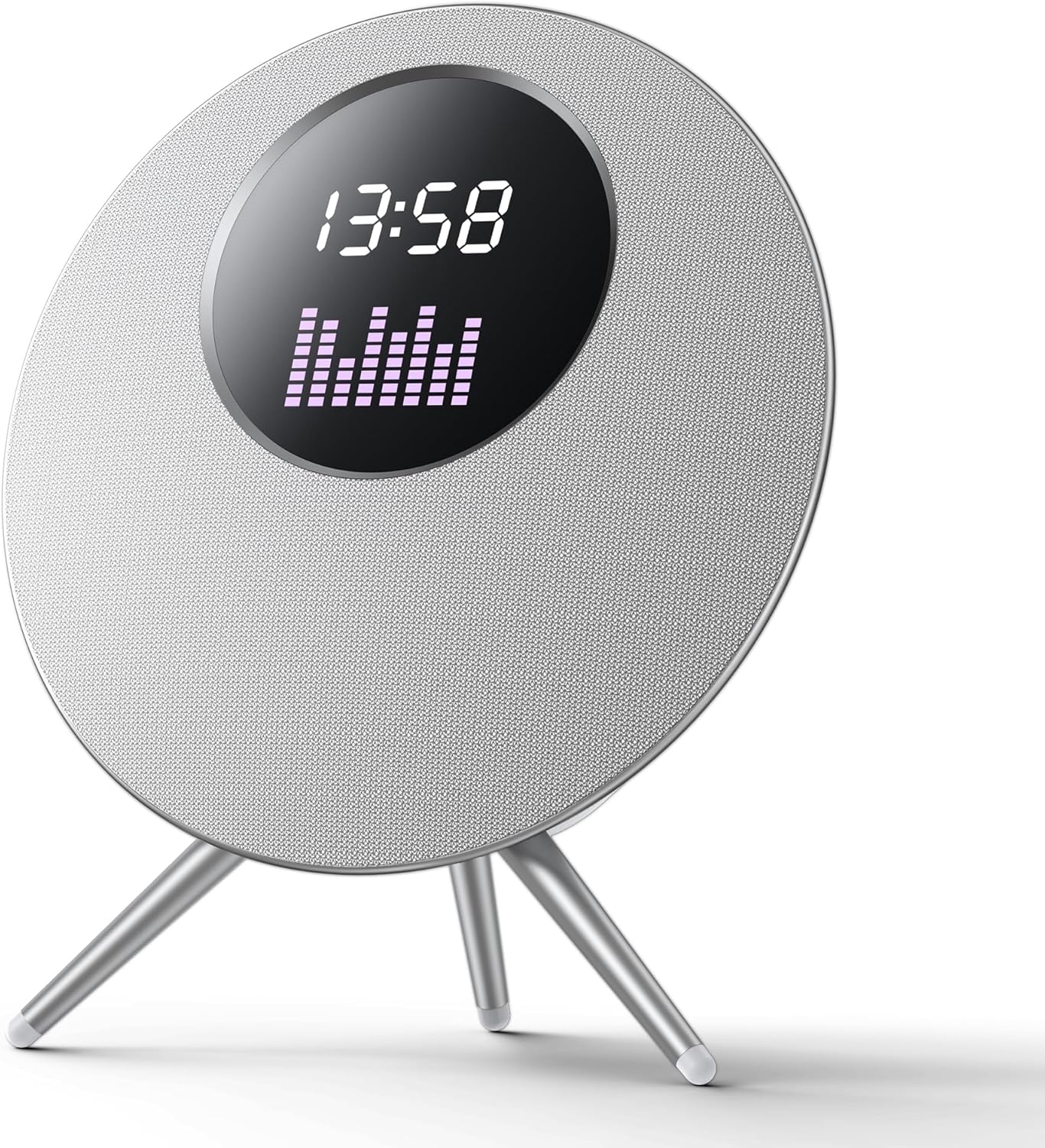
Imej: Depan view of the Kinglucky BTM-V1 Wireless Bluetooth Speaker, showcasing its circular design, LED screen displaying time and an equalizer, and its three-legged stand.

Image: Diagram illustrating the dimensions of the Kinglucky BTM-V1 speaker, showing its height of 432mm, width of 405mm, and depth of 172mm, with icons suggesting placement in fireplaces, bedrooms, and study rooms.
3.2. Kawalan dan Pelabuhan

Image: A close-up diagram of the top-mounted control buttons on the Kinglucky BTM-V1 speaker, with labels indicating their functions: Previous song/Volume down, Mode switching (Bluetooth/TF card/USB drive), Power on/off/Pause/Play, Next song/Volume increase, and LED lighting effects/Turn off LED light effect.
- Butang M: Switches between playback modes (Bluetooth, TF Card, USB, AUX).
- '-' Butang: Tekan pendek untuk lagu sebelumnya, tekan lama untuk mengurangkan kelantangan.
- Butang Kuasa: Long press to power on/off, short press to play/pause.
- Butang '+': Tekan pendek untuk lagu seterusnya, tekan lama untuk meningkatkan kelantangan.
- Butang Cahaya: Switches between multiple LED lighting effects, long press to turn off/on LED light effect.

Image: A detailed diagram of the rear panel of the Kinglucky BTM-V1 speaker, highlighting and explaining each port: Charging Port (Type-C 5V), Pilot Lamp (indicator for connection/charging), AUX (3.5mm audio input), MIC (dynamic microphone interface), USB Port (for MP3 audio files), and TF Card Slot (for MP3 audio files).
- Port Pengecasan (Jenis-C): For 5V power input.
- Juruterbang Lamp: Blue light flashes when no device is connected, stays solid when successfully connected. Red light stays on during charging and goes out when fully charged.
- Pelabuhan AUX: 3.5mm quad band audio cable input for connecting external devices.
- Pelabuhan MIC: Dynamic microphone interface.
- Port USB: Automatically switches to USB mode when inserting MP3 audio files.
- Slot Kad TF: Automatically switches to TF card mode when inserting MP3 audio files.
4. Persediaan
4.1. Pengecasan Awal
Before first use, fully charge the speaker. Connect the provided Type-C charging cable to the speaker's charging port and the other end to a 5V USB power adapter (not included). The pilot lamp will illuminate red during charging and turn off once fully charged. A full charge typically takes 3-4 hours.
4.2. Hidupkan/Mati Kuasa
- Untuk Menghidupkan: Tekan lama butang Kuasa (U) for 3 seconds. You will hear an audible prompt.
- Untuk Mematikan: Tekan lama butang Kuasa (U) for 3 seconds. You will hear an audible prompt.
4.3. Berpasangan Bluetooth
The speaker will automatically enter Bluetooth pairing mode when powered on if no other input source is connected. The pilot lamp akan berkelip biru.
- Ensure the speaker is powered on and in Bluetooth pairing mode (blue pilot lamp berkelip).
- Pada peranti mudah alih anda (telefon pintar, tablet, komputer riba), dayakan Bluetooth.
- Cari untuk available Bluetooth devices. The speaker will appear as "BTM-V1" or "Kinglucky Speaker".
- Select the speaker from the list to pair.
- Once successfully paired, the pilot lamp will stop flashing and remain solid blue, and you will hear a connection confirmation sound.
Note: The speaker supports Bluetooth 5.3 technology for stable connection up to 33 feet (10 meters).
5. Arahan Operasi
5.1. Main balik Muzik
- Main/Jeda: Tekan sebentar butang Kuasa (U).
- Kawalan Kelantangan: Long press the '+' button to increase volume, long press the '-' button to decrease volume.
- Trek Seterusnya / Sebelumnya: Short press the '+' button for the next track, short press the '-' button for the previous track.
5.2. Penukaran Mod
Press the 'M' button to cycle through the available playback modes:
- Mod Bluetooth: For wireless audio streaming from paired devices.
- Mod Kad TF: Automatically activated when a TF card with MP3 audio files dimasukkan.
- Mod USB: Automatically activated when a USB drive with MP3 audio files dimasukkan.
- Mod AUX: For wired connection using a 3.5mm audio cable.
5.3. LED Screen Effects
The speaker features 14 dynamic lighting animation modes on its LED screen.
- Kesan Perubahan: Short press the Light button (☀) to cycle through the animation modes.
- Turn On/Off LED: Long press the Light button (☀) to turn the LED screen effects on or off.
5.4. Penggunaan Mikrofon
Connect a dynamic microphone to the MIC port on the rear of the speaker. The speaker will automatically detect the microphone input. Adjust microphone volume as needed through the connected microphone's controls or the speaker's main volume.
6. Penyelenggaraan
- Pembersihan: Use a soft, dry cloth to wipe the speaker's surface. Do not use abrasive cleaners, alcohol, or chemical solvents, as these may damage the finish.
- Storan: Simpan pembesar suara di tempat yang sejuk dan kering jauh dari cahaya matahari langsung dan suhu yang melampau.
- Penjagaan Bateri: Untuk memanjangkan hayat bateri, elakkan daripada menyahcas sepenuhnya pembesar suara dengan kerap. Mengecasnya dengan kerap, walaupun tidak digunakan untuk tempoh yang lama.
- Tahan Air: While the speaker features splash-proof technology, it is not fully waterproof. Do not submerge it in water or expose it to heavy rain.
7. Penyelesaian masalah
| Masalah | Kemungkinan Punca | Penyelesaian |
|---|---|---|
| Speaker tidak dihidupkan. | Bateri hampir habis atau habis. | Connect the speaker to a power source using the charging cable and allow it to charge for at least 30 minutes before attempting to power on again. |
| Tiada bunyi dari pembesar suara. | Volume is too low; Incorrect mode selected; Device not connected properly. | Increase the speaker's volume and the volume on your connected device. Press the 'M' button to ensure the correct input mode is selected. Re-pair your Bluetooth device or re-insert the AUX/USB/TF card. |
| Gandingan Bluetooth gagal. | Speaker is not in pairing mode; Device is out of range; Interference. | Ensure the speaker's blue pilot lamp is flashing. Move your device closer to the speaker (within 10 meters). Turn off other Bluetooth devices nearby to reduce interference. Try restarting both the speaker and your device. |
| LED screen is off or not changing effects. | LED effects are turned off; Malfunction. | Short press the Light button (☀) to cycle through effects. Long press the Light button (☀) to ensure the LED is turned on. If the issue persists, contact customer support. |
8. Spesifikasi
| Ciri | Spesifikasi |
|---|---|
| Nama Model | Pembesar Suara Bluetooth |
| Nombor Model Item | BTM-V1 |
| Jenama | Kinglucky |
| Jenis Pembesar Suara | Outdoor (also suitable for Indoor) |
| Ciri Khas | Waterproof (Splash-proof) |
| Teknologi Ketersambungan | Wayarles (Bluetooth) |
| Teknologi Komunikasi Tanpa Wayar | Bluetooth 5.3 |
| Kuasa Output Maksimum Pembesar Suara | 25 Watt |
| Mod Keluaran Audio | Stereo |
| Nisbah Isyarat-ke-Bunyi | 88 dB |
| Jenis Pemacu Audio | Pemandu Dinamik |
| Kaedah Kawalan | Sentuh |
| Sumber Kuasa | Dikuasakan Bateri |
| Dimensi Produk | 4.3"D x 11.4"W x 13.8"H (11cm D x 29cm W x 35cm H) |
| Berat Barang | 4.94 paun (2.24 kg) |
| warna | White (Silver) |
| Masa bermain | Up to 6-8 hours at 50% volume |
9. Waranti dan Sokongan
Kinglucky products come with a limited warranty. For detailed warranty information, product support, or technical assistance, please refer to the warranty card included in your package or visit the official Kinglucky website. You can also contact Kinglucky customer service through the retailer where you purchased the product.
Untuk pertanyaan lanjut, sila layari Kinglucky Store on Amazon.