pengenalan
This manual provides essential instructions for setting up, operating, and maintaining your AOLON Tetra R4 Smart Watch. Please read it carefully to ensure proper use and to maximize the device's features.
Bermula
1. Tanpa Peti Masuk
Your AOLON Tetra R4 Smart Watch package includes the following items:
- AOLON Tetra R4 Smart Watch
- Kabel Pengecasan
- Manual Pengguna
- Jam Tangan

Image: Product Size And Packaging List
2. Mengecas Peranti
Before first use, fully charge your smart watch. The device features a 350 mAh battery, providing up to 7 days of typical use and up to 30 days of standby time. A full charge takes approximately 2.5 hours.
- Sambungkan kabel pengecas magnet ke titik pengecasan di bahagian belakang jam tangan.
- Palamkan hujung USB kabel ke dalam penyesuai kuasa USB standard (tidak disertakan) atau port USB komputer.
- Paparan jam tangan akan menunjukkan status pengecasan.
Video: This video demonstrates the unboxing and initial setup of the Tetra R4 Smart Watch, including charging and basic UI navigation.
3. Pemasangan Apl dan Berpasangan
Untuk memanfaatkan sepenuhnya potensi jam tangan pintar anda, muat turun dan pasang GloryFitPro aplikasi pada telefon pintar anda.
- Scan the QR code in the included user manual or search for "GloryFitPro" in your smartphone's app store (App Store for iOS, Google Play for Android).
- Dayakan Bluetooth pada telefon pintar anda.
- Open the GloryFitPro app and follow the on-screen instructions to add your device.
- Select "Aolon Tetra R4" from the list of available devices to connect.

Image: Connect the Smart Watch Via APP GloryFitPro "Aolon Tetra R4"
Mengendalikan Jam Tangan Pintar Anda
1. Navigasi Asas
The AOLON Tetra R4 features a 1.43-inch AMOLED full touch screen, a rotating crown, and two physical buttons for intuitive control.
- Skrin Sentuh: Leret ke kiri, kanan, atas atau bawah untuk menavigasi menu dan fungsi. Ketik untuk memilih.
- Mahkota Berputar: Rotate to scroll through lists or adjust settings. Press to confirm or return to the watch face.
- Butang Fizikal: Use for quick access to specific functions or to power on/off the device.
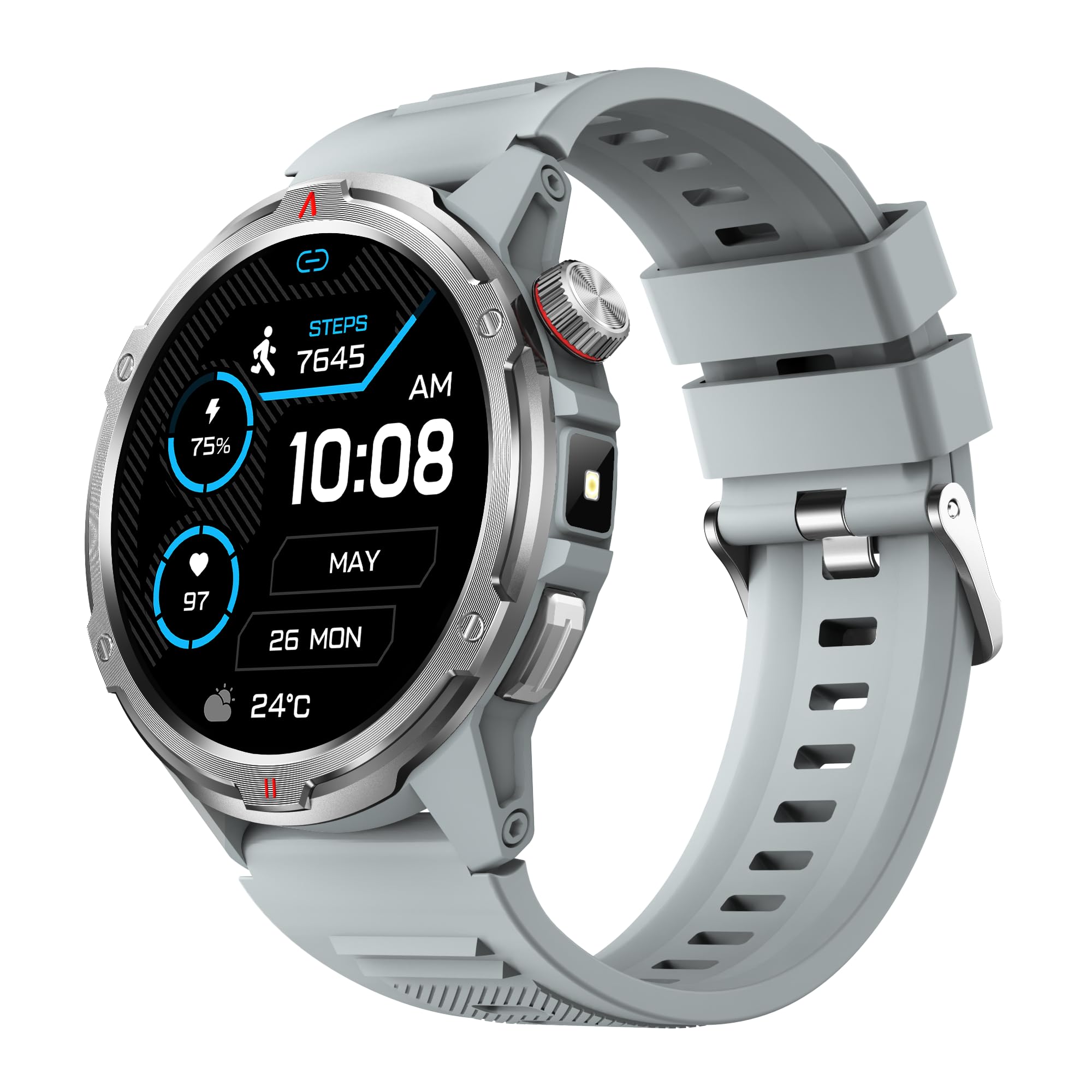
Imej: Produk utama view showing the 1.43" AMOLED HD Full Touch Screen and physical buttons.
2. Ciri-ciri Komunikasi
Stay connected directly from your wrist with Bluetooth calling and smart notifications.
- Panggilan Bluetooth: With the latest Bluetooth 5.2 chip, a high-quality speaker, and microphone, you can make and receive calls directly from your watch. You can also add up to 100 contacts and view log panggilan.
- Pemberitahuan Pintar: Receive message alerts, alarms, and other daily essentials from your paired smartphone. (Note: Message reply is not supported).

Image: BT Call & Message Sync Watch
Video: This video highlights the stylish design and various features of the smartwatch, including communication capabilities.
3. Pemantauan Kesihatan
The AOLON Tetra R4 utilizes Cywee Professional Algorithms for accurate health tracking, providing insights into your well-being.
- Pemantauan Denyut Jantung: Real-time heart rate monitoring throughout the day, whether at rest or during high-intensity exercise.
- Pemantau Oksigen Darah (SpO2): Measure your blood oxygen level anytime to regulate your body.
- Pemantauan Tahap Tekanan: Built-in PPG, SAR, AFE sensors and advanced algorithms monitor stress levels and provide alerts.
- Monitor Tidur: Combined with advanced algorithm analysis, it tracks deep sleep, light sleep, awake time, and REM sleep to help you understand and improve your sleep quality.
- Penjejakan Kitaran Haid: Provides intelligent management and thoughtful reminders for women's health.
- Pengukuran Satu Ketik: Check your heart rate, blood oxygen, and stress level simultaneously with a single tap.

Image: Heart Rate Monitoring
Video: This video demonstrates the heart rate and SpO2 monitoring features of the smartwatch.
4. Mod Sukan dan Penjejakan Aktiviti
Track your fitness journey with over 100 sports modes and comprehensive activity tracking.
- 100+ Mod Sukan: Supports a wide range of activities, from running and cycling to swimming and mountaineering.
- Penjejak Aktiviti: Records steps, calories burned, and distance covered.
- AGPS Function: Built-in AGPS provides accurate positioning and trajectory tracking for outdoor activities.

Image: 100+ More Sport Modes
Video: This video showcases the smart health features and the variety of over 100 sports modes available on the watch.
5. Outdoor Tools
Designed for outdoor enthusiasts, the Tetra R4 includes practical tools for navigation and convenience.
- Kompas: Kompas terbina dalam untuk navigasi.
- Lampu suluh: A convenient flashlight function for low-light situations.
- AGPS, Altimeter, Barometer: Auxiliary functions to assist with outdoor exploration.

Image: Built-in AGPS Movement
Video: This video demonstrates the IP68 waterproof rating and suitability for daily activities, including outdoor use.
6. Penyesuaian
Personalize your watch to match your style and preferences.
- Tonton Wajah: Choose from over 150 pre-designed dials in the app, or customize your watch face with your own photos.

Image: Choose from a variety of watch faces
7. Fungsi Praktikal Lain
The Tetra R4 offers a range of additional features to enhance your daily life.
- Kemas kini cuaca
- Jam Penggera
- Jam randik dan Pemasa
- Kawalan Muzik
- Remote Shutter for camera control
- Find Mobile Phone function
- Kalkulator
- Jam Dunia
- Panggilan Kecemasan
- Pembantu Suara

Image: Multiple Practical Functions
Video: This video demonstrates various multi-functional aspects of the Aolon Tetra R4 Smart Watch.
Penyelenggaraan
1. Penilaian Kalis Air
The AOLON Tetra R4 Smart Watch has an Penarafan kalis air IP68. This means it is resistant to dust and can withstand immersion in water up to 1.5 meters for up to 30 minutes. It is suitable for daily use, including hand washing, rain, and shallow swimming. However, it is not recommended for hot showers, saunas, or diving, as steam and high water pressure can compromise the seals.

Image: IP68 Level Waterproof
2. Pembersihan dan Penjagaan
To maintain your watch's performance and appearance:
- Lap jam tangan dan tali dengan kerap dengan lembut, damp kain.
- Elakkan menggunakan bahan kimia yang keras atau pembersih yang kasar.
- Pastikan sesentuh pengecasan bersih dan kering sebelum mengecas.
3. Pengoptimuman Hayat Bateri
Untuk memanjangkan hayat bateri:
- Laraskan kecerahan skrin ke tahap yang lebih rendah.
- Disable the Always-On Display (AOD) feature if not needed.
- Hadkan penyegaran dan pemberitahuan aplikasi latar belakang.
- Turn off continuous heart rate monitoring if not required for extended periods.
Menyelesaikan masalah
If you encounter issues with your AOLON Tetra R4 Smart Watch, try the following solutions:
- Watch not turning on/charging: Ensure the charging cable is securely connected to both the watch and a power source. Try a different USB port or power adapter.
- Isu sambungan (Bluetooth): Make sure Bluetooth is enabled on your smartphone and the watch is within range. Restart both the watch and your phone, then attempt to re-pair via the GloryFitPro app.
- Time synchronization incorrect: Ensure the watch is properly connected to the GloryFitPro app, as time is usually synced automatically from your phone. Reinstalling the app might resolve persistent issues.
- Inaccurate step count or health data: Ensure the watch is worn snugly on your wrist. Calibrate the device through the app if available.
- Skrin tidak bertindak balas: Restart the watch by pressing and holding the power button. If unresponsive, allow the battery to fully drain and then recharge.
Spesifikasi
| Ciri | Spesifikasi |
|---|---|
| Nombor Model | Tetra R4 |
| Paparan | AMOLED 1.43 inci, resolusi 466x466 |
| Kapasiti Bateri | 350 mAh |
| Penggunaan Biasa Hayat Bateri | Sehingga 7 hari |
| Masa Tunggu Sedia | Sehingga 30 hari |
| Masa Mengecas | lebih kurang 2.5 jam |
| Penilaian Kalis Air | IP68 |
| Ketersambungan | Bluetooth 5.2 |
| Keserasian Sistem Pengendalian | Android 4.4+, iOS 9.0+ |
| Pemantauan Kesihatan | Heart Rate, SpO2, Stress, Sleep, Menstrual Cycle |
| Mod Sukan | 100+ |
| Ciri-ciri Luar | Compass, Flashlight, AGPS, Altimeter, Barometer |
| Berat badan | 52 Gram |
Waranti dan Sokongan
AOLON provides a Waranti 12 bulan for the Tetra R4 Smart Watch. For any questions or issues, please contact AOLON Customer Support through Amazon. Our support team aims to provide a responsive resolution within 24 hours.