
pengenalan
Thank you for choosing the AOLON Curve Smart Watch. This device is designed to enhance your daily life with advanced health monitoring, fitness tracking, and smart communication features. This manual provides essential information for setting up, operating, and maintaining your new smart watch.

Image: The AOLON Curve Smart Watch in Rose Gold, showcasing reka bentuknya yang anggun dan paparan yang bertenaga.
Apa yang ada dalam Kotak
Upon opening your AOLON Curve Smart Watch package, you should find the following items:
- AOLON Curve Smart Watch (with Watch Band attached)
- Kabel Pengecasan
- Manual Pengguna (dokumen ini)

Image: A visual representation of the product packaging contents, showing the watch, charging cable, and user manual.
Persediaan
1. Pengecasan Awal
Before first use, fully charge your smart watch. A full charge typically takes approximately 2.5 hours. The watch offers up to 7 days of normal use and over 20 days in power-saving mode on a single charge.
- Sambungkan kabel pengecas magnet ke titik pengecasan di bahagian belakang jam tangan.
- Palamkan hujung USB kabel ke dalam penyesuai kuasa USB standard (tidak disertakan) atau port USB komputer.
- Paparan jam tangan akan menunjukkan status pengecasan.

Image: The smart watch connected to its magnetic charging cable, illustrating the charging process and battery icon.
2. Muat Turun Apl dan Berpasangan
To unlock the full potential of your AOLON Curve Smart Watch, download the companion app and pair it with your smartphone.
- Scan the QR code in your physical manual or search for "GloryFit" in the Apple App Store (for iOS) or Google Play Store (for Android).
- Pasangkan GloryFit aplikasi pada telefon pintar anda.
- Pastikan Bluetooth didayakan pada telefon pintar anda.
- Open the GloryFit app, navigate to the "Device" section, and tap "Add Device".
- Select "Aolon Curve2" from the list of available devices to pair.
- Ikuti mana-mana gesaan pada skrin untuk melengkapkan proses berpasangan.

Image: A step-by-step guide illustrating how to download the GloryFit app and connect the AOLON Curve Smart Watch to a smartphone.
Mengendalikan Jam Tangan Pintar Anda
1. Navigasi Asas
The AOLON Curve Smart Watch features a 1.83-inch HD full-view curved display with a responsive touchscreen and an optical rotary button for intuitive navigation.
- Leret ke atas/bawah: Tatal melalui menu dan pemberitahuan.
- Leret Kiri/Kanan: Access quick functions or different watch faces.
- Ketik: Pilih item atau sahkan tindakan.
- Tekan Butang Sisi: Kembali ke skrin utama atau hidupkan/matikan kuasa.
- Rotate Side Button: Scroll through menus or adjust settings.

Imej: A terperinci view of the smart watch's 1.83-inch HD display with 3D curved glass, highlighting its visual clarity.
2. Menyesuaikan Muka Jam
Personalize your watch with over 120 customizable watch faces available through the GloryFit app. You can also set your own photos as watch faces.
- From the watch home screen, long-press the display to quickly change watch faces.
- For more options, open the GloryFit app and navigate to the watch face selection menu.

Image: Various digital and analog watch faces shown on the smart watch, demonstrating customization options.
3. Panggilan Bluetooth
With its built-in microphone and speaker, the smart watch allows you to make and receive calls directly from your wrist when connected to your phone via Bluetooth.
- To make a call, access the dial pad or contact list on your watch.
- To answer an incoming call, tap the green phone icon on the watch screen.
- To reject a call, tap the red phone icon.

Image: A user interacting with the smart watch to manage calls while driving, highlighting the Bluetooth calling feature.
4. Pemberitahuan Pintar
Receive real-time notifications for messages, alarms, and other app alerts directly on your watch. Note that message reply is not supported directly from the watch.
- Ensure notification permissions are granted to the GloryFit app on your smartphone.
- Leret ke bawah pada muka jam ke view pemberitahuan terkini.

Image: The smart watch displaying various app notifications, indicating its intelligent notification reminder feature.
5. Pemantauan Kesihatan
The AOLON Curve Smart Watch provides continuous monitoring of key health metrics.
- Kadar Jantung: Continuous heart rate tracking with alerts for abnormal rates.
- Oksigen Darah (SpO2): Pantau tahap oksigen darah anda.
- Pemantauan Tidur: Tracks sleep duration, quality, and stages (deep, light, REM, awake).
- Pemantauan Tekanan: Memberikan gambaran tentang tahap tekanan anda.
- Penjejakan Basikal Wanita: Menyokong pengesanan kitaran haid.
- Peringatan Sedentari: Alerts you to move after prolonged periods of inactivity.
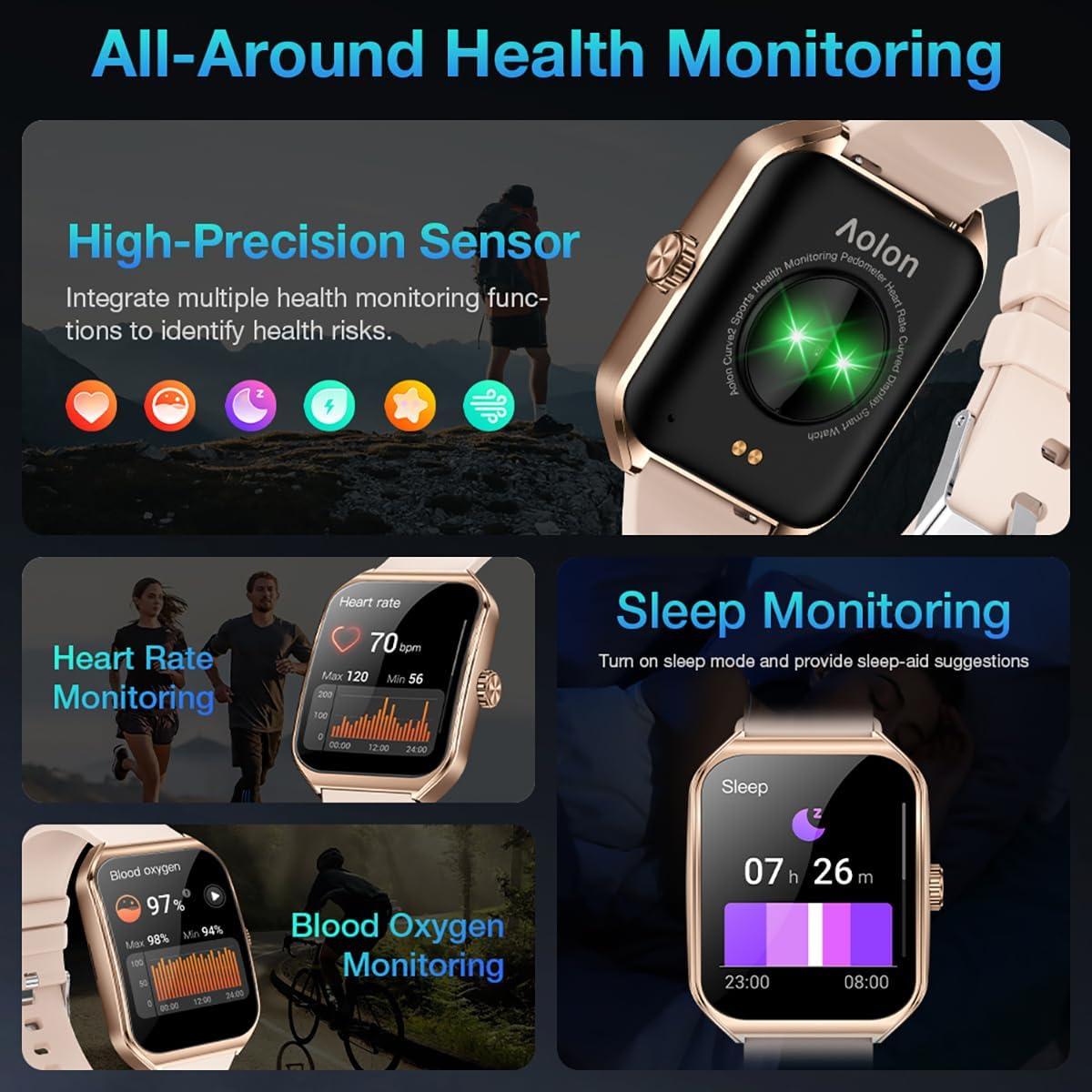
Image: A collage showing the smart watch monitoring heart rate, blood oxygen, and sleep, emphasizing its comprehensive health tracking capabilities.
Video: Demonstrates the 24/7 health monitoring features of the AOLON Smart Watch, including heart rate and SpO2 tracking.
6. Mod Sukan dan Penjejakan Aktiviti
The watch supports over 60 sports modes, allowing you to accurately monitor heart rate, calorie consumption, and exercise duration.
- Select your desired sports mode from the watch menu (e.g., outdoor run, indoor run, outdoor walk, ball games, dance, gymnastics).
- When connected to your phone, the watch can record and track your exercise routes using your phone's GPS.
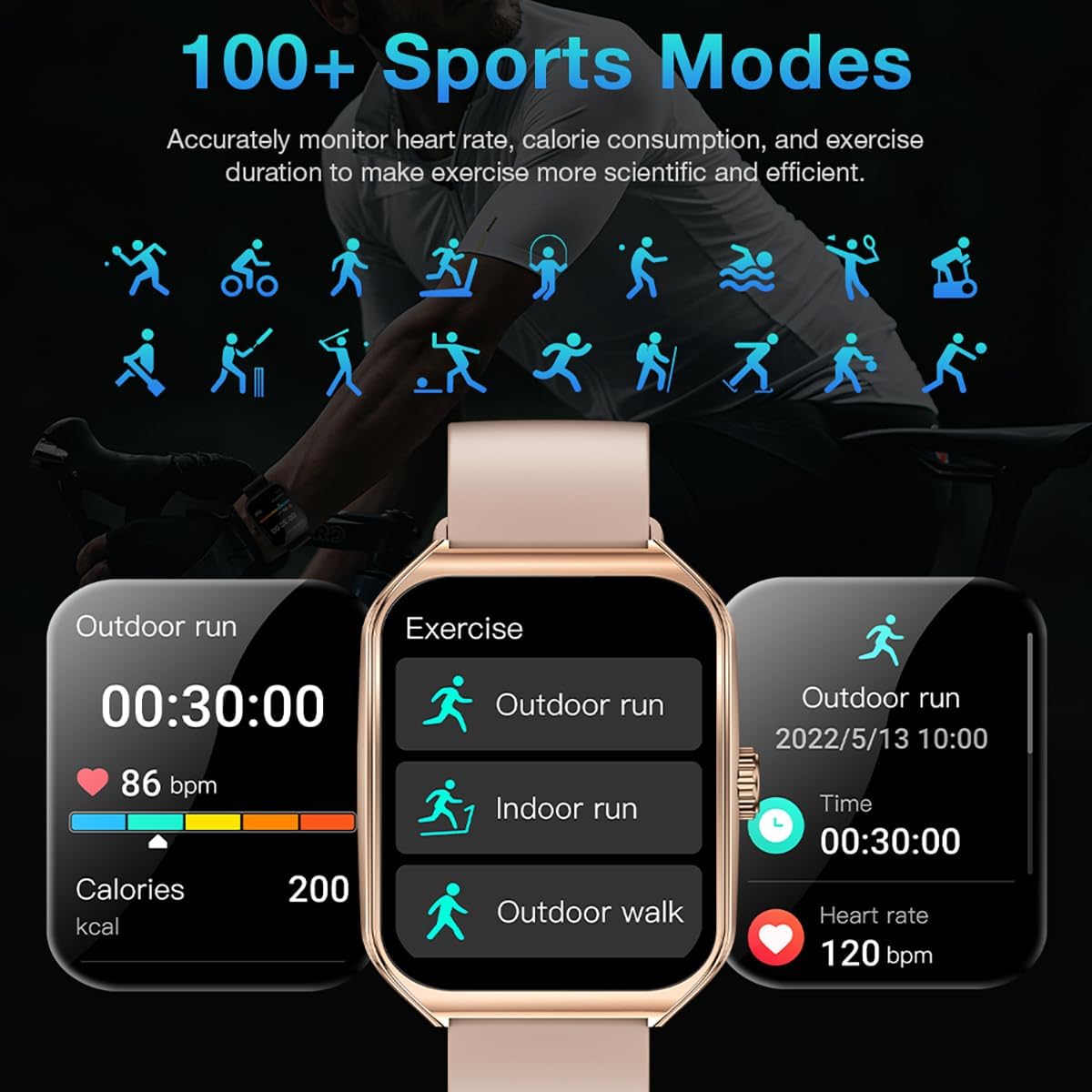
Image: The smart watch interface showing different sports modes and real-time exercise data like heart rate, calories, and distance.
7. Ciri-ciri Pintar Lain
The AOLON Curve Smart Watch integrates several convenient features for daily use:
- Pembantu Suara AI: Quickly activate your voice assistant for tasks like making calls, checking weather, or setting alarms.
- Ramalan cuaca: Dapatkan kemas kini cuaca masa nyata.
- Kawalan Muzik: Kawal main balik muzik pada telefon pintar anda.
- Jam loceng: Tetapkan dan uruskan penggera.
- Jam randik & Pemasa: Fungsi pemasaan penting.
- Cari Telefon Anda: Cari telefon pintar berpasangan anda.
- Lampu suluh: A simple flashlight function.
- Kalkulator: Pengiraan asas pada pergelangan tangan anda.
- Fungsi SOS: Untuk situasi kecemasan.
Video: Tamatview of the Curve2 Smart Watch features, including fitness tracking, notifications, and various smart functions.
Penyelenggaraan
1. Membersihkan Jam Tangan Anda
Regular cleaning helps maintain the appearance and functionality of your smart watch.
- Lap skrin dan badan dengan kain lembut,amp kain.
- The silicone strap is washable. You can gently clean it with mild soap and water.
- Elakkan menggunakan bahan kimia yang keras atau bahan yang melelas.
2. Rintangan Air (IP67)
The AOLON Curve Smart Watch is IP67 waterproof, meaning it is resistant to dust and can withstand immersion in water up to 1 meter for 30 minutes. It is suitable for daily use and light water activities like hand washing or rain exposure.
- Do not use the watch for diving, hot showers, or prolonged submersion in water.
- Elakkan daripada mendedahkan jam tangan kepada air atau wap bertekanan tinggi.

Image: The smart watch partially submerged in water, illustrating its IP67 water resistance feature.
Menyelesaikan masalah
If you encounter issues with your AOLON Curve Smart Watch, please refer to the following common solutions:
- Tonton tidak dihidupkan: Pastikan jam tangan dicas sepenuhnya. Sambungkannya ke kabel pengecas dan biarkan ia dicas selama sekurang-kurangnya 30 minit sebelum cuba menghidupkannya.
- Tidak boleh berpasangan dengan telefon:
- Pastikan Bluetooth didayakan pada telefon anda dan jam tangan berada dalam liputan.
- Mulakan semula telefon dan jam tangan anda.
- Check if the GloryFit app has necessary permissions (location, Bluetooth, notifications).
- If previously paired, try unpairing and re-pairing the device through the GloryFit app.
- Data kesihatan tidak tepat:
- Pastikan jam tangan dipakai dengan kemas di pergelangan tangan anda, tidak terlalu ketat atau terlalu longgar.
- Bersihkan penderia di belakang jam tangan.
- Environmental factors or skin conditions can sometimes affect sensor accuracy.
- Pemberitahuan tidak muncul:
- Verify that notification permissions are enabled for the GloryFit app in your phone's settings.
- Pastikan jam tangan disambungkan ke telefon anda melalui Bluetooth.
- Check the notification settings within the GloryFit app to ensure specific app notifications are enabled.
Spesifikasi
| Saiz Paparan | 1.83 Inci |
| Jenis Paparan | HD Curved Display with 3D Curved Glass |
| Ketersambungan | Bluetooth 5.0 |
| Kapasiti Bateri | 245 Miliamp jam |
| Hayat Bateri (Penggunaan Biasa) | Sehingga 7 hari |
| Battery Life (Power-Saving Mode) | Lebih 20 hari |
| Masa Mengecas | lebih kurang 2.5 jam |
| Tahan Air | IP67 |
| Pemantauan Kesihatan | Kadar Denyutan Jantung, SpO2, Tidur, Tekanan, Kitaran Wanita |
| Mod Sukan | 60+ mod |
| Keserasian | Android & iOS |
| Berat badan | 40g (watch body only) |
| Nombor Model | 5d738664-f1e0-4256-942f-d938b44e5e53 |
Waranti dan Sokongan
AOLON provides a Waranti 12 bulan for your smart watch. If you encounter any issues or require assistance, please contact our customer service team.
- Perkhidmatan Pelanggan: Available 24 hours a day. Please contact us through Amazon Customer Service for prompt assistance.