
XINDADA DW100
DW100 Smartwatch User Manual
Model: DW100
pengenalan
Thank you for choosing the XINDADA DW100 Smartwatch. This device combines the functionality of a smartphone with the convenience of a smartwatch, featuring 4G/5G LTE connectivity, an Android 10.0 operating system, a unique 180° rotary camera, and a vibrant 2.29-inch AMOLED display. This manual provides detailed instructions to help you set up, operate, and maintain your smartwatch, ensuring optimal performance and longevity.
Maklumat Keselamatan
- Jangan cuba membuka, membaiki atau mengubah suai peranti. Ini boleh membatalkan jaminan dan menyebabkan kerosakan.
- Jauhkan peranti daripada suhu yang melampau, cahaya matahari langsung dan kelembapan.
- Gunakan hanya pengecas dan aksesori yang diluluskan oleh pengilang.
- Elakkan daripada mendedahkan peranti kepada medan magnet yang kuat.
- Buang peranti dan baterinya secara bertanggungjawab mengikut peraturan tempatan.
- Do not use the device while driving or performing activities that require full attention.
Kandungan Pakej
Sila tandai kotak untuk item berikut:
- DW100 Smart Watch x1
- Original Strap x1
- Manual Arahan x1
- Kotak Asal x1
- Charging Cable (not explicitly listed but implied for a smartwatch)
Produk Selesaiview
Familiarize yourself with the components of your DW100 Smartwatch.

Rajah 1: Depan view of the DW100 Smartwatch showing the display, SIM card slot, and rotary camera.
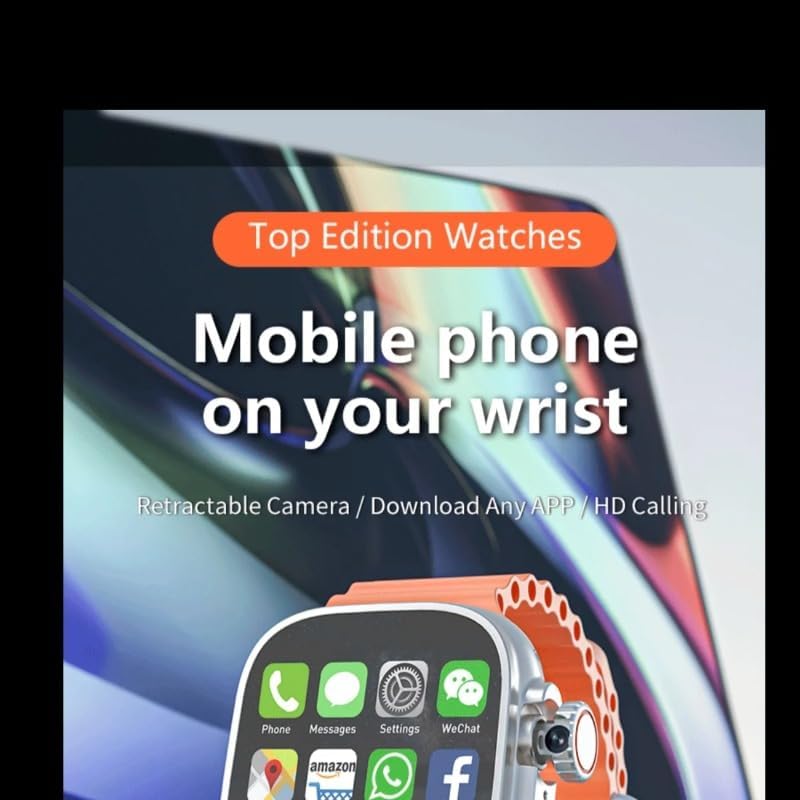
Rajah 2: Paparan jam tangan pintar menunjukkanasing various application icons, emphasizing its mobile phone capabilities.

Figure 3: The smartwatch emphasizing its role in a digital lifestyle, with health and communication functions.
Komponen Utama:
- Paparan AMOLED 2.29 inci: High-definition touchscreen for interaction.
- 180° Rotary Camera: An 8MP detachable camera capable of rotating for various shooting angles.
- Slot Kad SIM: Supports Nano SIM for independent 4G calling.
- Butang Kuasa: Typically located on the side, used for power on/off and screen wake/sleep.
- Mikrofon & Pembesar Suara: For calls and audio playback.
- Penderia Kadar Jantung: Terletak di bahagian belakang untuk pemantauan kesihatan.
Persediaan
1. Mengecas Peranti
Before first use, fully charge your smartwatch. Connect the charging cable to the watch's charging port and plug the other end into a USB power adapter (not included) or a computer's USB port. The battery indicator on the screen will show charging progress.
2. Memasukkan Kad SIM
The DW100 supports a Nano SIM card for independent calling and mobile data.
- Cari slot kad SIM pada sisi jam pintar.
- Carefully insert the Nano SIM card into the tray, ensuring the gold contacts face downwards and the notched corner aligns correctly.
- Push the SIM tray back into the slot until it clicks into place.
3. Kuasa Awal Hidup
Press and hold the Power button until the XINDADA logo appears on the screen. Follow the on-screen prompts to complete the initial setup, including language selection, time zone, and network connection.
4. Menyambung ke Wi-Fi dan Bluetooth
Untuk menyambung ke peranti Wi-Fi atau Bluetooth:
- Pergi ke tetapan > Rangkaian & Internet for Wi-Fi connections.
- Pergi ke tetapan > Bluetooth to pair with headphones or other Bluetooth accessories.
Arahan Operasi
Navigasi Asas
- Ketik: Pilih item atau buka apl.
- Leret ke Atas/Bawah/Kiri/Kanan: Navigate through menus, notifications, or quick settings.
- Tekan lama: Akses pilihan tambahan atau sesuaikan muka jam tangan.

Gambar 4: Cthamples of menu navigation, dial switching, and custom dial options on the DW100 Smartwatch.
Using the 180° Rotary Camera
The DW100 features an 8MP detachable camera that can rotate 180 degrees, allowing for versatile photo and video capture.

Figure 5: Close-up of the DW100 Smartwatch's 180° rotary camera, illustrating its telescopic and rotational capabilities.
- To access the camera, open the Camera app from the app menu.
- Gently rotate the camera module to adjust the viewing angle (e.g., for selfies or forward-facing shots).
- The camera supports photo taking, video recording, video calls, face recognition, and code scanning.
Membuat dan Menerima Panggilan
With a Nano SIM card inserted, your DW100 can make and receive calls independently.
- Untuk membuat panggilan: Buka apl Telefon, dail nombor dan ketik ikon panggilan.
- Untuk menerima panggilan: Swipe to answer or decline when an incoming call notification appears.
Using Applications (Play Store)
Running on Android 10.0, the DW100 allows you to download and install apps from the Google Play Store.
- Ensure you are connected to Wi-Fi or have mobile data enabled.
- Buka Gedung Play app from your app menu.
- Log masuk dengan akaun Google anda.
- Browse or search for apps and install them as you would on an Android smartphone.
Pemantauan Kesihatan
The smartwatch includes built-in sensors for health tracking.
- Pemantauan Denyut Jantung: Access the Heart Rate app to measure your pulse.
- Pengiraan Langkah: The device automatically tracks your steps throughout the day. View your daily activity in the Step Counter app.
Menyesuaikan Muka Jam
Peribadikan jam tangan pintar anda dengan pelbagai muka jam tangan.
- Long-press on the current watch face to enter the customization mode.
- Swipe left or right to browse through built-in watch faces.
- Some watch faces may offer additional customization options (e.g., complications, colors).
Tetapan Sistem
Akses ke tetapan app to configure various aspects of your smartwatch:
- Rangkaian & Internet: Manage WLAN, Hotspot & Tethering, Data Usage, Airplane Mode, VPN.
- Bluetooth: Pair and manage Bluetooth devices.
- Pemperibadian: Adjust display settings, sound, and modes.
- Apl & Pemberitahuan: Manage recently opened apps, notifications, app permissions, default apps.
- Keselamatan & Privasi: Konfigurasikan tetapan keselamatan.
- Software Version & Update: Check current software and perform OTA updates.
- Maklumat Lokasi: Manage GPS settings.
- Bateri: Monitor battery usage.
- Sistem: Language & Input, Date & Time, Reset Options.
Penyelenggaraan
Membersihkan Peranti
To keep your smartwatch clean, gently wipe the screen and body with a soft, lint-free cloth. Avoid using harsh chemicals or abrasive materials.
Penjagaan Bateri
- Elakkan menyahcas sepenuhnya bateri dengan kerap.
- Do not expose the device to extreme temperatures, as this can degrade battery life.
- Jika menyimpan peranti untuk tempoh yang lama, caskannya kepada kira-kira 50% sebelum penyimpanan.
Software Updates (OTA)
The DW100 supports Over-the-Air (OTA) updates. Regularly check for and install updates to ensure optimal performance and access to new features.
- Pergi ke tetapan > Sistem > Kemas Kini Perisian.
- Ensure your watch has sufficient battery and a stable internet connection before starting an update.
Menyelesaikan masalah
| Masalah | Penyelesaian yang Mungkin |
|---|---|
| Peranti tidak dihidupkan. | Pastikan bateri telah dicas. Sambungkan ke pengecas dan tunggu beberapa minit sebelum cuba menghidupkannya semula. |
| Tidak dapat menyambung ke Wi-Fi. | Check if Wi-Fi is enabled in Settings. Ensure the password is correct. Restart the Wi-Fi router. |
| Kad SIM tidak dikesan. | Ensure the Nano SIM card is inserted correctly and fully seated in the tray. Restart the watch. |
| Aplikasi perlahan atau ranap. | Close background apps (Settings > Apps & Notifications > App Background Management). Clear app cache. Restart the device. |
| Bateri cepat habis. | Reduce screen brightness. Disable unnecessary features like Wi-Fi, Bluetooth, or GPS when not in use. Limit background app activity. |
Spesifikasi
| Ciri | Perincian |
|---|---|
| Model | DW100 |
| CPU | Spreadtrum SC8541E 10-core 1.4GHz Processor |
| Ingatan | 3GB RAM + 32GB ROM (as per current product variant) |
| Kad SIM | 4G Independent Calling, Nano SIM |
| Skrin sentuh | 2.29-inch AMOLED with 490*580 HD Resolution |
| Kamera | 8MP Detachable Camera (180° Rotary) |
| Ketersambungan | Bluetooth, Wi-Fi (802.11g 54 Mbps), GPS (Built-in) |
| Bateri | 1280mAh |
| Sistem Operasi | Android 10.0 |
| Bahasa yang Disokong | English, Arabic, German, Spanish, Persian, Finnish, French, Italian, Japanese, Hebrew, Malay, Dutch, Polish, Portuguese, Russian, Thai, Turkish, Vietnamese, Korean, Filipino, Hindi |
| Ciri-ciri Kesihatan | Heart Rate Monitoring, Step Counting |
Waranti dan Sokongan
For warranty information, please refer to the warranty card included in your product packaging or contact your point of purchase.
For technical support or further assistance, please contact XINDADA customer service through the contact information provided on the product packaging or the official XINDADA webtapak.
Nota: Spesifikasi dan ciri produk tertakluk kepada perubahan tanpa notis awal.
Ask a question about this manual
Ask about setup, troubleshooting, compatibility, parts, safety, or missing instructions. Manuals+ will review the question and use this page’s manual context to help answer it.