
DOOGEE DOOGEE Blade GT
Manual Pengguna DOOGEE Blade GT
Model: DOOGEE Blade GT
1. Pengenalan
This manual provides essential information for the safe and efficient use of your DOOGEE Blade GT 5G outdoor mobile phone. Please read this manual thoroughly before operating the device to ensure optimal performance and longevity.

Rajah 1.1: Depan dan belakang view of the DOOGEE Blade GT, highlighting its storage capacity and LED notification feature.
2. Persediaan
2.1 Pemasangan Kad SIM dan Kad MicroSD
- Cari dulang kad SIM di sisi peranti.
- Masukkan alat ejektor SIM ke dalam lubang kecil di sebelah dulang untuk membukanya.
- Letakkan kad Nano-SIM dan/atau kad MicroSD anda ke dalam slot yang ditetapkan pada dulang. Pastikan kenalan emas menghadap ke bawah.
- Tolak dulang kembali ke dalam peranti dengan berhati-hati sehingga ia berbunyi pada tempatnya.
2.2 Kuasa Awal Hidup
Press and hold the Power button located on the side of the device until the DOOGEE logo appears on the screen. Follow the on-screen prompts to complete the initial setup, including language selection, Wi-Fi connection, and Google account setup.
2.3 Mengecas Peranti
Connect the USB Type-C cable to the charging port at the bottom of the phone and the other end to a compatible 18W power adapter. Plug the adapter into a power outlet. The battery indicator on the screen will show the charging status. For optimal battery life, use the original charger and cable.
3. Mengendalikan Peranti Anda
3.1 Paparan dan Navigasi
The DOOGEE Blade GT features a 6.72-inch FHD+ display with a 120Hz dynamic refresh rate, providing a smooth visual experience. Navigate the device using touch gestures: tap to select, swipe to scroll, pinch to zoom. The physical buttons control power, volume, and can be customized for quick access to certain functions.

Rajah 3.1: The 6.72-inch FHD+ display with 120Hz refresh rate, offering clear and fluid visuals.
3.2 Penggunaan Kamera
The device is equipped with a 48MP AI main camera, a 5MP wide-angle camera, and a 20MP front camera. To open the camera application, tap the camera icon on the home screen or app drawer. Select different modes (e.g., Photo, Video, Portrait) by swiping across the screen. Tap the shutter button to capture images or start/stop video recording.

Rajah 3.2: Berakhirview of the DOOGEE Blade GT's camera system, including the 48MP main sensor.
3.3 Ketersambungan
The DOOGEE Blade GT supports 5G cellular networks, Wi-Fi 6, Bluetooth, NFC for contactless payments, OTG for connecting USB devices, GPS for navigation, and FM radio. Access these settings via the Quick Settings panel (swipe down from the top of the screen) or the Settings app.
4. Penyelenggaraan
4.1 Penjagaan Bateri
The device is powered by a 5500mAh battery. To maximize battery life, avoid extreme temperatures, do not fully discharge the battery regularly, and unplug the charger once the battery is full. The phone supports 18W fast charging.

Rajah 4.1: Illustration of the 5500mAh battery and its estimated usage times for standby, music, calls, web browsing, and video watching.
4.2 Cleaning and Durability
The DOOGEE Blade GT is designed to be rugged, with IP68/IP69K water and dust resistance, and MIL-STD-810H compliance for drop protection. To clean the device, wipe it with a soft, damp cloth. Avoid using harsh chemicals or abrasive materials. Ensure all ports are closed before exposing the device to water or dust.
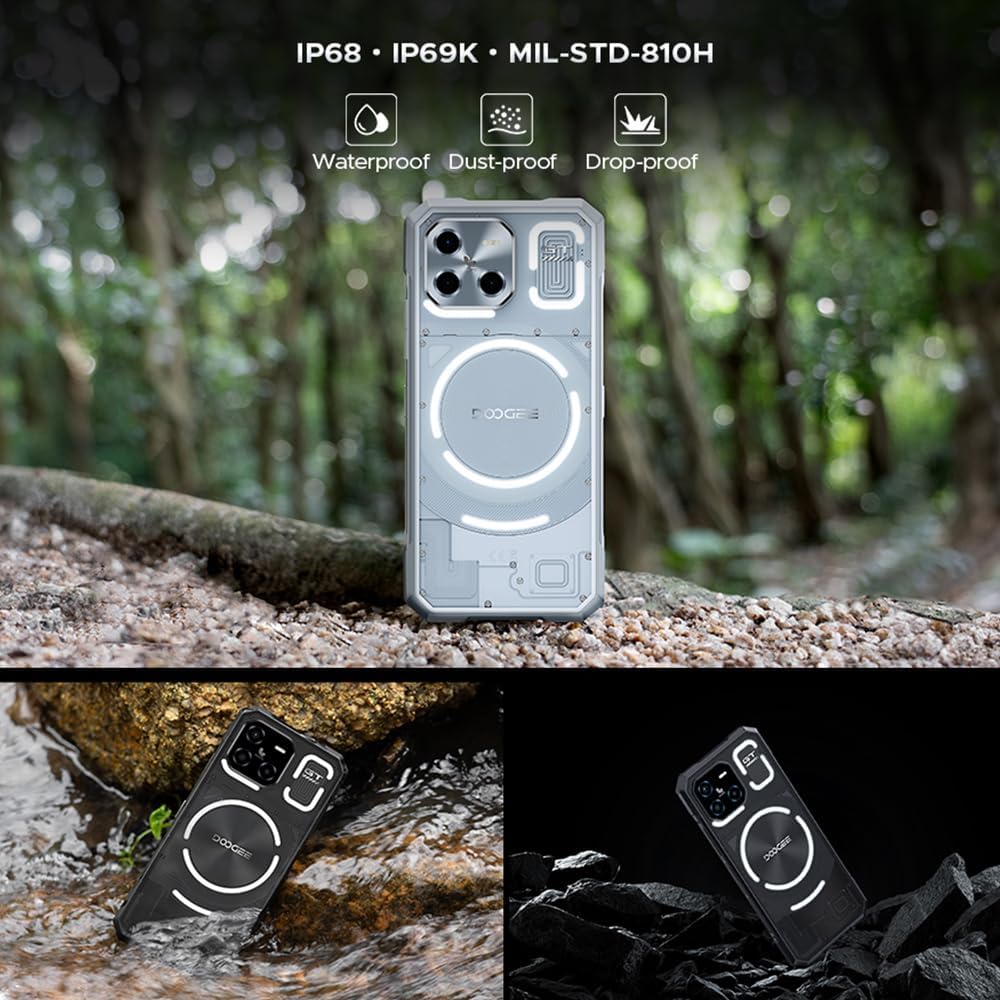
Rajah 4.2: Visual representation of the DOOGEE Blade GT's ruggedness, including its waterproof, dust-proof, and drop-proof capabilities.
5. Penyelesaian masalah
- Bateri Habis Cepat: Check for background apps consuming power. Reduce screen brightness or disable unnecessary features like GPS, Wi-Fi, or Bluetooth when not in use. Consider performing a factory reset if the issue persists after checking app usage.
- Speaker Noise/Unclear Sound: Ensure the speaker grille is clean and free of debris. Adjust volume settings. If the issue persists, it may indicate a hardware problem requiring professional service.
- Peranti Tidak Membalas: Tekan dan tahan butang Kuasa selama lebih kurang 10-15 saat untuk memaksa mula semula.
- Connectivity Issues (Wi-Fi/Bluetooth/Cellular): Toggle the respective connection off and on. Restart the device. For cellular issues, ensure your SIM card is properly inserted and your plan is active.
- Apl Ranap/Pembekuan: Clear the cache and data for the problematic app in Settings > Apps. If the issue continues, uninstall and reinstall the app.
6. Spesifikasi
| Ciri | Penerangan |
|---|---|
| Nama Model | DOOGEE Blade GT |
| Pemproses | MTK Dimensity 7050 Octa-core (6nm) |
| RAM | 12GB (boleh dikembangkan kepada 32GB dengan RAM maya 20GB) |
| Storan Dalaman | ROM 256GB |
| Paparan | 6.72-inch FHD+ (2400 x 1080) IPS, 120Hz Refresh Rate |
| Kamera Belakang | 48MP AI Main Camera + 5MP Wide Angle Camera |
| Kamera Depan | 20MP |
| Bateri | 5500mAh, Pengecasan Pantas 18W |
| Sistem Operasi | Android 14 |
| Ketahanan | IP68/IP69K Waterproof & Dustproof, MIL-STD-810H Drop-proof |
| Dimensi | Ketebalan 10.5mm, berat 260g |
| Ketersambungan | 5G, Wi-Fi 6, Bluetooth, NFC, OTG, GPS, FM, USB Type-C |

Rajah 6.1: Diagram illustrating the MediaTek D7050 6nm processor, central to the phone's performance.

Rajah 6.2: Visual representation of the phone's slim profile (10.5mm) and light weight (260g).
7. Waranti dan Sokongan
Your DOOGEE Blade GT is covered by a standard manufacturer's warranty. For specific warranty terms and conditions, please refer to the warranty card included in your product packaging or visit the official DOOGEE website. For technical support, product inquiries, or service requests, please contact DOOGEE customer service through their official channels.
Ask a question about this manual
Ask about setup, troubleshooting, compatibility, parts, safety, or missing instructions. Manuals+ will review the question and use this page’s manual context to help answer it.