1. Pengenalan
This instruction manual provides comprehensive guidance for the installation, operation, and maintenance of your Atcall Fast Link Cell Phone Booster. This device is designed to enhance cellular signal strength within your home or office, supporting all major U.S. carriers across multiple frequency bands. Please read this manual thoroughly before installation to ensure optimal performance and safe operation.
2. Kandungan Pakej
Sahkan bahawa semua item yang disenaraikan di bawah terdapat dalam pakej anda:
- 1 x Signal Booster (with built-in indoor antenna)
- 1 x Outdoor Directional Antenna
- 2 x 30ft RG6 Cables
- 1 x Penyesuai Kuasa
- Mounting Kits (for roof/pole mount)
- F Female to F Female Connector
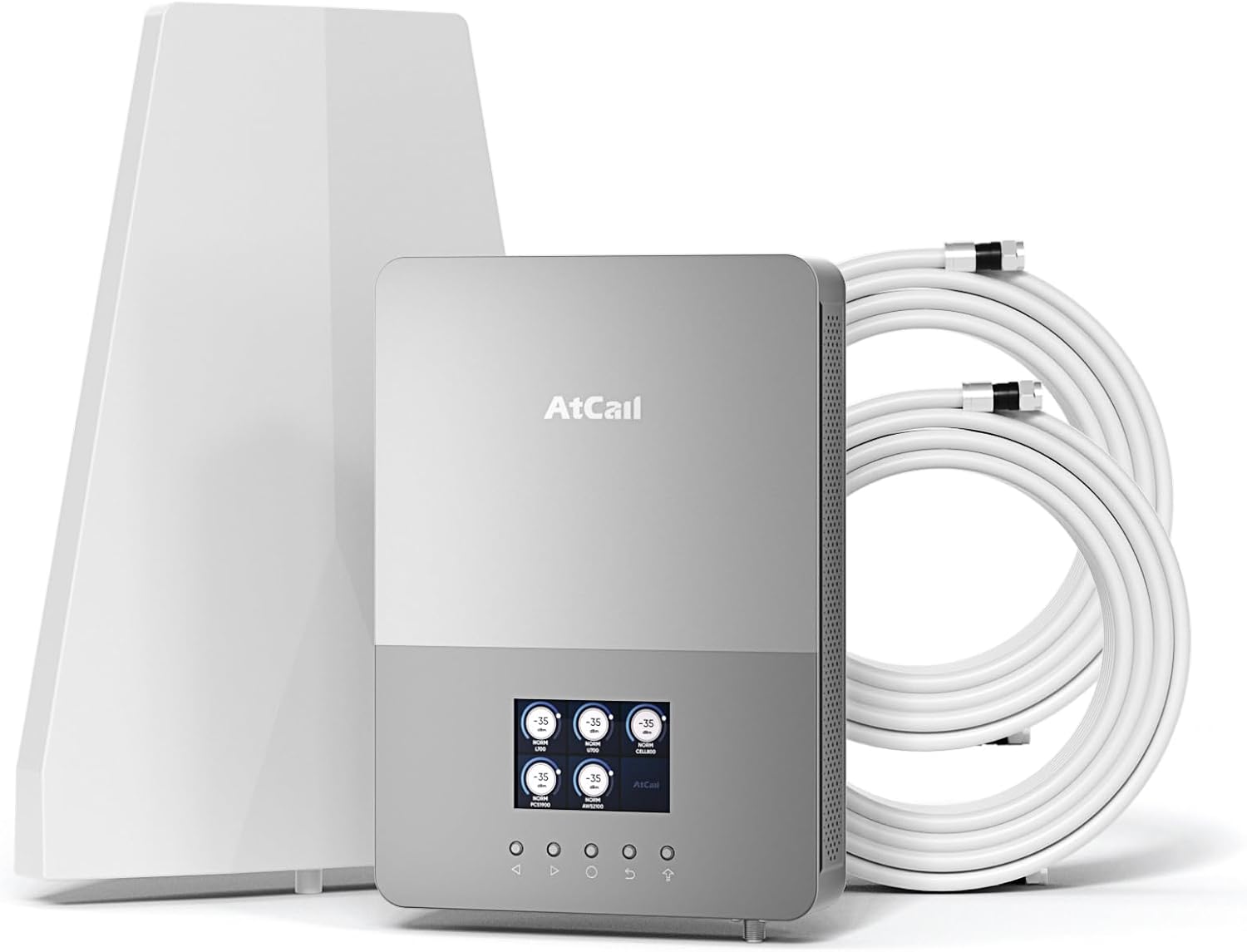
Rajah 2.1: Components included in the Atcall Fast Link Cell Phone Booster package. This image displays the main booster unit with its built-in indoor antenna, the separate outdoor directional antenna, two 30-foot coaxial cables, the power adapter, and mounting hardware.

Rajah 2.2: Detailed diagram showing the package contents and approximate dimensions of the booster unit (8.35 x 11.81 inches) and outdoor antenna (8.2 x 11.6 inches). Also shown are the two 30ft RG6 cables, power supply, F female to F female connector, and roof/pole mount bracket.
3. Produk Lebihview
The Atcall Fast Link Cell Phone Booster is designed to improve cellular signal strength for various U.S. carriers. It features a real-time LCD monitor for easy setup and troubleshooting.
3.1 Ciri-ciri Utama
- Five-Band Support: Works on bands 12/17, 13, 5, 2/25, and 4/66.
- Real-Time LCD Monitor: Displays working status, signal strength (dBm), uplink/downlink gain, and frequency band.
- Wide Carrier Compatibility: Supports Verizon, AT&T, T-Mobile, Sprint, Straight Talk, U.S. Cellular, and other U.S. carriers.
- Liputan: Up to 5,000 sq ft, suitable for homes, offices, warehouses, and rural areas.
- 5G Compatible: Enhances signal for 5G devices.
- Built-in Indoor Antenna: Simplifies installation.
- Diluluskan oleh FCC: Complies with FCC regulations (FCC ID: 2A34B-SFZN005).
3.2 Fungsi Paparan LCD
The integrated LCD screen provides critical information for monitoring and optimizing the booster's performance.

Rajah 3.1: The Smart LCD Display provides a clear view of signal strength. It shows real-time downlink signal strength (dBm), uplink and downlink gain, the working status of each band, and allows for frequency band switching. This visual feedback aids in installation and troubleshooting.
- Real Time Downlink Signal Strength (dBm): Indicates the strength of the signal received by the booster.
- Status Bekerja: Shows if a particular frequency band is active and boosting.
- Jalur Kekerapan: Identifies the specific cellular band being boosted (e.g., Band 12/17, Band 13).
- Uplink Gain / Downlink Gain: Memaparkan amplification level for signals transmitted from your phone (uplink) and received by your phone (downlink).
- Suis Jalur: Allows selection or deselection of specific frequency bands.
4. Panduan Persediaan
Pemasangan yang betul adalah penting untuk prestasi optimum. Ikuti langkah-langkah ini dengan teliti.
4.1 Semakan Pra-Pemasangan
- Check Outdoor Signal Strength: Before installation, ensure you have at least 1-2 bars of existing outdoor signal. The booster amplifies existing signal; it does not create signal where none exists.
- Identify Your Carrier's Frequency Band: Use your cell phone to determine the frequency band your carrier uses.
- Untuk iPhone: Dial *3001#12345#* then press the call button. Click "All Metrics," then "Serving Cell Info," and check "Band Info."
- Untuk Telefon Android: Download "Network Cell Info Lite" from your app store. Choose "GAUGE" and then check "BAND."

Rajah 4.1: Visual guide demonstrating how to check the frequency band on both iPhone and Android devices. This step is important to confirm compatibility and optimize booster settings.
4.2 Langkah Pemasangan
- Mount the Outdoor Antenna:
- Choose a location on your roof or an exterior wall that has the strongest existing cellular signal.
- Mount the directional outdoor antenna using the provided mounting kit. Ensure it is pointed towards the nearest cell tower.
- Maintain a minimum horizontal distance of 20 feet (6 meters) and a vertical distance of 20 feet (6 meters) between the outdoor antenna and the indoor booster unit. A straight-line distance of over 30 feet (9 meters) is recommended.
- Install the Indoor Booster Unit:
- Place the booster unit (with built-in indoor antenna) in a central location within your desired coverage area.
- Ensure the unit is positioned away from metal objects and other electronic devices that may cause interference.
- Sambungkan Kabel:
- Connect one end of a 30ft RG6 cable to the outdoor antenna.
- Route the cable indoors and connect the other end to the "Outdoor" port on the booster unit.
- Ensure all connections are finger-tight.
- Sambungkan Kuasa:
- Connect the power adapter to the booster unit's power input.
- Palamkan penyesuai kuasa ke soket elektrik standard.
- Hidupkan dan Pantau:
- The booster will power on, and the LCD screen will display real-time signal information.
- Adjust the outdoor antenna's direction slightly while monitoring the LCD display to achieve the highest possible downlink signal strength (dBm) and gain.

Rajah 4.2: Installation instruction diagram showing the recommended minimum separation distances: greater than 20 feet (6m) horizontally and vertically, and greater than 30 feet (9m) in a straight line between the outdoor antenna and the indoor booster unit to prevent oscillation.
5. Arahan Operasi
Once installed and powered on, the Atcall Fast Link Cell Phone Booster operates automatically. The LCD display provides continuous feedback on its performance.
5.1 Pemantauan Prestasi
- The LCD screen will show the signal strength (dBm) for each supported band. A higher (less negative) dBm value indicates a stronger signal.
- Observe the uplink and downlink gain values. These indicate the amplification provided by the booster.
- If a band is not showing activity or has low signal, ensure the outdoor antenna is correctly aimed and there is sufficient isolation between the indoor and outdoor antennas.
5.2 Band Selection (if applicable)
The booster typically operates on all supported bands simultaneously. If you need to disable a specific band, use the "Band Switch" function on the LCD display as indicated in Figure 3.1.
6. Penyelesaian masalah
If you experience issues with your cell phone booster, refer to the following common problems and solutions.
| Masalah | Kemungkinan Punca | Penyelesaian |
|---|---|---|
| No signal improvement or weak signal. |
|
|
| Booster LCD shows "OSC" or oscillation warning. | Feedback loop between indoor and outdoor antennas (antennas are too close). | Increase the physical separation between the outdoor and indoor antennas. Ensure they are not facing each other directly. |
| Power light is off. | Tiada bekalan kuasa. | Check power adapter connection and wall outlet. Ensure the power adapter is functioning. |
| Specific band not boosting. |
|
|
If problems persist after attempting these solutions, please contact Atcall customer support for assistance.
7. Spesifikasi
| Ciri | Perincian |
|---|---|
| Model | SFZN005 |
| Band yang Disokong | Band 12/17, Band 13, Band 5, Band 2/25, Band 4/66 |
| Keuntungan Maksimum | 68 dB |
| Kawasan Liputan | Sehingga 5,000 kaki persegi |
| Paparan | Real-Time LCD Monitor |
| Antena Dalaman | Built-in Panel Antenna |
| Antena Luaran | Antena Berarah |
| Jenis Kabel | Kabel Sepaksi RG6 |
| ID FCC | 2A34B-SFZN005 |
| Berat Barang | 6.8 paun |
| Dimensi Pakej | 13.8 x 9.5 x 5.5 inci |
8. Pematuhan FCC
Peranti ini mematuhi Bahagian 15 Peraturan FCC. Pengendalian tertakluk kepada dua syarat berikut: (1) peranti ini tidak boleh menyebabkan gangguan berbahaya, dan (2) peranti ini mesti menerima sebarang gangguan yang diterima, termasuk gangguan yang boleh menyebabkan operasi yang tidak diingini.
ID FCC: 2A34B-SFZN005
NOTA PENTING: This is a CONSUMER device. Before use, you MESTI MENDAFTAR PERANTI INI with your wireless provider and have your provider's consent. Most wireless providers consent to the use of signal boosters. Some providers may not consent to the use of this device on their network. If you are unsure, contact your provider. You MUST OPERATE this device with approved antennas and cables as specified by the manufacturer. Antennas TIDAK MESTI be installed within 20 centimeters (8 inches) of any person. You MESTI hentikan operasi peranti ini serta-merta jika diminta oleh FCC atau pembekal perkhidmatan wayarles berlesen.

Rajah 8.1: belakang view of the Atcall booster unit displaying the FCC compliance label. The label includes the HVIN, IC, and FCC ID, along with important consumer device registration and operation warnings.
9. Waranti dan Sokongan
Atcall provides a limited warranty for this product. For detailed warranty information, please refer to the warranty card included in your package or visit the official Atcall webtapak.
For technical support, troubleshooting assistance, or any questions regarding your Atcall Fast Link Cell Phone Booster, please contact our customer service team:
- e-mel: [Masukkan E-mel Sokongan Pelanggan Di Sini]
- telefon: [Insert Customer Support Phone Number Here]
- Webtapak: Visit the Atcall Store on Amazon
Our professional tech-support team is available to assist you.