
1. Pengenalan
Welcome to the user manual for your new XIAOMI Redmi Note 14 Pro+ 5G Smartphone. This guide provides essential information on setting up, operating, and maintaining your device. Please read it carefully to ensure optimal performance and longevity of your smartphone.
2. Kandungan Pakej
Sahkan bahawa pakej anda mengandungi item berikut:
- XIAOMI Redmi Note 14 Pro+ 5G Smartphone
- Kabel USB
- Panduan Mula Pantas (mungkin berbeza mengikut wilayah)
- SIM Eject Tool (may vary by region)
Note: A charger is not included in the package. Please use a compatible 120W HyperCharge adapter for optimal charging.
3. Peranti Lebihview
Familiarize yourself with the physical components of your Redmi Note 14 Pro+ 5G.
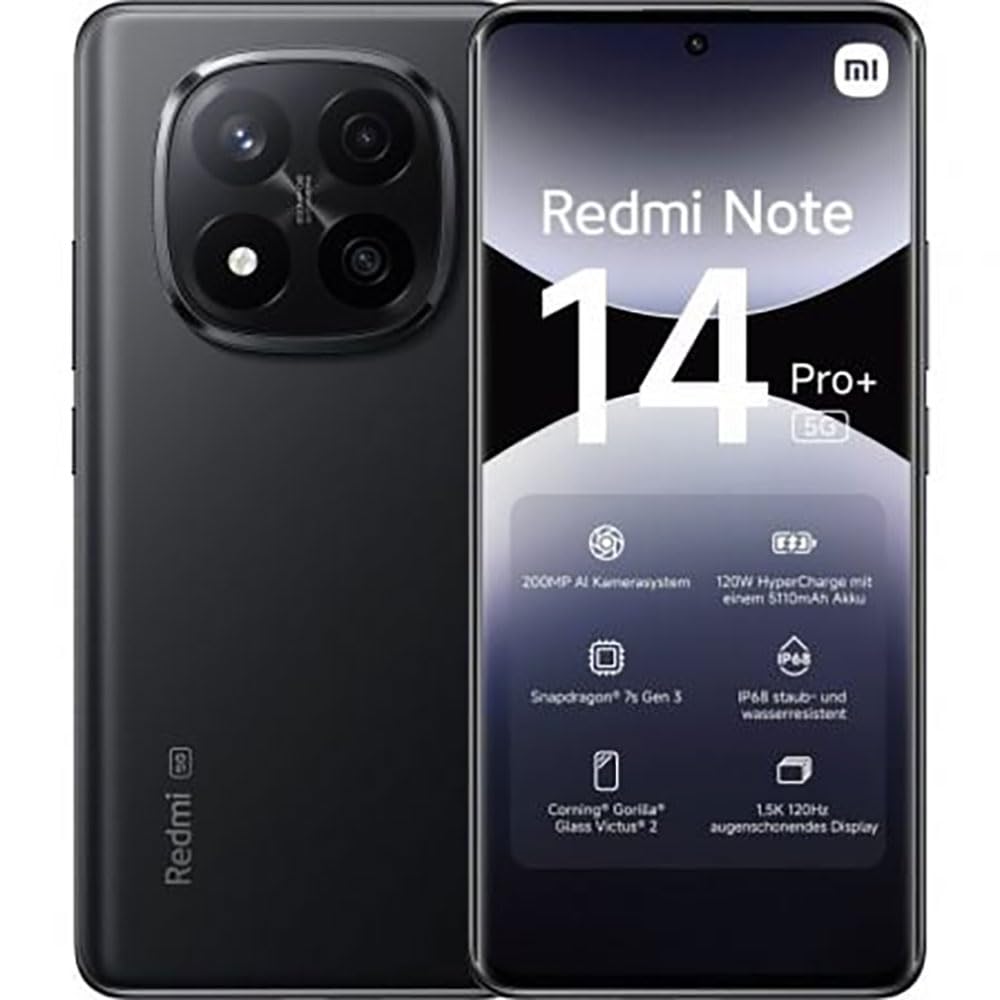
The image displays the front and back of the XIAOMI Redmi Note 14 Pro+ 5G smartphone. The front shows the display with 'Redmi Note 14 Pro+ 5G', '200 Megapixels', and '256 GB' text. The back features a prominent camera module with multiple lenses and the 'Redmi 5G' branding.
Komponen Utama:
- Paparan Hadapan: 6.67-inch 1.5K 120Hz AMOLED display with Corning Gorilla Glass Victus 2.
- Modul Kamera Belakang: Houses the 200MP Pro-Grade AI Camera system.
- Butang Kuasa: Terletak di sisi, digunakan untuk menghidupkan/mematikan dan membangunkan/menidurkan peranti.
- Butang Kelantangan: Terletak di sisi, digunakan untuk melaraskan media dan kelantangan panggilan.
- Port USB Jenis-C: Untuk pengecasan dan pemindahan data.
- Slot Kad SIM: Supports Dual SIM Nano SIM cards.
- Penceramah: Pembesar suara stereo untuk output audio.
4. Persediaan
4.1. Memasukkan Kad SIM
- Cari dulang kad SIM di sisi peranti anda.
- Insert the SIM eject tool into the small hole next to the tray and press firmly until the tray pops out.
- Place your Nano SIM card(s) into the tray with the gold contacts facing down. Ensure proper orientation.
- Tolak dulang perlahan-lahan ke dalam slot sehingga ia berbunyi klik pada tempatnya.
4.2. Menghidupkan Peranti Anda
Tekan dan tahan butang Butang Kuasa on the side of the phone until the XIAOMI logo appears on the screen. Follow the on-screen instructions to complete the initial setup, including connecting to Wi-Fi, setting up your Google account, and configuring security features like fingerprint recognition.
4.3. Caj Permulaan
It is recommended to fully charge your device before first use. Connect the USB Type-C cable to the phone and a compatible 120W HyperCharge adapter (not included) to a power outlet.
5. Mengendalikan Telefon Pintar Anda
5.1. Navigasi Asas
- Skrin Sentuh: Ketik untuk memilih, leret untuk menatal, cubit untuk mengezum.
- Skrin Utama: Hab pusat anda untuk aplikasi dan widget.
- Panel Pemberitahuan: Leret ke bawah dari bahagian atas skrin untuk mengakses pemberitahuan dan tetapan pantas.
- Laci Apl: Swipe up from the bottom of the screen (or tap the app drawer icon) to view semua aplikasi yang dipasang.
5.2. Hidupkan/Mati dan Mulakan Semula
- Kepada Matikan: Press and hold the Power Button until the power menu appears, then select "Power off."
- Kepada Mulakan semula: Press and hold the Power Button until the power menu appears, then select "Restart."
5.3. Ciri-ciri Keselamatan
Your device supports various security options:
- Pengecaman Cap Jari: Register your fingerprints for quick and secure unlocking.
- Buka Kunci Wajah: Gunakan wajah anda untuk membuka kunci peranti.
- PIN/Corak/Kata Laluan: Standard security methods.
Akses tetapan ini melalui Tetapan > Keselamatan & privasi.
6. Ciri-ciri Kamera
The Redmi Note 14 Pro+ 5G features a powerful 200MP Pro-Grade AI Camera system designed to enhance your photography experience.
- Kamera Utama 200MP: Capture highly detailed images with optical image stabilization (OIS).
- Multiple Camera Modes: Includes automatic, scene, portrait, and manual modes for versatile shooting.
- Dual LED Flash: Provides enhanced lighting in low-light conditions.
- Kamera Depan: A 20MP front sensor for high-quality selfies and video calls.
- Rakaman Video: Supports up to 8K video capture at 120 fps.
7. Ciri AI
Leverage the integrated AI functionalities for a smarter user experience:
- AI Erase Pro: Intelligently remove unwanted objects or people from your photos.
- AI Image Expansion: Expand the boundaries of your images using AI.
- AI Notes: Smart note-taking capabilities.
- AI Subtitles: Generate subtitles for videos or audio in real-time.
- AI Recorder: Enhanced voice recording with AI features.
- AI Interpreter: Real-time language translation.
- Gemini: Integrated AI assistant.
- Circle to Search by Google: Cari maklumat dengan pantas dengan membulatkan objek pada skrin anda.
8. Mengecas
Your Redmi Note 14 Pro+ 5G supports 120W HyperCharge technology for rapid charging.
- Kapasiti Bateri: 5110mAh Lithium-polymer battery.
- mengecas: Use the provided USB Type-C cable with a compatible 120W power adapter (sold separately) for optimal charging speeds.
- Hayat Bateri: Expect up to 20 hours of talk time. Actual battery life may vary based on usage.
Always use certified charging accessories to prevent damage to your device.
9. Penyelenggaraan
9.1. Tahan Air dan Debu
Peranti ini mempunyai Penarafan IP68 for dust and water resistance. This means it is protected against dust ingress and can withstand immersion in water up to 1.5 meters for 30 minutes. However, this resistance is not permanent and may decrease over time with normal wear. Avoid exposing the device to hot water, saltwater, or other liquids.
9.2. Membersihkan Peranti Anda
- Gunakan kain lembut dan tidak berbulu untuk membersihkan skrin dan badan.
- Elakkan menggunakan pembersih yang melelas, pelarut, atau semburan aerosol.
- If the device gets wet, wipe it thoroughly with a clean, dry cloth before charging or using ports.
9.3. Kemas Kini Perisian
Semak dan pasang kemas kini perisian secara kerap untuk memastikan peranti anda mempunyai ciri terkini, tampung keselamatan dan peningkatan prestasi. Pergi ke Tetapan > Perihal telefon > Versi MIUI untuk menyemak kemas kini.
10. Penyelesaian masalah
Jika anda menghadapi masalah dengan peranti anda, cuba penyelesaian biasa berikut:
- Peranti tidak dihidupkan: Pastikan bateri telah dicas. Sambungkan ke pengecas selama sekurang-kurangnya 15 minit, kemudian cuba hidupkan.
- Apl ranap atau beku: Close the problematic app and reopen it. If the issue persists, restart your phone.
- Sambungan rangkaian yang lemah: Check your SIM card is correctly inserted. Try toggling Airplane Mode on and off. If the issue persists, contact your network provider.
- Bateri cepat habis: Kurangkan kecerahan skrin, tutup apl yang tidak digunakan dan lumpuhkan ciri yang tidak diperlukan seperti GPS atau Bluetooth apabila tidak digunakan.
- Skrin tidak bertindak balas: Force restart your device by holding the Power Button for approximately 10-15 seconds.
For more complex issues, refer to the official XIAOMI support webtapak atau hubungi perkhidmatan pelanggan.
11. Spesifikasi
| Ciri | Spesifikasi |
|---|---|
| Jenama | XIAOMI |
| Nama Model | Redmi Note 14 Pro+ 5G |
| Sistem Operasi | Android 14 |
| Model CPU | Snapdragon 7 Gen 3 |
| RAM | 8 GB |
| Kapasiti Storan | 256 GB |
| Saiz Skrin | 6.67 Inci |
| Resolusi Paparan | 2712 x 1220 piksel |
| Kadar Segar Semula | 120 Hz |
| Resolusi Kamera Belakang | 200 Megapixels (with OIS) |
| Resolusi Kamera Depan | 20 Megapiksel |
| Kapasiti Bateri | 5110 mAh |
| Teknologi Pengecasan | Caj Hiper 120W |
| Tahan Air | IP68 |
| Teknologi Selular | 5G |
| Jenis Kad SIM | Nano SIM (Dual SIM) |
| Ketersambungan | USB Jenis-C |
12. Waranti dan Sokongan
12.1. Waranti Pengeluar
Your XIAOMI Redmi Note 14 Pro+ 5G Smartphone comes with a Waranti pengilang selama 2 tahun. Waranti ini melindungi kecacatan pada bahan dan mutu kerja di bawah penggunaan biasa. Sila simpan bukti pembelian anda untuk tuntutan waranti.
The warranty does not cover damage caused by accidents, misuse, unauthorized modifications, or normal wear and tear.
12.2. Sokongan Pelanggan
For technical assistance, warranty claims, or further information, please visit the official XIAOMI support website or contact their customer service department. Contact details can typically be found on the XIAOMI webtapak atau dalam kad jaminan yang disertakan dengan produk anda.