
ATTACK SHARK X68 HE
ATTACK SHARK X68 HE Gaming Keyboard User Manual
Model: X68 HE | Brand: ATTACK SHARK
1. Pengenalan
The ATTACK SHARK X68 HE is a high-performance 60% mechanical gaming keyboard designed for speed, precision, and customization. Featuring magnetic switches with Hall Effect triggering technology, it offers an 8000Hz polling rate for ultra-low latency and adjustable actuation points from 0.1mm to 3.4mm. Its robust design includes PBT keycaps and full RGB backlighting, making it suitable for both intense gaming and efficient typing across Windows and Mac systems.

Figure 1: Key features of the ATTACK SHARK X68 HE keyboard.
2. Kandungan Pakej
Sila sahkan bahawa semua item terdapat dalam pakej anda:
- ATTACK SHARK X68 HE Gaming Keyboard
- USB-C Coiled Cable
- Manual Pengguna
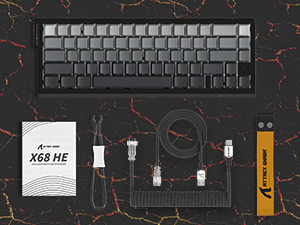
Figure 2: Included items in the product package.
3. Persediaan
To set up your ATTACK SHARK X68 HE keyboard, follow these simple steps:
- Sambungkan Kabel USB-C: Locate the USB-C port on the back of the keyboard. Insert the smaller end of the provided coiled USB-C cable into this port.
- Sambung ke Komputer: Insert the standard USB-A end of the cable into an available USB port on your computer (PC or Mac).
- Pemasangan Pemandu: The keyboard is plug-and-play for basic functionality. For advanced customization, including DKS, macros, and RGB settings, download the dedicated web driver software from the official ATTACK SHARK webtapak.
- penempatan: Place the keyboard on a stable, flat surface. Consider using a wrist rest for ergonomic comfort during extended use.
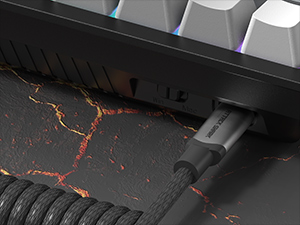
Figure 3: Connecting the USB-C cable to the keyboard.
4. Arahan Operasi
The ATTACK SHARK X68 HE is a 60% layout keyboard, meaning some functions are accessed via a function (Fn) layer. Familiarize yourself with the key legends and the Fn key combinations for full functionality.
Fungsi Utama Asas
- Penaipan Standard: All alphanumeric keys, symbols, and modifiers (Shift, Ctrl, Alt, Win/Cmd) function as standard.
- Kekunci Fungsi (Fn): Press and hold the Fn key to access secondary functions printed on the front or side of certain keycaps. For example, arrow keys, F-keys, and multimedia controls are typically accessed this way.
Polling Rate and Latency
The keyboard operates at an 8000Hz polling rate, providing a rapid 0.125ms response time. This ensures minimal input lag for competitive gaming and fast-paced tasks.

Figure 4: 8000Hz Polling Rate for ultra-fast response.
5. Penyesuaian
The ATTACK SHARK X68 HE offers extensive customization options through its web driver software and on-board controls.
Adjustable Actuation Points & Rapid Trigger
Utilizing magnetic switches, the keyboard allows you to customize the actuation point of each key from 0.1mm to 3.4mm with 0.01mm precision. This feature, combined with Rapid Trigger technology, enables faster resets and re-presses, providing a significant advantage in gaming by allowing dynamic keystrokes (DKS), Snap Tap, and Mod-Tap functions.

Figure 5: Adjustable Actuation Point mechanism.
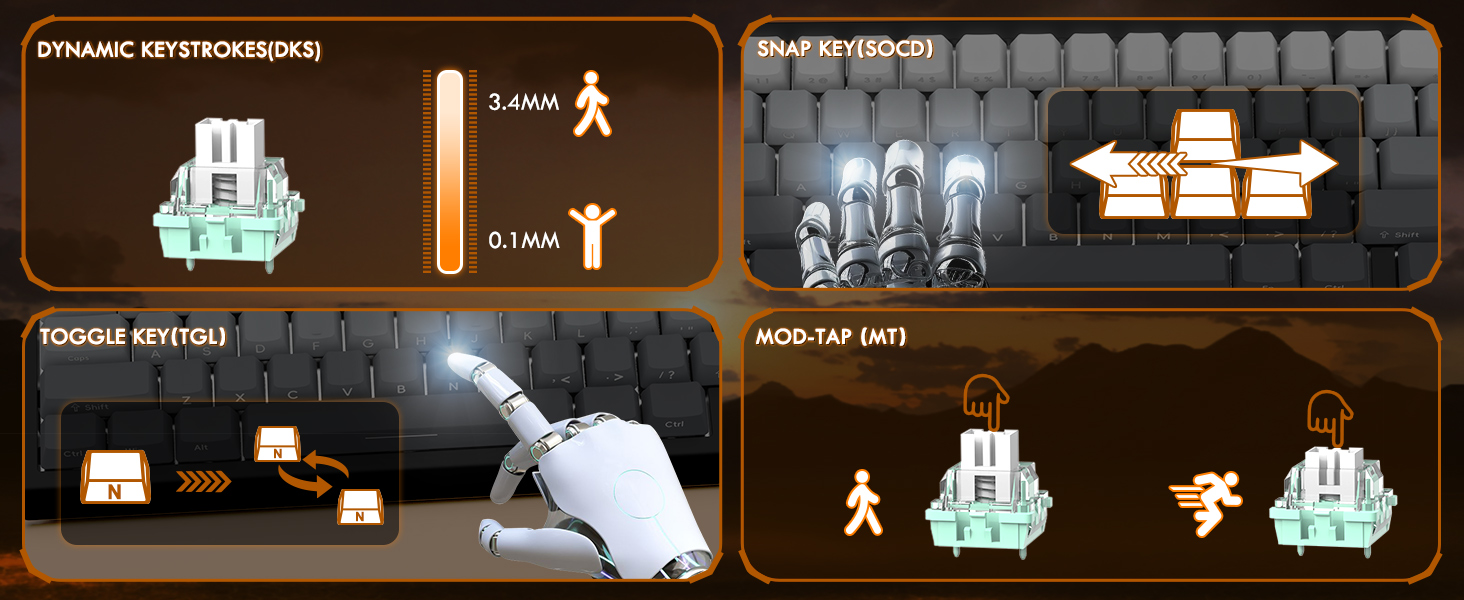
Figure 6: Explanation of DKS, Snap Tap, Toggle Key, and Mod-Tap features.
Lampu latar RGB
The keyboard features 16 million-color RGB lighting with over 20 preset light effects and multiple dynamic modes. You can adjust backlight brightness, speed, and switch between different lighting modes and colors using Fn key combinations or the web perisian pemacu.
- Fn + Up/Down Arrow: Adjust Backlit Brightness.
- Fn + Left/Right Arrow: Adjust Backlit Speed.
- Fn + \|: Switch Light Mode.
- Fn + Enter: Switch Light Color.
- Fn + Ruang Belakang: Lampu Hidup/Mati.

Figure 7: Full RGB light effects.
Web Perisian Pemandu
The professional customized web software allows for comprehensive customization on both Windows and Mac. You can easily configure DKS, key combinations, macros, key remapping, and detailed RGB lighting settings. This enables a truly personalized experience for various user needs and gaming styles.

Rajah 8: Web driver software interface for customization.
6. Penyelenggaraan
Penyelenggaraan yang betul memastikan jangka hayat dan prestasi optimum papan kekunci anda.
Pembersihan
- Pembersihan Am: Gunakan kain lembut dan kering untuk mengelap permukaan papan kekunci dengan kerap.
- Penyingkiran habuk: Gunakan udara termampat untuk mengeluarkan habuk dan serpihan dari antara penutup kekunci.
- Pembersihan Dalam: For deeper cleaning, you may carefully remove the PBT keycaps using a keycap puller (not included unless specified in package contents). Clean the keycaps with mild soap and water, ensuring they are completely dry before reattaching.

Figure 9: Keycap removal for cleaning.
Penyimpanan
Apabila tidak digunakan untuk tempoh yang lama, simpan papan kekunci di tempat yang sejuk dan kering jauh dari cahaya matahari langsung dan suhu yang melampau.
7. Penyelesaian masalah
If you encounter issues with your ATTACK SHARK X68 HE keyboard, please refer to the following common solutions:
- Papan Kekunci Tidak Membalas:
- Pastikan kabel USB-C disambungkan dengan selamat pada papan kekunci dan komputer.
- Cuba sambungkan papan kekunci ke port USB lain pada komputer anda.
- Uji papan kekunci pada komputer lain untuk menolak isu khusus sistem.
- Lampu RGB Tidak Berfungsi:
- Check if the RGB lighting is turned off using the Fn + Backspace shortcut.
- Memastikan web driver software is installed and updated, and check lighting settings within the software.
- Verify that the keyboard is receiving sufficient power from the USB port.
- Kunci Tidak Mendaftar atau Menaip Dua Kali:
- Clean under the affected keycaps to remove any debris.
- Adjust the actuation point settings in the web driver software. Sometimes, a very low actuation point can lead to unintended presses or misfires.
- Pastikan firmware papan kekunci dikemas kini melalui web perisian pemacu.
- Software Issues / Customization Not Applying:
- Ensure you are using the correct and latest version of the ATTACK SHARK web driver software for the X68 HE model.
- Run the software as an administrator (on Windows).
- Temporarily disable any antivirus or firewall software that might be interfering with the web pemandu.
If the problem persists after trying these steps, please contact ATTACK SHARK customer support for further assistance.
8. Spesifikasi
| Ciri | Penerangan |
|---|---|
| Model | X68 DIA |
| Jenama | SERANGAN JEUNG |
| Teknologi Ketersambungan | USB-C (Berwayar) |
| Penerangan Papan Kekunci | Papan Kekunci Permainan Mekanikal |
| Jenis Suis | Magnetic Switches (Hall Effect) |
| Kadar Mengundi | 8000Hz |
| Masa Tindak Balas | 0.125ms |
| Actuation Point Range | 0.1mm to 3.4mm (0.01mm accuracy) |
| Kekunci Kekunci | PBT Keycaps (Contour Line 3.0 version) |
| Pencahayaan latar | Full RGB (16 million colors, 20+ preset effects) |
| Anti-Ghosting | Anti-Ghosting Kunci Penuh |
| Peranti Serasi | Laptop, PC, Tablet (Windows/Mac) |
| Dimensi Produk | 14.25 x 6.18 x 0.79 inci |
| Berat Barang | 2.01 paun |
| Bilangan Kunci | 66 |
9. Waranti dan Sokongan
ATTACK SHARK products are designed for durability and performance. For specific warranty information, please refer to the warranty card included with your product or visit the official ATTACK SHARK website. If you require technical support, have questions about product functionality, or need assistance with troubleshooting, please contact ATTACK SHARK customer service through their official channels.
Sokongan dalam talian: Visit the ATTACK SHARK official webtapak untuk Soalan Lazim, muat turun pemandu dan maklumat hubungan sokongan.
Sokongan E-mel: Rujuk kepada pembungkusan produk anda atau pegawai rasmi webtapak untuk alamat e-mel sokongan pelanggan.
Ask a question about this manual
Ask about setup, troubleshooting, compatibility, parts, safety, or missing instructions. Manuals+ will review the question and use this page’s manual context to help answer it.