
1. Pengenalan
This manual provides essential information for the assembly, operation, maintenance, and troubleshooting of your Hbada E2 Ergonomic Office Chair. Please read these instructions carefully before use to ensure proper function and longevity of your chair.

Figure 1: Hbada E2 Ergonomic Office Chair, side view.
2. Maklumat Keselamatan
- Sentiasa ikut arahan pemasangan dengan teliti.
- Keep the chair away from direct heat sources to prevent material damage.
- Do not exceed the maximum weight capacity of the chair. Refer to specifications for details.
- Pastikan semua skru dan sambungan diketatkan dengan kukuh sebelum digunakan dan periksa secara berkala sama ada ia longgar.
- Gunakan kerusi di atas permukaan yang rata dan stabil.
3. Persediaan dan Pemasangan
Assembly is required for this product. Detailed step-by-step assembly instructions and all necessary tools are included in the product packaging. Please refer to the separate assembly guide for a complete walkthrough. Ensure all components are present before beginning assembly.

Figure 2: Hbada E2 Ergonomic Office Chair, front view daripada produk yang dipasang.
4. Arahan Pengendalian (Pelarasan)
The Hbada E2 chair offers multiple adjustment features to customize your seating experience for optimal comfort and support.
4.1. Pelarasan Tempat Letak Kepala
The 3D adjustable headrest can be positioned to support your neck and head effectively.
- Pelarasan Menegak: Adjust the headrest up or down by up to 10 cm.
- Forward and Backward Adjustment: Move the headrest forward or backward by up to 3 cm.
- Putaran: Rotate the headrest up to 60 degrees to find your preferred angle.

Figure 3: Headrest adjustment capabilities.
4.2. Pelarasan Sokongan Lumbar
The 6-way adjustable lumbar support provides comprehensive lower back protection.
- Forward and Backward Adjustment: Adjust the lumbar support in 3 levels.
- Pelarasan Menegak: Move the lumbar support up or down.
- Left-Right Suspension: The floating structure adapts to your movements.

Figure 4: Lumbar support dynamic adjustment features.
4.3. Pelarasan Tempat Letak Tangan
The 3D armrests can be adjusted to provide optimal elbow support.
- Pelarasan Ketinggian: Adjust armrest height by up to 7.5 cm.
- Forward and Backward Adjustment: Move armrests forward or backward by up to 5 cm.
- Putaran: Rotate armrests 40 degrees left and right.

Figure 5: Armrest adjustment options.
4.4. Recline Function and Locking
The chair features a reclining function with three lockable tilt angles.
- Recline up to 135 degrees.
- Lockable angles for 90° (comfortable office), 115° (leisure and entertainment), and 138° (short nap).

Figure 6: Three-level locking recline positions.
4.5. Wired Control Adjustment
The aluminum alloy wired control allows for easy adjustment without bending down.
- Simply toggle the adjuster for one-touch operation of chair functions.

Figure 7: Wired control for easy adjustments.
5. Penyelenggaraan
Regular maintenance ensures the longevity and optimal performance of your Hbada E2 chair.
- Pembersihan: For the mesh fabric, gently wipe with a damp cloth and mild soap. Avoid harsh chemicals. For the frame, use a soft, dry cloth.
- Pemeriksaan: Periksa semua skru dan bolt secara berkala untuk memastikan ia ketat. Ketatkan semula jika perlu.
- Kastor: Pastikan kastor bebas daripada rambut dan serpihan untuk memastikan pergerakan lancar.
- Elakkan beban berlebihan: Do not place excessive weight on the chair or armrests beyond the specified capacity.
6. Penyelesaian masalah
If you encounter any issues with your Hbada E2 chair, please refer to the following common solutions:
- Kerusi berdecit: Check and tighten all assembly bolts. A small amount of silicone spray on moving parts may help, but avoid contact with mesh or upholstery.
- Chair Not Adjusting: Ensure no obstructions are blocking the adjustment mechanisms. Verify that the wired control is functioning correctly.
- Pemutus Tidak Berguling dengan Lancar: Clean any debris from the caster wheels. Ensure they are properly inserted into the chair base.
- Gas Lift Issues: If the chair does not hold its height, the gas lift may need replacement. Contact customer support for assistance.
For persistent issues or concerns not addressed here, please contact Hbada customer support.
7. Spesifikasi
| Ciri | Perincian |
|---|---|
| Jenama | Hbada |
| Nama Model | E2 |
| warna | putih |
| Dimensi Produk (D x W x H) | 30.51"D x 22.24"W x 18.11"H |
| bahan | Alloy Steel (Frame), Mesh (Back, Seat), Foam (Fill) |
| Gaya Belakang | mesh |
| Gaya Lengan | Boleh Laras 3D |
| Kiraan Kedudukan Berbaring | 3 |
| Komponen yang Disertakan | Arm Pad, Cushion |
| Syor Permukaan | Lantai Keras, Permaidani |
| Pengeluar | Hbada |
| Tarikh Mula-mula Tersedia | 18 Disember 2024 |
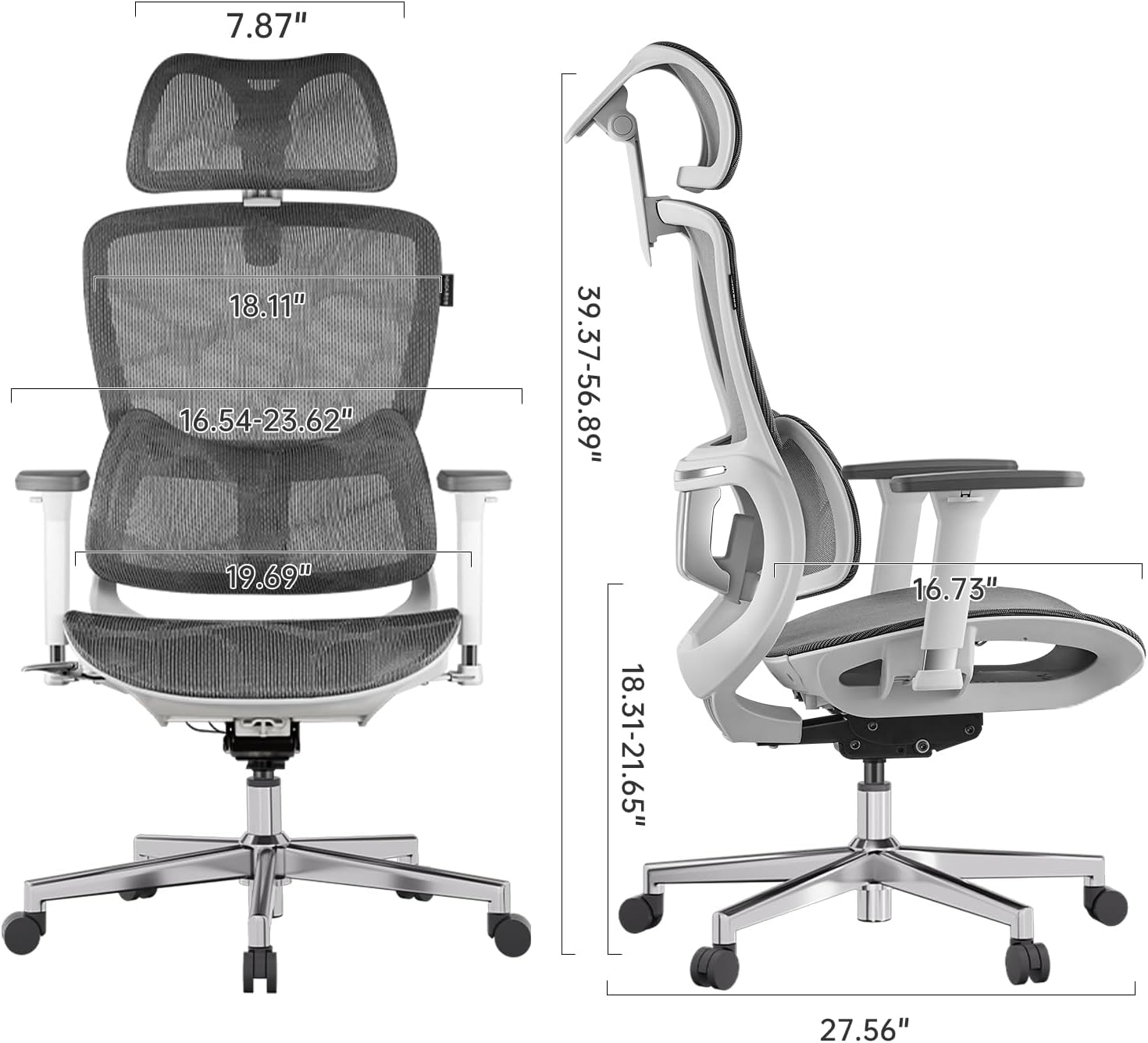
Figure 8: Detailed dimensions of the Hbada E2 Office Chair.
8. Waranti dan Sokongan
Hbada is committed to providing high-quality products and customer satisfaction.
8.1. Polisi Pemulangan
Produk ini layak untuk pemulangan dalam tempoh 30 hari dari tarikh pembelian, tertakluk kepada dasar pemulangan peruncit.
8.2. Pelan Perlindungan
Optional protection plans are available for purchase to extend coverage beyond the standard warranty:
- Pelan Perlindungan 2 Tahun: Bayaran sekali sahaja sebanyak $44.99.
- Pelan Perlindungan 3 Tahun: Bayaran sekali sahaja sebanyak $56.99.
- Perlindungan Lengkap: Monthly billing of $16.99, covering eligible past and future purchases.
These plans offer additional coverage and are separate from any manufacturer's warranty.
8.3. Sokongan Pelanggan
For product inquiries, assembly assistance, or warranty claims, please visit the official Hbada store or contact their customer service directly.

Figure 9: Hbada's commitment to customer service.
Lawati Kedai Hbada untuk maklumat lanjut.