
1. Pengenalan
This manual provides essential information for the safe and efficient operation of your ZDSSY HY320MAX Mini Projector. Please read it thoroughly before using the device and retain it for future reference. The ZDSSY HY320MAX is a 1080P native mini projector featuring Android 13, built-in licensed applications, WiFi 6, Bluetooth 5.4, and automatic keystone correction, designed for versatile indoor and outdoor entertainment.
2. Maklumat Keselamatan
- Bekalan Kuasa: Gunakan hanya penyesuai kuasa yang disediakan. Pastikan volumtage sepadan dengan bekalan kuasa tempatan anda.
- Pengudaraan: Jangan halang bukaan pengudaraan. Pastikan aliran udara yang mencukupi di sekitar projektor untuk mengelakkan terlalu panas.
- Pendedahan Cecair: Keep the projector away from water or other liquids. Do not operate in damp persekitaran.
- Sumber Haba: Avoid placing the projector near heat sources such as radiators, heat registers, stoves, or other heat-producing appliances.
- Perlindungan Mata: Jangan lihat terus ke dalam kanta projektor apabila lamp is on, as the bright light can cause eye strain or damage.
- Pembersihan: Disconnect the power before cleaning. Use a soft, dry cloth for cleaning the exterior. For the lens, use a specialized lens cleaning cloth.
- Servis: Jangan cuba servis produk ini sendiri. Rujuk semua perkhidmatan kepada pegawai perkhidmatan yang berkelayakan.
3. Kandungan Pakej
Sila pastikan semua barang ada dan dalam keadaan baik semasa membuka bungkusan:
- ZDSSY HY320MAX Mini Projector
- Penyesuai Kuasa
- Alat Kawalan Jauh Suara Bluetooth
- Manual Pengguna
- HDMI Cable (Disimpulkan)
4. Produk Lebihview
4.1 Komponen Projektor
The ZDSSY HY320MAX Mini Projector features a compact design with essential components for ease of use.
- Kanta Tayangan: Emits the image onto the screen or surface.
- Gril Pengudaraan: Located on the sides or rear to dissipate heat.
- Input Kuasa: Untuk menyambungkan penyesuai kuasa.
- Port HDMI: For connecting external devices like gaming consoles or laptops.
- Port USB: Untuk menyambungkan peranti storan USB.
- Penerima IR: Untuk menerima isyarat daripada alat kawalan jauh.
- Pendirian boleh laras: Allows for 180° flexible rotation for various projection angles.
4.2 Alat Kawalan Jauh
The included Bluetooth voice remote control allows for easy navigation and voice commands.
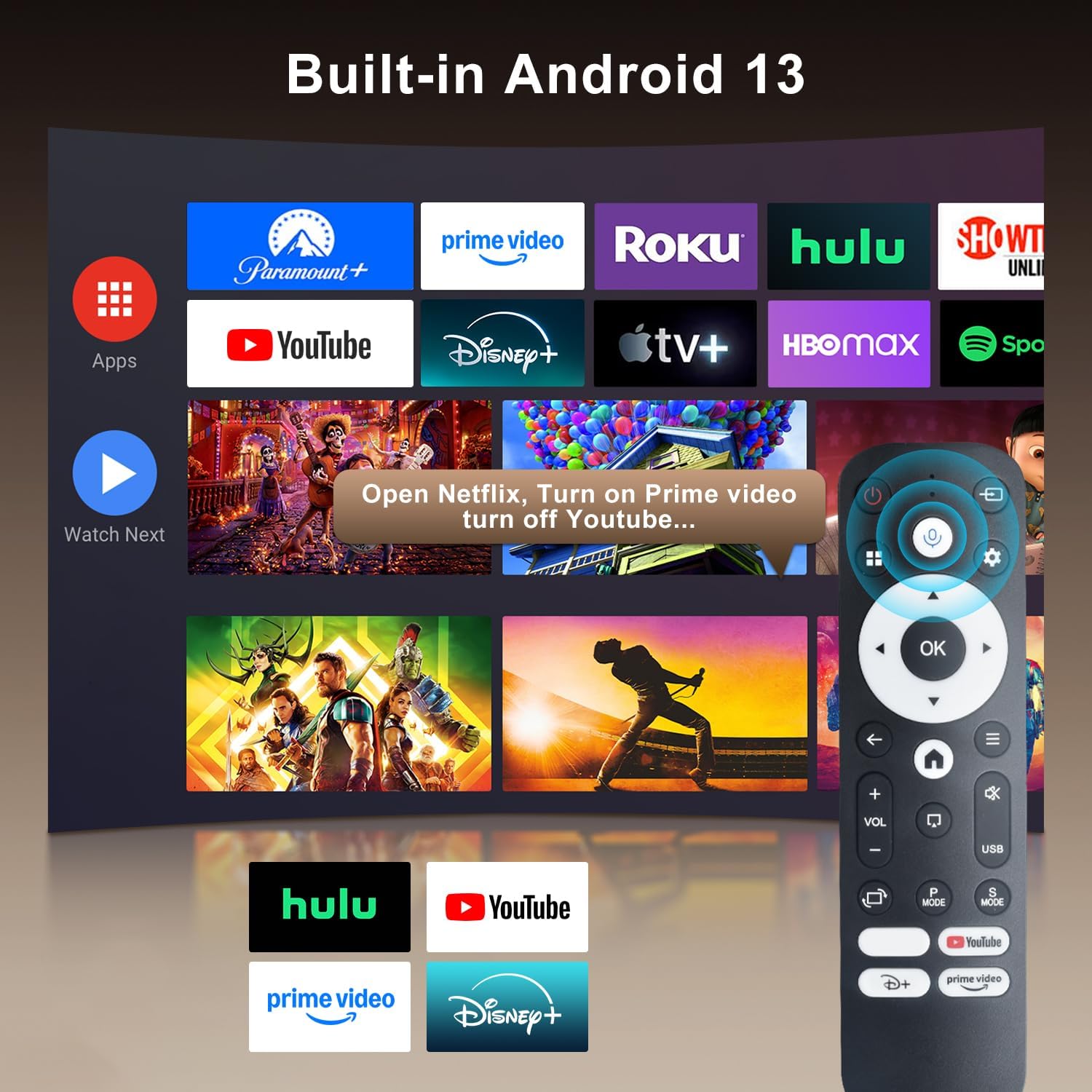
Image: The projector's interface showing built-in Android 13 apps and the Bluetooth voice remote control.
5. Persediaan
5.1 Penempatan
Position the projector on a stable, flat surface. The 180° flexible rotation allows projection onto walls, ceilings, or floors. Ensure the projector is within the recommended throw distance of 1 to 6 meters for an optimal image size between 30 and 300 inches.

Image: The ZDSSY HY320MAX Mini Projector set up for an outdoor movie night, demonstrating its portability and flexible placement.
5.2 Sambungan Kuasa
Sambungkan penyesuai kuasa ke port input kuasa projektor, kemudian pasangkan penyesuai ke soket kuasa.
5.3 Kuasa Awal Hidup
Press the power button on the projector or the remote control to turn on the device. The projector will boot up, displaying the Android 13 interface.
5.4 Fokus dan Pembetulan Keystone
The projector features AI Auto Keystone correction, which automatically adjusts the image to be rectangular even if the projector is placed at an angle. You can also use the 50%-100% zoom function to resize the screen without moving the projector.

Image: A visual representation of the projector's automatic keystone correction feature, ensuring a perfectly aligned picture.
5.5 Sambungan Rangkaian
Navigate to the settings menu to connect to a Wi-Fi network. The projector supports ultra-fast WiFi 6 for smooth streaming and lag-free gaming.

Image: The projector displaying content wirelessly, highlighting its WiFi 6 and Bluetooth 5.4 capabilities for smoother performance.
5.6 Berpasangan Bluetooth
For enhanced audio, pair Bluetooth 5.4 compatible speakers or headphones with the projector through the settings menu.
6. Arahan Operasi
6.1 Menavigasi Antara Muka
Use the directional buttons and 'OK' button on the remote control to navigate through the Android 13 interface. The 'Back' button returns to the previous screen, and the 'Home' button returns to the main menu.

Image: The ZDSSY HY320MAX projector's home screen, displaying various pre-installed streaming applications.
6.2 Using Built-in Apps
The projector comes with officially licensed apps such as Netflix, Prime Video, and YouTube pre-installed. Access these directly from the home screen. The built-in APP STORE allows you to download additional applications.
6.3 External Input Sources
Connect external devices via the HDMI or USB ports. Select the appropriate input source from the projector's menu to display content from these devices.
6.4 Pencerminan Skrin
The projector supports screen mirroring from compatible smartphones (Android and iOS) over Wi-Fi. Refer to the on-screen instructions for connecting your device.

Image: A user mirroring their smartphone screen to the projector, demonstrating the wireless connectivity feature.
6.5 Kawalan Suara
Utilize the Bluetooth voice remote for hands-free control. Press and hold the microphone button on the remote, then speak your command (e.g., "Open Netflix," "Cari untuk filem").

Image: The projector displaying a streaming service interface, with the remote control highlighting the voice assistant button and a voice command example.
7. Penyelenggaraan
- Pembersihan Kanta: Gently wipe the projector lens with a soft, lint-free cloth specifically designed for optical lenses. Avoid using abrasive materials or harsh chemicals.
- Pembersihan Luaran: Use a soft, dry cloth to clean the projector's exterior. Do not use liquid or aerosol cleaners.
- Pengudaraan: Regularly check that the ventilation grilles are free from dust and obstructions to ensure proper heat dissipation.
- Storan: Apabila tidak digunakan untuk tempoh yang lama, simpan projektor di tempat yang sejuk dan kering, terlindung daripada habuk dan cahaya matahari langsung.
8. Penyelesaian masalah
Jika anda menghadapi masalah dengan projektor anda, rujuk kepada masalah dan penyelesaian biasa berikut:
| Masalah | Kemungkinan Punca | Penyelesaian |
|---|---|---|
| Tiada Kuasa | Power cable disconnected; Power outlet fault | Pastikan kabel kuasa disambungkan dengan selamat; Cuba salur keluar kuasa yang berbeza. |
| Tiada Imej | Input source not selected; Device not connected | Select correct input source (HDMI/USB); Ensure external device is connected and powered on. |
| Imej Kabur | Out of focus; Incorrect keystone | Allow Auto Keystone to adjust; Manually adjust focus if available. |
| Tiada Bunyi | Volume too low; External audio device not connected | Increase volume; Check Bluetooth connection for external speakers. |
| Jauh Tidak Menjawab | Low battery; Not paired | Replace batteries; Re-pair the Bluetooth remote control. |
| Isu Sambungan Wi-Fi | Incorrect password; Router issues | Verify Wi-Fi password; Restart your router and the projector. |
9. Spesifikasi
Detailed technical specifications for the ZDSSY HY320MAX Mini Projector:
- Jenama: ZDSSY
- Nama Model: HY320MAX
- Nombor Model: HY320MAX-US
- Resolusi Paparan: Native 1920 x 1080 Pixels
- Resolusi Paparan Maksimum: 3840 x 2160 Piksel (Sokongan 4K)
- Jenis Paparan: LCD
- Kecerahan: 20000 Lumen (400 ANSI Lumens)
- Nisbah Kontras: 10000:1
- Hayat Operasi Sumber Cahaya: 60000 Jam
- Teknologi Ketersambungan: USB, HDMI, Built-In Wi-Fi (WiFi 6), Bluetooth 5.4
- Kaedah Kawalan: Remote Control, Voice
- Penggunaan yang Disyorkan: Dalaman/Luar
- Jenis Pemasangan: Ceiling Mount/Table Mount/Wall Mount
- Jarak Balingan Minimum: 1 Meter
- Jarak Lemparan Maksimum: 6 Meter
- Minimum Image Size: 30 Inci
- Saiz Imej Maksimum: 300 Inci
- Voltage: 110 Volt
- Wattage: 70 watt
- Dimensi Item (L x W x H): 4.09"L x 3.98"W x 8.66"H

Image: A comparison illustrating the native 1080P resolution and 4K support capabilities of the ZDSSY HY320MAX projector.
10. Waranti dan Sokongan
The ZDSSY HY320MAX Mini Projector comes with a Waranti 3 tahun. This warranty includes free parts replacement and lifelong technical support. For any warranty claims, technical assistance, or support inquiries, please contact ZDSSY customer service through the retailer where the product was purchased or refer to the contact information provided on the official ZDSSY webtapak.