
1. Pengenalan
This user manual provides detailed instructions for the installation, operation, and maintenance of your BoyKeep D112-10 Light Bulb Security Camera. Please read this manual thoroughly before using the product to ensure proper functionality and safety.

Figure 1.1.1: BoyKeep D112-10 Light Bulb Security Camera (10-pack). This image displays the product as a bundle of ten light bulb-shaped security cameras.
2. Produk Lebihview
2.1. Kandungan Pakej
The package for the BoyKeep D112-10 Light Bulb Security Camera (10-pack) includes:
- 10 x BoyKeep D112-10 Light Bulb Security Camera bodies
- Manual Pengguna (dokumen ini)
2.2. Ciri-ciri Utama
- 1080P High-Resolution Video: Memberikan imej yang jelas dan terperinci.
- Penglihatan Malam Warna: Penglihatan yang dipertingkatkan dalam keadaan cahaya malap.
- 24/7 Real-time Motion Alerts: Notifies your device upon motion detection.
- Perbincangan Dua Hala: Mikrofon dan pembesar suara terbina dalam untuk komunikasi.
- Sambungan Satu Sentuhan: Simplifies pairing with your device.
- Pelbagai Peranti Viewing & Sharing: Monitor multiple cameras and share access.
- Cloud & Memory Card Storage: Flexible recording options (memory card not included).
- Sorot 360° & Condong 95°: Wide area coverage with remote control.
- Pemasangan Mudah: Designed for standard E27 light sockets.
2.3. Komponen Kamera

Figure 2.3.1: Camera Component Diagram. This image illustrates the various parts of the BoyKeep D112-10 camera, including the E27 light socket base, enhanced WiFi module, microphone, 4 array LEDs, HD lens, 4 white LEDs, light sensor, memory card slot, and reset button. Dimensions are also shown: 6 cm (2.35 in) width and 15 cm (5.9 in) height.
3. Persediaan
3.1. Pemasangan
The BoyKeep D112-10 camera is designed for easy installation into a standard E27 light bulb socket.
- Matikan: Ensure the power to the light socket is turned off before installation to prevent electrical shock.
- Skru Masuk: Carefully screw the camera into a standard E27 light socket until it is securely fastened.
- Hidupkan kuasa: Restore power to the light socket. The camera will power on and initiate its startup sequence.
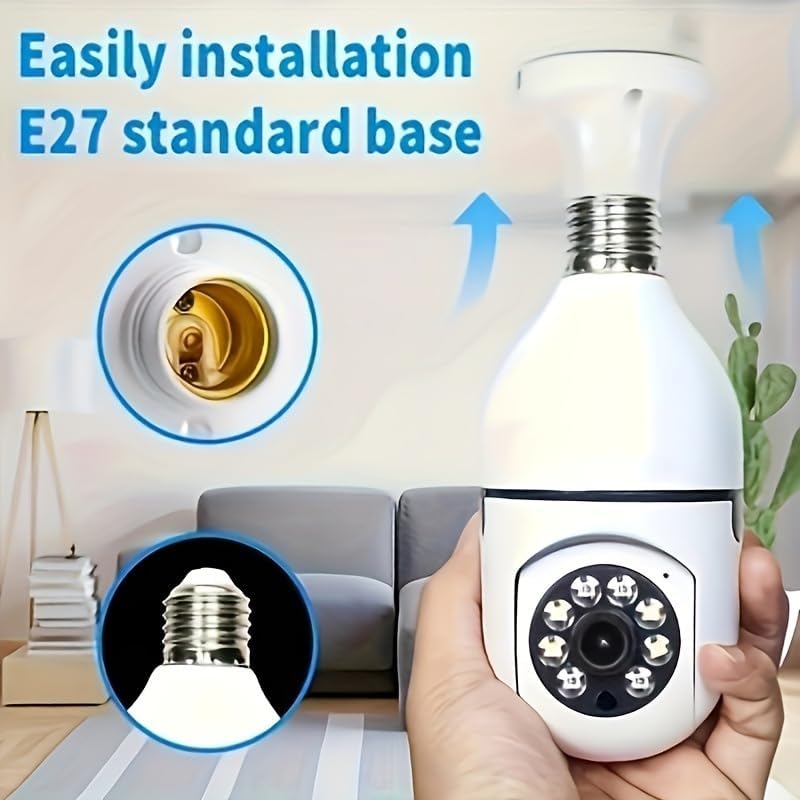
Figure 3.1.1: Easy Installation. This image demonstrates the simple process of screwing the camera into a standard E27 light bulb socket for quick setup.
3.2. Muat Turun Apl dan Sambungan
To operate the camera, you need to download the dedicated mobile application.
- Muat turun Aplikasi: Cari untuk the "BoyKeep" app (or specified app name in product packaging) on your smartphone's app store (Google Play Store for Android or Apple App Store for iOS).
- Daftar/Log Masuk: Buka apl dan ikut arahan pada skrin untuk mendaftar akaun baharu atau log masuk jika anda sudah memilikinya.
- Tambah Peranti: In the app, select "Add Device" or the '+' icon. Choose the camera type (e.g., "Smart Camera" or "Light Bulb Camera").
- Sambung ke Wi-Fi: Ensure your smartphone is connected to a 2.4GHz Wi-Fi network. The camera only supports 2.4GHz Wi-Fi. Follow the app's instructions to connect the camera to your Wi-Fi network. This usually involves scanning a QR code generated by the app with the camera, or entering Wi-Fi credentials.
- penyiapan: Sebaik sahaja disambungkan, kamera akan muncul dalam senarai peranti anda dalam aplikasi.
Nota: Ensure your Wi-Fi router supports 2.4GHz and that your phone is connected to the 2.4GHz band during setup. 5GHz networks are not supported by this device.
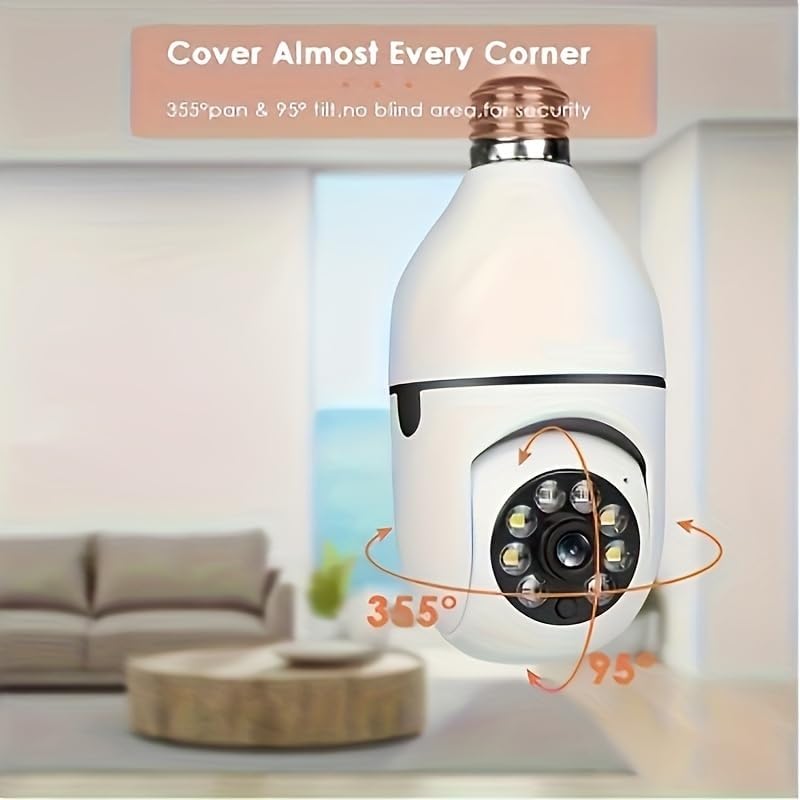
Figure 3.2.1: Wi-Fi Connection and Two-Way Talk. This diagram illustrates how the camera connects to a 2.4GHz Wi-Fi network and enables two-way communication between the camera and a smartphone or computer via the internet, allowing for interactions like speaking to a delivery person.
4. Arahan Operasi
4.1. Hidup View dan Main semula
- Langsung View: Open the app and select the camera from your device list to view suapan langsung.
- Main balik: Akses foo yang dirakamtage by selecting the "Playback" option within the camera's interface in the app. You can navigate through the timeline to view peristiwa-peristiwa tertentu.
4.2. Kawalan Pan dan Condong
Kamera ini menawarkan keupayaan pan mendatar 360° dan kecondongan menegak 95°.
- Kawalan: Dalam siaran langsung view interface of the app, use the directional controls (usually a joystick or arrow icons) to remotely adjust the camera's viewsudut ing.
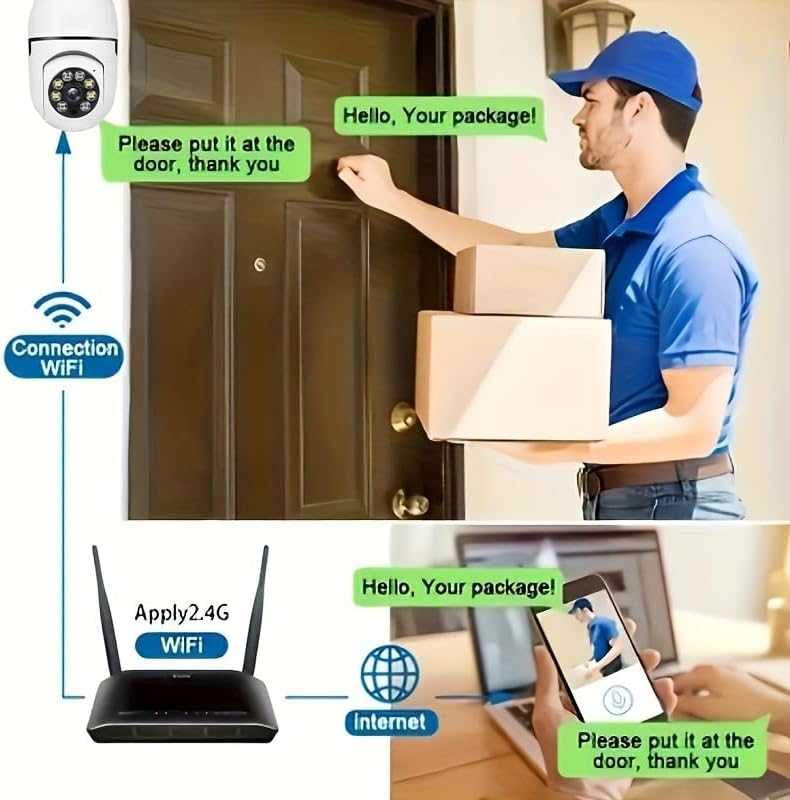
Figure 4.2.1: Pan and Tilt Coverage. This image demonstrates the camera's ability to cover almost every corner with its 355° pan and 95° tilt functions, eliminating blind spots for comprehensive security.
4.3. Pengesanan Pergerakan dan Makluman
- Dayakan/Lumpuhkan: Navigate to the camera settings in the app to enable or disable motion detection.
- Sensitiviti: Adjust the motion detection sensitivity level to minimize false alarms.
- Makluman: When motion is detected, the camera will send push notifications to your smartphone. Recorded events will be stored in the cloud (if subscribed) or on the inserted memory card.
4.4. Audio Dua Hala
- Aktifkan: Dalam siaran langsung view, tap the microphone icon to speak through the camera's speaker. Tap it again to mute.
- Dengar: The camera's microphone is active during live view, allowing you to hear audio from the camera's vicinity.
- Panggilan Satu Sentuhan: If available, press the physical one-touch call button on the camera (if present) to initiate a call to your linked smartphone.
4.5. Mod Penglihatan Malam
The camera supports both infrared and full-color night vision.
- Mod Automatik: The camera automatically switches between day and night vision based on ambient light.
- Penglihatan Malam Inframerah: Memberikan imej hitam putih yang jelas dalam kegelapan sepenuhnya.
- Penglihatan Malam Warna Penuh: Utilizes built-in white LEDs to provide color images in low light, similar to daytime viewing. This mode can be activated manually or set to trigger upon motion detection.

Figure 4.5.1: Smart Dual Light LED Night Vision. This image compares the visual output of infrared night vision (top, black and white) and full-color night vision (bottom, color) provided by the camera's smart dual light LEDs, showcasing improved visibility in low-light conditions.
4.6. Pilihan Storan
- Memory Card (MicroSD): Insert a compatible MicroSD card (up to 128GB, Class 10 or higher recommended, not included) into the camera's memory card slot for local storage of recordings. The camera supports 24/7 continuous recording to the memory card.
- Storan Awan: The camera offers cloud storage services (e.g., a 30-day trial may be included). Refer to the app for subscription details and management.
5. Penyelenggaraan
- Pembersihan: Gunakan kain lembut dan kering untuk membersihkan kanta dan badan kamera. Jangan gunakan pembersih cecair atau bahan kasar.
- Kemas kini Firmware: Regularly check the app for firmware updates. Keeping the firmware updated ensures optimal performance and security.
- Kestabilan Rangkaian: Ensure your Wi-Fi network is stable and strong in the camera's location for uninterrupted operation.
- Keadaan Persekitaran: The camera is designed for indoor use. Avoid exposing it to extreme temperatures, direct sunlight, or high humidity.
6. Penyelesaian masalah
| Masalah | Kemungkinan Punca | Penyelesaian |
|---|---|---|
| Kamera tidak dihidupkan. | No power to the light socket; camera not screwed in properly. | Pastikan soket lampu mempunyai kuasa. Skru semula kamera dengan kuat ke dalam soket. |
| Tidak dapat menyambung ke Wi-Fi. | Incorrect Wi-Fi password; connecting to 5GHz network; weak Wi-Fi signal. | Verify Wi-Fi password. Ensure you are connecting to a 2.4GHz network. Move camera closer to router or use a Wi-Fi extender. Reset camera and try again. |
| Amaran gerakan tidak diterima. | Motion detection disabled; app notifications turned off; low sensitivity. | Enable motion detection in app settings. Check phone's notification settings for the app. Increase motion detection sensitivity. |
| Kualiti video yang teruk. | Isyarat Wi-Fi lemah; kanta kotor. | Improve Wi-Fi signal strength. Clean the camera lens with a soft, dry cloth. |
| Audio dua hala tidak berfungsi. | Mikrofon/pembesar suara diredam dalam aplikasi; masalah rangkaian. | Semak tetapan audio dalam aplikasi. Pastikan sambungan rangkaian stabil. |
7. Spesifikasi
| Ciri | Perincian |
|---|---|
| Nama Model | D112-10 |
| Resolusi Video | 1080P |
| Ketersambungan | Wi-Fi 2.4GHz (IEEE 802.11b/g/n) |
| Sumber Kuasa | Corded Electric (E27 Light Socket) |
| Julat Pan/Sendeng | 355° Mendatar, 95° Menegak |
| Penglihatan Malam | Infrared & Full-Color Night Vision |
| Pilihan Storan | MicroSD Card (up to 128GB, not included), Cloud Storage |
| Audio | Ceramah Dua Hala (Mik & Pembesar Suara Terbina dalam) |
| Penggunaan Dalaman/Luar | Dalaman |
| Dimensi (Badan Kamera) | Approx. 6 cm (2.35 in) diameter, 15 cm (5.9 in) height |
| Komponen yang Disertakan | Badan kamera |
8. Maklumat Waranti
BoyKeep products are manufactured to the highest quality standards. This product comes with a standard manufacturer's warranty. Please refer to the product packaging or the official BoyKeep webtapak untuk terma dan syarat jaminan tertentu, termasuk tempoh dan butiran perlindungan.
9. Sokongan Pelanggan
For technical support, troubleshooting assistance, or any inquiries regarding your BoyKeep D112-10 Light Bulb Security Camera, please contact our customer support team:
- Sokongan dalam talian: Visit the official BoyKeep store on Amazon: BoyKeep Store
- Sokongan E-mel: Refer to the contact information provided in your product packaging or on the BoyKeep webtapak.
When contacting support, please have your product model number (D112-10) and purchase details ready.