
Ollny NYD050A
Ollny 110FT Solar String Lights (Model NYD050A) Instruction Manual
Panduan komprehensif untuk persediaan, operasi dan penyelenggaraan.
1. Pengenalan
Thank you for choosing the Ollny 110FT Solar String Lights. This manual provides detailed instructions for the safe and efficient use of your new lighting system. Please read this manual thoroughly before installation and operation.
Kandungan Pakej:
- 1x 110FT Solar String Lights with 50 G40 LED Bulbs
- 2x Spare Shatterproof G40 LED Bulbs
- 1x Solar Panel with Ground Stake
- 1x Remote Control (2 AAA batteries included)
- Mounting Hardware (clips, screws, wall anchors)
- 1x Kabel Pengecasan USB
- 1x Manual Pengguna (dokumen ini)
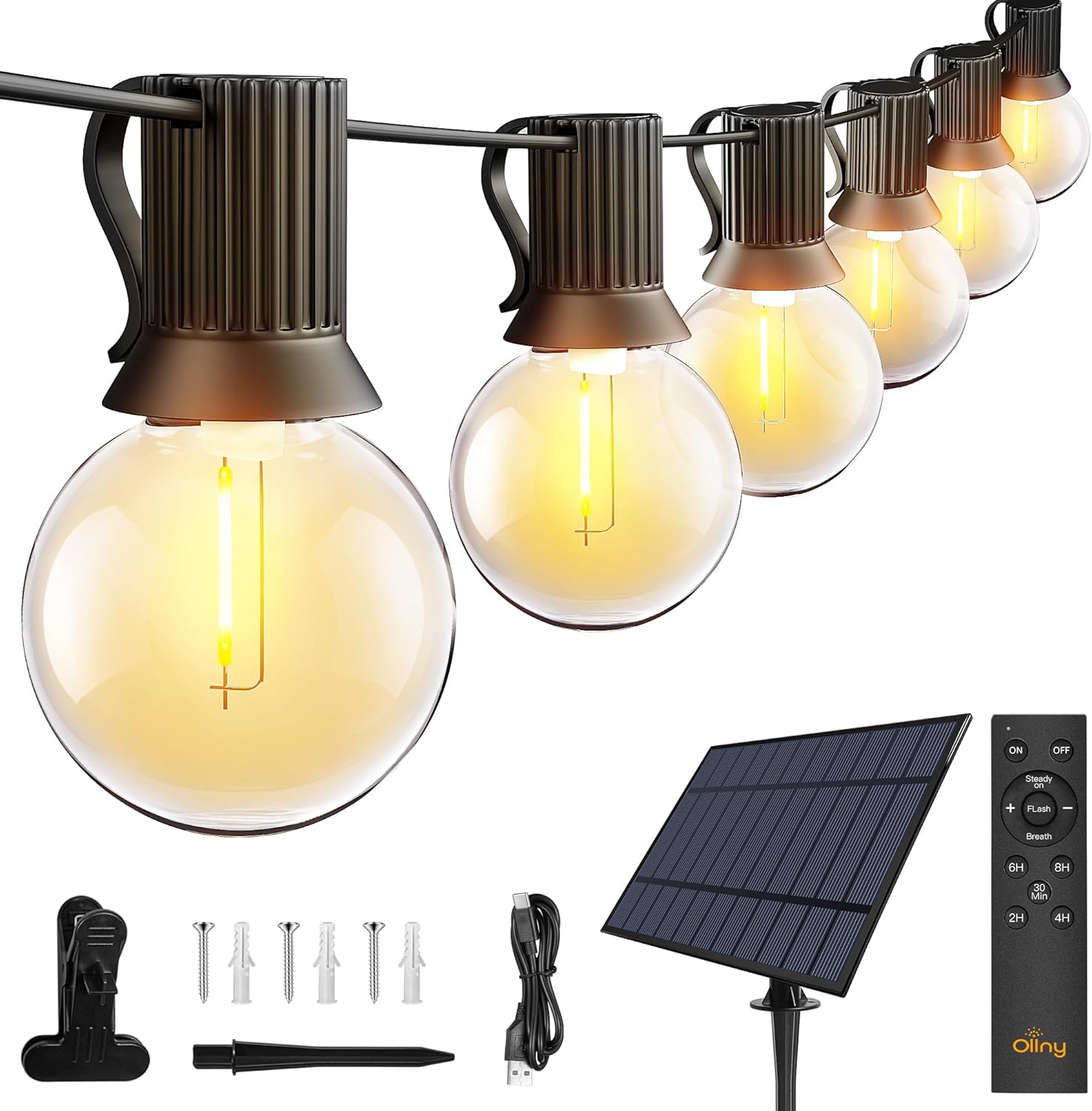
Imej: Selesaiview of the Ollny 110FT Solar String Lights package contents, showing the string lights, solar panel, remote control, and various installation accessories.
2. Maklumat Keselamatan
- Pastikan semua komponen disambungkan dengan selamat sebelum digunakan.
- Jangan cuba mengubah suai atau membaiki produk. Hubungi khidmat pelanggan untuk mendapatkan bantuan.
- Pastikan panel solar bersih untuk memastikan kecekapan pengecasan yang optimum.
- Avoid submerging the string lights or solar panel in water, despite their water-resistant rating (IP65 for solar panel, IP45 for bulbs).
- Shatterproof bulbs are designed for durability, but handle with care.
3. Persediaan dan Pemasangan
3.1 Penempatan Panel Suria
The solar panel is crucial for charging the lights. Choose a location that receives at least 6-8 hours of direct sunlight daily. Avoid shaded areas.

Image: Close-up of the solar panel, highlighting the USB charging port and the 'MODE' and 'ON/OFF' buttons. It also shows the 4000mAh battery capacity and 10 hours of light duration.
3.2 Kaedah Pemasangan
The solar panel offers multiple installation options:
- Pancang Tanah: Attach the stake to the solar panel and insert it firmly into the ground.
- Pemasangan Dinding: Use the provided screws and anchors to secure the panel to a wall or fence.
- Lekapan Klip: Attach the clip to the panel and secure it to a suitable edge or railing.

Image: Depicts three ways to install the solar panel: inserting it into the ground with a stake, nailing it to a wall, or clamping it to a board.
3.3 String Light Placement
Uncoil the string lights carefully. Hang them using the integrated clips on each bulb socket or other suitable fasteners. Ensure the solar panel is connected to the string lights.

Image: A diagram illustrating the total length of the 110FT solar outdoor string lights, the 2-foot spacing between bulbs, and the 11.5-foot lead cable from the solar panel to the first bulb. It also notes that the lights are not connectable.
3.4 Pengaktifan Awal
Before first use, press the ON button located behind the solar panel. Allow the solar panel to charge in direct sunlight for 4-6 hours, or use the USB cable for faster charging (approximately 4 hours).

Image: Illustrates two charging methods for the solar panel: solar power (6 hours charging) and USB charging (4 hours charging).
4. Arahan Operasi
4.1 Automatic ON/OFF Function
The solar panel has a built-in light sensor. The lights will automatically turn on at dusk and turn off at dawn, provided the ON button on the solar panel is activated.
Nota: If you wish to use the lights during daylight hours, ensure the solar panel is covered to simulate darkness.

Image: Demonstrates the light sensor function of the solar panel, with lights automatically turning on at night and off during the day. A note advises covering the solar panel for daytime use.
4.2 Fungsi Kawalan Jauh
The included remote control allows for convenient adjustment of light settings from up to 33 feet away.

Imej: A terperinci view of the remote control, illustrating buttons for power (ON/OFF), brightness adjustment (+/-), three lighting modes (Steady ON, Flash, Breath), and timer settings (30 minutes, 2 hours, 4 hours, 6 hours, 8 hours).
- HIDUP/MATI: Hidupkan atau matikan lampu.
- Peredupan: Gunakan + dan - buttons to adjust brightness from 25% to 100% in Steady ON mode.
- Mod: Select from three lighting modes:
- Stabil HIDUP: Pencahayaan berterusan.
- kilat: Flashing effect.
- nafas: Gradual dimming and brightening effect.
- Pemasa: Set the lights to turn off automatically after a specified duration: 30 minutes, 2 hours, 4 hours, 6 hours, or 8 hours.
Video: An official product video demonstrating the Ollny G40 solar outdoor lights in various settings, showcasing their aesthetic appeal and functionality. This video is provided by the seller, Ollny Decor Lights.
5. Penyelenggaraan
- Pembersihan: Lap panel solar secara berkala dengan lembut, damp cloth to remove dust and debris, ensuring maximum charging efficiency.
- Penggantian mentol: The string lights include 2 spare bulbs. To replace a bulb, gently unscrew the old bulb and screw in a new one. Ensure the power is off before replacing bulbs.
- Storan: If storing the lights for an extended period, ensure the solar panel is fully charged. Store in a cool, dry place.

Imej: A terperinci view of one of the G40 LED bulbs, showing its clear shatterproof casing and the E12 screw base.
6. Penyelesaian masalah
| Masalah | Kemungkinan Punca | Penyelesaian |
|---|---|---|
| Lampu tidak menyala pada waktu malam. |
|
|
| Lampu malap atau berkelip. |
|
|
| Alat kawalan jauh tidak berfungsi. |
|
|
7. Spesifikasi Produk
| Ciri | Perincian |
|---|---|
| Nombor Model | NYD050A |
| Jumlah Panjang | 110 Kaki |
| Bilangan Mentol | 50 LED + 2 Spare |
| Jenis Mentol | G40 Shatterproof LED |
| Pangkalan Mentol | E12 |
| Warna Cerah | Putih Hangat (2700 Kelvin) |
| Sumber Kuasa | Solar Powered (with USB charging option) |
| Bateri Panel Suria | 4000mAh |
| Masa Pengecasan Panel Suria | 4-6 jam (cahaya matahari langsung) |
| Masa Pengecasan USB | lebih kurang 4 jam |
| Masa Operasi | Sehingga 10 jam (dicas sepenuhnya) |
| Penilaian Kalis Air | Solar Panel: IP65, Bulbs: IP45 |
| Kaedah Kawalan | Remote Control (RF, 33ft range) |
| Bateri Kawalan Jauh | 2 AAA (termasuk) |
| Ciri Khas | Dimmable (25%-100%), 3 Lighting Modes (Steady, Flash, Breath), Timers (30min/2H/4H/6H/8H), Auto ON/OFF Light Sensor |
| bahan | plastik |
| Berat Barang | 3.85 paun (1.75 Kilogram) |
8. Waranti dan Sokongan
Ollny products are designed for quality and durability. For any questions, concerns, or technical support, please contact Ollny customer service via Amazon. Our support team is available to assist you within 24 hours.
Sila rujuk dokumentasi pembelian anda untuk butiran jaminan khusus.
Ask a question about this manual
Ask about setup, troubleshooting, compatibility, parts, safety, or missing instructions. Manuals+ will review the question and use this page’s manual context to help answer it.