
1. Pengenalan
This manual provides essential instructions for the safe and efficient operation of your Jectse 5G Portable Wi-Fi Hotspot, Model Jectsekwnbat6q37. Please read this manual thoroughly before using the device and retain it for future reference.
2. Kandungan Pakej
Sahkan bahawa semua item terdapat dalam pakej anda:
- Jectse 5G Portable Wi-Fi Hotspot (Model Jectsekwnbat6q37)
- Kabel Pengecas USB-C
- Manual Pengguna (dokumen ini)
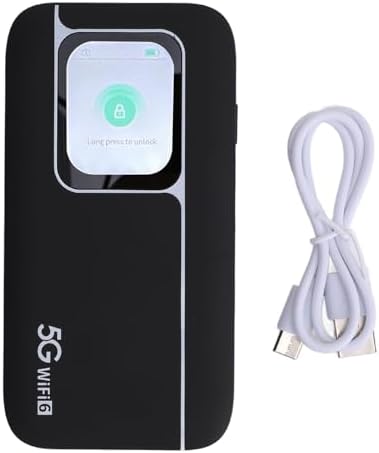
Image: The Jectse 5G Portable Wi-Fi Hotspot shown next to its included USB-C charging cable.
3. Peranti Lebihview
Familiarize yourself with the physical components of your hotspot.
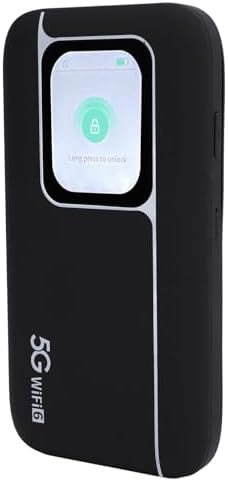
Imej: Depan view of the Jectse 5G Portable Wi-Fi Hotspot, showcasing its display screen with a lock icon and "Long press to unlock" message.
- Skrin Paparan: Shows network status, signal strength, battery level, and data usage.
- Butang Kuasa: Digunakan untuk menghidupkan/mematikan peranti dan membangunkan/menidurkan skrin.
- Port USB-C: Untuk mengecas peranti.
- Slot Kad SIM: Located on the side or back, for inserting your 5G/4G/3G SIM card.
- Penunjuk LED: Provide quick visual cues for device status (e.g., signal, battery).
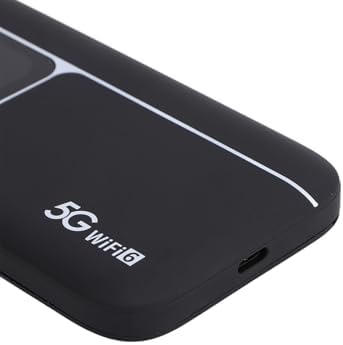
Imej: Dari dekat view of the USB-C charging port located on the side of the Jectse 5G Portable Wi-Fi Hotspot.
4. Persediaan
- Masukkan Kad SIM:
Locate the SIM card slot. Carefully insert your activated 5G/4G/3G SIM card into the slot until it clicks into place. Ensure the SIM card is correctly oriented.
- Cas Peranti:
Connect the provided USB-C cable to the hotspot's charging port and the other end to a compatible USB power adapter (not included) or a computer's USB port. The device features a 7100mAh polymer battery. Allow the device to fully charge before first use.
- Hidupkan kuasa:
Press and hold the Power Button for a few seconds until the display screen illuminates. The device will begin to boot up and connect to the cellular network.
- Sambungan Wi-Fi Awal:
Once powered on, the device's display will show the default Wi-Fi Network Name (SSID) and Password (Wi-Fi Key). You can also find this information on the back of the device.
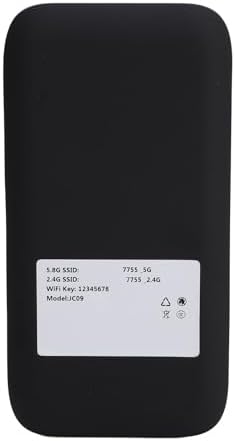
Image: The back panel of the Jectse 5G Portable Wi-Fi Hotspot, displaying the default 5.8G SSID, 2.4G SSID, and Wi-Fi Key.
On your computer, smartphone, or other Wi-Fi enabled device, search for available Wi-Fi networks. Select the SSID matching your hotspot and enter the Wi-Fi Key to connect.
5. Arahan Operasi
- Menyambung Berbilang Peranti:
The hotspot supports connecting up to 16 devices simultaneously. It operates on dual bands (2.4GHz and 5.8GHz) with WiFi6 (802.11 a/b/g/n/ac/ax) for optimized performance across various devices.

Image: An illustration depicting the Jectse 5G Portable Wi-Fi Hotspot providing high-speed internet to several users with laptops, tablets, and smartphones.
- Status Peranti Pemantauan:
The display screen and LED lights provide real-time information on signal strength, battery level, and data usage. Refer to the screen for detailed status updates.
- Network Frequency Support:
The device supports a broad range of network frequencies, including 5G NR, 4G, and 3G, ensuring connectivity in various locations. The built-in 1T4R 5G antenna enhances signal reception.
- Hot Swappable SIM:
The device supports hot-swapping of SIM cards, allowing you to change SIM cards without powering down the device, though a brief network re-connection period may occur.
6. Penyelenggaraan
- Penjagaan Bateri: To prolong battery life, avoid exposing the device to extreme temperatures. Charge the 7100mAh battery regularly and avoid complete discharge.
- Pembersihan: The device features an IP67 reinforced design, offering protection against dust and water. To clean, gently wipe the exterior with a soft, dry cloth. Do not use harsh chemicals or abrasive materials.
- Storan: Apabila tidak digunakan untuk tempoh yang lama, simpan peranti di tempat yang sejuk dan kering.
7. Penyelesaian masalah
If you encounter issues with your Jectse 5G Portable Wi-Fi Hotspot, refer to the following common solutions:
| Masalah | Kemungkinan Punca | Penyelesaian |
|---|---|---|
| Tiada isyarat rangkaian | SIM card not inserted correctly, no cellular coverage, or SIM not activated. | Reinsert SIM card, move to an area with better coverage, or contact your service provider to activate SIM. |
| Tidak dapat menyambung ke Wi-Fi | Incorrect Wi-Fi password, device too far from hotspot, or hotspot is off. | Verify password, move closer to the hotspot, ensure hotspot is powered on. |
| Kelajuan internet perlahan | Isyarat lemah, terlalu banyak peranti yang disambungkan atau kesesakan rangkaian. | Check signal strength on the display, reduce number of connected devices, or try connecting in a less congested area. |
| Peranti tidak dihidupkan | Bateri lemah atau kerosakan peranti. | Cas peranti selama sekurang-kurangnya 30 minit. Jika isu berterusan, hubungi sokongan. |
Jika masalah berterusan selepas mencuba penyelesaian ini, sila hubungi sokongan pelanggan.
8. Spesifikasi
| Ciri | Perincian |
|---|---|
| Nama Model | Jectsekwnbat6q37 |
| Jenama | Jectse |
| Teknologi Ketersambungan | 5G |
| Standard Komunikasi Tanpa Wayar | 802.11ax (WiFi6) |
| Kelas Band Kekerapan | Dwi-Jalur (2.4GHz & 5.8GHz) |
| Data Transfer Rate (Download) | Sehingga 2.77 Gbps |
| Data Transfer Rate (Upload) | Sehingga 1.25 Gbps |
| Kapasiti Bateri | Bateri Polimer 7100mAh |
| Antena | 1T4R 5G Antenna |
| Reka Bentuk Lasak | IP67 (Protection against drops, dust, and water) |
| Peranti Bersambung Maksimum | 16 |
| Sistem Operasi | ZyNOS |
| Dimensi Pakej | 17 x 10 x 4 cm |
| Berat Barang | 280 g |
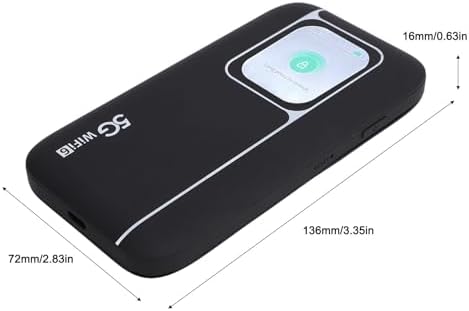
Image: A visual representation of the Jectse 5G Portable Wi-Fi Hotspot's dimensions, showing its length (136mm/3.35in), width (72mm/2.83in), and thickness (16mm/0.63in).
9. Waranti dan Sokongan
Jectse products are designed for reliability and performance. For warranty information, please refer to the warranty card included with your purchase or visit the official Jectse webtapak.
For technical support, troubleshooting assistance, or service inquiries, please contact Jectse customer support through the contact information provided on the official webtapak atau dokumentasi pembelian anda.
Please have your model number (Jectsekwnbat6q37) and purchase details ready when contacting support.