
1. Pengenalan
The JLab JBuds Mini Tones are true wireless Bluetooth earbuds designed for compact size and robust performance. These earbuds offer a range of features to enhance your audio experience, whether for music, podcasts, or calls.
Ciri-ciri utama termasuk:
- Reka bentuk padat: Significantly smaller earbuds and charging case for enhanced portability.
- Masa Main Dilanjutkan: Sehingga 5.5 jam setiap fon telinga, dengan jumlah 20 jam menggunakan bekas pengecas.
- Berbilang Titik Bluetooth: Seamlessly connect and switch between two devices simultaneously.
- Penilaian IP55: Sweat and dustproof for durability during active use.
- Penyesuaian Aplikasi JLab: Personalize sound settings, touch controls, and Be Aware Audio.
- Audio Berhati-hati: Allows ambient noise to be heard for situational awareness.
- Panggilan Crystal Clear: MEMS microphones in each earbud reduce background noise for clear communication.

Figure 1.1: JLab JBuds Mini Tones Earbuds and Charging Case.
2. Apa yang ada di dalam Kotak
Your JLab JBuds Mini Tones package includes the following items:
- JBuds Mini Earbuds
- Sarung Pengecas Tanpa Wayar
- 3 Sets of Silicone Gel Tips (various sizes)
- Manual Pengguna (dokumen ini)
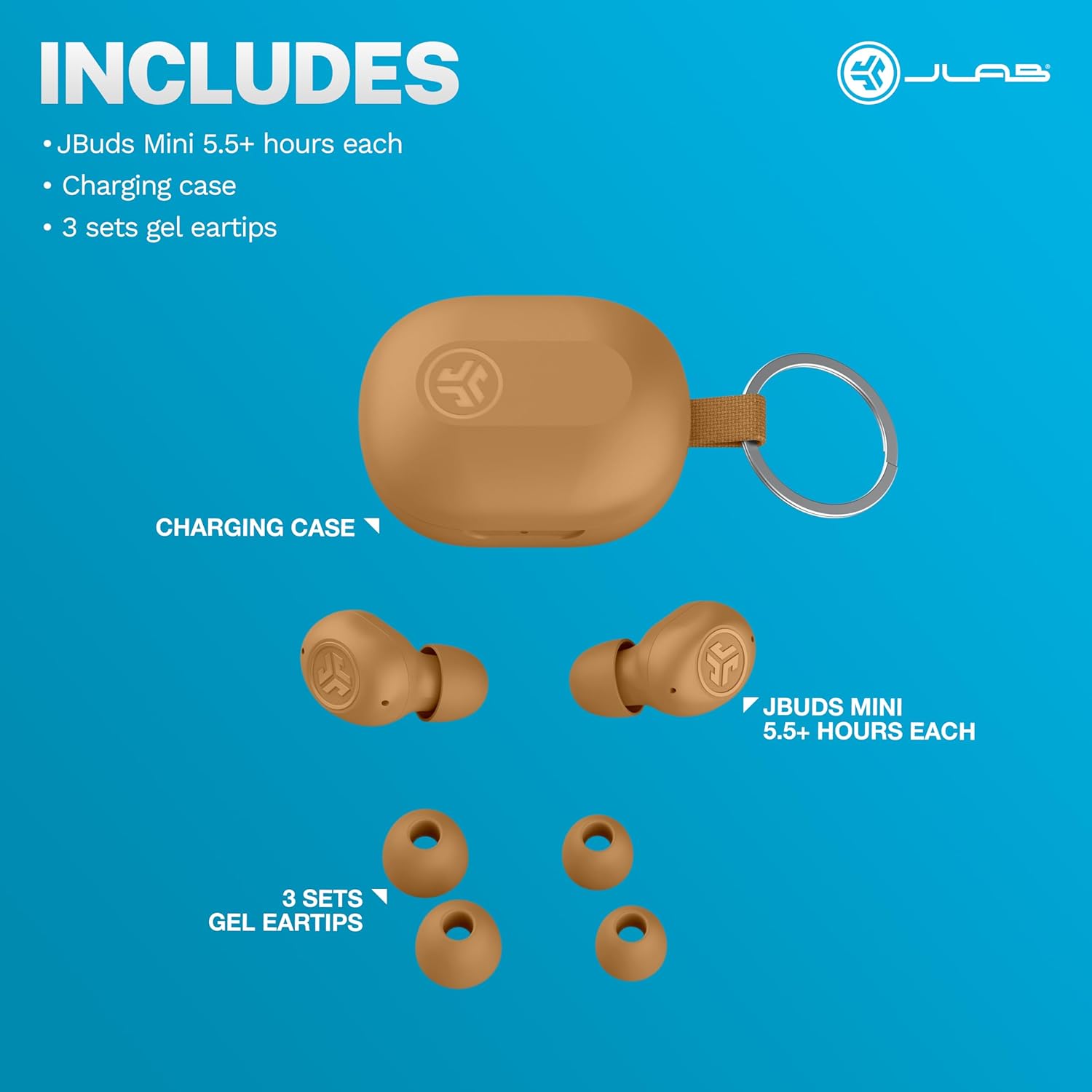
Figure 2.1: Included components: JBuds Mini earbuds, charging case, and three sets of silicone gel tips.
3. Persediaan
3.1 Mengecas Fon telinga dan Sarung
Before first use, fully charge your JBuds Mini. The charging case provides additional power for on-the-go use.
- Letakkan fon telinga ke dalam bekas pengecasan.
- Connect the charging case to a USB-C power source using the provided cable.
- The earbuds offer approximately 5.5 hours of playtime, with the charging case extending total playtime to 20 hours.
3.2 Gandingan Awal
Untuk memasangkan JBuds Mini anda dengan peranti:
- Tanggalkan kedua-dua fon telinga daripada bekas pengecas. Kedua-dua fon telinga akan memasuki mod berpasangan secara automatik.
- On your device (smartphone, laptop, etc.), open Bluetooth settings.
- Select "JBuds Mini" from the list of available devices.
- Sebaik sahaja disambungkan, anda akan mendengar gesaan audio yang mengesahkan pasangan yang berjaya.
3.3 Bluetooth Multipoint Connection
The JBuds Mini support Bluetooth Multipoint, allowing simultaneous connection to two devices.
- Pair with your first device as described in section 3.2.
- Lumpuhkan Bluetooth pada peranti pertama. Fon telinga akan memasuki semula mod berpasangan.
- Pair with your second device.
- Re-enable Bluetooth on the first device. The earbuds will now be connected to both devices.
- Audio will automatically switch between devices based on active playback.
3.4 Kesesuaian Optimum
Selecting the correct ear tip size is crucial for comfort and sound quality. Experiment with the three included silicone gel tip sizes to find the best fit for your ears.

Figure 3.1: The compact design of the JBuds Mini ensures a discreet and comfortable fit.
Video 3.1: A user demonstrates the unboxing and size comparison of JBuds Mini with other earbuds, highlighting their compact nature.
4. Arahan Operasi
4.1 Kawalan Sentuhan
The JBuds Mini feature intuitive touch controls on each earbud for managing playback, calls, and sound modes. Specific functions can be customized via the JLab App.
4.2 JLab App Customization
Download the JLab App to unlock the full potential of your JBuds Mini. The app allows you to:
- Adjust Be Aware Audio levels.
- Sesuaikan kawalan sentuh.
- Select from preset EQ sound settings (JLab Signature, Balance, Bass Boost) or create custom profiles.
- Enable safe hearing options with volume limits.
- Terima kemas kini perisian untuk fon telinga anda.

Figure 4.1: Customize your sound and controls using the JLab App.
4.3 Be Aware Audio
Activate Be Aware Audio to allow ambient sounds to pass through, keeping you connected to your surroundings. This feature is ideal for outdoor activities or when you need to hear conversations while listening to audio.

Figure 4.2: Be Aware Audio allows you to hear your surroundings for safe listening.
4.4 Panggilan Jelas
Each JBuds Mini earbud is equipped with a MEMS microphone designed to minimize background noise, ensuring your voice is transmitted clearly during calls. You can use either earbud independently for calls or both together.
5. Penyelenggaraan
5.1 Pembersihan
Regularly clean your earbuds and charging case to maintain optimal performance and hygiene. Use a soft, dry cloth to wipe down the surfaces. For ear tips, remove them and clean with mild soap and water, ensuring they are completely dry before reattaching.
5.2 Rintangan Air dan Habuk (IP55)
The JBuds Mini are rated IP55, meaning they are protected against dust ingress and low-pressure water jets from any direction. This makes them suitable for workouts and light rain. However, they are not designed for submersion in water.

Figure 5.1: The IP55 rating ensures durability against sweat and dust.
6. Penyelesaian masalah
If you encounter issues with your JBuds Mini, refer to the following common solutions:
6.1 Connectivity Issues (Sound Breaking Up)
If the audio connection is unstable or breaks up, ensure your earbuds are within close proximity to your connected device. Obstacles between the earbuds and the device can interfere with the Bluetooth signal. Try moving closer to your device or removing any potential obstructions.
6.2 Accidental Control Activation
If touch controls are accidentally triggered, particularly when lying down or adjusting the earbuds, ensure they are seated correctly in your ear. The JLab App allows for customization of touch controls, which may help mitigate unintended activations.
Video 6.1: A user highlights the comfort of JBuds Mini for side sleepers, indicating minimal pressure on the ear.
Video 6.2: A user demonstrates the comfortable fit of the JBuds Mini, suitable for various activities including lying down.
6.3 Amaran Bateri Rendah
The earbuds provide subtle audio warnings when the battery is low, allowing ample time to place them back in the charging case before they power off.
7. Spesifikasi
| Ciri | Spesifikasi |
|---|---|
| Nama Model | JBuds Mini |
| Teknologi Ketersambungan | Wayarles (Bluetooth) |
| Versi Bluetooth | 4.0 |
| Tahap Ketahanan Air | IP55 (Kalis Peluh dan Habuk) |
| Hayat Bateri (Earbud) | 5.5 Jam |
| Jumlah Masa Main (dengan Kes) | 20 Jam |
| Masa Mengecas | 5.5 Hours (for case, likely refers to total charge time for case + earbuds) |
| Jenis Kawalan | Sentuh, Kawalan Kelantangan |
| Ciri Kawalan Bunyi | Be Aware Audio, Sound Isolation |
| Peranti Serasi | Mobile Phones, Laptops, Computers |
| Berat Barang | 0.04 Kilogram (1.44 auns) |
| bahan | plastik |
| UPC | 810119073532 |
8. Waranti & Sokongan
8.1 Maklumat Waranti
Your JLab JBuds Mini Tones True Wireless Bluetooth Earbuds come with a JLab Two Year Warranty. Please refer to the official JLab webtapak atau dokumentasi pembelian anda untuk terma dan syarat waranti penuh.
8.2 Sokongan Pelanggan
For further assistance, technical support, or warranty claims, please visit the official JLab support page or contact their customer service directly.
Lawati Kedai JLab di Amazon untuk maklumat lanjut.