
DOOGEE S119
Manual Pengguna Telefon Lasak DOOGEE S119 (2025)
Model: S119 | Brand: DOOGEE
1. Pengenalan
Welcome to the user manual for your new DOOGEE S119 (2025) Rugged Phone. This guide provides essential information to help you set up, operate, maintain, and troubleshoot your device. The DOOGEE S119 is designed for durability and performance, featuring a robust build, a large battery, and advanced camera capabilities, making it ideal for demanding environments and active lifestyles.
2. Kandungan Pakej
Sila semak kandungan pakej anda untuk memastikan semua item ada:
- 1 x Telefon Pintar Lasak DOOGEE S119
- 1 x Pengecas (33W)
- 1 x Kabel USB Jenis-C
- 1 x Anti-explosion film (Screen Protector)
- 1 x Manual Pengguna
3. Produk Lebihview
The DOOGEE S119 is engineered for resilience and functionality. Key features include:
- 1.32" Multifunctional Rear Display: Provides quick access to notifications, call alerts, media controls, and more.
- Bateri 10200mAh: Offers extended usage time with 33W fast charging and OTG reverse charging capabilities.
- RAM 24GB + ROM 512GB: Ample memory and storage, expandable up to 2TB via TF card.
- 6.72" FHD+ IPS Waterdrop Screen: Vibrant display with 1080x2400 resolution.
- Kamera Utama AI 100MP: High-resolution main camera for detailed photos.
- Kamera Penglihatan Malam 20MP: Captures clear images in low-light conditions.
- Mediatek MT8788 Octa-core Processor: Ensures smooth performance and efficient power consumption.
- Sistem Android 14: Latest Android OS for a seamless user experience.
- Pensijilan Lasak: IP68/IP69K/MIL-STD-810H certified for water, dust, and drop resistance.
- Ketersambungan: NFC, Dual SIM, GPS (Glonass, Galileo, Beidou), Bluetooth, Wi-Fi, USB.
- Keselamatan: Fingerprint ID and Face Unlock.

Rajah 3.1: Depan dan belakang view of the DOOGEE S119 (2025) Rugged Phone, highlighting its robust design and rear display.

Rajah 3.2: Terperinci view of the 1.32" multifunctional rear display, showing various functions like call answering, camera, calendar, message view, music, and alarm clock.

Figure 3.3: Illustration of the 10200mAh mega battery with 33W fast charging and OTG reverse charging capabilities.

Figure 3.4: Visual representation of the 24GB RAM (8GB Basic + 16GB Extended) and 512GB ROM, expandable to 2TB.

Figure 3.5: Close-up of the 6.72" FHD+ IPS Waterdrop Screen, highlighting its aspect ratio, color depth, and brightness.
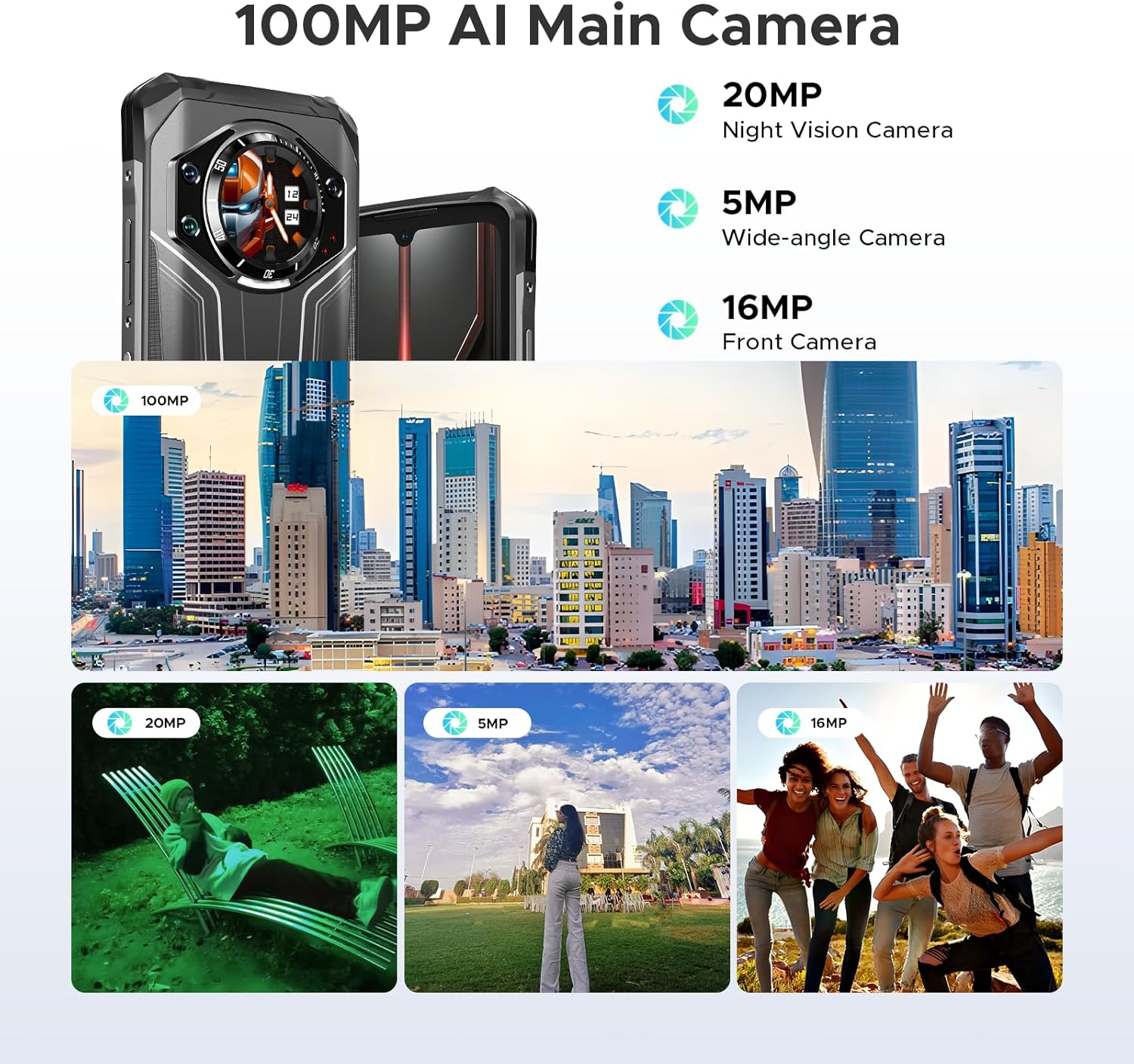
Gambar 3.6: Lebihview of the camera system, including the 100MP AI Main Camera, 20MP Night Vision Camera, 5MP Wide-angle Camera, and 16MP Front Camera, with exampfoto-foto itu.

Figure 3.7: Diagram illustrating the MediaTek MT8788 Octa-core Processor, its LPDDR4 Flash Memory, 12nm Production Process, and 2.0GHz Operating Frequency.

Figure 3.8: Depiction of the latest Android 14 System with various app icons, emphasizing a security-enhanced Linux base.
4. Persediaan
4.1 Memasukkan Kad SIM dan Kad TF
The DOOGEE S119 supports a triple card slot (2 SIM cards + 1 TF card).
- Cari dulang kad SIM di sisi telefon.
- Gunakan alat ejektor SIM yang disediakan untuk membuka dulang.
- Letakkan kad Nano-SIM dan/atau kad TF anda dengan berhati-hati ke dalam slot yang ditetapkan. Pastikan orientasi yang betul.
- Tolak dulang perlahan-lahan ke dalam telefon sehingga ia berbunyi pada tempatnya.
4.2 Kuasa Awal Hidup dan Konfigurasi Asas
- Tekan dan tahan butang Kuasa (terletak di sisi) sehingga logo DOOGEE muncul.
- Ikut gesaan pada skrin untuk memilih bahasa anda, menyambung ke Wi-Fi dan menyediakan akaun Google anda.
- Configure security features such as Fingerprint ID and Face Unlock for convenient and secure access.
5. Arahan Operasi
5.1 Using the 1.32" Rear Display
The rear display offers quick access to various functions without needing to fully activate the main screen:
- Pemberitahuan: View panggilan masuk, mesej dan makluman apl.
- Menjawab Panggilan: Answer or reject calls directly from the rear screen.
- Kawalan Muzik: Play, pause, skip tracks, and adjust volume for media playback.
- kamera: Gunakan sebagai a viewfinder for rear camera selfies or quick shots.
- Clock/Calendar: Display time, date, and set alarms.
- Pemeriksaan Bateri: dengan pantas view peratus bateritage.
- Kompas: Access a digital compass for navigation.
Video 5.1: Demonstration of the DOOGEE S119 (2025) Rugged Phone's 1.32" multifunctional rear display features, including call answering, music control, and quick access to information.
5.2 Operasi Kamera
The S119 features a versatile camera system:
- Kamera Utama AI 100MP: For high-resolution photos. Open the Camera app and select "Photo" mode.
- Kamera Penglihatan Malam 20MP: Ideal for low-light environments. Switch to "Night Vision" mode in the camera app.
- Kamera Sudut Lebar 5MP: For capturing broader scenes. Select the wide-angle option in the camera interface.
- Kamera Depan 16MP: For selfies and video calls. Switch to the front camera in the app.
- Mod: Explore various modes like HDR, Panorama, and Pro Mode for enhanced photography.
5.3 Pengurusan Bateri
Bateri 10200mAh menyediakan penggunaan yang lebih lama. Untuk mengoptimumkan hayat bateri:
- Use the included 33W fast charger for quick power-ups.
- Dayakan mod penjimat bateri apabila bateri rendah.
- Tutup aplikasi latar belakang yang tidak digunakan.
- Utilize OTG reverse charging to power other devices (cable not included).
5.4 General Phone Use
- Navigasi: Use GPS, Glonass, Galileo, and Beidou for accurate location services.
- NFC: Enable NFC in settings for contactless payments and data transfer.
- Dual Unlock: Use side fingerprint sensor or face unlock for quick and secure access.
- Android 14: Customize settings, manage apps, and utilize Google services.
6. Penyelenggaraan
To ensure the longevity and optimal performance of your DOOGEE S119:
- Pembersihan: Lap telefon dengan kain lembut,amp kain. Elakkan bahan kimia yang keras atau bahan yang melelas.
- Tahan Air: While IP68/IP69K certified, ensure all ports and covers are securely closed before exposing to water. Do not intentionally submerge the device beyond specified limits.
- Suhu: Elakkan mendedahkan telefon kepada suhu yang melampau (sangat panas atau sangat sejuk) untuk tempoh yang lama.
- Perlindungan Skrin: Apply the provided anti-explosion film to protect the main screen from scratches.
- Kemas Kini Perisian: Semak dan pasang kemas kini sistem secara kerap untuk memastikan prestasi dan keselamatan yang optimum.
7. Penyelesaian masalah
| Masalah | Penyelesaian yang Mungkin |
|---|---|
| Telefon tidak dihidupkan. | Pastikan bateri telah dicas. Sambungkan ke pengecas selama sekurang-kurangnya 10 minit sebelum cuba menghidupkannya. |
| Isyarat rangkaian lemah atau tiada perkhidmatan. | Check SIM card insertion. Verify network compatibility with your carrier (FDD, TDD, WCDMA, GSM bands). Move to an area with better coverage. |
| Aplikasi perlahan atau ranap. | Tutup aplikasi latar belakang. Kosongkan cache aplikasi. Mulakan semula telefon. Pastikan ruang storan yang mencukupi. |
| Bateri cepat habis. | Reduce screen brightness. Disable unused features like Wi-Fi, Bluetooth, GPS. Limit background app activity. |
| Rear display not responding. | Restart the phone. Check for system updates. |
| Tidak dapat menyambung ke Wi-Fi. | Restart your router and phone. Re-enter Wi-Fi password. Ensure you are within range. |
8. Spesifikasi
| Ciri | Perincian |
|---|---|
| Model | DOOGEE S119 |
| Sistem Operasi | Android 14 |
| Pemproses | Mediatek MT8788 Octa-core (2 GHz CPU Speed) |
| RAM | 24 GB (8GB fizikal + 16GB maya) |
| Storan Dalaman | 512 GB ROM (Expandable up to 2TB via TF card) |
| Paparan Utama | 6.72 inches FHD+ IPS Waterdrop Screen (1080 x 2400 resolution) |
| Paparan Belakang | 1.32 inches Multifunctional Round Display (386 PPI) |
| Kamera Utama | Kamera Utama AI 100MP |
| Kamera Penglihatan Malam | 20MP |
| Kamera sudut lebar | 5MP |
| Kamera Depan | 16MP |
| Kapasiti Bateri | 10200 mAh (81 Hours Phone Talk Time) |
| Mengecas | Pengecasan Pantas 33W, Pengecasan Songsang OTG |
| Ketahanan | IP68, IP69K, MIL-STD-810H certified (Waterproof, Dustproof, Drop-proof) |
| Ketersambungan | Bluetooth, Wi-Fi, USB Type-C, NFC, GPS (Glonass, Galileo, Beidou) |
| Slot Kad SIM | Slot Tiga Kad (2 Kad SIM + 1 Kad TF) |
| Ciri Keselamatan | ID Cap Jari Sisi, Buka Kunci Muka |
| Dimensi | 7.02 x 3.27 x 7.04 inci |
| Berat Barang | 1.32 paun |
9. Waranti & Sokongan
DOOGEE menyediakan sokongan komprehensif untuk produknya:
- Waranti: Produk ini disertakan dengan Waranti Terhad 2 Tahun.
- Pulangan: Enjoy a 30-Day Money Back Guarantee and Free Return policy.
- Perkhidmatan Pelanggan: For any inquiries or technical assistance, please contact DOOGEE customer support. Refer to the official DOOGEE website or the contact information provided in your package for details.

Gambar 9.1: Lebihview of DOOGEE's customer service, including 30-day money-back guarantee, 2-year limited warranty, and 24/7 online support.
Ask a question about this manual
Ask about setup, troubleshooting, compatibility, parts, safety, or missing instructions. Manuals+ will review the question and use this page’s manual context to help answer it.