
1. Pengenalan
This manual provides essential information for the proper use and care of your Yunseity R36PRO Handheld Game Console. The R36PRO is a portable gaming device featuring a 3.5-inch high-resolution screen, dual 3D joysticks, and a powerful RK3326 chipset, designed to support a wide range of retro emulator games. Please read this manual thoroughly before operating the device to ensure optimal performance and longevity.

Figure 1: Yunseity R36PRO Handheld Game Console overview. This image displays the console's front view with its screen showing a racing game, surrounded by other game screenshots in the background.
2. Persediaan
2.1 Membuka Kotak dan Komponen yang Disertakan
Carefully unpack your Yunseity R36PRO Handheld Game Console. Verify that all components listed below are present.
- Yunseity R36PRO Handheld Game Console
- Manual Pengguna (dokumen ini)
- Kabel Pengecasan (USB-A ke USB-C)
- Game Console Case
- Kad Memori (dipasang terlebih dahulu atau disertakan secara berasingan)

Figure 2: Included accessories. This image shows the Yunseity R36PRO console, its USB charging cable, and the protective carrying case.
2.2 Mengecas Peranti
Before first use, fully charge the console.
- Connect the small end of the charging cable (USB-C) to the charging port on the console.
- Connect the large end of the charging cable (USB-A) to a compatible USB power adapter (not included) or a computer's USB port.
- Lampu penunjuk pengecasan akan menyala. Cas penuh biasanya mengambil masa kira-kira 2-3 jam.
- Setelah dicas sepenuhnya, lampu penunjuk mungkin berubah warna atau padam. Putuskan sambungan kabel pengecas.
2.3 Memasukkan Kad Memori
The console requires a memory card to store games and system files. A memory card is typically included.
- Locate the TF card slot on the side of the console.
- Gently insert the memory card into the slot with the gold contacts facing down until it clicks into place.
- Untuk mengeluarkan, tolak kad masuk sedikit sehingga ia keluar.
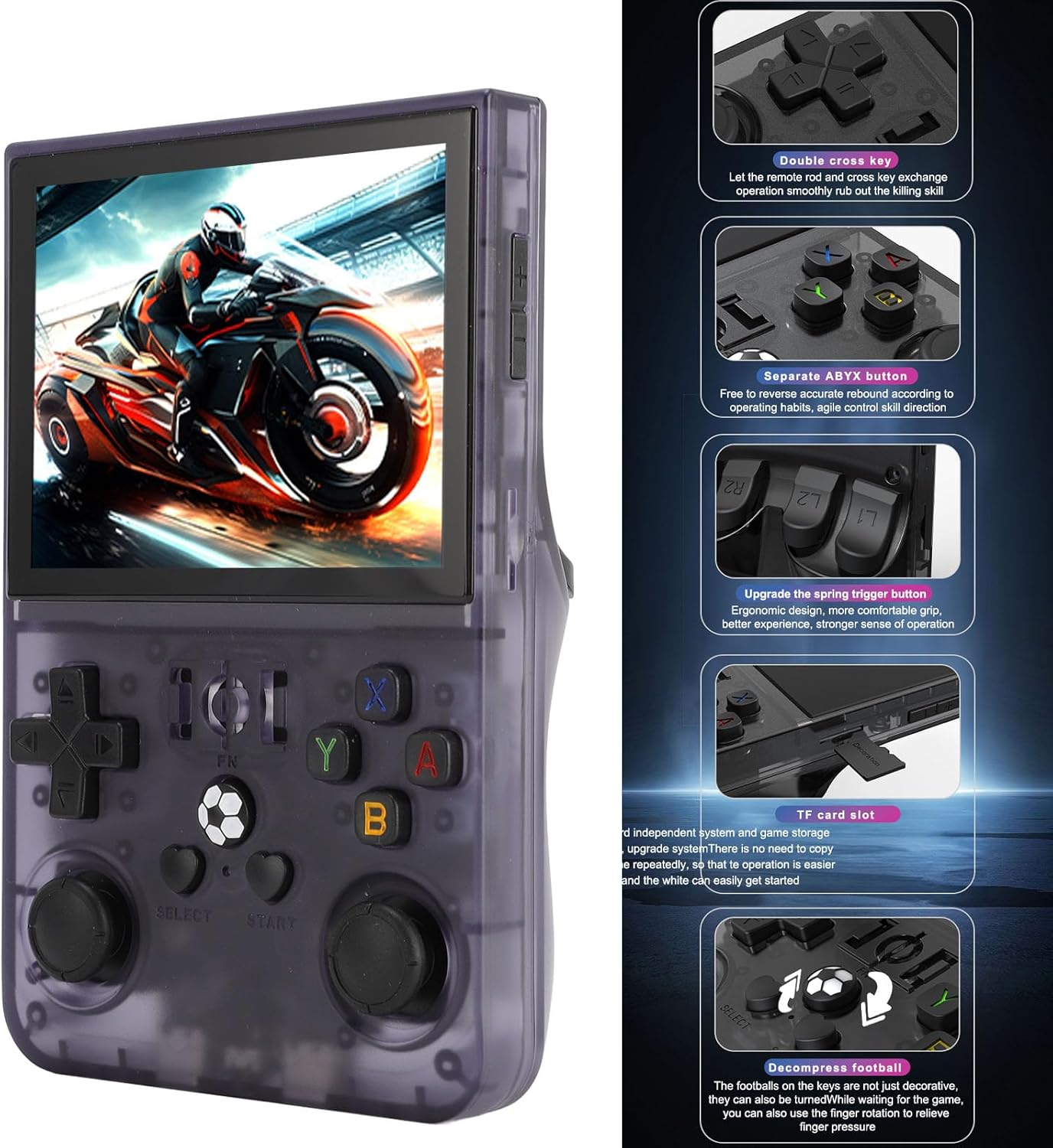
Figure 3: Console features and TF card slot location. This image highlights various buttons and the TF card slot on the side of the Yunseity R36PRO console.
2.4 Menghidupkan/Mematikan
- Untuk Menghidupkan: Press and hold the Power button (usually located on the top or side) for a few seconds until the screen illuminates.
- Untuk Mematikan: Press and hold the Power button until a power-off menu appears on the screen. Select "Power Off" or "Shutdown". Alternatively, a quick press may put the device into sleep mode.
3. Arahan Operasi
3.1 Kawalan Ke Atasview
The Yunseity R36PRO features a standard set of gaming controls. Refer to Figure 3 for button locations.
- D-Pad (Pad Arah): For directional input in games and menu navigation.
- Dual 3D Joysticks: Analog input for precise movement and camera control in supported games.
- Butang Tindakan (A, B, X, Y): Primary action buttons for gameplay.
- L1/L2, R1/R2 (Shoulder/Trigger Buttons): Located on the top rear of the console, used for various in-game actions.
- Butang PILIH/MULAKAN: For in-game menus, pausing, or system functions.
- Butang FN: Function button, typically used for system-level shortcuts or emulator specific functions.
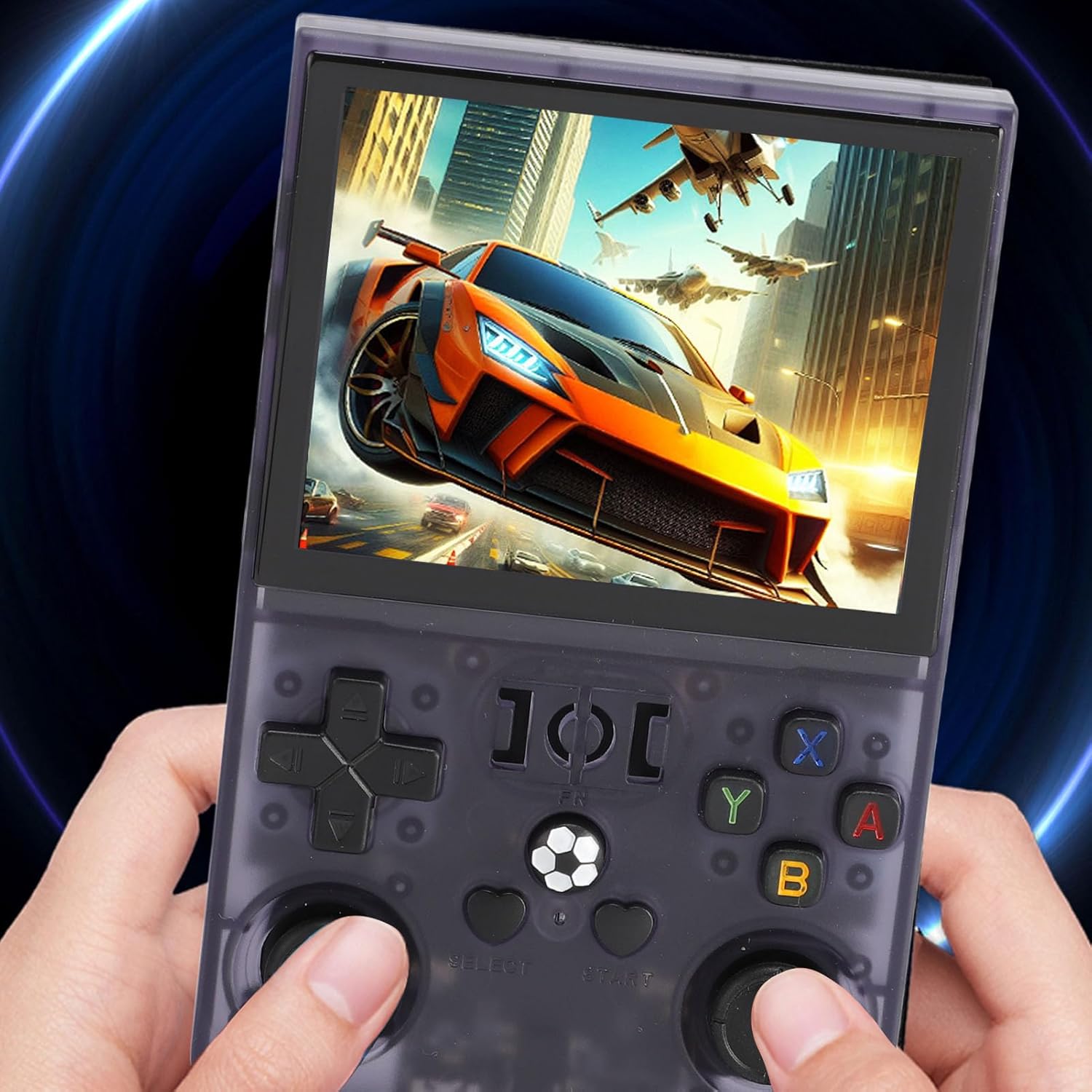
Figure 4: Console in use. This image shows a user holding the Yunseity R36PRO console, demonstrating its ergonomic design during gameplay.
3.2 Navigating the System Interface
Upon powering on, the console will display its main operating system interface.
- Gunakan D-Pad or Joystick Kiri to navigate through menus and select options.
- Tekan ke Satu butang (or equivalent) to confirm a selection.
- Tekan ke Butang B (or equivalent) to go back to the previous screen.
- The main interface typically categorizes games by emulator or allows browsing of game files.
3.3 Loading and Playing Games
The console supports over 60 emulators. Games are typically pre-loaded on the memory card or can be added by the user.
- From the main menu, navigate to the desired emulator or game category.
- Select the game you wish to play from the list.
- Tekan ke Satu butang untuk melancarkan permainan.
- During gameplay, specific button combinations (often involving the butang FN) may be used to access emulator menus for saving/loading states, exiting games, or adjusting settings. Refer to the emulator's specific documentation if available.
3.4 Tetapan Sistem
Access system settings to adjust display brightness, volume, language, and other console-specific options. The method to access settings may vary depending on the installed operating system (e.g., a dedicated "Settings" icon or a combination of buttons).
4. Penyelenggaraan
4.1 Membersihkan Peranti
- Use a soft, dry, lint-free cloth to wipe the screen and console body.
- Untuk calitan degil, sedikit dampen kain dengan air atau pembersih selamat skrin. Elakkan bahan kimia yang keras.
- Do not spray liquids directly onto the console.
- Use a soft brush or compressed air to clean dust from ports and button crevices.
4.2 Penjagaan Bateri
- Elakkan menyahcas sepenuhnya bateri dengan kerap.
- Cas peranti secara berkala, walaupun tidak digunakan, untuk mengekalkan kesihatan bateri.
- Simpan konsol di tempat yang sejuk dan kering apabila tidak digunakan untuk tempoh yang lama.
- The 4000mAh polymer battery is designed to be removable for intuitive status checks and safer charging/discharging.
4.3 Kemas Kini Perisian
Periodically check the manufacturer's official website or community forums for potential firmware or operating system updates. Updates can improve performance, add features, or fix bugs. Follow update instructions carefully to avoid damaging the device.
4.4 Penyimpanan
When not in use, store the console in its protective case to prevent scratches and damage from dust or impacts. Keep it away from extreme temperatures, direct sunlight, and moisture.
5. Penyelesaian masalah
| Masalah | Kemungkinan Punca | Penyelesaian |
|---|---|---|
| Peranti tidak dapat dihidupkan. | Bateri lemah; Sistem rosak. | Charge the device for at least 30 minutes. Perform a hard reset by holding the Power button for 10-15 seconds. |
| Games not loading or crashing. | Corrupt game file; Incompatible emulator settings; Memory card issue. | Ensure game files are correct and compatible. Check emulator settings. Reinsert or reformat the memory card (backup data first). |
| Screen flickering or no display. | Gangguan perisian; Masalah perkakasan. | Restart the device. Ensure the battery is charged. If the problem persists, contact support. |
| Butang tidak bertindak balas. | Software freeze; Physical damage. | Restart the device. Check for any physical obstructions or damage to the buttons. |
| Hayat bateri pendek. | High screen brightness; Background processes; Aging battery. | Reduce screen brightness. Close unnecessary applications. Ensure the battery is fully charged before use. |
Jika anda menghadapi masalah yang tidak disenaraikan di sini atau jika penyelesaian yang dicadangkan tidak menyelesaikan masalah, sila rujuk bahagian Waranti & Sokongan untuk bantuan lanjut.
6. Spesifikasi
| Model | R36PRO |
| Jenama | Yunseity |
| Saiz Skrin | 3.5 inci |
| Resolusi Skrin | 640x480 |
| Chipset | RK3326 (64-bit, 1.5Ghz) |
| Emulators Supported | 60+ (e.g., MD, CPS, SMD) |
| Kapasiti Bateri | Bateri Polimer 4000mAh |
| Hayat Bateri | Approximately 4 hours on a full charge |
| Penyimpanan | Memory card expansion slot (128GB version specified) |
| bahan | ABS |
| Dimensi Item | 6.3 x 5.12 x 1.97 inci |
7. Waranti dan Sokongan
7.1 Waranti Produk
The Yunseity R36PRO Handheld Game Console comes with a standard manufacturer's warranty. Please refer to the warranty card included in your product packaging or visit the official Yunseity webtapak untuk terma dan syarat jaminan terperinci. Simpan bukti pembelian anda untuk tuntutan waranti.
7.2 Sokongan Pelanggan
For technical assistance, troubleshooting beyond this manual, or warranty inquiries, please contact Yunseity customer support.
- Sokongan dalam talian: Visit the official Yunseity webtapak untuk Soalan Lazim, sumber sokongan dan borang hubungan.
- Sokongan E-mel: Rujuk kepada pembungkusan produk anda atau pegawai rasmi webtapak untuk alamat e-mel sokongan pelanggan.
When contacting support, please have your product model number (R36PRO) and purchase information ready.