
1. Pengenalan
This manual provides comprehensive instructions for the setup, operation, and maintenance of your Dune HD Pro 8K Plus Media Player. The Dune HD Pro 8K Plus is an advanced media player designed for high-quality audio and video playback, supporting 8K resolution, Dolb Visio, and a powerful S928X media processor. Please read this manual thoroughly before using the device to ensure optimal performance and longevity.
2. Produk Lebihview
2.1 Ciri-ciri Utama
- Advanced S928X Media Processor: Features a high-end S928X media processor with Dolb Visio VS10 engine for superior image quality and performance.
- Full 8K Support: Supports true 8Kp60 HDR video decoding and output, with capabilities to downscale 8K content and upscale any content to 8K. Includes YouTube 8K HDR support.
- AV1 Video Codec: Integrates the new AV1 video codec for improved video quality and efficiency.
- Prestasi Tinggi: Equipped with a powerful CPU (four 2.0 GHz ARM A55 cores, one 1.9 GHz ARM A76 core) and Mali G57 GPU, LPDDR4X RAM, and eMMC for lightning-fast system performance.
- Dolb Visio VS10 Engine: Ensures maximum image quality across various content types (SDR, HDR, Dolb Visio) and output signals, enhancing conversion quality.
- Comprehensive Dolb Visio Support: Supports all common Dolb Visio profiles and a wide range of Dolb Visio file format variations.
- HD Audio Passthrough: Capable of outputting all HD audio formats (up to Dolb TruHD and DTS X) in end-to-end bitstream mode via HDMI. Supports high-quality music playback via HDMI and S/PDIF.
- Penyejukan yang cekap: Utilizes the entire metal casing as a heat sink for effective passive cooling of the S928X processor.
- Ketersambungan: Includes HDMI 2.1a, BT5, WiFi6, 1Gbit Ethernet, USB 3.0, Optical S/PDIF.
- Ingatan: 8GB RAM / 64GB internal storage.
2.2 Kandungan Pakej
Sahkan bahawa semua item yang disenaraikan di bawah disertakan dalam pakej anda:
- Dune HD Pro 8K Plus Media Player x1
- Kawalan Jauh Bluetooth x1
- AAA Batteries x2 (for remote control)
- Power Supply (12V 2A) x1
- HDMI Cable (8K Ultra High Speed) x1

Image: Contents of the Dune HD Pro 8K Plus retail box, showing the media player, remote, power adapter, and cables.
2.3 Produk Views and Connectors

Imej: Depan view of the Dune HD Pro 8K Plus media player, displaying the front panel with a digital clock and status indicator.
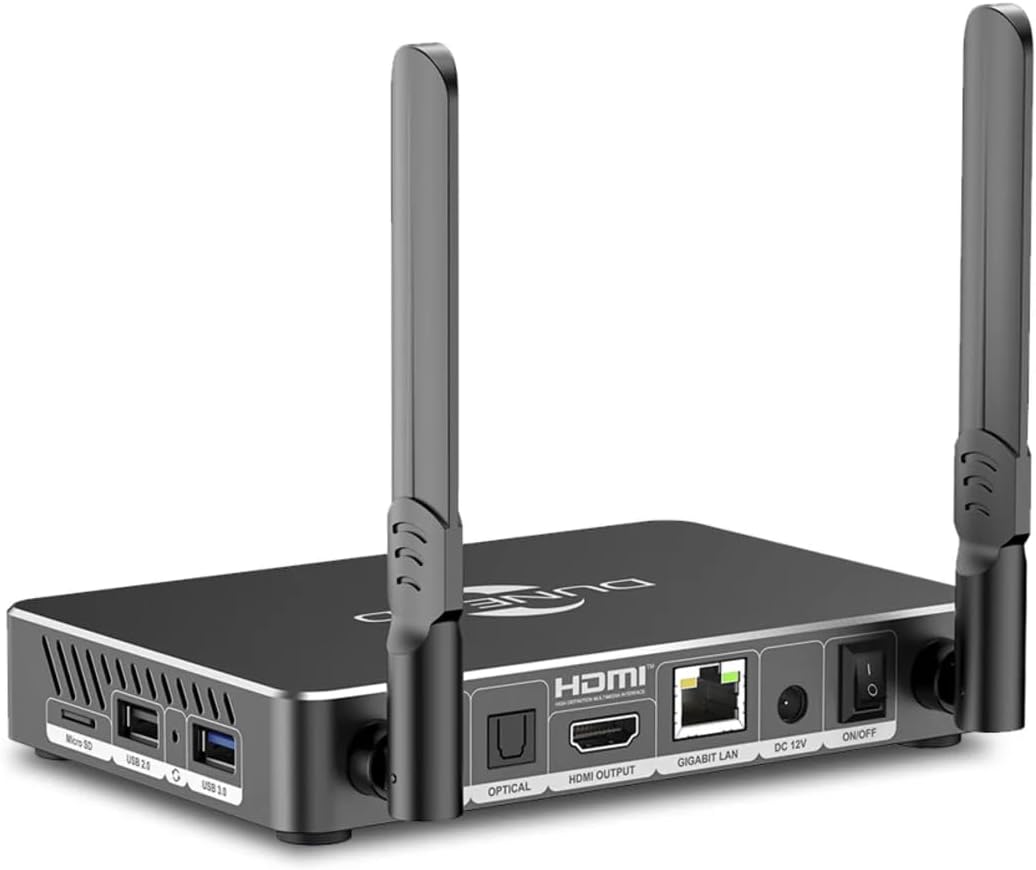
Imej: Belakang view of the Dune HD Pro 8K Plus, highlighting the various connectivity ports including Optical S/PDIF, HDMI Output, Gigabit LAN, DC 12V power input, and power ON/OFF switch.

Imej: Sisi view of the Dune HD Pro 8K Plus, showing the MicroSD card slot, USB 2.0 ports, and a USB 3.0 port.

Image: The Bluetooth remote control for the Dune HD Pro 8K Plus, featuring buttons for power, navigation, media playback, voice search, and IR learning.
For a detailed diagram of the connectors, refer to the image below:

Image: Diagram illustrating the numbered connectors on the Dune HD Pro 8K Plus: 1. MicroSD card slot, 2. USB 2.0 host, 3. Recovery button, 4. USB 3.0 host, 5. 3.5mm analog audio output (stereo), 6. Optical S/PDIF output, 7. HDMI output, 8. Ethernet 10/100/1000 Mbit/s, 9. DC input 12V, 10. Power ON/OFF switch.
3. Persediaan
3.1 Connecting the Media Player
- Sambung ke TV: Use the provided 8K Ultra High Speed HDMI cable to connect the HDMI OUTPUT port on the media player to an HDMI input port on your TV or display.
- Sambung ke Kuasa: Connect the power supply to the DC 12V input port on the media player, then plug the power adapter into a wall outlet.
- Sambungan Rangkaian (Pilihan):
- Berwayar: For a stable connection, connect an Ethernet cable from your router to the GIGABIT LAN port on the media player.
- wayarles: The device supports WiFi6. You can configure Wi-Fi settings after initial boot-up.
- Sambungan Audio (Pilihan): If using an external audio system, connect an optical S/PDIF cable from the OPTICAL port on the media player to your audio receiver, or use the 3.5mm analog audio output.
3.2 Persediaan Kawalan Jauh
- Open the battery compartment on the back of the Bluetooth remote control.
- Masukkan dua bateri AAA, pastikan kekutuban (+/-) betul.
- Close the battery compartment. The remote control is pre-paired with the media player. If pairing is required, follow the on-screen instructions during the first boot or refer to the troubleshooting section.
3.3 First Boot and Initial Configuration
- Pastikan semua sambungan selamat.
- Turn on the media player using the power ON/OFF switch on the rear panel.
- Switch your TV's input source to the corresponding HDMI port.
- Follow the on-screen prompts to complete the initial setup, which may include language selection, network configuration, and system updates.
4. Operasi
4.1 Navigasi Asas
Use the directional pad (up, down, left, right) and the "ENTER" button on the remote control to navigate through the user interface. The "BACK" button returns to the previous screen, and the "HOME" button takes you to the main menu.
4.2 Main Semula Media
- Storan Setempat: Connect USB drives or MicroSD cards to the respective ports. The media player will detect the storage, and you can browse files menggunakan binaan dalam file pengurus.
- Storan Rangkaian: Akses media files from network-attached storage (NAS) or shared folders on your computer via SMB/NFS protocols. Configure network shares in the settings menu.
- Perkhidmatan Penstriman: Utilize pre-installed applications or download new ones from the app store (e.g., YouTube 8K HDR) to access online streaming content.
4.3 Ciri Lanjutan
- Carian Suara: Press the microphone button on the remote control to activate voice search for content or system commands.
- Pembelajaran IR: The remote control supports IR learning, allowing you to program certain buttons to control your TV (e.g., power, volume). Refer to the remote control's specific instructions for this feature.
- Kawalan Apl: Download the Dune HD control application on your smartphone or tablet for an alternative control method.
5. Penyelenggaraan
5.1 Pembersihan
To clean the media player, use a soft, dry cloth. Do not use liquid cleaners, aerosols, or abrasive materials, as these can damage the device. Ensure the device is powered off and unplugged before cleaning.
5.2 Kemas Kini Perisian
Regularly check for and install software updates to ensure optimal performance, security, and access to new features. Updates can typically be found in the system settings menu under "About" or "System Update." Ensure a stable internet connection during updates.
6. Penyelesaian masalah
| Masalah | Kemungkinan Punca | Penyelesaian |
|---|---|---|
| Tiada kuasa | Power cable not connected; power outlet faulty; device off. | Ensure power cable is securely connected. Try a different power outlet. Check the power ON/OFF switch on the rear panel. |
| Tiada gambar di TV | Incorrect HDMI input selected; HDMI cable faulty; TV not compatible. | Select the correct HDMI input on your TV. Try a different HDMI cable. Ensure your TV supports the output resolution (e.g., 8K, 4K). |
| Tiada bunyi | Volume too low; incorrect audio output settings; audio cable faulty. | Increase volume on TV/receiver and media player. Check audio output settings in the media player's menu. Verify audio cable connections. |
| Alat kawalan jauh tidak bertindak balas | Batteries low/dead; remote not paired. | Replace batteries. If the remote is not paired, go to system settings and follow the pairing instructions for Bluetooth devices. |
| Isu sambungan rangkaian | Incorrect Wi-Fi password; router issues; Ethernet cable disconnected. | Verify Wi-Fi password. Restart your router. Check Ethernet cable connection. Ensure DHCP is enabled on your router or configure static IP. |
| Peranti membeku atau ranap | Software glitch; overheating; corrupted data. | Restart the device by unplugging and replugging the power. Ensure adequate ventilation. Perform a factory reset if issues persist (Note: This will erase all data). |
6.1 Tetapan Semula Kilang
If you encounter persistent issues, a factory reset may resolve them. This will restore the device to its original factory settings and erase all user data, installed applications, and configurations.
- Navigasi ke tetapan > Sistem > Tetapkan semula pilihan.
- Pilih Padam semua data (set semula kilang).
- Confirm your choice. The device will restart and begin the reset process.
7. Spesifikasi
| Ciri | Perincian |
|---|---|
| Jenama | Dune HD |
| Nama Model | Pro 8K Plus |
| Nombor Model Item | Pro 8K Plus (D1006) |
| Pemproses | Hi-End version of Amlogic S928X with Dolb Visio VS10 engine |
| CPU | Four 2.0 GHz ARM A55 cores, one 1.9 GHz ARM A76 core |
| GPU | Mali G57 |
| Operating Memory (RAM) | 8GB LPDDR4X |
| Flash Memory (Storage) | 64GB eMMC |
| Wi-Fi | 802.11b/g/n/ac/ax (Wi-Fi 6) 2.4 + 5 GHz, 2T2R |
| Bluetooth | Bluetooth 5.2 |
| Ethernet | Gigabit Ethernet (1 Gbit/s) |
| Port USB | 1x USB 3.0, 2x USB 2.0 |
| Output Video | HDMI 2.1a |
| Sokongan Resolusi | 8Kp60 HDR, 4Kp60, 1080p |
| Output Audio | HDMI, Optical S/PDIF, 3.5mm analog audio jack |
| Perkhidmatan Internet yang Disokong | YouTube (8K HDR supported) |
| Jenis Pengawal | App Control, Bluetooth Remote Control (with Voice Search, IR Learning, AirMouse) |
| Sistem Operasi | Dune HD OS + Android 11.0 |
| Filesystems Supported | FAT16/FAT32, exFAT, NTFS, HFS/HFS+ (Mac OS X), EXT2/EXT3/EXT4, BTRFS |
| Dimensi Produk | 6.3 x 4.53 x 1.02 inci (16 x 11.5 x 2.6 cm) |
| Berat Barang | 2.44 paun (1.11 kg) |
| warna | Hitam |
| Bekalan Kuasa | 12V 2A |
| Tarikh Mula-mula Tersedia | 6 Disember 2024 |
| Alamat MAC | 14:C0:89:92:9A:DD |
| Nombor Siri | FC188B001240900990 |
| Barcode (UPC/EAN) | 4897031343765 |
8. Waranti dan Sokongan
8.1 Maklumat Waranti
This product is covered by a manufacturer's warranty. For specific warranty terms and conditions, please refer to the documentation included with your purchase or contact Dune HD customer support. Protection plans may also be available for extended coverage.
- Polisi Pemulangan: Typically 30 days for refund/replacement from the date of purchase.
- Pelan Perlindungan Pilihan:
- Pelan Perlindungan 2 Tahun
- Pelan Perlindungan 3 Tahun
- Perlindungan Lengkap (langganan bulanan)
8.2 Sokongan Pelanggan
For technical assistance, troubleshooting, or general inquiries, please contact Dune HD customer support.
- rasmi Webtapak: www.dune-hd.com
- Halaman Sokongan: support.dune-hd.com
- Importer Support Email: support@atdbaltics.com
- Dune HD Amazon Store: Visit the Dune HD Store on Amazon
Android ialah tanda dagangan Google LLC.