
E88 Pro
Drone E88 Pro User Manual
Model: E88 Pro | Brand: Generic
1. Pengenalan
Thank you for choosing the Drone E88 Pro. This foldable quadcopter with camera and remote control is designed for aerial photography and videography enthusiasts. Its compact design, advanced features, and user-friendly controls make it an excellent choice for exploring the world from a new perspective. Please read this manual thoroughly before operating the drone to ensure safe and optimal performance.
2. Garis Panduan Keselamatan
Operating a drone requires responsibility. Adhere to the following safety guidelines to prevent injury or damage.
- Semakan Pra-Penerbangan: Always inspect the drone, remote control, and batteries for any damage before each flight.
- Keadaan Persekitaran: Do not fly in strong winds, rain, snow, or fog. Avoid flying near power lines, buildings, or crowded areas.
- Garis penglihatan: Sentiasa mengekalkan garis penglihatan visual dengan dron semasa penerbangan.
- Keselamatan Bateri: Use only the provided charger and batteries. Do not overcharge or puncture batteries. Store batteries in a cool, dry place.
- Keselamatan Kipas: Keep hands, face, and loose clothing away from rotating propellers. Ensure propellers are securely attached before flight.
- Sekatan Umur: This product is recommended for adults.
- Hormati Privasi: Be mindful of privacy laws when capturing aerial footage.
- Pendaratan Kecemasan: In case of emergency, land the drone immediately in a safe, open area.
3. Kandungan Pakej
Sahkan bahawa semua item yang disenaraikan di bawah disertakan dalam pakej anda:
- 1 x Drone E88 Pro
- 1 x Alat Kawalan Jauh
- 1 x Kabel Pengecas USB
- 1 x Manual Pengguna
- Kipas Ganti (kuantiti mungkin berbeza)
- Drone Battery (pre-installed or separate)
- AAA Batteries for Remote Controller (2 included)
4. Pengenalan Komponen
4.1 Drone E88 Pro
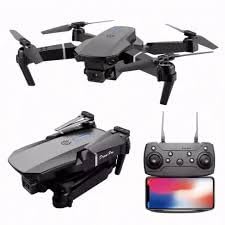
Penerangan Imej: This image displays the Drone E88 Pro in both its unfolded flight configuration and its compact, folded state. Alongside the drone, the remote control is shown with a smartphone mounted in its holder, illustrating the complete operational setup.
- Lengan boleh dilipat: Allow for compact storage and portability.
- Penjual: Empat kipas utama untuk angkat dan tujahan.
- Motor: Power the propellers.
- Kamera HD: Located at the front, capable of capturing photos and videos.
- Petak Bateri: Located on the underside or rear of the drone.
- Lampu Penunjuk LED: Provide status information (e.g., power, pairing, low battery).
4.2 Alat Kawalan Jauh
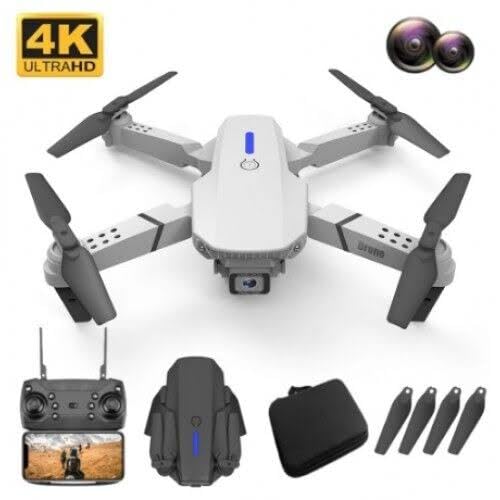
Penerangan Imej: This image features a white version of the Drone E88 Pro, accompanied by its remote control, a carrying case, and a set of spare propellers. This illustrates the typical contents of the product package.
- Kayu Joy Kiri: Mengawal ketinggian (atas/bawah) dan putaran (kiri/kanan).
- Joystick Kanan: Mengawal pergerakan ke hadapan/belakang dan kiri/kanan.
- Butang Pelepasan/Pendaratan Satu Kunci: Memulakan berlepas atau mendarat automatik.
- Butang Mod Tanpa Kepala: Mengaktifkan mod penerbangan tanpa kepala.
- Butang Pulangan Satu Kekunci: Commands the drone to return to its take-off point.
- Butang Suis Kelajuan: Toggles between different flight speeds (e.g., low, medium, high).
- Butang Foto/Video: Menangkap foto atau memulakan/menghentikan rakaman video.
- Butang Kuasa: Menghidupkan/mematikan alat kawalan jauh.
- Pemegang Telefon Pintar: For mounting your smartphone to view FPV (Orang Pertama View) footage.
5. Persediaan
5.1 Mengecas Bateri Dron
- Remove the drone battery from the drone.
- Sambungkan kabel pengecas USB ke bateri.
- Pasangkan hujung kabel USB yang satu lagi ke dalam penyesuai kuasa USB 5V/1A (tidak disertakan) atau port USB komputer.
- Lampu penunjuk pada kabel USB akan menunjukkan status pengecasan (cth., merah untuk pengecasan, padam apabila dicas sepenuhnya).
- Charging typically takes 60-90 minutes. Do not leave unattended while charging.
5.2 Memasang Baling-baling
The drone comes with pre-installed propellers. If replacement is needed, ensure correct orientation. Propellers are marked 'A' and 'B'. Match them to the corresponding motor arms.
5.3 Memasang Bateri Dron
- Pastikan dron dimatikan.
- Insert the fully charged battery into the battery compartment on the drone until it clicks into place.
5.4 Memasang Bateri Alat Kawalan Jauh
- Buka penutup bateri di bahagian belakang alat kawalan jauh.
- Insert 2 x AAA batteries (included) according to the polarity markings (+/-).
- Tutup penutup bateri dengan selamat.
5.5 Memasangkan Dron dan Alat Kawalan Jauh
- Letakkan drone di permukaan rata dan rata.
- Power on the drone by pressing and holding the power button. The drone's LED lights will flash.
- Power on the remote controller. The remote's indicator light will flash.
- Tolak kayu bedik kiri (pendikit) ke atas, kemudian tariknya ke bawah.
- The drone's and remote's indicator lights will stop flashing and become solid, indicating successful pairing.
5.6 App Installation (Optional for FPV)
Untuk FPV (Orang Pertama View) and advanced features, download the dedicated app (e.g., "WiFi_CAM" or similar, refer to packaging for exact app name) from your smartphone's app store (iOS/Android).
- Scan the QR code on the packaging or search for the app name in your app store.
- Pasang apl.
- Connect your smartphone to the drone's Wi-Fi network (usually named "WiFi_UFO" or similar) in your phone's Wi-Fi settings.
- Buka apl ke view suapan kamera langsung dan akses kawalan tambahan.
6. Arahan Operasi
6.1 Pemeriksaan Pra-Penerbangan
- Pastikan dron dan bateri jauh dicas sepenuhnya.
- Periksa bahawa kipas dipasang dengan selamat dan tidak rosak.
- Confirm drone and remote are successfully paired.
- Choose an open, clear area free from obstacles, people, and animals.
6.2 Berlepas dan Mendarat
- Berlepas Manual: After pairing, push both joysticks simultaneously outwards and downwards to unlock the motors. Then, slowly push the left joystick (throttle) up to ascend.
- Berlepas Satu Kunci: Press the One-Key Take-off/Landing button. The drone will automatically ascend to a certain height and hover.
- Pendaratan Manual: Slowly pull the left joystick (throttle) down until the drone lands. Once landed, hold the joystick down for a few seconds until the motors stop.
- Pendaratan Satu Kunci: Press the One-Key Take-off/Landing button again. The drone will automatically descend and land.
6.3 Kawalan Asas Penerbangan
| Kawalan | Tindakan | Penerangan |
|---|---|---|
| Left Joystick Up/Down | Naik/Turun | Controls the drone's altitude. |
| Left Joystick Left/Right | Putar Kiri/Kanan | Controls the drone's yaw (rotation around its vertical axis). |
| Right Joystick Up/Down | Maju/Mundur | Controls the drone's pitch (movement along its longitudinal axis). |
| Right Joystick Left/Right | Fly Left/Right (Sideways) | Controls the drone's roll (movement along its lateral axis). |
6.4 Ciri Lanjutan
- Tahan Ketinggian: The drone will automatically maintain its current altitude when the left joystick is released, providing stable hovering.
- Mod Tanpa Kepala: Press the Headless Mode button. In this mode, the drone's orientation is relative to the pilot, regardless of the drone's actual front. This simplifies control for beginners. Press again to exit.
- Pulangan Satu Kunci: Press the One-Key Return button. The drone will attempt to fly back towards its take-off point. This feature is basic and relies on the drone's internal compass; it is not GPS-accurate. Press any joystick to cancel.
- Suis Kelajuan: Press the Speed Switch button to cycle through different flight speeds (e.g., low, medium, high). Low speed is recommended for beginners.
6.5 Operasi Kamera
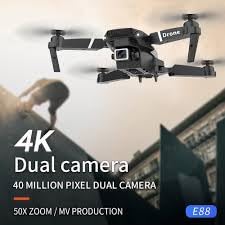
Penerangan Imej: This image shows the Drone E88 Pro in flight, with text overlays highlighting its "4K Dual camera" capability and "40 MILLION PIXEL DUAL CAMERA" feature, emphasizing its high-resolution imaging.
- Mengambil gambar: While flying, press the Photo/Video button once on the remote control to take a photo. The drone's lights may flash to indicate a photo has been taken.
- Rakaman Video: Press and hold the Photo/Video button for 2-3 seconds to start video recording. Press and hold again to stop recording. The drone's lights may flash differently or continuously during recording.
- Viewing Footage: If using the app, photos and videos will be saved directly to your smartphone's gallery. If using an SD card (not included, if applicable), remove the card from the drone and insert it into a card reader to view files pada komputer.
7. Penyelenggaraan
- Pembersihan: Use a soft, dry cloth to clean the drone and remote control. Do not use water or chemical cleaners.
- Penggantian Kipas: If propellers are damaged or bent, replace them immediately with spare parts. Ensure correct 'A' and 'B' propeller types are installed on the correct motor arms.
- Penjagaan Bateri:
- Jangan cas berlebihan atau terlalu nyahcas bateri.
- Simpan bateri di tempat yang sejuk dan kering, jauh daripada cahaya matahari langsung dan haba.
- If storing for extended periods, charge batteries to about 50% capacity.
- Storan: Store the drone and its accessories in a cool, dry environment, preferably in its original packaging or a protective case, away from direct sunlight and extreme temperatures.
8. Penyelesaian masalah
| Masalah | Kemungkinan Punca | Penyelesaian |
|---|---|---|
| Drone tidak bertindak balas kepada alat kawalan jauh. | Tidak berpasangan; bateri rendah; gangguan. | Re-pair drone and remote; charge batteries; move to an area with less interference. |
| Drone hanyut semasa penerbangan. | Not calibrated; uneven surface at take-off; wind. | Calibrate the drone (refer to app or specific remote sequence); take off from a flat surface; avoid flying in windy conditions. |
| Kipas-kipas tidak berputar. | Motors locked; damaged propellers; motor issue. | Unlock motors (joysticks outwards/downwards); replace damaged propellers; contact support if motors are faulty. |
| Suapan kamera terputus-putus atau terputus sambungan. | Weak Wi-Fi signal; too far from drone; app issue. | Ensure strong Wi-Fi connection; fly closer to the drone; restart app and drone. |
| Masa penerbangan yang singkat. | Bateri tidak dicas sepenuhnya; bateri lama; terbang agresif. | Ensure battery is fully charged; consider replacing old batteries; fly more conservatively. |
9. Spesifikasi
| Ciri | Perincian |
|---|---|
| Jenama | Generik |
| Nama Model | E88 Pro |
| Ciri Khas | Headless Mode, Foldable, Wifi Fpv, Altitude Hold |
| Julat Umur (Perihalan) | Dewasa |
| warna | Kelabu |
| Resolusi Tangkapan Video | 1080p |
| Resolusi Pegun Berkesan | 32 MP |
| Teknologi Ketersambungan | Bluetooth, WiFi |
| Komponen yang Disertakan | User Manual, USB Cable, Drone, Remote Controller |
| Tahap Kemahiran | pemula |
| Berat Barang | 220 Gram |
| Kapasiti Bateri | 2 Amp jam |
| Teknologi Kawalan Jauh | 2.4ghz |
| Jenis Kawalan | Alat Kawalan Jauh |
| Jenis Media | Micro SDXC (if applicable, not included) |
| bahan | Plastik, Logam |
| Teknologi Komunikasi Tanpa Wayar | Wi-Fi |
| Komposisi Sel Bateri | Litium Ion |
| Bateri Termasuk | Ya (2 AAA untuk alat kawalan jauh) |
| Format Gambar yang Disokong | JPEG, MP4 |
| Resolusi Keluaran Video | 1080p |
| Dimensi Produk | 25L x 15W x 5H Sentimeter |
| Pengeluar | Riya global |
| Tarikh Mula-mula Tersedia | 2 Disember 2024 |
10. Waranti dan Sokongan
This product is manufactured by Riya global. For any manufacturing defects or issues not covered by troubleshooting, please contact the seller or manufacturer directly.
Please retain your proof of purchase for any warranty claims. Specific warranty terms and conditions may vary by region and retailer.
For further assistance, refer to the contact information provided with your purchase or visit the manufacturer's official webtapak.
Ask a question about this manual
Ask about setup, troubleshooting, compatibility, parts, safety, or missing instructions. Manuals+ will review the question and use this page’s manual context to help answer it.