
1. Pengenalan
Thank you for choosing the MESWAO 15.6 inch Android 14 Tablet Pro. This tablet is designed to provide a superior visual and performance experience with its large Full HD display, powerful octa-core processor, and extended battery life. This manual will guide you through the setup, operation, maintenance, and troubleshooting of your new device, ensuring you get the most out of its advanced features.
2. Apa yang ada di dalam Kotak
Sila semak kandungan pakej anda. Jika ada item yang hilang atau rosak, hubungi sokongan pelanggan.
- 1 x MESWAO 15.6 inch Android Tablet
- 1 x Penyesuai Kuasa
- 1 x Kabel Jenis-C
- 1 x Manual Pengguna
- 1 x Jenis-C ke penyesuai USB
- 1 x Stuck pin (SIM ejector tool)

Image: Visual representation of the MESWAO tablet and its included accessories.
3. Produk Lebihview
3.1 Ciri-ciri Utama
- 15.6-inch 1080P FHD IPS Display: Large screen with 1920x1080p resolution, 16:9 aspect ratio, 85% screen-to-body ratio, and 350 nits adjustable brightness for clear visuals.
- OS Android 14: Latest Android version for faster app launches, intuitive user interface, split-screen multitasking, and GMS certification for Google Play access.
- MediaTek Helio G99 CPU: Octa-core processor (6nm, up to 2.2GHz) and ARM Mali-G57 GPU for smooth performance in multitasking, streaming, and gaming.
- 12,000mAh Mega Battery & 30W Fast Charging: Provides up to 15 hours of video playback and 12+ hours of daily use, with 90% charge in 3 hours.
- RAM 6GB + ROM 128GB (Boleh dikembangkan hingga 1TB): Ample storage for apps, photos, and videos, with expandable memory via microSD card (FAT32 format).
- Dual-band Wi-Fi & Bluetooth 5.0: High-speed 2.4G/5G Wi-Fi and efficient Bluetooth connectivity for peripherals.
- 5MP Front + 32MP Rear Cameras: Capture moments and conduct clear video calls.
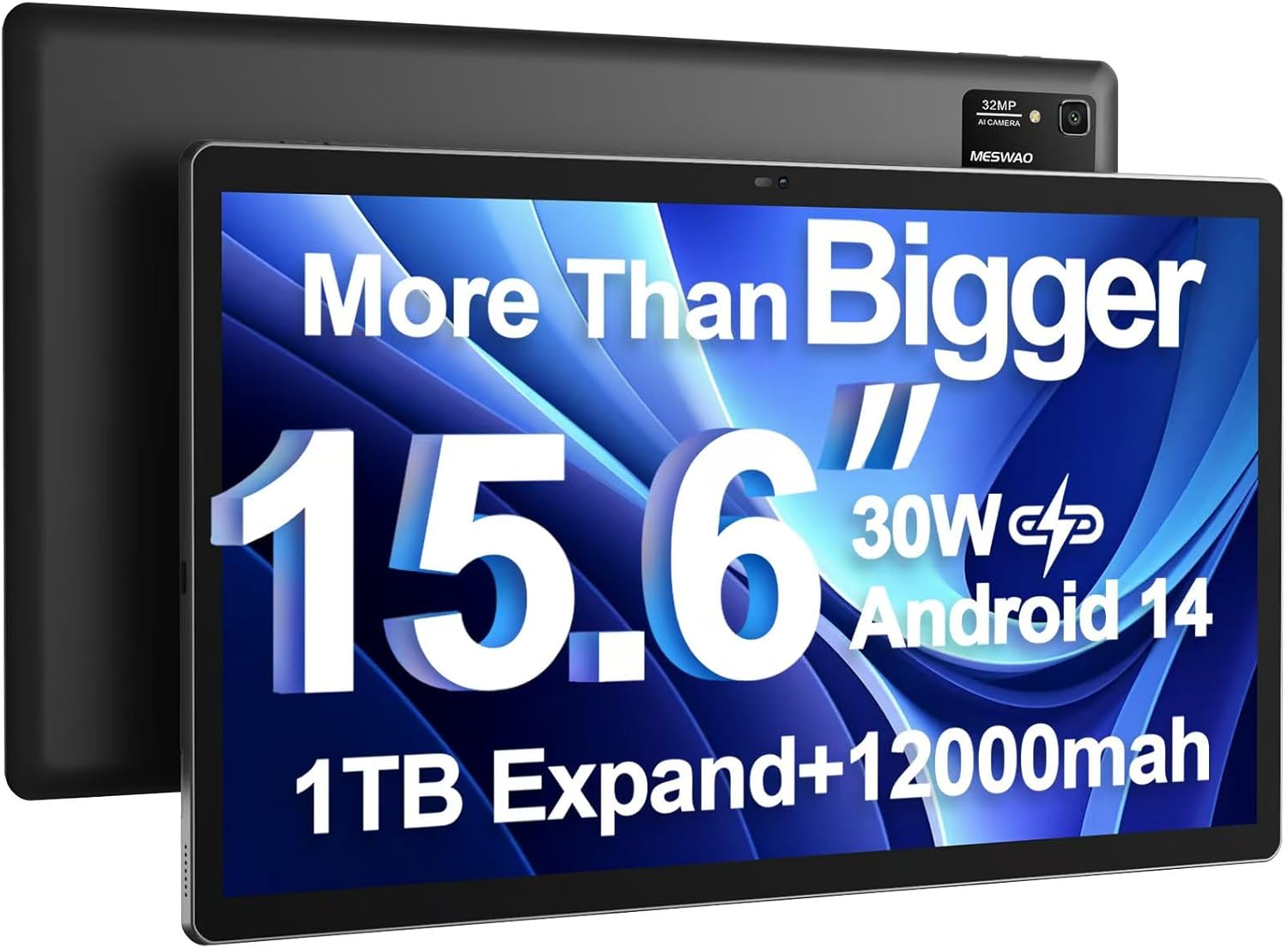
Image: The MESWAO 15.6 inch Android 14 Tablet Pro, showcasing its large display and rear camera module.

Image: Visual comparison highlighting the significantly larger screen area of the 15.6-inch tablet compared to a standard 10-inch tablet.

Image: Illustration of the tablet's 12,000mAh ultra-large capacity battery and 30W fast charging, indicating quick charge times and extended usage.
3.2 Komponen Tablet
Familiarize yourself with the physical components of your MESWAO tablet:
- Butang Kuasa: Terletak di sisi, digunakan untuk menghidupkan/mematikan tablet atau membangunkan/menidurkan skrin.
- Butang Kelantangan: Adjust audio output levels.
- Kamera Depan: Kamera 5MP untuk panggilan video dan swafoto.
- Kamera Belakang: 32MP camera with flash for high-resolution photos and videos.
- Pelabuhan Jenis-C: Untuk pengecasan dan pemindahan data.
- Slot Kad TF: For expanding storage with a microSD card.
- Pembesar Suara Stereo: Quad speakers for enhanced audio experience.
- Bicu Alat dengar 3.5mm: For wired audio connection (requires included Type-C to 3.5mm adapter).
4. Persediaan
4.1 Kuasa Awal Hidup
- Tekan dan tahan butang Butang Kuasa until the MESWAO logo appears on the screen.
- Ikut arahan pada skrin untuk memilih bahasa, rantau dan sambungkan ke rangkaian Wi-Fi anda.
- Sign in with your Google account or create a new one to access Google Play Store and other services.
4.2 Mengecas Tablet
Before first use, fully charge the tablet. Use the provided power adapter and Type-C cable.
- Connect the Type-C cable to the tablet's Type-C port.
- Palamkan penyesuai kuasa ke salur keluar dinding.
- The charging indicator will appear on the screen. A full charge takes approximately 3 hours with the 30W fast charger.
4.3 Memasukkan Kad MicroSD
To expand storage, insert a microSD card (FAT32 format, up to 1TB, sold separately).
- Cari slot kad TF di sisi tablet.
- Use the provided stuck pin to gently press into the small hole next to the slot to eject the tray.
- Place the microSD card into the tray with the gold contacts facing down.
- Masukkan semula dulang dengan berhati-hati ke dalam slot sehingga ia berbunyi klik pada tempatnya.
5. Arahan Operasi
5.1 Navigasi Asas
- Skrin Utama: Leret ke kiri atau kanan untuk menavigasi antara skrin utama.
- Laci Apl: Access all installed applications (if using a launcher with an app drawer, otherwise apps are on home screens).
- Pemberitahuan & Tetapan Pantas: Leret ke bawah dari bahagian atas skrin untuk mengakses pemberitahuan dan togol tetapan pantas (Wi-Fi, Bluetooth, Kecerahan, dsb.).
- Apl Terbaharu: Tap the square icon (or swipe up and hold from the bottom if using gesture navigation) to view dan bertukar antara aplikasi yang digunakan baru-baru ini.
5.2 Multitasking with Split Screen
The Android 14 OS supports split-screen functionality for enhanced productivity.
- Buka apl pertama yang anda mahu gunakan.
- Go to the Recent Apps view.
- Tap the app icon at the top of the first app's card and select 'Split screen'.
- Choose the second app from your recent apps or app drawer to open it in the other half of the screen.
- Adjust the size of each app by dragging the divider in the middle.

Imej: Selesaiview of key features of the Android 14 operating system on the tablet, including multitasking capabilities.
5.3 Ketersambungan
- Wi-Fi: Pergi ke Tetapan > Rangkaian & Internet > Wi-Fi to connect to available networks. Supports 2.4Ghz and 5Ghz bands.
- Bluetooth: Pergi ke Tetapan> Peranti yang disambungkan> Pilihan sambungan> Bluetooth to pair with Bluetooth headphones, keyboards, or other devices.
- Hantaran Skrin: The tablet supports wireless screen casting to compatible displays. Access this feature from Quick Settings or Settings > Connected devices > Connection preferences > Cast.

Image: Depiction of the tablet's stable dual-band Wi-Fi and Bluetooth 5.0 capabilities, enabling seamless wireless connections.
6. Penyelenggaraan
6.1 Penjagaan Bateri
- Elakkan suhu yang melampau (panas atau sejuk) kerana ia boleh menjejaskan jangka hayat bateri.
- Jangan biarkan bateri kehabisan kuasa sepenuhnya dengan kerap. Cas sebelum mencapai 0%.
- Use only the provided charger or a certified 30W PD fast charger.
6.2 Pembersihan
- Gunakan kain lembut dan tidak berbulu untuk membersihkan skrin dan badan.
- Untuk calitan degil, sedikit dampen kain dengan air atau pembersih skrin. Elakkan bahan kimia yang keras.
- Do not spray liquids directly onto the tablet.
6.3 Kemas Kini Perisian
Semak dan pasang kemas kini sistem secara kerap untuk memastikan prestasi dan keselamatan yang optimum.
- Connect your tablet to a stable Wi-Fi network.
- Pergi ke Tetapan > Sistem > Kemas kini sistem.
- Ikut arahan pada skrin untuk memuat turun dan memasang sebarang kemas kini yang tersedia.
7. Penyelesaian masalah
Jika anda menghadapi masalah dengan tablet anda, rujuk kepada penyelesaian biasa berikut:
| Masalah | Kemungkinan Punca | Penyelesaian |
|---|---|---|
| Tablet tidak dapat dihidupkan | Bateri lemah; Ranap sistem | Cas tablet selama sekurang-kurangnya 30 minit. Tekan dan tahan butang Kuasa selama 10-15 saat untuk memaksa mulakan semula. |
| Slow performance/Lag | Terlalu banyak aplikasi yang berjalan; Storan rendah; Perisian ketinggalan zaman | Close background apps. Clear cache. Free up storage. Check for system updates. |
| Isu sambungan Wi-Fi | Kata laluan salah; Isu penghala; Wi-Fi tablet dimatikan | Ensure Wi-Fi is on. Re-enter password. Restart router. Forget and reconnect to network. |
| Bateri cepat habis | High screen brightness; Background apps; Heavy usage | Reduce screen brightness. Close unused apps. Limit background data. Check battery usage in settings. |
| Touchscreen unresponsive/Phantom touches | Temporary software glitch; Defective unit | Restart the tablet. If the issue persists, contact MESWAO customer support for assistance. |
If the problem persists after trying these solutions, please contact MESWAO customer support for further assistance.
8. Spesifikasi
| Ciri | Perincian |
|---|---|
| Nama Model | MES-B3 Pro |
| Sistem Operasi | Android 14 |
| Saiz Skrin | 15.6 Inci |
| Resolusi Skrin | 1920 x 1080 piksel (HD Penuh IPS) |
| Pemproses | MediaTek Helio G99 Octa-core (up to 2.2GHz) |
| Pemproses bersama Grafik | ARM Mali-G57 |
| RAM | 6 GB |
| Storan Dalaman (ROM) | 128 GB |
| Storan Boleh Dikembangkan | Up to 1TB via MicroSD card (FAT32 format) |
| Kapasiti Bateri | 12,000mAh |
| Hayat Bateri (Purata) | 13 Hours (up to 15 hours video playback) |
| Mengecas | Pengecasan Pantas PD 30W |
| Kesambungan Wayarles | 802.11a/b/ac/ax (2.4G/5G Dual-band Wi-Fi), Bluetooth 5.0 |
| Kamera Depan | 5MP |
| Kamera Belakang | 32MP |
| Berat Barang | 4.42 paun (lebih kurang 2 kg) |
| Dimensi Produk | 14.49 x 8.66 x 0.39 inci (36.8 x 22 x 1 cm) |
9. Waranti dan Sokongan
MESWAO products come with a standard manufacturer's warranty. Please refer to the warranty card included in your package for specific terms and conditions. For technical support, troubleshooting assistance, or warranty claims, please contact MESWAO customer service through the contact information provided on the official MESWAO webtapak atau platform pembelian anda.
Maklumat Hubungan: Please visit the official MESWAO website or refer to the support card included in your product packaging for the most up-to-date contact details.