
pengenalan
This manual provides essential information for the safe and efficient operation of your SCULPFUN S9 PRO 10W Laser Engraver. The S9 PRO features 10W laser beam shaping technology, offering a 0.06mm ultra-fine laser focus for strong cutting penetration and precision. It is capable of cutting materials such as 15mm thick wood and 10mm acrylic, and engraving ceramics and stainless steel. Please read this manual thoroughly before use to ensure proper setup, operation, and maintenance.

Maklumat Keselamatan
Operating a laser engraver involves potential hazards. Adhere to all safety guidelines to prevent injury or damage.
- Perlindungan Mata: Always wear appropriate laser safety glasses when operating the machine. The integrated laser filter on the S9 PRO blocks 98% of ultraviolet light, allowing observation without additional safety glasses for bystanders, but direct laser exposure should always be avoided.
- Suis kuasa: The machine is equipped with a secure power switch. Always turn off the machine when not in use or during maintenance.
- Penempatan Selamat: Utilize the fastening holes on the four feet and frame structure to secure the machine and data cables, preventing accidental movement.
- Perlindungan Permukaan: Use the provided A4-sized steel pad to protect your work surface from laser damage.
- Pengudaraan: Ensure adequate ventilation in your workspace to dissipate fumes produced during engraving and cutting.
- Bahan mudah terbakar: Do not engrave or cut highly flammable materials without proper precautions.
- Kanak-kanak dan Haiwan Kesayangan: Keep children and pets away from the operating area. The laser point can attract attention, but direct exposure is dangerous.

Kandungan Pakej
Sahkan bahawa semua komponen hadir semasa membongkar:
- 1 x SCULPFUN S9 Pro 10 W Laser Engraver
- A4-sized steel pad
- Penyesuai kuasa
- Kabel USB
- Alat pemasangan
- Manual Pengguna (dokumen ini)
Panduan Persediaan
1. Perhimpunan
The SCULPFUN S9 PRO features a fast assembly design, allowing for installation typically within 10 to 20 minutes. Follow the steps below:
- Langkah 1: Assemble the main frame components.
- Langkah 2: Attach the X-axis and laser module to the frame.
- Langkah 3: Sambungkan semua kabel yang diperlukan.
- Selesai: Pastikan semua sambungan kukuh dan rangka stabil.
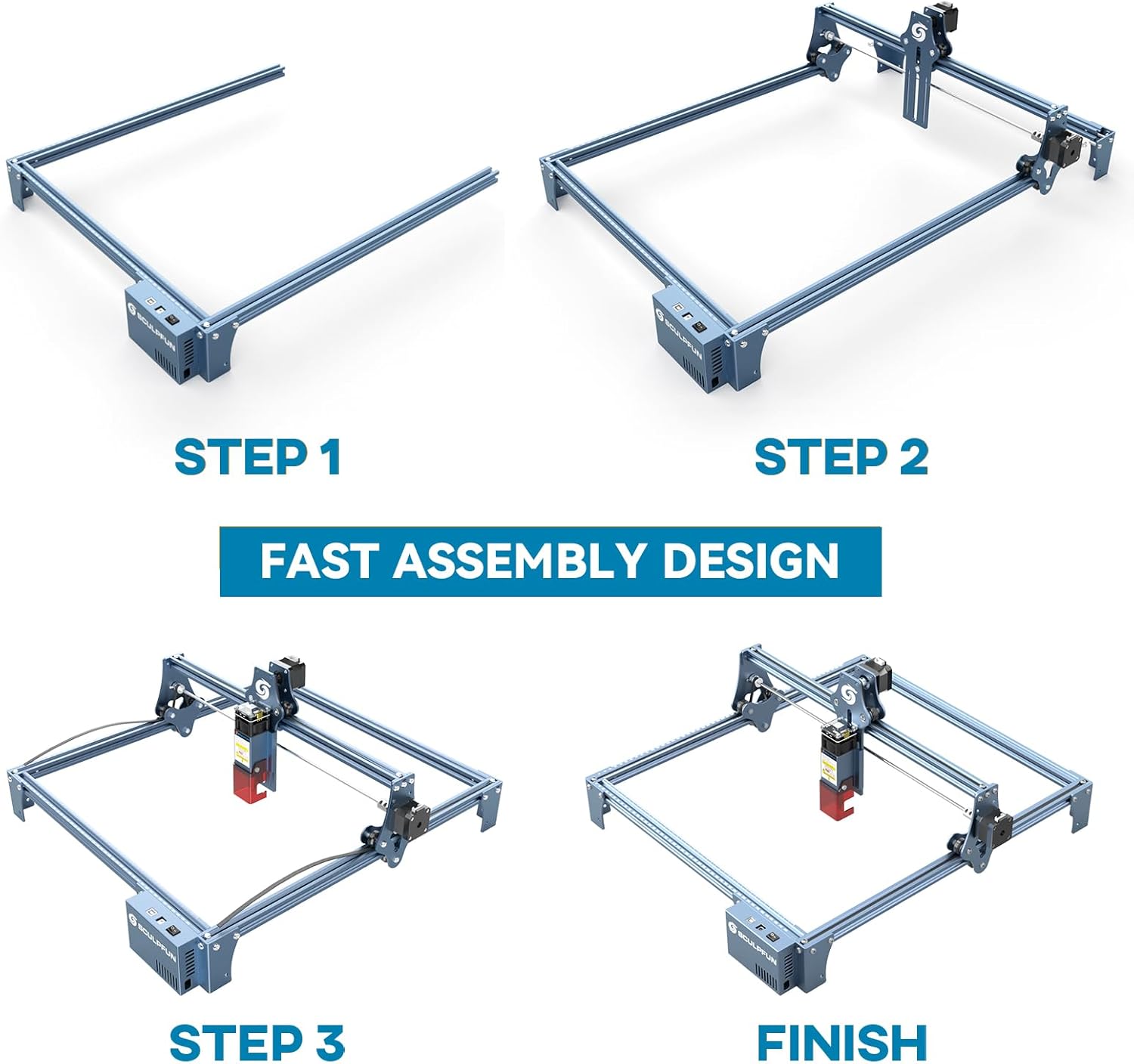
The full-metal structure enhances robustness and engraving accuracy. The X and Y axes include precise scale lines, forming a rectangular measuring ruler for quick object sizing.


2. Pelarasan Fokus
The S9 PRO features a quick fixed-focus design. The laser combines a fixed-focus lens with a sliding design for easy adjustment.
- Place the laser module over your material.
- Move the laser module up or down until the focus is achieved.
- Tighten the screws to secure the laser module in place.

Arahan Operasi
1. Keserasian Perisian
The SCULPFUN S9 PRO is compatible with various advanced engraving software:
- LaserGRBL (Windows)
- LightBurn (Windows, macOS, Linux)
- Benbox
- Pengawal Grbl
- LiteFire
It supports engraving in PWM mode and various file formats including JPG, PNG, DXF, SVG, AI, G-code, NC, and BMP.

2. Material Capabilities
The 10W laser module provides strong cutting and engraving capabilities across a wide range of materials:
- Memotong: Up to 15mm thick wood, 10mm black acrylic.
- ukiran: Wood, leather, ceramics, stainless steel, aluminum oxide, PCB board, paper, cardboard, dark stone, and more.


3. General Operation Workflow
- Reka bentuk: Create or import your design using compatible software (e.g., LightBurn, LaserGRBL).
- Peletakan Bahan: Place your material on the work surface, ensuring it is flat and secure. Use the integrated rulers for precise positioning.
- Pelarasan Fokus: Adjust the laser focus as described in the Setup section.
- Tetapan Perisian: Configure laser power, speed, and passes in your chosen software according to the material and desired effect. Refer to software documentation for detailed settings.
- Mulakan Operasi: Initiate the engraving or cutting process from the software. Monitor the machine during operation.
- penyiapan: Once the process is complete, turn off the machine and carefully remove your finished piece.
Penyelenggaraan
Regular maintenance ensures optimal performance and extends the lifespan of your SCULPFUN S9 PRO.
- Bersihkan Kanta Laser: Periodically clean the laser lens with a soft, lint-free cloth and lens cleaning solution to maintain laser precision.
- Clean the Work Area: Remove debris and dust from the engraving area after each use to prevent interference with machine movement.
- Inspect Belts and Rails: Check the drive belts for tension and wear. Keep the guide rails clean and lubricated if necessary to ensure smooth movement of the laser module.
- Kemas kini Firmware: Check the official SCULPFUN weblaman web untuk sebarang kemas kini perisian tegar yang tersedia bagi memastikan mesin anda mempunyai ciri dan penambahbaikan terkini.
Menyelesaikan masalah
Bahagian ini menangani isu biasa yang mungkin anda hadapi.
- Laser Tidak Menyala:
- Check if the power cable is securely connected and the power switch is on.
- Verify that the USB cable is connected to your computer and the machine.
- Ensure the software is correctly configured and sending commands.
- Check the laser module connection.
- Kualiti Ukiran/Pemotongan yang Buruk:
- Re-check the laser focus. An incorrect focus is a common cause of poor quality.
- Adjust laser power and speed settings in your software. Different materials require different settings.
- Pastikan bahan tersebut rata dan diletakkan dengan kukuh.
- Bersihkan kanta laser jika ia kelihatan kotor.
- Machine Not Moving Correctly:
- Check for any obstructions on the rails or belts.
- Ensure belts are properly tensioned and not slipping.
- Verify that all cables are securely connected.
- Mulakan semula perisian dan mesin.
- Isu Sambungan Perisian:
- Pastikan port COM yang betul dipilih dalam perisian anda.
- Try restarting your computer and the engraver.
- Reinstall the software or drivers if necessary.
For persistent issues, refer to the SCULPFUN support webtapak atau hubungi perkhidmatan pelanggan.
Spesifikasi
| Jenama | SCULPFUN |
| Nombor Model | S9PRO10W-ELE |
| Kuasa Laser | 10W (Laser Diod) |
| Fokus Laser | 0.06mm (Ultrafine) |
| Ketepatan Ukiran | 0.01mm |
| Kawasan Ukiran | 400 x 410 mm |
| Sumber Kuasa | AC |
| Dimensi Pakej | 61.79 x 38.4 x 13.4 cm |
| Berat Pakej | 4.95 kg |
| Komponen yang Disertakan | 1 x SCULPFUN S9 Pro 10 W laser engraver |
| Keserasian Perisian | LaserGRBL, LightBurn, Benbox, GrblController, LiteFire |
| OS yang disokong | Windows, macOS, Linux |
| Disokong File Format | JPG, PNG, DXF, SVG, AI, G-code, NC, BMP |
Waranti dan Sokongan
For warranty information, technical support, or service inquiries, please contact SCULPFUN customer support through their official webtapak atau peruncit tempat produk dibeli. Simpan resit pembelian anda sebagai bukti pembelian.
Pengeluar: SCULPFUN
Tarikh Pertama Tersedia: 29 November 2024