
1. Pengenalan
This manual provides essential information for the proper setup, operation, maintenance, and troubleshooting of your Meizu mblu 21 4G LTE smartphone. Please read this manual thoroughly before using your device to ensure optimal performance and longevity.
The Meizu mblu 21 features a 6.79-inch HD display, a 13MP dual camera system, and runs on Android 14. It is designed for efficient performance and reliable connectivity.
2. Persediaan
2.1 Kandungan Pakej
Sahkan bahawa pakej anda mengandungi item berikut:
- Meizu mblu 21 Smartphone
- Penyesuai Kuasa
- Panduan Mula Pantas (jika disertakan)
2.2 Pemasangan Kad SIM dan Kad MicroSD
The Meizu mblu 21 supports Dual Nano SIM cards and a MicroSD card for expandable storage.
- Cari dulang SIM di sisi peranti anda.
- Insert the SIM ejector tool (not included, use a thin pin if necessary) into the small hole on the SIM tray to eject it.
- Place your Nano SIM card(s) and/or MicroSD card into the designated slots on the tray, ensuring proper orientation.
- Masukkan semula dulang SIM dengan berhati-hati ke dalam telefon sehingga ia berbunyi klik pada tempatnya.
2.3 Initial Power On and Network Configuration
- Press and hold the power button until the Meizu logo appears.
- Ikut gesaan pada skrin untuk melengkapkan persediaan awal, termasuk pemilihan bahasa, sambungan Wi-Fi dan persediaan akaun Google.
- For cellular connectivity, ensure your SIM card is active. This device is an international version and in the USA market, it operates exclusively on T-Mobile's 4G LTE network. Outside the USA, it is compatible with various carriers worldwide.
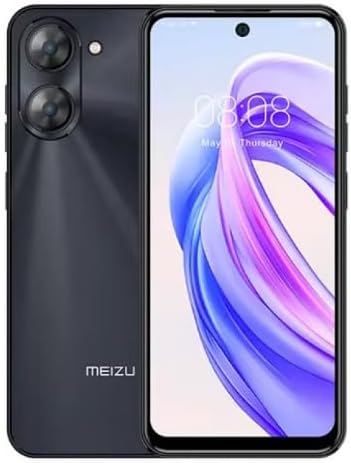
Imej 2.3.1: Depan dan belakang view of the Meizu mblu 21 smartphone. The front displays the screen with a punch-hole camera, while the rear shows the dual camera module and the Meizu branding.
3. Arahan Operasi
3.1 Navigasi Asas (Android 14)
Your Meizu mblu 21 runs on Android 14, offering an intuitive user experience. Use gestures or on-screen navigation buttons to move between apps, access settings, and manage notifications.
3.2 Penggunaan Kamera
The device features a 13MP Smart Camera on the rear and an 8MP front camera. Open the Camera app to capture photos and videos. Utilize various modes and settings for optimal results.
3.3 Ciri Keselamatan
Unlock your device using the side-mounted fingerprint sensor for instant access or the 8MP front camera for Smart Face Unlock.
3.4 Ketersambungan
- Wi-Fi: Supports Dual-Band Wi-Fi (2.4GHz and 5GHz) for stable internet access.
- Bluetooth: Bluetooth 5.0 for connecting to wireless accessories.
- VoLTE: Enjoy clearer voice calls with VoLTE HD Calls.

Imej 3.4.1: Visual representation of key connectivity and operating system features, including Android 14, Dual-Band Wi-Fi, Bluetooth 5.0, and VoLTE HD Calls.
4. Penyelenggaraan
4.1 Penjagaan Am
- Pastikan peranti anda kering dan jauh dari suhu yang melampau.
- Bersihkan skrin dan badan dengan kain lembut dan tidak berbulu. Elakkan bahan kimia yang keras.
- Protect the screen with a screen protector and the body with a protective case to prevent scratches and damage.
4.2 Pengurusan Bateri
The 4900mAh battery is designed for all-day performance. To prolong battery life:
- Elakkan menyahcas sepenuhnya bateri dengan kerap.
- Gunakan penyesuai kuasa yang disediakan untuk mengecas.
- Optimize background app usage and screen brightness in settings.

Imej 4.2.1: Satu dalaman view of the Meizu mblu 21 smartphone highlighting the 4900mAh battery, emphasizing its capacity for extended use.
5. Penyelesaian masalah
5.1 Isu dan Penyelesaian Biasa
- Peranti tidak dihidupkan: Pastikan bateri telah dicas. Sambungkan ke penyesuai kuasa dan cuba lagi.
- Isu sambungan rangkaian: Check if your SIM card is properly inserted and active. Verify network settings and ensure you are within T-Mobile's coverage area in the USA.
- Prestasi perlahan: Tutup aplikasi latar belakang yang tidak diperlukan. Kosongkan cache dan sementara files. Restart the device.
- Bateri cepat habis: Reduce screen brightness, disable unused features like Bluetooth or GPS, and check for power-intensive apps.
If problems persist, consider performing a factory reset (back up your data first) or contacting customer support.
6. Spesifikasi
| Nombor Model | M416L |
| Sistem Operasi | Android 14 |
| Paparan | 6.79 Inches HD, 2340 x 1080 Resolution, 90Hz Adaptive Refresh Rate |
| Pemproses | Octa Core 1.6GHz ARM Mali-G57 |
| Ingatan | 64 GB Internal Storage, 4 GB RAM |
| Bateri | 4900mAh (4.9E+3 Milliamp Hours) Lithium Polymer |
| Kamera Belakang | 13MP Smart Camera, 5P Precision Lens |
| Kamera Depan | 8MP |
| Teknologi Selular | 4G LTE FDD: 2,3,4,5,7,8,12,17,26,28,66; 3G WCDMA: 2/4/5/8; 2G Quad Band |
| Jenis SIM | Dual Nano SIM + MicroSD |
| Wi-Fi | Dwi-Jalur (2.4GHz & 5GHz) |
| Bluetooth | 5.0 |
| Bicu Audio | USB Jenis C |
| Berat Barang | 14 auns |
| ID FCC | 2ANQ6-M416L |

Imej 6.1: The Meizu mblu 21 smartphone presented in its Titan Black color variant, showcasing reka bentuknya.
7. Waranti dan Sokongan
For warranty information, please refer to the warranty card included with your product or consult the retailer where the device was purchased. Meizu provides support for its products. For further assistance, please visit the official Meizu webtapak atau hubungi perkhidmatan pelanggan mereka.