
1. Pengenalan
This manual provides essential information for the safe and efficient operation of your Meizu mblu 21 smartphone. Please read it thoroughly before using the device.
The Meizu mblu 21 features a Prism Edge Design with a radiant gradient and a large immersive 6.79-inch HD display. It is equipped with a 13MP main camera and an 8MP front camera, powered by Android 14. The device includes a 4900mAh battery for extended use and supports 4G LTE connectivity, Dual-Band Wi-Fi, and Bluetooth 5.0.
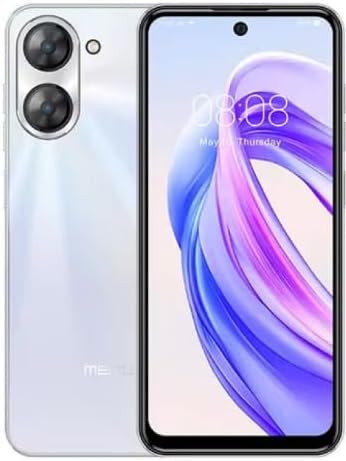
Rajah 1.1: Depan dan belakang view of the Meizu mblu 21 smartphone in White Diamond color.
2. Apa yang ada di dalam Kotak
Sahkan bahawa semua item terdapat dalam pakej:
- Meizu mblu 21 Smartphone
- Penyesuai Kuasa
- Kabel USB
- Alat Ejector SIM
- Panduan Mula Pantas

Figure 2.1: Meizu mblu 21 smartphone alongside its power adapter.
3. Persediaan
3.1. Memasukkan Kad SIM dan Kad MicroSD
The Meizu mblu 21 supports Dual Nano SIM cards and a MicroSD card for expandable storage. Locate the SIM tray on the side of the device.
- Power off the device before inserting or removing SIM/MicroSD cards.
- Gunakan alat ejector SIM yang disediakan untuk membuka dulang SIM.
- Carefully place the Nano SIM cards and/or MicroSD card into the designated slots on the tray, ensuring correct orientation.
- Tolak dulang kembali ke dalam peranti dengan lembut sehingga rata.
3.2. Kuasa Awal Hidup dan Wizard Persediaan
- Press and hold the Power button until the Meizu logo appears.
- Follow the on-screen instructions to complete the initial setup, including selecting your language, connecting to a Wi-Fi network, and setting up your Google account.
4. Mengendalikan Peranti Anda
4.1. Paparan dan Navigasi
The 6.79-inch HD display features a 90Hz adaptive refresh rate for smooth visuals. Navigate the interface using touch gestures: tap, swipe, pinch-to-zoom.
4.2. Fungsi Kamera
The device is equipped with a 13MP main camera and an 8MP front camera. Open the Camera application to capture photos and videos.
- 13MP Smart Camera: Ideal for capturing everyday moments with sharpness and true-to-life colors.
- Kamera Depan 8MP: Designed for clear selfies and video calls.
4.3. Ciri-ciri Keselamatan
- Side Unlock: A fast and secure fingerprint sensor integrated into the side power button for instant access.
- Smart Face Unlock: Use the front camera to unlock your device quickly and conveniently.
4.4. Ketersambungan
Your mblu 21 supports various connectivity options:
- 4G LTE: For mobile data connectivity. In the USA, this device is compatible with T-Mobile. Outside the USA, it works with any carrier worldwide.
- Wi-Fi Dwi-Jalur: Supports both 2.4GHz and 5GHz bands for seamless internet access.
- Bluetooth 5.0: For connecting wireless accessories with improved energy efficiency.
- VoLTE HD Calls: Enjoy sharper, clearer voice calls over LTE networks.

Figure 4.1: Key technology features of the Meizu mblu 21, including Android 14, Dual-Band Wi-Fi, Bluetooth 5.0, and VoLTE.
5. Penyelenggaraan
5.1. Penjagaan Bateri
The mblu 21 is equipped with a 4900mAh battery. To maximize battery lifespan:
- Elakkan suhu yang melampau.
- Use only the provided power adapter or certified compatible chargers.
- Elakkan menyahcas sepenuhnya bateri dengan kerap.

Gambar 5.1: Dalaman view of the Meizu mblu 21, showcasing the 4900mAh battery and internal components.
5.2. Membersihkan Peranti Anda
Gunakan kain lembut dan tidak berbulu untuk membersihkan skrin dan badan telefon. Elakkan menggunakan bahan kimia yang keras atau bahan yang melelas.
5.3. Kemas Kini Perisian
Regularly check for and install software updates to ensure optimal performance and security. Updates can be found in the device's settings menu.
6. Penyelesaian masalah
If you encounter issues with your Meizu mblu 21, try the following solutions:
- Peranti Tidak Membalas: Tekan dan tahan butang Kuasa selama kira-kira 10-15 saat untuk memaksa mulakan semula.
- Isu Ketersambungan Rangkaian:
- Pastikan kad SIM dimasukkan dengan betul.
- Hidupkan dan matikan Mod Pesawat.
- Check network settings (APN, preferred network type).
- Bateri Habis Cepat:
- Tutup apl yang tidak digunakan yang berjalan di latar belakang.
- Kurangkan kecerahan skrin.
- Disable unnecessary features like GPS or Bluetooth when not in use.
- Isu Prestasi:
- Clear cache and data of problematic apps.
- Free up storage space.
- Consider a factory reset (Note: This will erase all data on your device. Back up important data first.).
7. Spesifikasi
| Ciri | Perincian |
|---|---|
| Nama Model | mblu 21 |
| Nombor Model | M416L |
| Sistem Operasi | Android 14 |
| Saiz Skrin | 6.79 Inci |
| Kapasiti Penyimpanan Memori | 64 GB |
| Saiz Terpasang Memori RAM | 4 GB |
| Kapasiti Bateri | 4900 Miliamp jam |
| Kamera Utama | 13 MP |
| Kamera Depan | 8 MP |
| Wireless Carrier (USA) | T-Mobile |
| Teknologi Selular | 4G LTE |
| Teknologi Ketersambungan | 4G, Dual-Band Wi-Fi, Bluetooth 5.0 |
| Berat Barang | 14 auns |
| Dimensi Pakej | 7 x 4 x 2 inci |
| warna | White Diamond |
8. Waranti dan Sokongan
Your Meizu mblu 21 smartphone comes with a manufacturer's warranty. Please refer to the warranty card included in your product packaging for specific terms and conditions.
For technical support, service, or further inquiries, please contact Meizu customer support through their official channels. Contact information can typically be found on the manufacturer's webtapak atau dalam dokumentasi produk.