
IPASON G-SLIM
IPASON G-SLIM Desktop PC User Manual
Model: G-SLIM | Brand: IPASON
1. Produk Lebihview
The IPASON G-SLIM Desktop PC is a high-performance, space-saving computer designed for both personal and business use. It features a slim tower design, powered by a 12th Gen Intel Core i3 processor, and equipped with a high-speed NVMe M.2 SSD for rapid data access and system responsiveness. This PC comes pre-installed with Windows 11, offering the latest operating system features and security.

Rajah 1: Depan view of the IPASON G-SLIM Desktop PC, showcasing reka bentuknya yang padat dan anggun.
Key features include a functional slim design with conveniently located front USB and headphone jacks, eliminating the need for extended cables. It boasts robust performance suitable for multi-tasking, thanks to its ample memory and the high-speed NVMe SSD, which offers significantly faster transfer speeds compared to traditional SATA SSDs.
2. Ciri-ciri Utama dan Reka Bentuk
2.1 Slim and Functional Design
The G-SLIM PC is engineered with a focus on functional beauty and space efficiency. Its compact dimensions make it ideal for various environments, from home offices to business settings, without compromising on performance.

Figure 2: Detailed dimensions of the IPASON G-SLIM Desktop PC, illustrating its compact form factor (100mm width x 336mm depth x 350mm height).
2.2 High Performance for Business and Personal Use
Equipped with a balanced CPU (Intel Core i3 12th Gen) and ample memory, the G-SLIM ensures stable high performance for various applications, from daily productivity tasks to more demanding business scenarios. The large capacity memory allows for comfortable multi-tasking, handling numerous applications simultaneously with ease.

Figure 3: The IPASON G-SLIM Desktop PC integrated into a business environment, demonstrating its suitability for professional use.
2.3 Advanced Storage and Operating System
The PC utilizes a PCIe Gen3 NVMe SSD, providing significantly faster data transfer speeds compared to traditional SATA SSDs, ensuring quick boot times and application loading. It comes with the latest Windows 11 operating system, offering a refreshed user interface, enhanced multitasking features like Snap Layouts, and improved widget functionality.
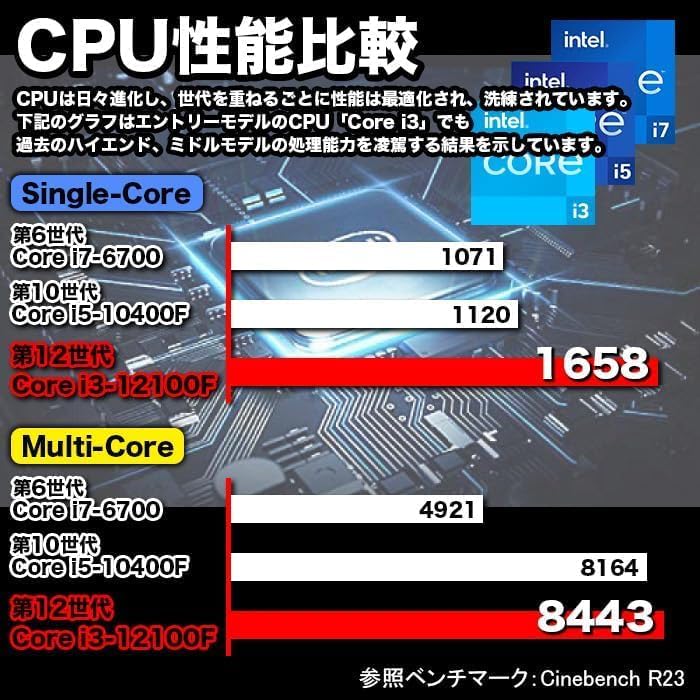
Figure 4: A visual representation of the Windows 11 operating system, highlighting its modern interface and features.
2.4 Performance Benchmarks and Quality Assurance
The G-SLIM's CPU performance is optimized for efficiency. IPASON ensures product reliability through rigorous testing, including 3C Certification, 6-sided drop tests, compatibility tests, degradation/durability tests, and high-load temperature control and noise tests, all conducted under strict standards.

Figure 5: A chart comparing CPU performance (Single-Core and Multi-Core) across different generations of Intel Core processors, demonstrating the G-SLIM's capabilities.

Figure 6: Visual representation of the strict quality control tests the IPASON G-SLIM undergoes, ensuring reliability and stability.
3. Panduan Persediaan
Follow these steps to set up your IPASON G-SLIM Desktop PC:
- Membongkar: Carefully remove the PC and all accessories from the packaging. Ensure all components listed in the packing list are present.
- penempatan: Place the PC on a stable, flat surface with adequate ventilation. Avoid placing it in direct sunlight or near heat sources.
- Sambung Peranti:
- Connect your monitor to the appropriate video output port (e.g., HDMI, DisplayPort) on the back of the PC.
- Sambungkan papan kekunci dan tetikus anda ke port USB yang tersedia.
- Jika menggunakan rangkaian berwayar, sambungkan kabel Ethernet ke port LAN.
- Sambungkan pembesar suara atau fon kepala ke bicu output audio.
- Sambungan Kuasa: Connect the provided power cable to the power input on the back of the PC, then plug the other end into a power outlet.
- But Pertama: Press the power button on the front of the PC. The system will boot into Windows 11. Follow the on-screen instructions for initial setup, including language, region, and network configuration.
Nota: The PC comes with Windows 11 pre-installed and WPS Office for productivity tasks, offering high compatibility with Microsoft Office formats.
4. Arahan Operasi
Your IPASON G-SLIM PC is ready for use after initial setup. Here are some general operating guidelines:
- Hidupkan/Mati Kuasa: Press the power button to turn on the PC. To shut down, click the Start button in Windows 11, then select Power > Shut down.
- Pelabuhan Panel Depan: Utilize the conveniently located USB ports and headphone jack on the front panel for easy access to connect external devices like USB drives, external hard drives, or headphones.
- Berbilang tugas: Ambil advantage of Windows 11's enhanced multitasking features, such as Snap Layouts, to efficiently arrange multiple application windows on your screen.
- Pejabat WPS: The pre-installed WPS Office suite provides essential word processing, spreadsheet, and presentation tools. It is fully compatible with Microsoft Office file format.
- Kesambungan Internet: Connect to the internet via the wired LAN port for stable and high-speed network access.
5. Penyelenggaraan
Regular maintenance helps ensure the longevity and optimal performance of your IPASON G-SLIM PC:
- Pembersihan:
- Keep the PC case and vents free from dust. Use a soft, dry cloth to wipe external surfaces.
- For dust accumulation in vents, use compressed air to gently clear them. Ensure the PC is powered off before cleaning.
- Kemas Kini Perisian: Semak dan pasang kemas kini Windows secara berkala untuk memastikan sistem anda mempunyai tampalan keselamatan dan penambahbaikan prestasi terkini.
- Perlindungan Antivirus: Maintain up-to-date antivirus software to protect against malware and other security threats.
- Sandaran Data: Sandarkan data penting secara berkala ke pemacu luaran atau storan awan untuk mengelakkan kehilangan data.
- Pengudaraan: Ensure the PC has adequate airflow around it. Do not block the ventilation openings.
6. Penyelesaian masalah
If you encounter issues with your IPASON G-SLIM PC, refer to the following common troubleshooting steps:
| Masalah | Kemungkinan Punca | Penyelesaian |
|---|---|---|
| PC tidak dihidupkan. | Kabel kuasa longgar; masalah soket kuasa. | Periksa sambungan kabel kuasa. Cuba salur kuasa yang lain. |
| Tiada paparan pada monitor. | Monitor cable loose; monitor off; incorrect input. | Ensure monitor is powered on and connected. Check monitor input source. |
| Sistem lambat atau tidak bertindak balas. | Too many programs running; low disk space. | Close unnecessary applications. Free up disk space. Restart the PC. |
| Tiada sambungan internet. | Ethernet cable disconnected; network driver issue. | Check Ethernet cable connection. Restart router/modem. Update network drivers. |
If the issue persists after trying these steps, please contact IPASON customer support for further assistance.
7. Spesifikasi
| Ciri | Perincian |
|---|---|
| Jenama | IPASON |
| Siri Model | G-SLIM |
| Sistem Operasi | Windows 11 |
| Jenama CPU | Intel (12th Gen Core i3) |
| Kelajuan CPU | 2.5 GHz |
| Kapasiti RAM | 16 GB DDR4 |
| Jenis Storan | NVMe M.2 SSD |
| Kapasiti Storan | 500 GB |
| Pemecut Grafik | Intel UHD Graphics 620 (Bersepadu) |
| Resolusi Maks | 1920 x 1080 |
| Port USB 2.0 | 3 |
| Port USB 3.0 | 5 |
| Port LAN berwayar | ya |
| Pemacu Optik | Tidak termasuk |
| Bekalan Kuasa | 300W SFX |
| Dimensi (W x D x H) | 100mm x 336mm x 350mm |
8. Waranti dan Sokongan
IPASON is committed to providing high-quality products. This product is manufactured in an ISO9001 certified factory, ensuring stringent quality control.
Waranti: Your IPASON G-SLIM Desktop PC comes with a Waranti 1 tahun against manufacturing defects from the date of purchase. Please retain your proof of purchase for warranty claims.
Sokongan: For technical assistance, troubleshooting beyond this manual, or warranty inquiries, please contact IPASON customer support through the vendor's official channels or the platform where the product was purchased. Refer to your purchase documentation for specific contact information.
Nota: Waranti ini tidak meliputi kerosakan yang disebabkan oleh penyalahgunaan, kemalangan, pengubahsuaian tanpa kebenaran atau bencana alam.
Ask a question about this manual
Ask about setup, troubleshooting, compatibility, parts, safety, or missing instructions. Manuals+ will review the question and use this page’s manual context to help answer it.