
1. Pengenalan
Terima kasih kerana membeliasing the Generic L018 Projector. This portable projector is designed to deliver a high-quality home theater experience with its Native 1080P resolution, 650 ANSI Lumens brightness, and 4K support. Featuring Android 11, Wi-Fi 6, Bluetooth 5.2, and automatic keystone correction and focus, it offers versatile entertainment options for various environments, including bedrooms, home theaters, outdoor settings, and gaming.

Figure 1.1: The L018 Projector, showcasing its compact design and included remote control. The projected image highlights its visual capabilities.

Figure 1.2: Versatile applications of the L018 Projector, suitable for gaming, bedroom viewing, dedicated home theaters, and outdoor movie nights.
2. Maklumat Keselamatan Penting
Sila baca semua arahan keselamatan dengan teliti sebelum menggunakan projektor. Simpan manual ini untuk rujukan pada masa hadapan.
- Jangan lihat terus ke dalam kanta projektor apabila lamp sedang dihidupkan. Cahaya terang boleh menyebabkan kerosakan mata.
- Pastikan pengudaraan yang betul. Jangan sekat bukaan pengudaraan.
- Jangan dedahkan projektor kepada hujan atau lembapan untuk mengelakkan kebakaran atau kejutan elektrik.
- Gunakan hanya lampiran/aksesori yang ditentukan oleh pengilang.
- Cabut plag projektor semasa ribut petir atau apabila tidak digunakan untuk tempoh yang lama.
- Rujuk semua servis kepada kakitangan perkhidmatan yang berkelayakan.
3. Kandungan Pakej
Sahkan bahawa semua item terdapat dalam pakej anda:
- Generic L018 Projector
- Alat Kawalan Jauh
- Penyesuai Kuasa (tidak disenaraikan secara eksplisit tetapi tersirat untuk operasi)
- Manual Pengguna (dokumen ini)
4. Produk Lebihview
Familiarize yourself with the components of your L018 Projector.

Figure 4.1: Key features and components of the L018 Projector, highlighting its advanced capabilities.
4.1. Antara muka
The projector includes various ports for connectivity:
- Port USB: Untuk menyambungkan peranti storan USB.
- Port HDMI: For connecting external video sources like laptops, gaming consoles, or Blu-ray players.
- Output Audio: Untuk menyambungkan pembesar suara luaran atau fon kepala.
- Input Kuasa: Untuk menyambungkan penyesuai kuasa.
5. Persediaan
5.1. penempatan
The L018 Projector features a 360° removable adjustable stand, allowing for flexible placement and projection angles. You can easily rotate and tilt the projector to achieve the perfect viewing angle on a wall, ceiling, or screen.
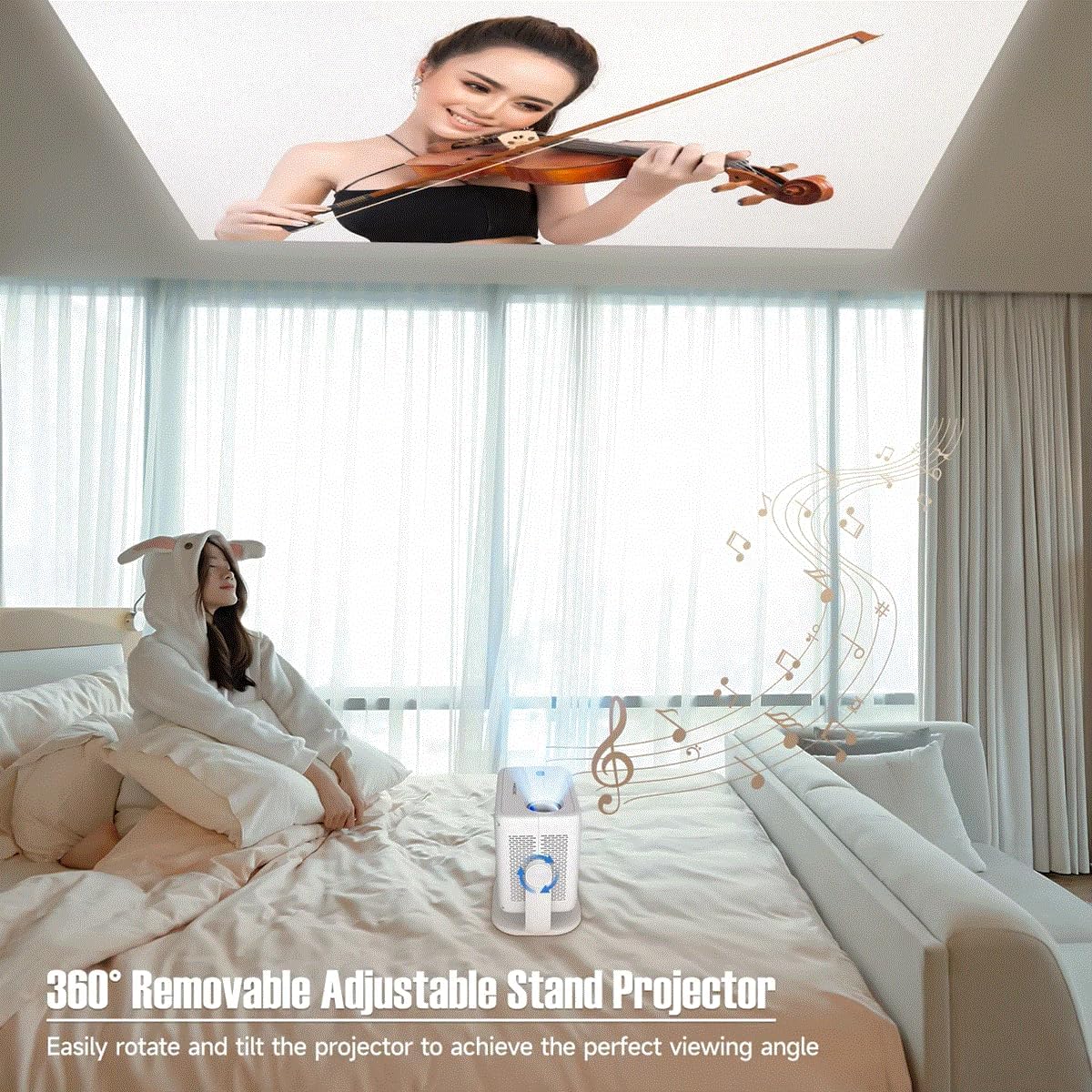
Figure 5.1: The projector's adjustable stand enables projection onto various surfaces, including ceilings, for comfortable viewing.
5.2. Sambungan Kuasa
- Sambungkan penyesuai kuasa ke port input kuasa projektor.
- Palamkan penyesuai kuasa ke salur keluar elektrik yang sesuai.
5.3. Kuasa Awal Hidup
Press the power button on the projector or the remote control to turn on the device. The projector will automatically perform keystone correction and focus.
6. Arahan Operasi
Video 6.1: This video demonstrates key features of the L018 Projector, including its 360° adjustable stand, automatic focus and keystone correction, projection throw distance capabilities, integrated Bluetooth 5.2 Hi-Fi stereo speaker, 1080P native resolution with 4K support, and wireless screen mirroring functionality.
6.1. Auto Keystone Correction & Focus
The L018 Projector features automatic keystone correction and focus. This means the image will automatically adjust to be rectangular and sharp, even if the projector is placed at an angle. This process typically takes only 2 seconds.
Figure 6.1: The projector automatically corrects image distortion and focuses for a clear picture.
6.2. Image Adjustment (Zoom In & Zoom Out)
You can easily adjust the image size from 50% to 100% without physically moving the projector. After using this function, it may be necessary to slightly move the projector for the auto-focus and keystone correction to re-engage and optimize the image.
6.3. Pencerminan Skrin Tanpa Wayar
Seamlessly cast content from your phone, tablet, or laptop to the projector. The built-in Android 11 system and high-performing Allwinner H713 Chip ensure a smooth mirroring experience.

Figure 6.2: The projector delivers sharp and detailed images with high brightness and contrast.
6.4. Ketersambungan
- Dual-band WiFi 6 (2.4G+5G): Provides ultra-fast and stable connection for streaming and online content without delay.
- Bluetooth 5.2: Connect external Bluetooth speakers or headphones for an enhanced audio experience.
- HDMI & USB: Wired connectivity options for various devices.

Figure 6.3: The benefits of Dual-band WiFi 6 for fast and stable streaming.
6.5. Bunyi
The projector is equipped with a built-in Hi-Fi Stereo Speaker, allowing you to enjoy an immersive sound experience directly from the device. For private listening or enhanced audio, connect external speakers or headphones via Bluetooth 5.2 or the audio output port.
6.6. Mod Tayangan
The projector offers three distinct projection modes to suit your viewkeperluan:
- Mod Standard: Tetapan seimbang untuk umum viewing.
- Mod Sorotan: Increases brightness for clearer visibility in brighter environments.
- Mod Penjimatan Tenaga: Reduces power consumption, ideal for extended viewing or when battery life is a concern.
7. Penyelenggaraan
Penyelenggaraan berkala membantu memastikan jangka hayat dan prestasi optimum projektor anda.
- Pembersihan Kanta: Gunakan kain lembut dan bebas bulu yang direka khas untuk kanta optik. Jangan gunakan pembersih atau pelarut yang kasar.
- Port Pengudaraan: Periodically check and clean the ventilation openings to prevent dust buildup, which can lead to overheating. Use a soft brush or compressed air.
- Pembersihan Luaran: Lap bahagian luar projektor dengan kain lembut dan kering. Untuk tanda degil, sedikit damp Kain boleh digunakan, diikuti dengan tisu kering.
- Storan: Apabila tidak digunakan untuk tempoh yang lama, simpan projektor di tempat yang sejuk dan kering, jauh daripada cahaya matahari langsung dan suhu yang melampau.
8. Penyelesaian masalah
Jika anda menghadapi masalah dengan projektor anda, rujuk kepada masalah dan penyelesaian biasa berikut:
| Masalah | Kemungkinan Punca | Penyelesaian |
|---|---|---|
| Tiada Kuasa | Kabel kuasa tidak disambungkan; Isu salur keluar kuasa. | Pastikan kabel kuasa disambungkan dengan kukuh. Cuba soket lain. |
| Tiada Imej | Input source not selected; Cable connection issue; Lens cap on. | Select correct input source. Check HDMI/USB cable connections. Remove lens cap. |
| Imej Kabur | Out of focus; Projector moved after zoom adjustment. | Allow auto-focus to re-engage (slight movement may help). Ensure projector is within optimal throw distance. |
| Distorted Image (Trapezoid) | Projektor tidak berserenjang dengan skrin. | Auto keystone correction should fix this. If not, slightly adjust projector position. |
| Tiada Bunyi | Volume too low; Muted; External audio device not connected/selected. | Tingkatkan kelantangan. Nyahbisu. Periksa sambungan Bluetooth atau kabel audio luaran. |
| Wireless Mirroring Issues | Network instability; Device compatibility. | Ensure both devices are on the same Wi-Fi network. Restart both devices. Check device compatibility. |
9. Spesifikasi
| Ciri | Penerangan |
|---|---|
| Nama Jenama | Generik |
| Nombor Model Item | Projektor L018 |
| Nama Warna | putih |
| Ciri Khas | 360° Removable Adjustable Stand Projector, BT5.2 & Hl-Fl Stereo Speaker, Ultra-fast connection Dual-band WiFi6 (2.4G+5G), High-Performing Processor Allwinner H713 Chip |
| Penggunaan yang Disyorkan | Pendidikan, Pawagam Rumah, Permainan, Perniagaan |
| Teknologi Ketersambungan | Bluetooth, Wi-Fi, USB, HDMI |
| Resolusi Paparan | 1920 x 1080 (1080P Asli, 4K Disokong) |
| ANSI Lumens | 650 ANSI |
| Dimensi Unjuran | 30-300 inci |
| Sumber Cahaya | LED |
| Skala Skrin | 16:09 |
| Nisbah Kontras | 10,001:1-20,000:1 |
| Pembetulan Batu Kunci | Pembetulan Auto |
| Sistem Operasi | Android 11 |
| Pemproses | Allwinner H713 Chip |
| Bluetooth | BT5.2 |
| Pembesar Suara Terbina dalam | ya |
| Alat Kawalan Jauh | ya |
| Projection Throw Ratio | 1.2:1 |
10. Waranti dan Sokongan
For warranty information and customer support, please refer to the documentation provided at the time of purchase or contact the manufacturer directly. Keep your purchase receipt as proof of purchase.
For technical assistance or further inquiries, please visit the official Generic brand webtapak atau hubungi perkhidmatan pelanggan mereka.