
pengenalan
This manual provides detailed instructions for the safe and efficient operation of your Phomemo M836-B Portable Thermal Printer. The M836-B is an inkless, wireless thermal printer designed for portability and convenience, supporting various paper sizes including US Letter and A4. Please read this manual thoroughly before using the printer to ensure optimal performance and longevity.
Produk Selesaiview
Ciri-ciri Utama
- Pencetakan Terma Tanpa Dakwat: Utilizes thermal technology, eliminating the need for ink cartridges or ribbons.
- Kesambungan Tanpa Wayar: Supports Bluetooth for seamless connection with iOS and Android devices.
- Kesambungan USB: Compatible with Windows, macOS, ChromeOS, and Linux via USB Type-C.
- Resolusi Tinggi: Offers a print resolution of 300 DPI for clear text and graphics.
- Reka Bentuk Mudah Alih: Compact and lightweight, ideal for travel and on-the-go printing.
- Multi-Size Paper Support: Accommodates various thermal paper sizes, including US Letter (8.5'' x 11'') and A4.
- Output Monokrom: Prints in black and white.

Image: The Phomemo M836-B printer demonstrating its inkless thermal printing capability, highlighting no mess from ink.

Imej: Tamatview of the Phomemo M836-B's key features, including wireless connectivity, inkless operation, 2600mAh battery capacity, and 300 DPI resolution.
Kandungan Pakej
Sahkan bahawa semua item terdapat dalam pakej:
- Phomemo M836-B Portable Thermal Printer
- Thermal Paper (as specified in the box)
- Kabel Jenis-C USB
- Manual Pengguna (dokumen ini)
Panduan Persediaan
1. Mengecas Pencetak
- Connect the provided USB Type-C cable to the printer's charging port.
- Sambungkan hujung kabel USB yang satu lagi ke penyesuai kuasa USB yang serasi (tidak disertakan) atau port USB komputer.
- The indicator light will show charging status. Charge the printer fully before first use.
2. Memuatkan Kertas
The Phomemo M836-B supports both thermal paper rolls and sheet-fed thermal paper.
- Buka penutup petak kertas.
- For roll paper: Insert the thermal paper roll into the designated slot, ensuring the printing side faces upwards. Gently pull a small length of paper out.
- For sheet-fed paper: Insert the thermal paper sheet into the input slot, ensuring it is straight and aligned.
- Tutup penutup petak kertas dengan kemas.

Image: Illustration of how to load different types of thermal paper (roll and sheet) into the Phomemo M836-B printer, showing the paper selection mechanism.
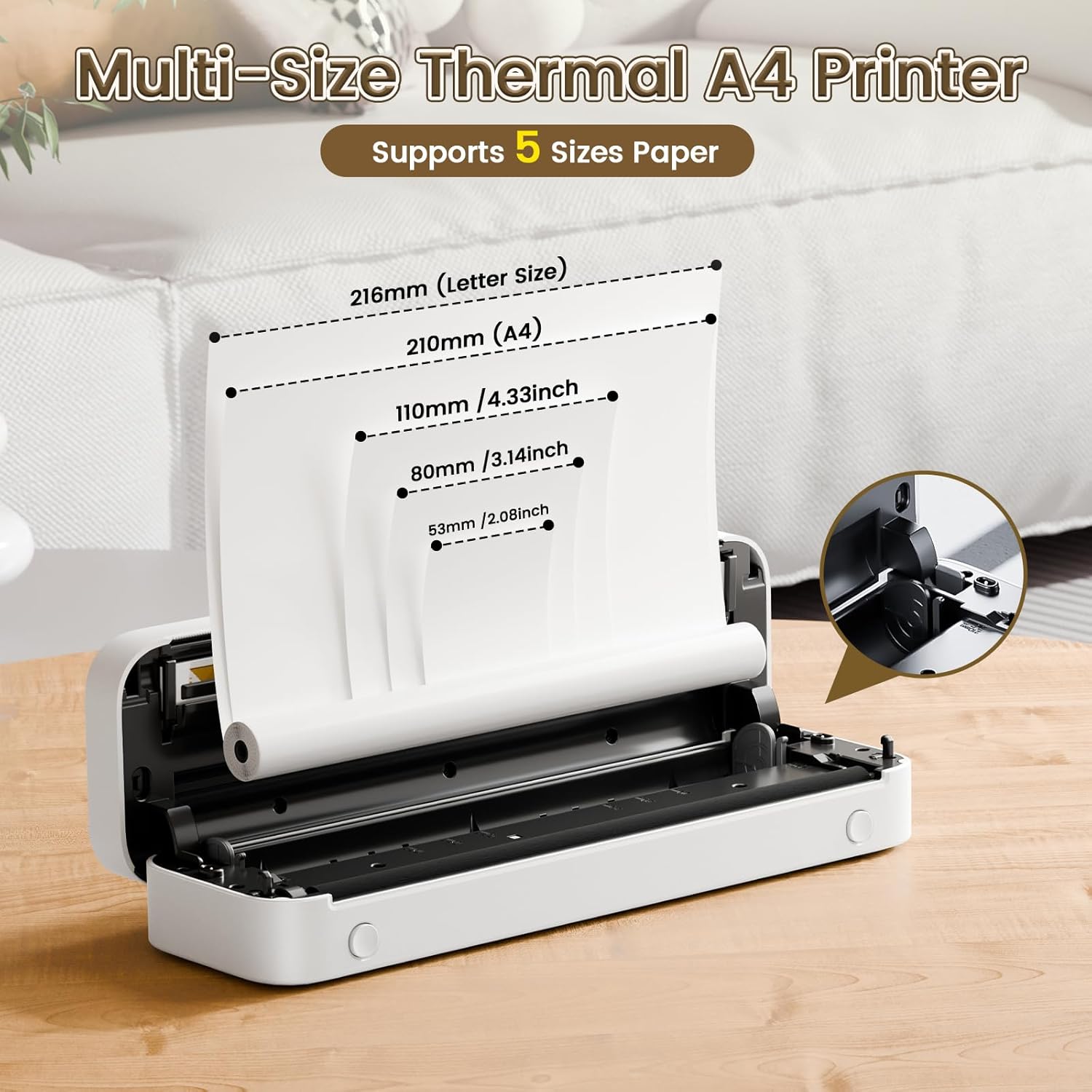
Image: The Phomemo M836-B printer demonstrating support for multiple paper sizes, including US Letter (216mm) and A4 (210mm).
3. Menyambung ke Peranti
Pencetak ini menyokong sambungan Bluetooth dan USB.
Bluetooth Connection (for iOS/Android)
- Download the official Phomemo app from your device's app store.
- Turn on the printer by pressing and holding the power button.
- Dayakan Bluetooth pada peranti mudah alih anda.
- Open the Phomemo app, search for the printer (M836-B), and pair with it.
- Ikuti mana-mana gesaan pada skrin untuk melengkapkan proses berpasangan.
USB Connection (for Windows/macOS/ChromeOS/Linux)
- Pastikan pencetak dihidupkan.
- Sambungkan pencetak ke komputer anda menggunakan kabel USB Jenis-C yang disediakan.
- Lawati Phomemo rasmi webtapak (www.phomemo.com) to download and install the appropriate drivers for your operating system.
- Sebaik sahaja pemacu dipasang, pencetak akan dikenali oleh komputer anda.

Image: Diagram illustrating the two types of connections supported by the Phomemo M836-B: Bluetooth for Android, iOS, and iPad, and USB for Windows, macOS, ChromeOS, and Linux.
Arahan Operasi
Printing from Mobile Devices
- Ensure your printer is charged, loaded with paper, and connected via Bluetooth to your mobile device.
- Buka apl Phomemo.
- Select the document or image you wish to print from within the app.
- Adjust print settings (e.g., paper size, density) as needed.
- Ketik butang cetak untuk memulakan percetakan.
Printing from Computers
- Ensure your printer is charged, loaded with paper, and connected via USB to your computer with drivers installed.
- Buka dokumen atau file yang anda ingin cetak pada komputer anda.
- Pergi ke "File" > "Cetak" (atau gunakan pintasan Ctrl+P/Cmd+P).
- Select the Phomemo M836-B from the list of available printers.
- Adjust print preferences (e.g., paper size, orientation) as required.
- Klik "Cetak".
Paper Handling Tips
- Always use high-quality thermal paper for best results.
- Ensure the paper is loaded correctly with the printable side facing the print head.
- Avoid exposing thermal paper to direct sunlight or high temperatures, as this can degrade print quality over time.
- Manually tear off printed documents carefully after printing, as the printer does not have an automatic cutter.
Penyelenggaraan
Membersihkan Pencetak
- Matikan pencetak dan putuskan sambungannya daripada sumber kuasa.
- Gunakan kain lembut dan tidak berbulu sedikit dampened with isopropyl alcohol to gently wipe the print head. Allow it to dry completely before use.
- Clean the exterior of the printer with a soft, dry cloth. Do not use abrasive cleaners or solvents.
Penyimpanan
- Simpan pencetak di tempat yang sejuk dan kering jauh dari cahaya matahari langsung dan suhu yang melampau.
- If storing for an extended period, ensure the printer is fully charged to maintain battery health.
- Keep thermal paper in its original packaging in a dark, cool place to prevent premature fading.
Menyelesaikan masalah
If you encounter issues with your Phomemo M836-B printer, refer to the following common problems and solutions:
Pencetak Tidak Dihidupkan
- Periksa Bateri: Ensure the printer is sufficiently charged. Connect it to a power source and try again.
- Butang Kuasa: Press and hold the power button for a few seconds to ensure it's properly activated.
Connectivity Issues (Bluetooth/USB)
- Bluetooth:
- Ensure Bluetooth is enabled on your device and the printer is within range.
- Unpair and re-pair the printer in your device's Bluetooth settings.
- Mulakan semula kedua-dua pencetak dan peranti mudah alih anda.
- USB:
- Verify the USB cable is securely connected to both the printer and the computer.
- Ensure the correct printer drivers are installed on your computer. Reinstall if necessary.
- Cuba port USB atau kabel lain.
Poor Print Quality (Blurry, Faded, Streaks)
- Kepala Cetak Bersih: Follow the cleaning instructions in the Maintenance section.
- Paper Quality/Type: Ensure you are using high-quality thermal paper and that it is loaded correctly.
- Ketumpatan Cetakan: Adjust print density settings in the Phomemo app or printer driver.
- Penyimpanan Kertas: Thermal paper exposed to heat or light can degrade. Try a fresh roll of paper.
Kesesakan Kertas
- Turn Off Printer: Immediately turn off the printer.
- Keluarkan Kertas: Gently pull out any jammed paper. Do not force it, as this can damage the printer.
- Tambah nilai: Ensure paper is loaded correctly and not wrinkled or bent before restarting.
Spesifikasi Teknikal
| Ciri | Spesifikasi |
|---|---|
| Jenama | Phomemo |
| Nama Model | M836-B |
| Teknologi Ketersambungan | Bluetooth, USB Jenis C |
| Teknologi Percetakan | terma |
| Output Pencetak | Monokrom |
| Resolusi Cetakan Maks | 300 DPI |
| Kelajuan Cetakan Maks (Monokrom) | 1.5 muka surat seminit |
| Peranti Serasi | Android Devices, Mac, Windows, iPhone, iPad |
| Saiz Media Maksimum | 8.5 x 11 inch (US Letter) |
| Sokongan Saiz Kertas | US Letter, A4 |
| Printing Media Type | Kertas Terma |
| Berat Barang | 1.53 Paun (lebih kurang 694g) |
| Dimensi Produk (D x W x H) | 7.8D x 26.4W x 4.5H Sentimeter |
| Kaedah Kawalan | Apl |
| Negara Asal | China |
Waranti dan Sokongan
Specific warranty details for the Phomemo M836-B Portable Thermal Printer are not provided within this document. For information regarding warranty coverage, technical support, or service, please refer to the warranty card included with your product or contact Phomemo customer service directly through their official webtapak atau maklumat hubungan yang diberikan dalam pembungkusan produk anda.
Official Phomemo Webtapak: www.phomemo.com