
1. Pengenalan
Thank you for choosing the BoyKeep Ease Life Light Bulb Security Camera D115. This manual provides essential information for the safe and effective installation, operation, and maintenance of your security camera. Please read this manual thoroughly before use and retain it for future reference.
Apa yang ada dalam Kotak
- BoyKeep Ease Life Light Bulb Security Camera (D115)
- Mounting Base (if applicable, for E27 socket)
- Manual Pengguna
Note: The D115 camera is designed to fit standard E27 light bulb sockets.
2. Maklumat Keselamatan
- Ensure the power supply is disconnected before installing or removing the camera.
- Peranti ini direka untuk kegunaan dalaman sahajaJangan dedahkannya kepada hujan, kelembapan atau suhu yang melampau.
- Do not attempt to disassemble or modify the camera. This may void the warranty and pose safety risks.
- Keep the camera away from strong magnetic fields or sources of interference.
- Use only the specified power source (E27 light socket).
- Jauhkan daripada kanak-kanak.
3. Produk Lebihview
The BoyKeep Ease Life D115 is a 1080P light bulb security camera featuring 360° pan and 95° tilt capabilities, color night vision, motion detection, two-way talk, and easy Wi-Fi connectivity.
Komponen Kamera

Imej: Terperinci view of the BoyKeep D115 camera, highlighting its E27 light socket, microphone, array LEDs, HD lens, white LEDs, light sensor, memory card slot, and reset button.
- E27 Light Socket: Standard screw-in base for power and installation.
- Lensa HD: Captures 1080P video resolution.
- Array LEDs & White LEDs: Provide enhanced night vision, including color night vision.
- Mic & Speaker: Dayakan komunikasi audio dua hala.
- Sensor Cahaya: Detects ambient light for automatic night vision activation.
- Slot Kad Memori: Supports local storage (MicroSD card not included).
- Butang Tetapkan Semula: Used for factory reset or pairing mode.
Kefungsian Pan dan Condongkan

Imej: The camera demonstrates its ability to pan 355 degrees horizontally and tilt 95 degrees vertically, allowing it to cover a wide area without blind spots.
The camera offers a 355° horizontal pan and 95° vertical tilt, allowing you to remotely adjust the viewing angle via the mobile application to monitor almost every corner of your space.
4. Persediaan
Langkah 1: Sediakan untuk Pemasangan
- Ensure the power to the light socket is turned OFF at the circuit breaker.
- Locate a standard E27 light bulb socket where you wish to install the camera.
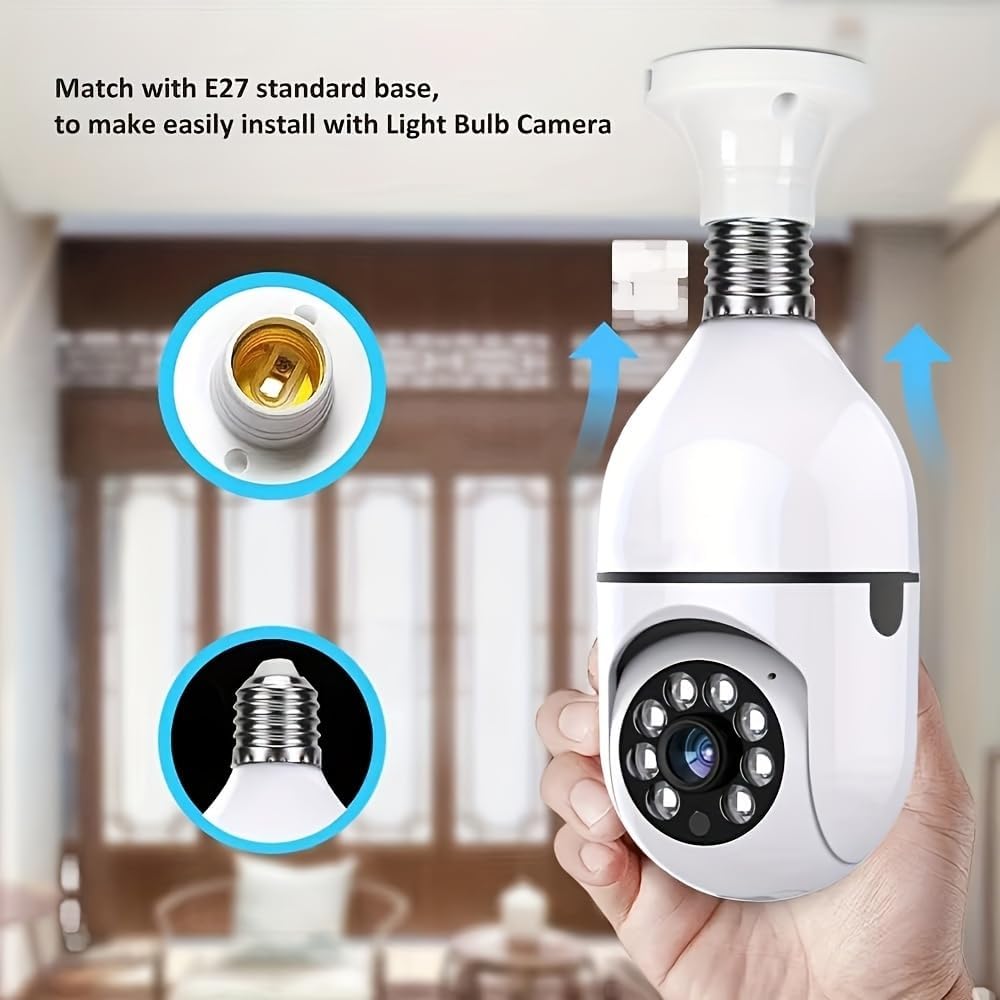
Imej: The camera's E27 base is shown, illustrating how it screws into a standard light bulb socket for easy installation.
Langkah 2: Pasang Kamera
- Carefully screw the BoyKeep D115 camera into the E27 light socket until it is secure. Do not overtighten.
- Turn ON the power to the light socket at the circuit breaker. The camera will power on and initiate its startup sequence.

Imej: The camera is shown installed in a lamp, emphasizing its E27 compatibility and dual-band (2.4G/5G) Wi-Fi connectivity for easy setup.
Langkah 3: Muat turun Aplikasi Mudah Alih
Cari untuk the designated BoyKeep security camera application on your smartphone's app store (iOS App Store or Google Play Store) and install it.
Step 4: Connect to Wi-Fi and Pair
- Open the BoyKeep application and create an account or log in.
- Follow the in-app instructions to add a new device. This typically involves scanning a QR code on the camera or selecting the camera model from a list.
- Connect the camera to your home Wi-Fi network. The D115 supports both 2.4GHz and 5GHz Wi-Fi bands. Ensure your phone is connected to the same Wi-Fi network during the pairing process.
- Setelah disambungkan, anda boleh menamakan kamera anda dan mula memantau.
5. Arahan Operasi
Langsung View dan Kawalan Pan/Tilt
- Open the BoyKeep app and select your camera to view suapan langsung.
- Use the on-screen controls to pan (rotate horizontally) and tilt (rotate vertically) the camera lens to adjust your viewkawasan ing.
Satu Klik View of Preset Locations

Imej: The camera's ability to quickly switch between pre-defined monitoring points (1, 2, 3, 4, 5) in a room, offering a one-click view of specific areas.
The app allows you to set specific preset viewing positions. With a single tap, the camera will automatically move to a pre-configured location, enabling quick monitoring of key areas.
Pengesanan Pergerakan dan Makluman
- The camera is equipped with motion detection capabilities. When motion is detected, the camera can send push notifications to your smartphone.
- Adjust motion detection sensitivity and alert settings within the app to suit your environment.
- An audible alarm can be triggered upon motion detection, configurable through the app.
Ceramah Dua Hala
- Gunakan mikrofon dan pembesar suara terbina dalam untuk komunikasi audio dua hala.
- Press and hold the microphone icon in the app to speak, and release to listen.
- The camera also features a one-touch call button for immediate communication from the camera's side.
Rakaman dan Penyimpanan

Imej: The camera highlights its dual storage options: a memory card slot for local recording and an optional cloud recording service.
- Penyimpanan Kad Memori: Insert a MicroSD card (not included) into the designated slot for continuous 24/7 recording or event-triggered recordings.
- Storan Awan: The camera supports cloud storage services (subscription may be required after a trial period) for secure off-site video backup.
- Akses foo yang dirakamtage through the playback feature in the mobile application.
Pelbagai Peranti Viewing and Sharing
The BoyKeep app allows you to add multiple cameras and view up to four real-time video feeds simultaneously. You can also share camera access with family members on up to 10 devices.
6. Penyelenggaraan
- Pembersihan: Lap kanta dan badan kamera dengan lembut menggunakan kain lembut dan kering. Jangan gunakan pembersih cecair atau bahan kasar.
- Kemas kini Firmware: Regularly check the mobile application for available firmware updates to ensure optimal performance and security.
- Storan: If storing the camera for an extended period, disconnect it from power and store it in a cool, dry place.
7. Penyelesaian masalah
- Kamera tidak dihidupkan: Ensure the E27 socket has power and the camera is screwed in correctly. Check the circuit breaker.
- Tidak dapat menyambung ke Wi-Fi:
- Ensure your Wi-Fi network is 2.4GHz or 5GHz and has a strong signal where the camera is installed.
- Sahkan kata laluan Wi-Fi yang dimasukkan adalah betul.
- Try resetting the camera using the reset button and re-pairing.
- Kualiti imej yang lemah:
- Periksa kekuatan isyarat Wi-Fi anda.
- Pastikan lensa kamera bersih.
- Pengesanan gerakan tidak berfungsi:
- Sahkan pengesanan gerakan didayakan dalam tetapan apl.
- Laraskan tahap kepekaan.
- Two-way talk issues:
- Pastikan kebenaran mikrofon dan pembesar suara diberikan kepada aplikasi pada telefon anda.
- Check volume settings on both the app and your phone.
- Kamera luar talian: Check Wi-Fi connection and power supply. Restart the camera by turning off and on the power to the socket.
8. Spesifikasi
| Ciri | Perincian |
|---|---|
| Nama Model | D115 |
| Resolusi Tangkapan Video | 1080p |
| Teknologi Ketersambungan | Wayarles (Wi-Fi) |
| Protokol Ketersambungan | Wi-Fi (Jalur Dwi 2.4GHz/5GHz) |
| Penggunaan Dalaman/Luar | Dalaman |
| Ciri Khas | Adjustable (Pan/Tilt), Color Night Vision, Motion Detection, Two-Way Talk, Audible Alarm |
| Jenis Pengawal | APP (Smartphone) |
| Jenis Gunung | Ceiling Mount (E27 Light Socket) |
| Sumber Kuasa | Corded Electric (via E27 socket) |
| Dimensi Item | 3.11 x 11.8 x 6.73 inches (approximate, packaging) |
| Format Tangkapan Video | H264 |
9. Waranti dan Sokongan
BoyKeep products are designed for reliability and performance. For warranty information, technical support, or customer service inquiries, please refer to the contact information provided on the product packaging or the official BoyKeep webtapak.
Sila simpan bukti pembelian anda untuk tuntutan waranti.