pengenalan
This document provides essential instructions for the use and maintenance of your Generic replacement remote control. This remote is specifically designed to be compatible with Ridgeway QS-2821 and QS-855 portable stereo power amplifiers, offering a direct replacement for your original remote without requiring any programming.
Please read this manual thoroughly to ensure proper operation and longevity of your remote control.
Persediaan: Pemasangan Bateri
The remote control requires batteries for operation. Batteries are not included in the package and must be purchased separately.
- Cari petak bateri di belakang alat kawalan jauh.
- Geser buka penutup petak bateri.
- Sisipkan one (1) AAA battery, ensuring the positive (+) and negative (-) terminals align correctly with the markings inside the compartment.
- Tutup penutup petak bateri dengan selamat.
Once new batteries are inserted, the remote control is ready for immediate use with your compatible Ridgeway amplebih hidup.
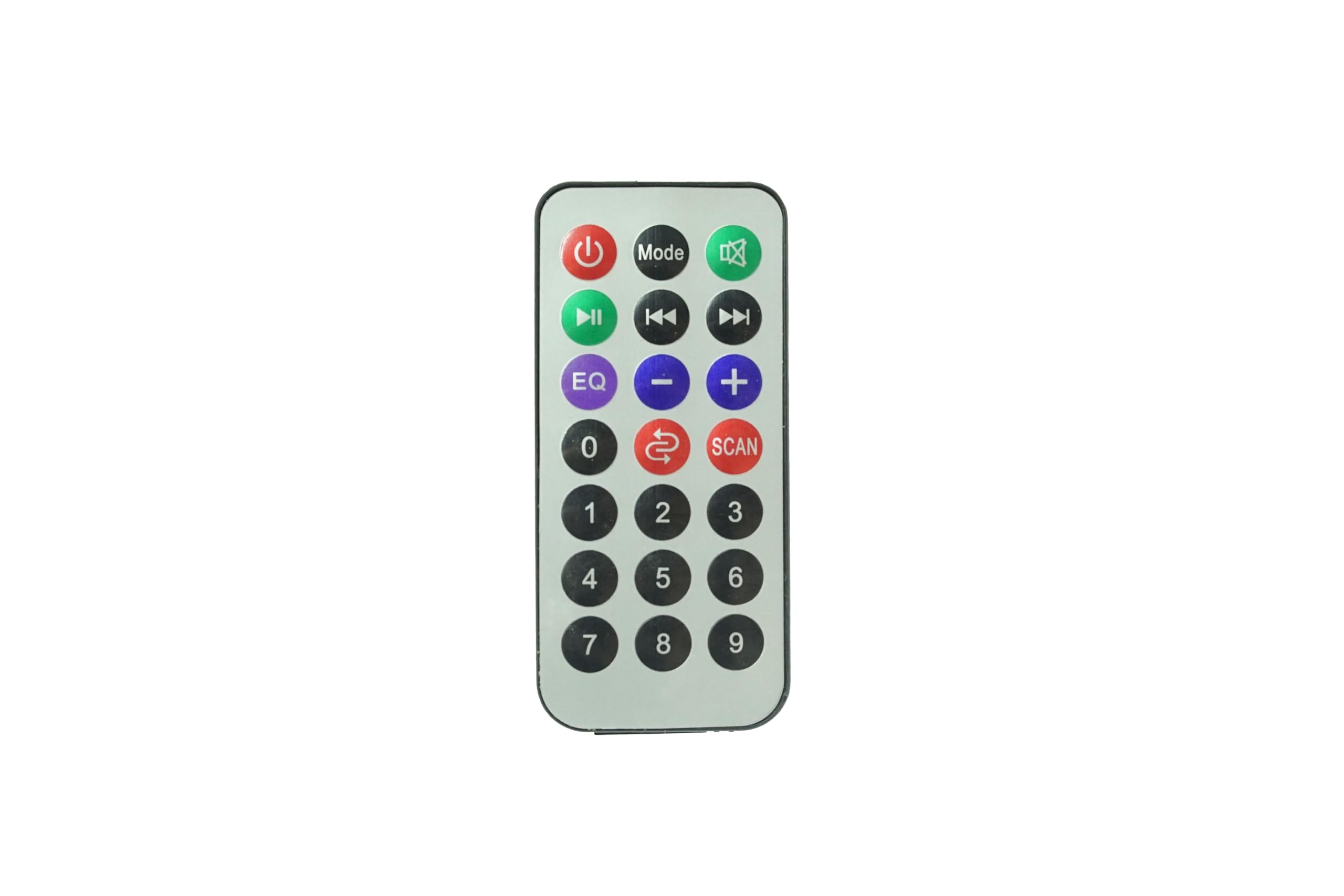
Imej: Depan view of the Generic Replacement Remote Control. This image displays the layout of buttons including power, volume, and navigation controls, designed for compatibility with Ridgeway QS-2821 and QS-855 amppenyelamat.
Arahan Operasi
This replacement remote control is pre-programmed and requires no additional setup or coding. It functions identically to the original remote control for your Ridgeway QS-2821 or QS-855 amplebih hidup.
To operate your amplebih hidup:
- Hidupkan/Mati Kuasa: Tekan ke KUASA butang untuk menghidupkan amphidup atau mati.
- Kawalan Kelantangan: Gunakan JILID + dan JILID - butang untuk melaraskan tahap bunyi.
- Pemilihan Input: Gunakan INPUT or source buttons to switch between different audio inputs (e.g., AUX, USB, Bluetooth).
- Kawalan Main Semula: For media playback, use buttons such as MAIN/JEDA, Langkau ke Hadapan, dan SKIP KE BELAKANG.
- Redam: Tekan ke HILANGKAN butang untuk menyenyapkan audio buat sementara waktu.
Ensure there is a clear line of sight between the remote control and the infrared (IR) receiver on your amppenguat untuk prestasi optimum.
Penyelenggaraan
- Pembersihan: Lap alat kawalan jauh dengan kain lembut dan kering. Jangan gunakan pembersih cecair atau bahan kasar, kerana ia boleh merosakkan permukaan atau komponen dalaman.
- Penggantian Bateri: Replace batteries when the remote control's response becomes sluggish or stops working. Always replace with new batteries of the specified type (AAA).
- Storan: Store the remote control in a cool, dry place away from direct sunlight and extreme temperatures. If the remote will not be used for an extended period, remove the batteries to prevent leakage.
- Elakkan Titisan: Lindungi alat kawalan jauh daripada hentaman fizikal, kerana jatuhan boleh merosakkan litar dalaman.
Menyelesaikan masalah
| Masalah | Kemungkinan Punca | Penyelesaian |
|---|---|---|
| Alat kawalan jauh tidak berfungsi. |
|
|
| Buttons are unresponsive or delayed. |
|
|
| Jauh berfungsi untuk beberapa fungsi tetapi tidak berfungsi untuk yang lain. |
|
|
Spesifikasi
- Jenama: Generik
- Peranti Serasi: Ridgeway QS-2821, Ridgeway QS-855 Portable Stereo Power Amppenghidup
- Ciri Khas: Tiada Pengaturcaraan Diperlukan
- Jenis Penyambung: Inframerah (IR)
- Bateri Diperlukan: 1 x AAA (tidak termasuk)
- Bilangan Maks Peranti yang Disokong: 1
- warna: Seperti yang Ditunjukkan
Waranti dan Sokongan
Specific warranty information for this Generic replacement remote control is not provided in the product details. For any warranty claims, technical support, or inquiries regarding your purchase, please contact the seller directly through the platform where the item was purchased.
Please retain your proof of purchase for any support requests.


