
1. Produk Lebihview
The WANBO T-Type Ceiling Mount is a robust and adjustable mounting solution designed specifically for the Wanbo X5 Pro home projector. Constructed from high-quality aluminum alloy, this mount provides a secure and stable platform for ceiling installation. Its adjustable design allows for precise positioning of your projector, ensuring optimal viewing angles. The minimalist aesthetic integrates seamlessly into various room decors.
2. Kandungan Pakej
Pastikan semua komponen ada di dalam pakej sebelum meneruskan pemasangan.
- Lengan Melekap
- Perkakasan Pemasangan (skru, sauh)
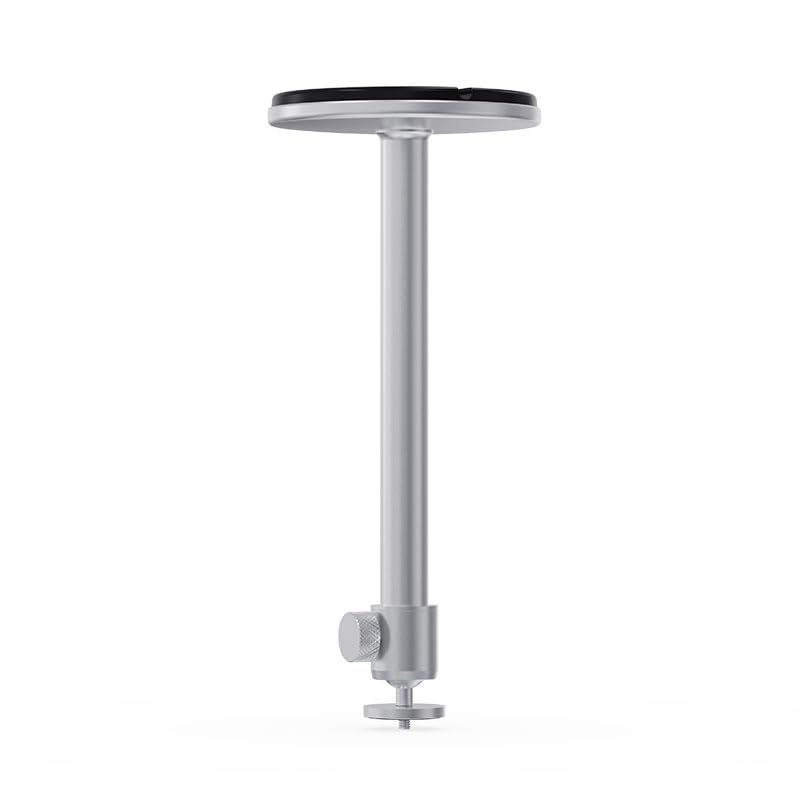
Image 2.1: Components of the WANBO T-Type Ceiling Mount, including the main arm and the ceiling base.
3. Maklumat Keselamatan
- Baca semua arahan dengan teliti sebelum pemasangan.
- Ensure the mounting surface (ceiling) can safely support the combined weight of the mount and the projector (maximum 10 pounds).
- Use appropriate tools and safety gear during installation.
- If unsure about installation, consult a qualified professional.
- Do not overtighten screws, as this may damage the mount or the projector.
- Jauhkan kanak-kanak dan haiwan peliharaan dari kawasan pemasangan.
4. Persediaan dan Pemasangan
Follow these steps to securely install your WANBO T-Type Ceiling Mount.
4.1 Identify Mounting Location
- Choose a suitable location on the ceiling that provides a clear projection path and is structurally sound.
- Ensure there are no electrical wires or plumbing in the drilling path.
4.2 Pasang Gunung
- Attach the mounting arm to the circular ceiling base by screwing them together. Ensure it is hand-tightened securely.

Image 4.1: The WANBO T-Type Ceiling Mount fully assembled before ceiling installation.
4.3 Mount to Ceiling
- Hold the assembled mount against the chosen ceiling location and mark the drilling points through the holes in the circular base.
- Drill pilot holes into the ceiling at the marked points. Use appropriate drill bits for your ceiling material.
- Insert the provided wall anchors (if necessary for your ceiling type) into the pilot holes.
- Align the mount's base with the drilled holes and secure it to the ceiling using the provided screws. Ensure the mount is firmly attached and does not wobble.
4.4 Attach Projector
- Locate the mounting screw hole on the bottom of your Wanbo X5 Pro projector.
- Align the projector's mounting hole with the threaded screw at the end of the mount's arm.
- Carefully screw the projector onto the mount until it is secure. Do not overtighten.
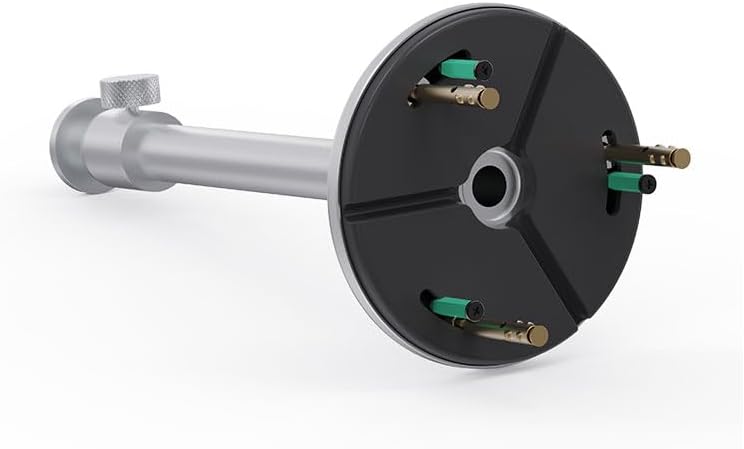
Image 4.2: Detail of the projector attachment mechanism on the mount.
5. Arahan Operasi
The WANBO T-Type Ceiling Mount offers adjustable features for optimal projector positioning.
5.1 Melaraskan Ketinggian
The mount features a telescoping design. To adjust the height, loosen the knob on the side of the mounting arm, extend or retract the arm to the desired length (up to 13.0 inches), and then tighten the knob firmly to secure the position.
5.2 Rotating the Projector
The mount allows for rotation. Gently rotate the projector to achieve the desired horizontal angle. Ensure the projector is stable after adjustment.
6. Penyelenggaraan
- Pembersihan: Lap pelekap dengan kain lembut dan kering. Jangan gunakan pembersih atau pelarut yang melelas.
- Pemeriksaan Berkala: Periksa semua skru dan sambungan secara berkala untuk memastikan ia kekal ketat dan selamat.
- Had Berat: Jangan melebihi kapasiti berat maksimum 10 paun.
7. Penyelesaian masalah
- Gunung berasa tidak stabil: Ensure all mounting screws are securely tightened to the ceiling and the projector is firmly attached to the mount. Verify the ceiling structure is adequate.
- Difficulty adjusting height/rotation: Loosen the adjustment knob sufficiently before attempting to move the arm or rotate the projector. Do not force adjustments.
- Projector not level: Re-adjust the rotation and ensure the ceiling mount itself is installed level.
8. Spesifikasi
| Jenama | WANBO |
| Nama Model | T-Type Ceiling Mount |
| Nombor Model | WBUS-T-X5 Pro (WBCA01) |
| Peranti Serasi | Wanbo X5 Pro Projector |
| Jenis Pemasangan | Pemasangan Siling |
| bahan | Aloi Aluminium |
| warna | Perak |
| Kapasiti Berat Maksimum | 10 paun (4.5 kg) |
| Berat Barang | 0.7 paun (0.32 kg) |
| Panjang Lengan | 13.0 inci (33 cm) |
| Ciri-ciri Tambahan | Adjustable, Rotatable |
9. Waranti dan Sokongan
9.1 Maklumat Waranti
This WANBO T-Type Ceiling Mount comes with a Waranti Pengeluar 1 Tahun from the date of purchase. This warranty covers defects in materials and workmanship under normal use. It does not cover damage caused by improper installation, misuse, accidents, or unauthorized modifications.
9.2 Sokongan Pelanggan
For technical assistance, warranty claims, or any questions regarding your WANBO T-Type Ceiling Mount, please contact WANBO customer support through the official WANBO website or your retailer's support channels. Please have your model number (WBUS-T-X5 Pro) and proof of purchase ready when contacting support.