
pengenalan
Thank you for choosing the Smart Ring. This innovative device is designed to seamlessly integrate into your daily life, providing comprehensive health monitoring, activity tracking, and convenient smart features. With its advanced sensors and durable design, the Smart Ring helps you stay informed about your well-being and enhances your digital experience. Please read this manual carefully to ensure proper use and maintenance of your Smart Ring.
Apa yang ada dalam Kotak
Your Smart Ring package includes the following items:
- Cincin Pintar
- Charging Cable for Ring
- Crystal Charging Case
- Manual Pengguna (dokumen ini)

Image: The Smart Ring, its dedicated charging cable, and the elegant crystal charging case included in the package.
Panduan Persediaan
1. Mengecas Cincin Pintar
Before first use, fully charge your Smart Ring.
- Place the Smart Ring into the Crystal Charging Case. Ensure the charging contacts on the ring align with those in the case.
- Connect the Charging Cable to the Crystal Charging Case and a USB power source (e.g., computer USB port, wall adapter).
- The indicator light on the charging case will show the charging status. A full charge typically takes approximately 1-2 hours.
2. Pemasangan Apl dan Berpasangan
To access all features and view your health data, download the companion mobile application.
- Scan the QR code provided in the packaging or search for the official Smart Ring app on the App Store (iOS 8.0 and above) or Google Play Store (Android 5.1 and above).
- Pasang aplikasi pada telefon pintar anda.
- Buka apl dan ikut arahan pada skrin untuk membuat akaun atau log masuk.
- Pastikan Bluetooth telefon anda diaktifkan.
- Within the app, navigate to the device pairing section and select your Smart Ring from the list of available devices.
- Confirm the pairing request on both your phone and, if prompted, by interacting with the ring (e.g., placing it on the charger).
- Once paired, the app will synchronize with your ring, and you can begin monitoring your health data.
Panduan Saiz
Accurate sizing is crucial for comfortable wear and precise data collection. Please follow these steps to determine your correct ring size. If the ring is too loose, it may affect data accuracy.
Measuring Your Finger
- Langkah 1: Choose a thin, non-stretchy wire or string. Wrap it snugly around the base of the finger where you intend to wear the ring. Mark the point where the wire/string overlaps with a pen or marker.
- Langkah 2: Straighten the marked wire/string and measure its length in millimeters using a ruler. This measurement is your finger's circumference.
- Langkah 3: Refer to the size chart below to find the corresponding Smart Ring size based on your measured inner diameter or circumference.
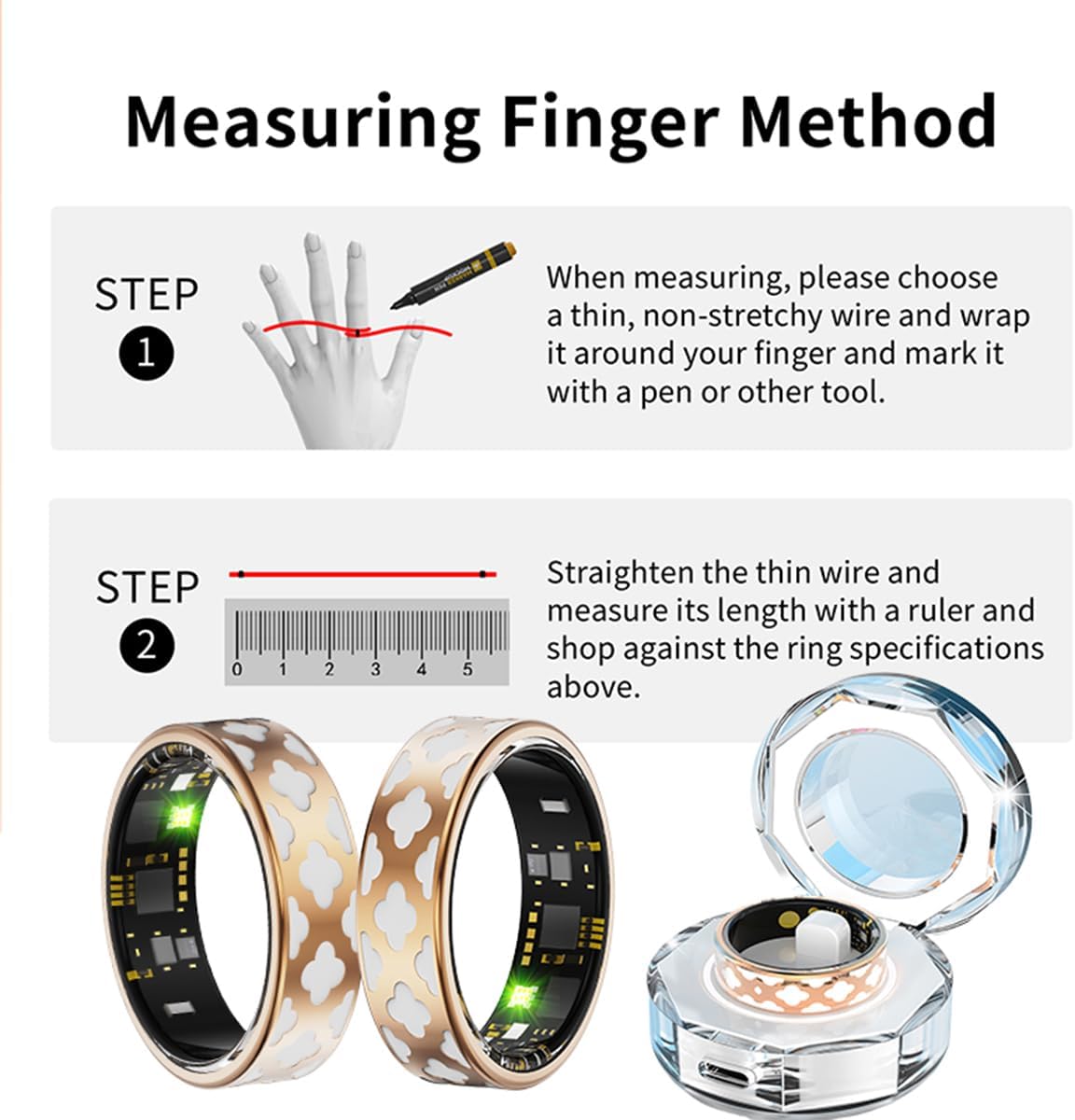
Image: Visual guide demonstrating the two-step process for accurately measuring your finger size using a string and ruler.
Smart Ring Size Chart
| Saiz Model | Inner Diameter (mm) | Lilitan (mm) |
|---|---|---|
| #7 | 17.3mm | 54.3mm |
| #8 | 18.1mm | 56.9mm |
| #9 | 18.9mm | 59.5mm |
| #10 | 19.8mm | 62.1mm |
| #11 | 20.6mm | 64.6mm |
| #12 | 21.4mm | 67.2mm |
| #13 | 22.2mm | 69.7mm |
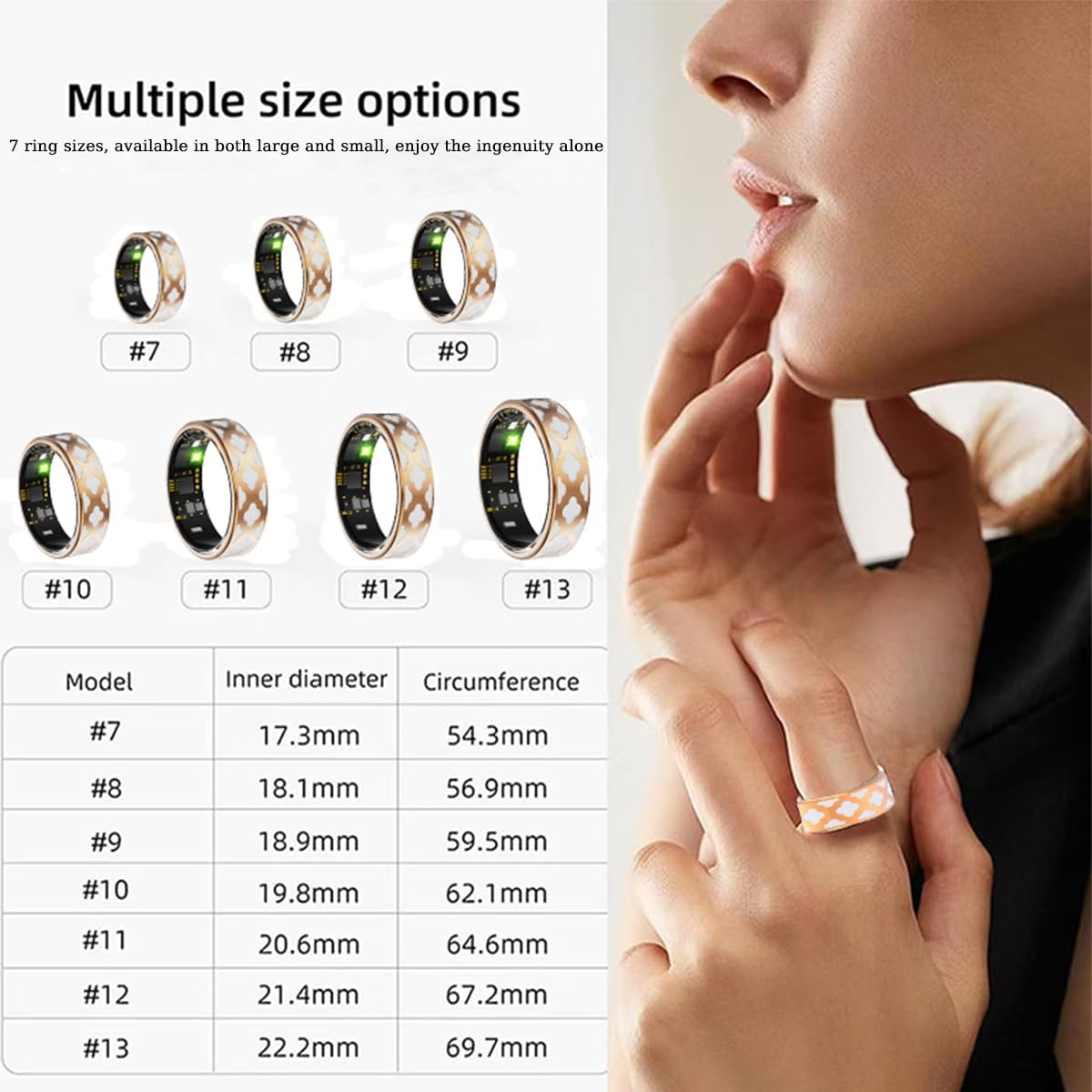
Image: A visual representation of the various Smart Ring sizes available, along with a detailed chart showing inner diameter and circumference measurements for each size.
Arahan Operasi
1. 24-Hour Health Monitoring
The Smart Ring continuously monitors your vital health parameters throughout the day.
- Kadar Jantung: Menjejaki kadar denyutan jantung anda dalam masa nyata, memberikan pandangan tentang kesihatan kardiovaskular anda.
- Oksigen Darah (SpO2): Mengukur tahap ketepuan oksigen darah anda.
- Tekanan darah: Provides real-time blood pressure readings.
All collected data is automatically synchronized with the mobile app, allowing you to view trends and historical data. You can also add family members and friends within the app to view their health information (with their consent).
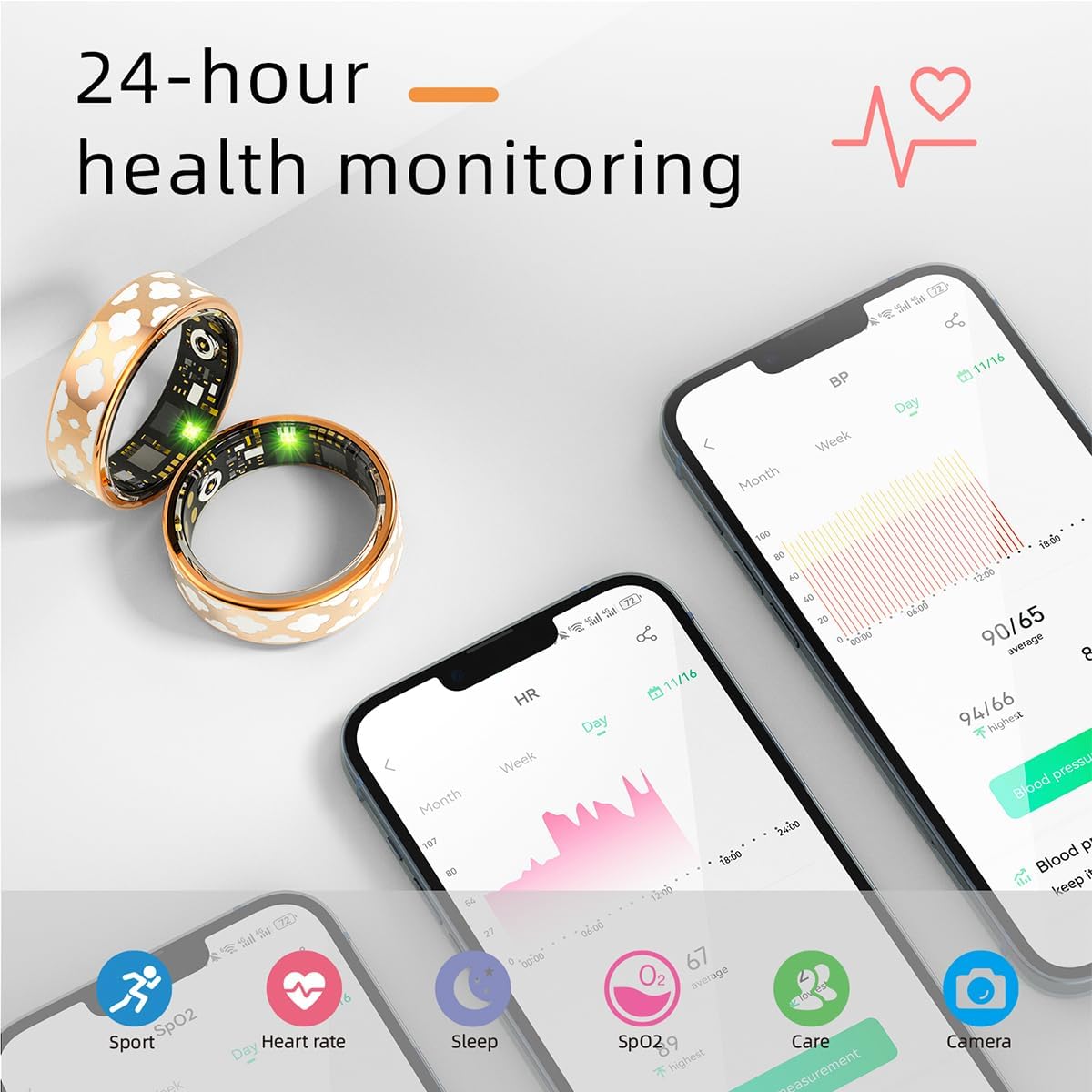
Image: A smartphone screen showing the Smart Ring app interface with detailed 24-hour health monitoring data, including graphs for blood pressure and heart rate.
2. Real-Time Sleep Tracking
The Smart Ring intelligently records your daily sleep information, helping you understand your sleep patterns.
- Monitors different sleep stages: deep sleep, light sleep, and wakefulness.
- Provides a sleep quality score and detailed reports in the app.

Image: The Smart Ring app interface displaying comprehensive real-time sleep tracking data, including sleep stages (deep, light, awake, REM) and a sleep quality score.
3. Exercise Data Monitoring
The Smart Ring supports multiple exercise modes, providing real-time recording of your activity data.
- Tracks heart rate, speed, time, and other relevant information during workouts.
- Utilizes GPS via smartphone for mapping outdoor activities like cycling.
- Records steps through motion detection.

Image: A person wearing the Smart Ring while exercising, with a smartphone displaying the app's exercise data monitoring interface, including a map of the activity route.
4. Remote Control Photography and Gesture Features
Enhance your smartphone experience with the Smart Ring's remote control capabilities.
- Remote Camera Shutter: Use the app to activate the remote control photo function. Shake the Smart Ring to remotely trigger your cell phone's camera and take photos.
- Kawalan Gerak Isyarat: Built-in motion gesture features allow you to control certain applications, such as watching TikTok videos, by simply wearing the ring and performing specific gestures.

Image: A person demonstrating the remote control photography feature, using the Smart Ring to take a picture with their smartphone.
Penilaian Kalis Air IP68
The Smart Ring boasts an IP68 waterproof rating, meaning it is designed to withstand immersion in water up to 1.5 meters for up to 30 minutes. This allows for worry-free use during daily activities.
- Suitable for hand washing, showering, and swimming in shallow water.
- Nota Penting: DO NOT expose the Smart Ring to hot water or steam, as this can damage the internal components and compromise the waterproof seal.

Image: A hand wearing the Smart Ring submerged in water, illustrating its IP68 waterproof capability for daily activities like hand washing or swimming.
Penyelenggaraan
To ensure the longevity and optimal performance of your Smart Ring, follow these maintenance guidelines:
- Clean the ring regularly with a soft, dry cloth. For stubborn dirt, a slightly damp kain boleh digunakan, diikuti dengan pengeringan segera.
- Ensure the charging contacts on both the ring and the charging case are clean and free of debris to maintain efficient charging.
- Avoid exposing the ring to harsh chemicals, strong detergents, or abrasive materials.
- Simpan cincin di tempat yang sejuk dan kering apabila tidak digunakan.
Menyelesaikan masalah
If you encounter issues with your Smart Ring, please refer to the following common solutions:
- Dering tidak bersambung ke aplikasi:
- Pastikan Bluetooth didayakan pada telefon pintar anda.
- Make sure the ring is charged.
- Restart the Smart Ring app and your phone's Bluetooth.
- Cuba nyahgandingkan dan pasangkan semula cincin itu dalam tetapan apl.
- Data kesihatan tidak tepat:
- Ensure the ring is worn snugly on your finger. If it's too loose, data accuracy may be affected.
- Bersihkan sensor di bahagian dalam cincin.
- Pastikan apl anda dikemas kini kepada versi terkini.
- Ring not charging:
- Periksa sama ada kabel pengecasan disambungkan dengan selamat ke kedua-dua bekas dan sumber kuasa.
- Ensure the ring is correctly seated in the charging case with contacts aligned.
- Cuba port USB atau penyesuai kuasa yang berbeza.
- Clean the charging contacts on both the ring and the case.
- Aplikasi ranap atau beku:
- Tutup dan buka semula apl.
- Clear the app's cache (in your phone's settings).
- Pastikan sistem pengendalian telefon anda dikemas kini.
Jika masalah berterusan, sila hubungi sokongan pelanggan untuk mendapatkan bantuan lanjut.
Spesifikasi
| Ciri | Perincian |
|---|---|
| Nombor Model | R10M-1 |
| Jenama | Generik |
| Teknologi Ketersambungan | Bluetooth |
| Sistem Operasi | Android Wear 1.0 (Compatible with Android 5.1+ / iOS 8.0+) |
| Kapasiti Bateri | 15 Miliamp jam |
| Jenis Bateri | Polimer Litium |
| Penilaian Kalis Air | IP68 |
| Ciri Khas | Multisport Tracker, Activity Tracker, Heart Rate, Blood Oxygen, Sleep Monitoring, Remote Control Photography |
| GPS | GPS Melalui Telefon Pintar |
| bahan | High-quality stainless steel and enamel craftsmanship |
| Pengeluar | JTL |
| Tarikh Tersedia Pertama | 16 November 2024 |
Waranti dan Sokongan
Your Smart Ring is designed for durability and performance. For any questions or problems regarding your product, please do not hesitate to contact our customer service team.
- Perkhidmatan Pelanggan: Our team is available to assist you with any inquiries. Please allow up to 24 hours for a response.
- Nota Penting: The product is not suitable for hot water or steam exposure. Damage resulting from such exposure may not be covered under warranty.
For the most up-to-date support information and contact methods, please refer to the official product website or the contact section within the mobile application.