
pengenalan
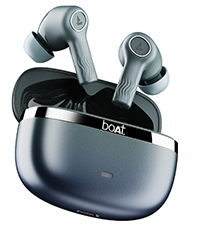
Welcome to the user manual for your boAt Nirvana Ion ANC Pro True Wireless Stereo (TWS) Earbuds. These earbuds are designed to provide a high-quality audio experience with advanced features such as Hi-Res Audio with LDAC, Active Noise Cancellation, and extended battery life. Please read this manual carefully to ensure proper use and optimal performance of your device.

Image: boAt Nirvana Ion ANC Pro TWS Earbuds and charging case.
Apa yang ada dalam Kotak
- 1 x TWS Fon telinga
- 1 x Kes Pengecasan
- 1 x Kad Waranti
- 1 x Manual Pengguna
- 1 x Kabel Pengecasan (Jenis-C)
Persediaan
1. Pengecasan Awal
Before first use, fully charge the earbuds and the charging case. Connect the provided Type-C charging cable to the charging port on the case and a power source. The indicator light on the case will show charging status.
2. Berpasangan dengan Peranti Anda
- Buka penutup bekas pengecas. Fon telinga akan memasuki mod berpasangan secara automatik.
- Pada telefon pintar atau peranti lain yang didayakan Bluetooth anda, pergi ke tetapan Bluetooth.
- Cari untuk "Nirvana Ion ANC Pro" in the list of available devices.
- Select it to connect. Once connected, you will hear an audio prompt.
The earbuds support Bluetooth v5.3 for stable and efficient wireless connectivity.
3. boAt Hearables App Installation
Enhance your experience by installing the boAt Hearables App. This app allows for customization of EQ settings, firmware updates, and other advanced controls.
Scan this QR code to download the boAt Hearables App. Alternatively, visit l.ead.me/bdAX6k.

Image: boAt Hearables App interface for sound customization and ANC control.
Arahan Operasi
1. Kawalan Sentuh
The earbuds feature intuitive touch controls for various functions. Specific gestures may vary; refer to the app for customization options.
- Main/Jeda: Ketik sekali pada salah satu fon telinga.
- Lagu Seterusnya: Ketik dua kali pada fon telinga kanan.
- Trek Sebelumnya: Ketik dua kali pada fon telinga kiri.
- Jawab/Tamatkan Panggilan: Ketik sekali pada salah satu fon telinga.
- Tolak Panggilan: Tekan lama pada kedua-dua fon telinga.
- Aktifkan Pembantu Suara: Ketik tiga kali pada salah satu fon telinga.
- Tukar Mod ANC: Long press on either earbud (customizable via app).
2. Mod Pembatalan Bunyi Aktif (ANC).
The Nirvana Ion ANC Pro offers up to 32dB Active Noise Cancellation to reduce ambient noise. You can switch between different modes:
- Mod ANC: Mengurangkan hingar luaran untuk pengalaman mendengar yang mengasyikkan.
- Mod Ketelusan: Membolehkan anda mendengar persekitaran anda sambil mendengar audio, meningkatkan kesedaran situasi.
- Mod Biasa: Main balik audio standard tanpa pembatalan hingar atau ketelusan.

Image: Demonstrating 32dB Active Noise Cancellation.
3. Dual EQ Modes with Crystal Bionic Sound
Experience high-fidelity audio with 10mm drivers and choose between two distinct sound profiles:
- Crystal Bionic Sound: Powered by HiFi, this mode delivers enhanced clarity and detail.
- boAt Signature Sound: Provides a balanced and dynamic audio experience, characteristic of boAt products.

Image: Visual representation of Dual EQ Modes.
4. BEAST™ Mode (Low Latency for Gaming)
Activate BEAST™ Mode for an ultra-low latency experience, ideal for gaming. This mode reduces audio delay to approximately 60ms, ensuring synchronized sound with on-screen action.

Image: BEAST™ Mode for low latency gaming.
5. Ketersambungan Berbilang Titik
Connect your earbuds to two devices simultaneously and seamlessly switch between them. For example, you can listen to music on your laptop and instantly answer a call on your phone without re-pairing.

Image: Multipoint Connectivity feature.
6. Crystal Clear Calling with ENx™ Technology
The earbuds are equipped with 4 microphones and ENx™ Technology to ensure your voice is transmitted clearly during calls, even in noisy environments.

Image: Crystal Clear Calling with ENx™ Technology.
7. Pengecasan dan Hayat Bateri
The earbuds offer an impressive total playback time of up to 120 hours with the charging case. The ASAP™ Charge feature provides 4 hours of playback from just 10 minutes of charging.

Image: 120 Hours Playback and ASAP™ Charge.
Penyelenggaraan
- Pembersihan: Gunakan kain lembut dan kering untuk membersihkan fon telinga dan bekas pengecas. Jangan gunakan bahan kimia yang keras atau bahan yang kasar.
- Storan: Simpan fon telinga dalam bekas pengecasnya apabila tidak digunakan untuk melindunginya dan memastikan ia dicas.
- Tahan Air: The earbuds are not water resistant. Avoid exposure to water, sweat, or moisture.
- Port Pengecasan: Keep the Type-C charging port free from dust and debris.
Menyelesaikan masalah
| Masalah | Penyelesaian |
|---|---|
| Fon telinga tidak berpasangan | Pastikan fon telinga dicas. Matikan dan hidupkan Bluetooth pada peranti anda. Letakkan fon telinga kembali dalam kes, tutup, kemudian buka semula untuk memasuki semula mod berpasangan. |
| Hanya satu fon telinga berfungsi | Place both earbuds back in the case, close the lid, then open again. Check battery levels for both earbuds. Try resetting the earbuds (refer to app or support for specific reset instructions). |
| Kelantangan rendah atau kualiti bunyi yang lemah | Adjust volume on your device and through touch controls. Ensure earbuds are clean and properly seated in your ears. Check EQ settings in the boAt Hearables App. |
| Isu pengecasan | Ensure the charging cable is securely connected. Try a different charging cable or power adapter. Clean the charging port on the case. |
| ANC tidak berkesan | Ensure earbuds are properly sealed in your ear canal. Switch between ANC modes using touch controls or the app. |
Spesifikasi
| Ciri | Perincian |
|---|---|
| Nama Model | Nirvana Ion ANC Pro |
| Jenama | botAt |
| Penempatan Telinga | Di Telinga |
| Versi Bluetooth | 5.3 |
| Julat Bluetooth | 15 Meter |
| Kawalan Bunyi | Pembatalan Bunyi Aktif (sehingga 32dB) |
| Saiz Pemacu Audio | 10 Milimeter |
| Codec Audio | LDAC (Hi-Res Audio) |
| Hayat Bateri (Jumlah) | Sehingga 120 Jam |
| Caj Cepat | ASAP™ Charge (10 mins = 4 Hrs playback) |
| Kaedah Kawalan | Sentuh, Kawalan Suara |
| Mikrofon | 4 (with ENx™ Technology) |
| Tahap Ketahanan Air | Bukan Tahan Air |
| Peranti Serasi | Telefon Pintar, Tablet, Komputer Riba, Komputer Desktop |
| Berat badan | 45 Gram (lebih kurang) |
Waranti & Sokongan
Your boAt Nirvana Ion ANC Pro TWS Earbuds come with a Waranti 1 Tahun dari tarikh pembelian.
For product-related queries, technical support, or warranty claims, please contact boAt customer support:
- Hubungi Sokongan: +91 (022) 69181920
- e-mel: info@imaginemarketingindia.com
- Pengeluar: Imagine Marketing Sdn. Bhd.
- Alamat Pengilang: Unit no. 204 & 205, 2nd floor, D-wing & E-wing, Corporate Avenue, Andheri Ghatkopar Link Road, Mumbai, Maharashtra-400093, India.
Please retain your purchase receipt for warranty validation.