
1. Produk Lebihview
The DOOGEE Fire 6 Power is a robust and high-performance rugged smartphone designed for durability and extended use. It features a massive 15500mAh battery with 33W fast charging, a powerful Unisoc T606 octa-core processor, and runs on Android 14. Equipped with a 50MP AI main camera and a bright 120LM top-mounted flashlight, it is built to withstand challenging environments while providing excellent functionality.
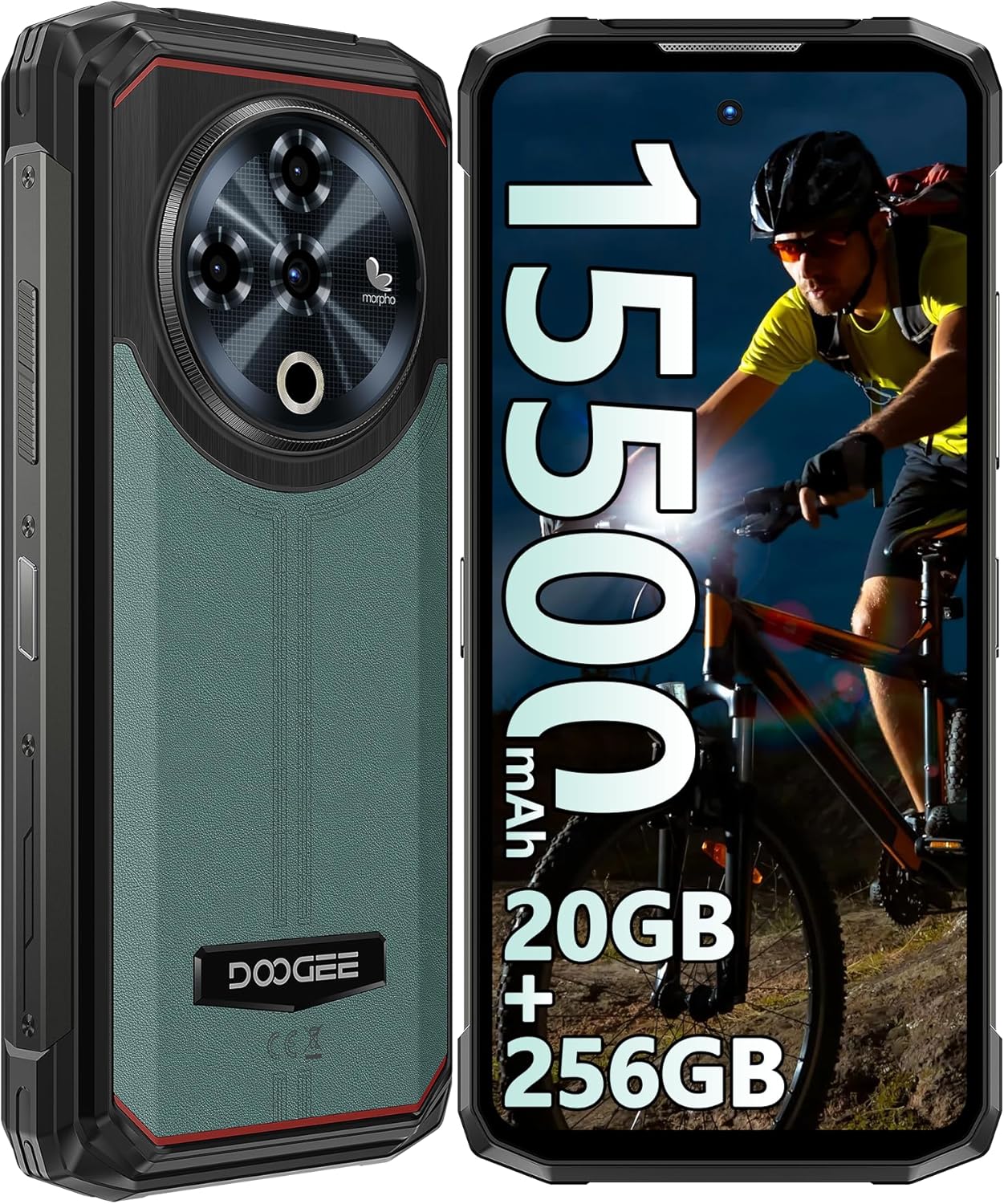
Rajah 1: Depan dan belakang view of the DOOGEE Fire 6 Power Rugged Phone, highlighting its robust design and large display.
This device is IP68/IP69K certified for water and dust resistance and meets MIL-STD-810H standards for shockproof durability, making it an ideal companion for outdoor adventures and demanding work conditions.
2. Bermula
2.1 Kandungan Pakej
Sila pastikan semua item ada dalam pakej anda:
- DOOGEE Fire 6 Power Smartphone
- Penyesuai Kuasa (33W)
- Kabel USB-C
- Alat Ejector SIM
- Manual Pengguna (dokumen ini)
- Kad Waranti
2.2 Pemasangan Kad SIM dan Kad TF
The DOOGEE Fire 6 Power supports a triple SIM card slot configuration, allowing for two Nano SIM cards and one TF (microSD) card simultaneously.
- Cari dulang kad SIM di sisi telefon.
- Masukkan alat ejektor SIM ke dalam lubang kecil di sebelah dulang dan tolak perlahan-lahan sehingga dulang terkeluar.
- Tarik keluar dulang kad SIM dengan berhati-hati.
- Place your Nano SIM cards and/or TF card into the designated slots on the tray, ensuring correct orientation as indicated on the tray.
- Tolak dulang perlahan-lahan ke dalam telefon sehingga ia berbunyi pada tempatnya.

Figure 2: Illustration of the triple card slot for two SIM cards and one TF card.
2.3 Pengecasan Awal dan Penghidupan Kuasa
Your device comes with a large 15500mAh battery. For optimal performance, fully charge the phone before first use.
- Sambungkan kabel USB-C ke port pengecasan telefon.
- Sambungkan hujung kabel yang satu lagi ke penyesuai kuasa 33W.
- Palamkan penyesuai kuasa ke salur keluar dinding.
- Penunjuk pengecasan akan muncul pada skrin.
- Once charged, press and hold the Power button (located on the side) until the DOOGEE logo appears to power on the device.

Figure 3: The phone connected to its 33W fast charger, illustrating its large battery capacity.
The phone also supports 18W OTG reverse charging, allowing it to act as a power bank for other devices (OTG cable not included).

Figure 4: The phone demonstrating its 18W OTG reverse charging feature, capable of powering other devices.
2.4 Security Features: Fingerprint and Face ID
For enhanced security, the DOOGEE Fire 6 Power offers both side-mounted fingerprint recognition and facial recognition.
- To set up Fingerprint ID: Go to Settings > Security & privacy > Device unlock > Fingerprint. Follow the on-screen instructions to register your fingerprint.
- To set up Face ID: Go to Settings > Security & privacy > Device unlock > Face unlock. Follow the on-screen instructions to register your face.

Figure 5: Visual representation of the Face ID and side fingerprint unlock functionalities.
3. Mengendalikan Peranti Anda
3.1 Paparan dan Antara Muka Pengguna
The phone features a 6.56-inch HD+ IPS Notch-less Punch Display with a 90Hz dynamic refresh rate, providing a smooth and vivid visual experience.

Figure 6: The 6.56-inch HD+ IPS display, showcasing its vibrant colors and smooth 90Hz refresh rate.
The device runs on the Android 14 operating system, offering an intuitive interface, enhanced privacy controls, and optimized performance.

Figure 7: A visual representation of the Android 14 system, highlighting its modern interface and features.
3.2 Ciri-ciri Kamera
Rakam foto dan video yang menakjubkan dengan sistem kamera serba boleh:
- Kamera Utama AI 50MP: For high-resolution photos with AI scene recognition.
- Kamera Depan 8MP: Untuk swafoto dan panggilan video yang jelas.
- Kamera Makro 2MP: Untuk gambar jarak dekat objek kecil yang terperinci.

Gambar 8: Lebihview of the phone's camera system, including the 50MP main, 8MP front, and 2MP macro lenses.
The camera app includes features like audio note, beauty mode, watermark, filter options, composition lines, smile shutter, and AI scene recognition to enhance your photography experience.
Video 1: A demonstration of the DOOGEE Fire 6 Power's features, including camera capabilities and rugged design.
3.3 Top Position Dual Lamp Lampu suluh
The phone is equipped with a powerful 120LM top-mounted dual lamp flashlight, providing strong illumination for various situations. It can be controlled via a customized key and an APP function.
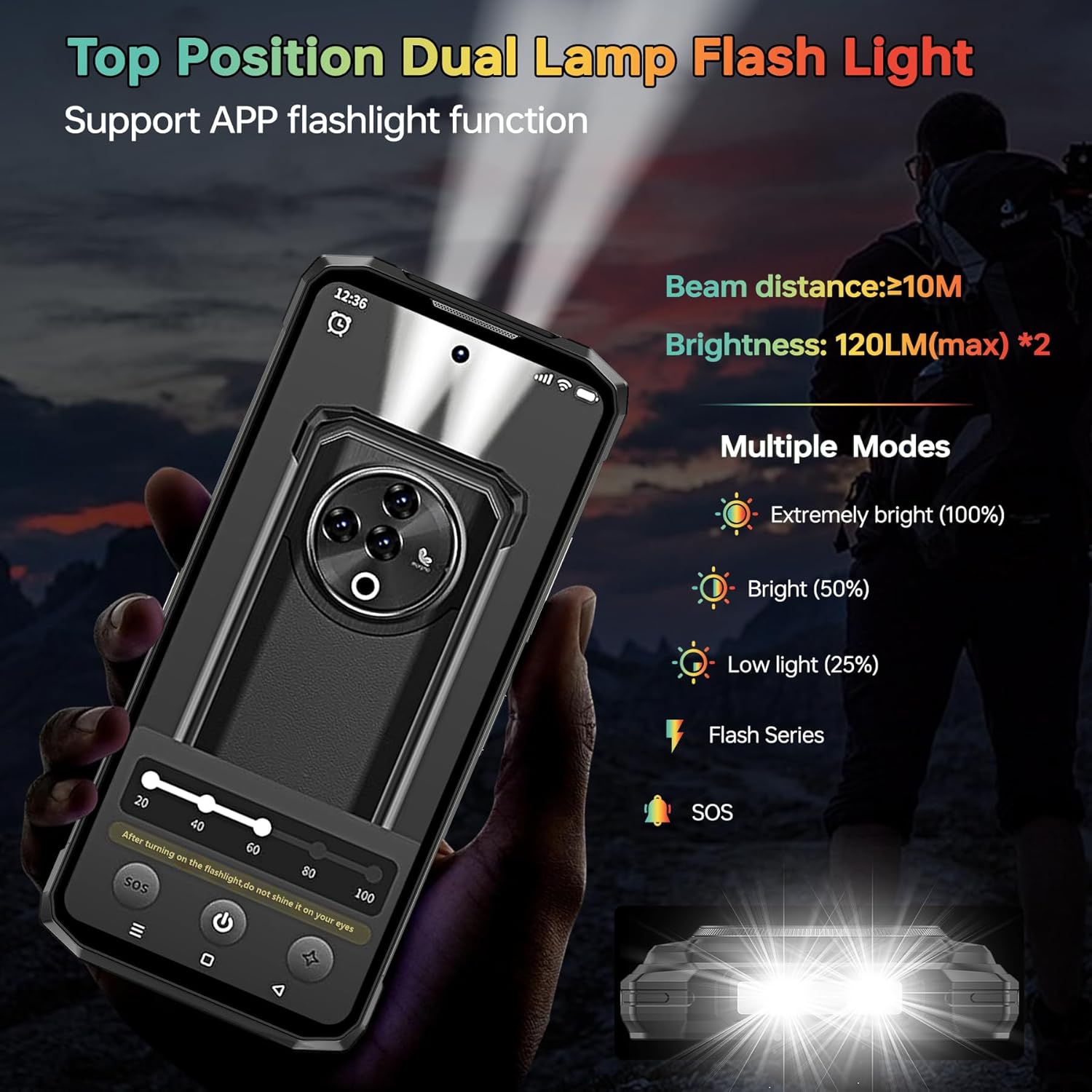
Figure 9: The powerful top-mounted dual lamp flashlight in action, illustrating its various modes and brightness levels.
3.4 Prestasi dan Penyimpanan
Powered by the Unisoc T606 octa-core 12nm processor, the Fire 6 Power delivers smooth performance for multitasking and gaming. It comes with 20GB RAM (8GB physical + 12GB virtual) and 256GB internal storage, expandable up to 1TB with a TF card.

Figure 10: The Unisoc T606 octa-core processor, highlighting its 12nm technology and performance benefits.

Figure 11: Visual representation of the 20GB RAM and 256GB ROM, with an emphasis on 1TB TF card expandability.
3.5 Ketersambungan
Peranti menyokong pelbagai pilihan sambungan:
- Rangkaian 4G: Supports a wide range of FDD and TDD bands for reliable cellular connectivity.
- NFC & Google Pay: For convenient contactless payments and data transfer.
- GPS/GLONASS/Beidou/Galileo: Provides accurate geographic location information for navigation.
- Bluetooth 5.0: For wireless connection to accessories.
- Wi-Fi: Supports 2.4G and 5G Wi-Fi networks.
Figure 12: An illustration of the phone's comprehensive connectivity features, including Wi-Fi, Bluetooth, 4G, and the triple card slot.
4. Ketahanan dan Penyelenggaraan
The DOOGEE Fire 6 Power is built to be highly durable, with certifications for water, dust, and shock resistance.
- IP68 Kalis Air: Can withstand immersion in 1.5 meters of water for up to 30 minutes.
- Kalis habuk IP69K: Terlindung sepenuhnya daripada kemasukan habuk.
- MIL-STD-810H: Military-grade standard for shockproof durability, enduring multiple drop tests from various angles.
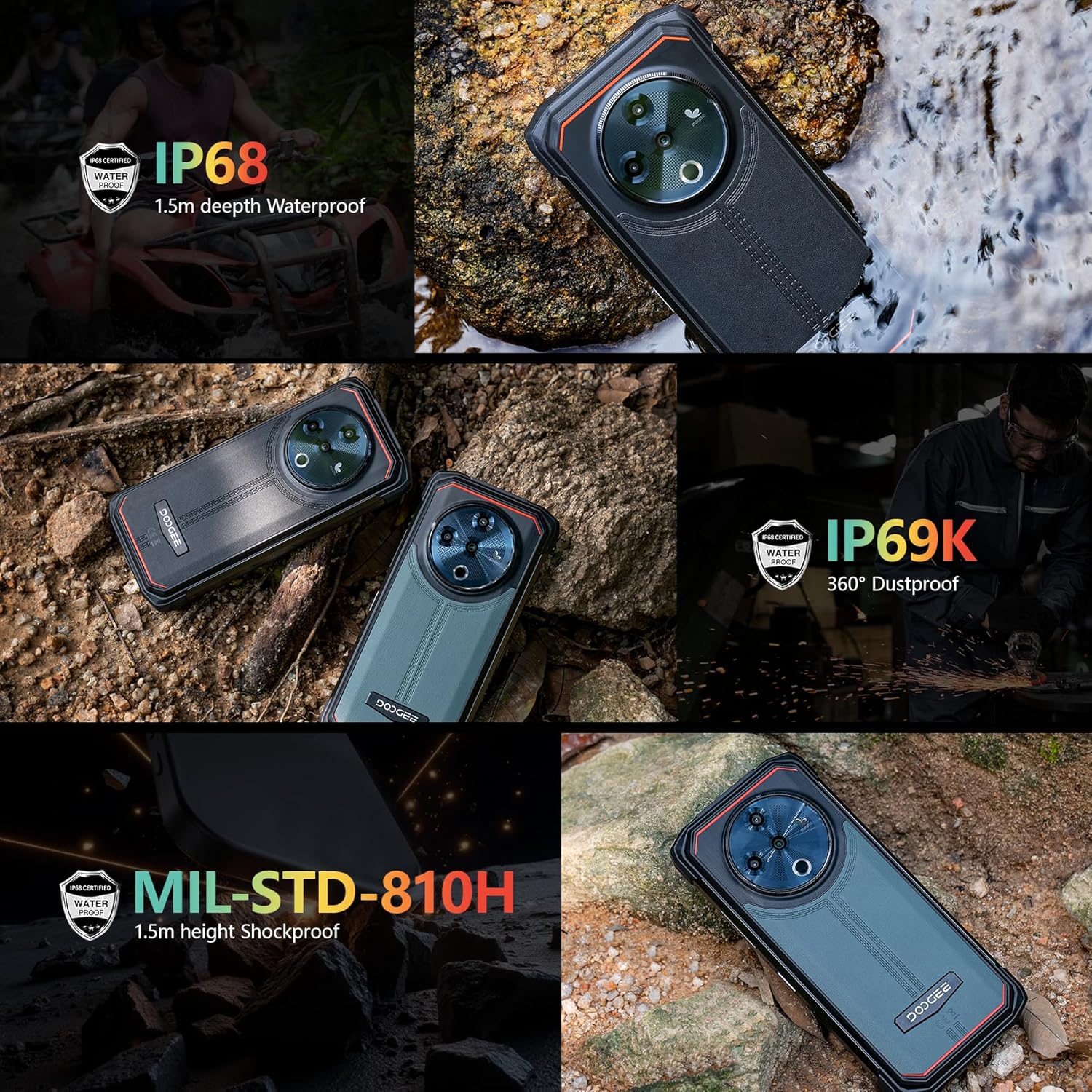
Figure 13: The phone demonstrating its IP68 waterproof, IP69K dustproof, and MIL-STD-810H shockproof capabilities in various environments.
To maintain the phone's ruggedness, ensure all port covers are securely closed before exposing the device to water or dust. Avoid intentional drops or extreme impacts beyond the certified limits.
5. Penyelesaian masalah
5.1 Isu dan Penyelesaian Biasa
| Isu | Kemungkinan Punca | Penyelesaian |
|---|---|---|
| Telefon tidak dihidupkan | Bateri lemah, ranap perisian | Cas telefon selama sekurang-kurangnya 30 minit. Tekan dan tahan butang Kuasa selama 10-15 saat untuk memaksa mula semula. |
| Isyarat rangkaian yang lemah | Out of coverage, incorrect SIM installation, incompatible frequency band | Move to an area with better coverage. Reinstall SIM card. Verify network compatibility with your local carrier (refer to specifications). |
| Apps crashing/slow performance | Too many apps running, low storage, software bug | Close background apps. Clear app cache. Free up storage space. Restart the phone. Update apps and system software. |
| Mengecas perlahan atau tidak mengecas langsung | Faulty cable/adapter, dirty charging port | Use the original 33W charger and cable. Clean the charging port gently. Ensure port cover is fully open during charging. |
5.2 Keserasian Rangkaian
Sebelum pembelianasing or if experiencing network issues, please verify that your local carrier's frequency bands are supported by the DOOGEE Fire 6 Power. The supported bands are:
- GSM: B2/3/5/8
- WCDMA: B1/2/4/5/8
- TDD: B34/38/39/40/41
- FDD: 1/2/3/4/5/7/8/18/19/20/25/26/28AB/66
6. Spesifikasi Teknikal
| Ciri | Spesifikasi |
|---|---|
| Jenama | DOOGEE |
| Nombor Model | Kuasa Api 6 |
| Sistem Operasi | Android 14 |
| Saiz Paparan | 6.56 Inci |
| Resolusi Paparan | 720 x 1612 |
| Saiz Terpasang Memori RAM | 20 GB (8GB fizikal + 12GB maya) |
| Kapasiti Penyimpanan Memori | 256 GB (Boleh dikembangkan sehingga 1TB dengan kad TF) |
| Penilaian Kuasa Bateri | 15500 mAh |
| Kelajuan Mengecas | Pengecasan Pantas 33W |
| Kamera Utama | Kamera AI 50MP |
| Kamera Depan | 8MP |
| Kamera Makro | 2MP |
| Flashlight Brightness | 120LM (max) |
| Tahan Air | IP68 |
| Rintangan Habuk | IP69K |
| Rintangan Kejutan | MIL-STD-810H |
| Pembawa Tanpa Wayar | Dibuka kunci |
| Teknologi Selular | 4G LTE |
| Teknologi Ketersambungan | LTE, Wi-Fi, Bluetooth 5.0, NFC, GPS/GLONASS/Beidou/Galileo |
| Berat Barang | 1.55 paun |
| Dimensi Pakej | 7.61 x 4.07 x 2.5 inci |
7. Waranti dan Sokongan
For warranty information and technical support, please refer to the warranty card included in your product package or visit the official DOOGEE webtapak. Simpan bukti pembelian anda untuk sebarang tuntutan waranti.
For further assistance, you may contact DOOGEE customer service through their official channels.


