pengenalan
The Walker's Xcel Series Digital Electronic Muffs are designed to provide advanced hearing protection and sound enhancement for various environments, including shooting sports and hunting. This manual provides essential information for the proper setup, operation, and maintenance of your Xcel Series muffs.
Maklumat Keselamatan
Amaran Proposisi 65: This product contains chemicals known to the State of California to cause cancer and birth defects or other reproductive harm. Always follow local safety guidelines and regulations when using hearing protection devices.
Persediaan
1. Pemasangan Bateri
The Xcel Series muffs require two AAA batteries for operation. Locate the battery compartment, typically on one of the ear cups. Open the compartment, insert the batteries according to the polarity indicators (+/-), and securely close the cover.
2. Melaraskan Ikat Kepala
Adjust the headband to ensure a snug and comfortable fit over your ears. The ear cups should fully cover your ears to provide optimal noise reduction. The ergonomic headband design allows for easy adjustment.
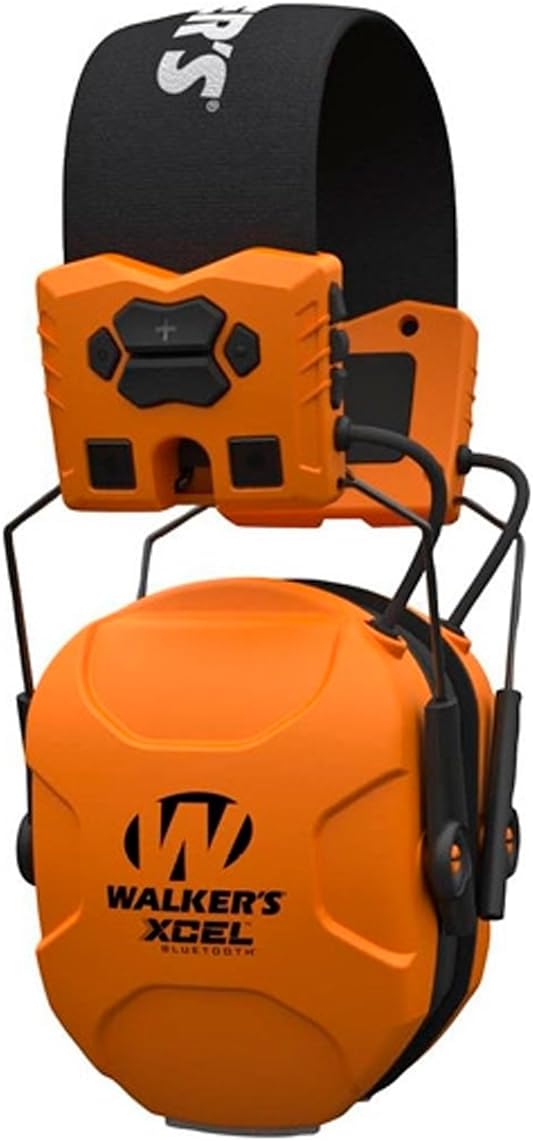
Imej: Depan view of the Walker's Xcel Series Digital Electronic Muffs, showing the headband and ear cups.
Arahan Operasi
1. Hidupkan/Mati Kuasa
Locate the power button on the control panel. Press and hold to power the unit on or off. Voice prompts will confirm the power status.
2. Sound-Activated Compression and Dynamic Sound Suppression
The muffs feature advanced Sound-Activated Compression (SAC) and variable Dynamic Sound Suppression. These technologies automatically adjust compression time based on noise intensity and duration, providing continuous hearing protection while allowing ambient sounds to be heard at safe levels.
3. Mod Mendengar
The Xcel Series offers four distinct listening modes for personalized experience:
- Universal: Standard mode for general use.
- Suara yang jelas: Enhances speech clarity in noisy environments.
- Peningkatan Kuasa: Amplifies ambient sounds for increased situational awareness.
- (Fourth mode not specified in product description, assuming a general or custom mode)
Use the mode selection buttons on the control panel to cycle through these options.
4. Hi-Gain Omni Directional Microphones and Wind Noise Reduction
Integrated Hi-Gain Omni Directional Microphones amplify important sounds, while wind noise reduction technology minimizes interference from environmental factors, ensuring clear audio input.
5. Auto Mati
The muffs are equipped with an auto shut-off feature to conserve battery life. The unit will power down automatically after a period of inactivity. Refer to the full product manual for specific timing.
6. Bluetooth Connectivity (Xcel 500-BT models)
For models equipped with Bluetooth, you can pair your muffs with a mobile device to access calls and notifications. Activate Bluetooth on your device and select the Xcel Series muffs from the available devices list. Voice prompts will guide you through the pairing process.

Image: Diagram illustrating key features of the Xcel Digital Electronic Muffs, including NRR, headband design, program settings, microphones, and digital performance.
Penyelenggaraan
1. Pembersihan
Wipe the exterior of the muffs with a soft, damp cloth. Do not use abrasive cleaners or immerse the unit in water. Ensure the battery compartment is dry before closing.
2. Penyimpanan
When not in use, store the muffs in a cool, dry place. Remove batteries if storing for extended periods to prevent leakage. The muffs are designed to fold up for compact storage.

Image: Visual representation of the cushioned headband, foldable design for storage, and comfort gel earpads of the electronic muffs.
Menyelesaikan masalah
- Tiada Kuasa: Pastikan bateri dipasang dengan betul dan tidak kehabisan kuasa. Gantikan dengan bateri AAA yang baharu jika perlu.
- Static Hissing Sound: A faint static hiss can sometimes occur. If persistent or disruptive, try replacing batteries. If the issue continues, contact customer support.
- Tiada Bunyi Amppemberitahuan: Check if the unit is powered on and the volume is adjusted appropriately. Ensure microphones are not obstructed.
- Isu Berpasangan Bluetooth: Ensure Bluetooth is enabled on your device and the muffs are in pairing mode. Move closer to the device and ensure no other devices are interfering.
- Amaran Bateri Rendah: Replace batteries promptly when the low battery warning is indicated to ensure continued performance.
Spesifikasi
| Penilaian Pengurangan Bunyi (NRR) | 27dB |
| Sumber Kuasa | 2 x Bateri AAA |
| Berat Barang | 0.47 Kilogram |
| Dimensi Item (LxWxH) | 5.91 x 4.14 x 4.14 inci |
| Mikrofon | Hi-Gain Omni Directional |
| Ciri-ciri | Variable Dynamic Sound Suppression, Wind Noise Reduction, Auto Shut Off, Ergonomic Headband, Low Battery Warning, Voice Prompts, Bluetooth (on compatible models) |
Waranti dan Sokongan
For warranty information or technical support, please refer to the official Walker's webtapak atau hubungi bahagian perkhidmatan pelanggan mereka. Simpan bukti pembelian anda untuk sebarang tuntutan waranti.
Sokongan dalam talian: melawat Walker's Official Store untuk sumber tambahan dan maklumat hubungan.