
1. Maklumat Keselamatan
Before using the ZIBOO 15B PRO Digital Multimeter, please read and understand all safety instructions. Failure to follow these instructions may result in electric shock, fire, or personal injury.
1.1 Garis Panduan Keselamatan Am
- Sentiasa pastikan multimeter berada dalam fungsi dan julat yang betul sebelum membuat pengukuran.
- Jangan gunakan multimeter jika ia kelihatan rosak atau jika wayar ujian telah rosak.
- Observe all safety precautions for working with electricity, including wearing appropriate personal protective equipment (PPE).
- Never exceed the maximum input values for any function.
- The device is rated CAT III 600V and CAT II 1000V. Adhere to these ratings for safe operation.
- The multimeter features double fuse protection to prevent damage from overload.
2. Produk Lebihview
The ZIBOO 15B PRO True RMS Digital Multimeter is a compact and reliable tool designed for a wide range of electrical testing applications. It offers accurate measurements for AC/DC voltage, AC/DC current, resistance, continuity, diode, capacitance, and duty cycle. Its True RMS capability ensures precise readings for non-sinusoidal waveforms.
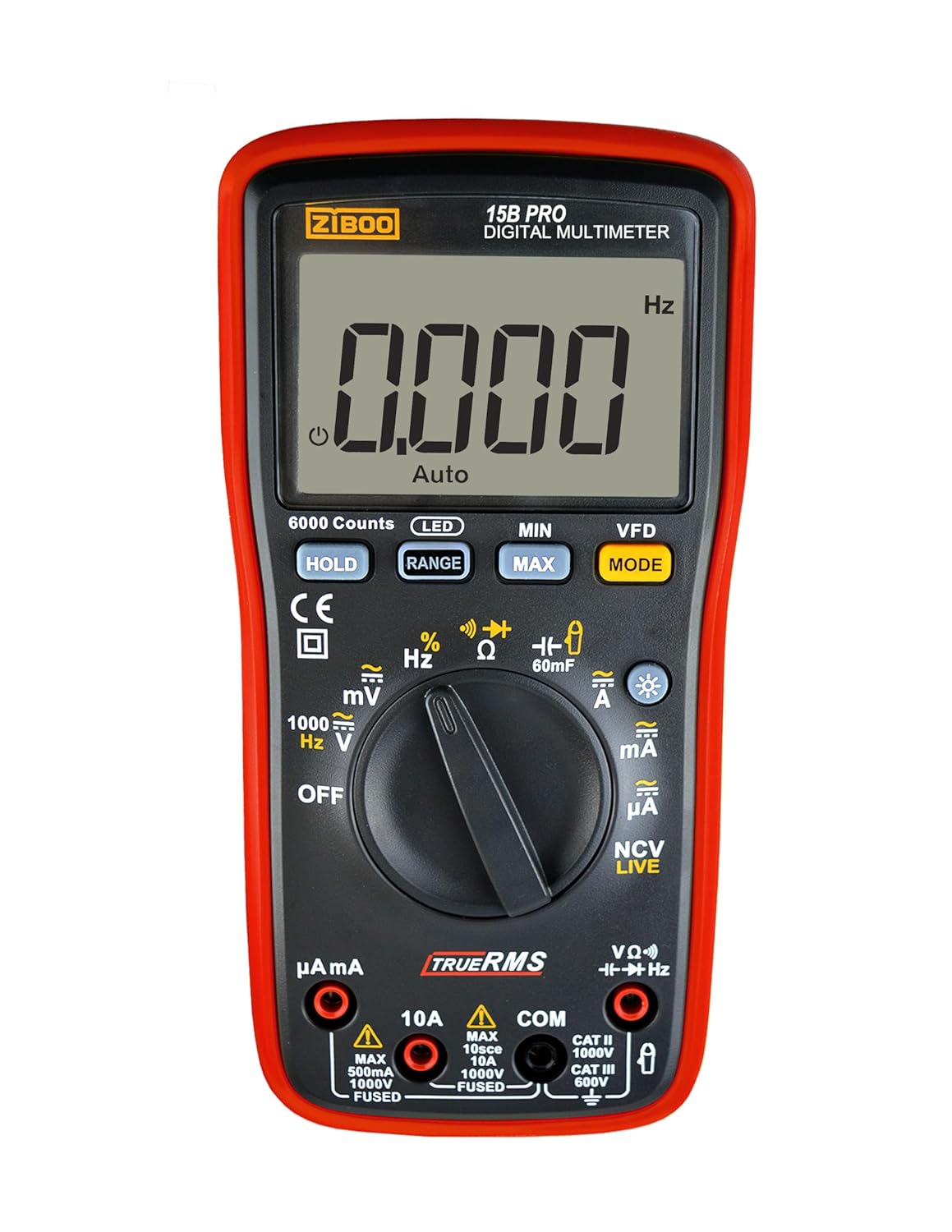
Rajah 1: Depan view of the ZIBOO 15B PRO Digital Multimeter, showing the display, rotary dial, and function buttons.
2.1 Ciri-ciri Utama
- RMS Benar: Provides accurate measurements for both sinusoidal and non-sinusoidal AC waveforms.
- Paparan 6000 Kiraan: High-resolution display for precise readings.
- AC / DC Voltage: Measures up to 1000V.
- Arus AC/DC: Measures up to 10A (optional current clamp for up to 600A).
- Resistance, Continuity, Diode, Capacitance, Duty Cycle: Essential functions for comprehensive electrical troubleshooting.
- VFD AC 600V: Variable Frequency Drive measurement capability.
- NCV/LIVE: Vol. Bukan Kenalantage and Live Wire Detection with Red LED Flash.
- Pegangan Data: Membekukan bacaan yang dipaparkan untuk memudahkan rakaman.
- Lampu latar: Bright white backlight for clear visibility in various lighting conditions.
- Pelindung Casing: Luaran tahan lasak casing for enhanced protection.

Figure 2: Visual representation of the various measurement functions available on the multimeter.
2.2 Apa yang ada di dalam Kotak
- ZIBOO 15B PRO Digital Multimeter
- Petunjuk Ujian Multimeter (Merah dan Hitam)
- Protective Caps for Test Leads
- Manual Pengguna
Note: AC pliers are an optional accessory and are not included with the standard package.
3. Persediaan
3.1 Pemasangan Bateri
- Ensure the multimeter is powered off.
- Cari petak bateri di bahagian belakang peranti.
- Unscrew the single Phillips #1 screw to open the compartment.
- Insert three AA 1.5V batteries, observing correct polarity.
- Gantikan penutup petak bateri dan kencangkannya dengan skru.
3.2 Menghubungkan Petunjuk Ujian
- Masukkan petunjuk ujian hitam ke dalam bicu 'COM' (Common).
- Untuk kebanyakan ukuran (voltage, resistance, continuity, diode, capacitance, frequency, duty cycle), insert the red test lead into the 'VΩHz' jack.
- For current measurements up to 10A, insert the red test lead into the '10A' jack.
- Untuk miliampere (mA) atau mikroampere (µA) measurements, insert the red test lead into the 'µAmA' jack.

Figure 3: The ZIBOO 15B PRO Multimeter with its test leads, showing the connection points.
4. Arahan Operasi
4.1 Hidupkan/Mati Kuasa dan Paparan
Turn the rotary dial from 'OFF' to any desired function to power on the multimeter. To power off, turn the dial back to 'OFF'. The device features an automatic power-off function to conserve battery life. Press the LED button to activate or deactivate the display backlight for improved visibility.
4.2 Fungsi Pengukuran
Rotate the dial to select the desired measurement function. Use the MODE button to toggle between different sub-functions within a dial position (e.g., AC/DC voltage, NCV/LIVE).
- VoltagPengukuran (AC/DC):
Set the dial to 'V~' for AC voltage atau 'V=' untuk DC voltage. Connect the test leads in parallel to the circuit or component being measured. The display will show the voltage membaca. - Pengukuran Arus (AC/DC):
Set the dial to 'A~' for AC current or 'A=' for DC current. Ensure the red test lead is in the appropriate current jack (10A or µAmA). Connect the multimeter in series with the circuit. - Pengukuran Rintangan (Ω):
Set the dial to 'Ω'. Connect the test leads across the component. Ensure the circuit is de-energized before measuring resistance. - Ujian Kesinambungan ():
Set the dial to 'Ω' and press MODE until the continuity icon appears. A buzzer will sound and a green LED will flash if continuity is detected (low resistance). - Ujian Diod ():
Set the dial to 'Ω' and press MODE until the diode icon appears. Connect the test leads across the diode. - Pengukuran Kapasitans (F):
Set the dial to 'F'. Connect the test leads across the capacitor. Ensure the capacitor is discharged before measurement. - NCV (Voltage) / LIVE (Live Wire Detection):
Set the dial to 'NCV LIVE'. The multimeter will detect AC voltage without direct contact. 'L' indicates a live wire with voltage, accompanied by a red LED flash and buzzer. 'EF' indicates non-contact detection.

Figure 4: The multimeter's NCV function detecting voltage near an electrical outlet, indicated by 'EF' on the display.
Video 1: This video demonstrates the difference between the NCV (Non-Contact Voltage) and LIVE (Live Wire Detection) functions on the ZIBOO 15B PRO/17B PRO multimeters. It shows how to toggle between these modes and their respective indications when detecting live electrical circuits.
4.3 Fungsi Khas
- DIBERI: Tekan ke TAHAN butang untuk membekukan bacaan semasa pada paparan. Tekan sekali lagi untuk melepaskan.
- MIN / MAX: Tekan ke MIN / MAX button to record the minimum and maximum values during a measurement session. Press again to cycle through MIN, MAX, and current readings.
- RANGE: Tekan ke JULAT button to switch between auto-ranging and manual ranging.
5. Penyelenggaraan
5.1 Pembersihan
Lap multimeter casing dengan iklanamp cloth and mild detergent. Do not use abrasive cleaners or solvents. Ensure the device is completely dry before use.
5.2 Penggantian Bateri
When the battery indicator appears on the display, replace the batteries as described in Section 3.1. Always use three new AA 1.5V batteries.
5.3 Penggantian Fius
The multimeter is equipped with internal fuses for protection. If a current measurement function stops working, the fuse may need replacement. To access the fuses, open the battery compartment (Section 3.1). The fuses are located inside. Replace with fuses of the correct type and rating (e.g., 10A/1000V and 500mA/1000V).
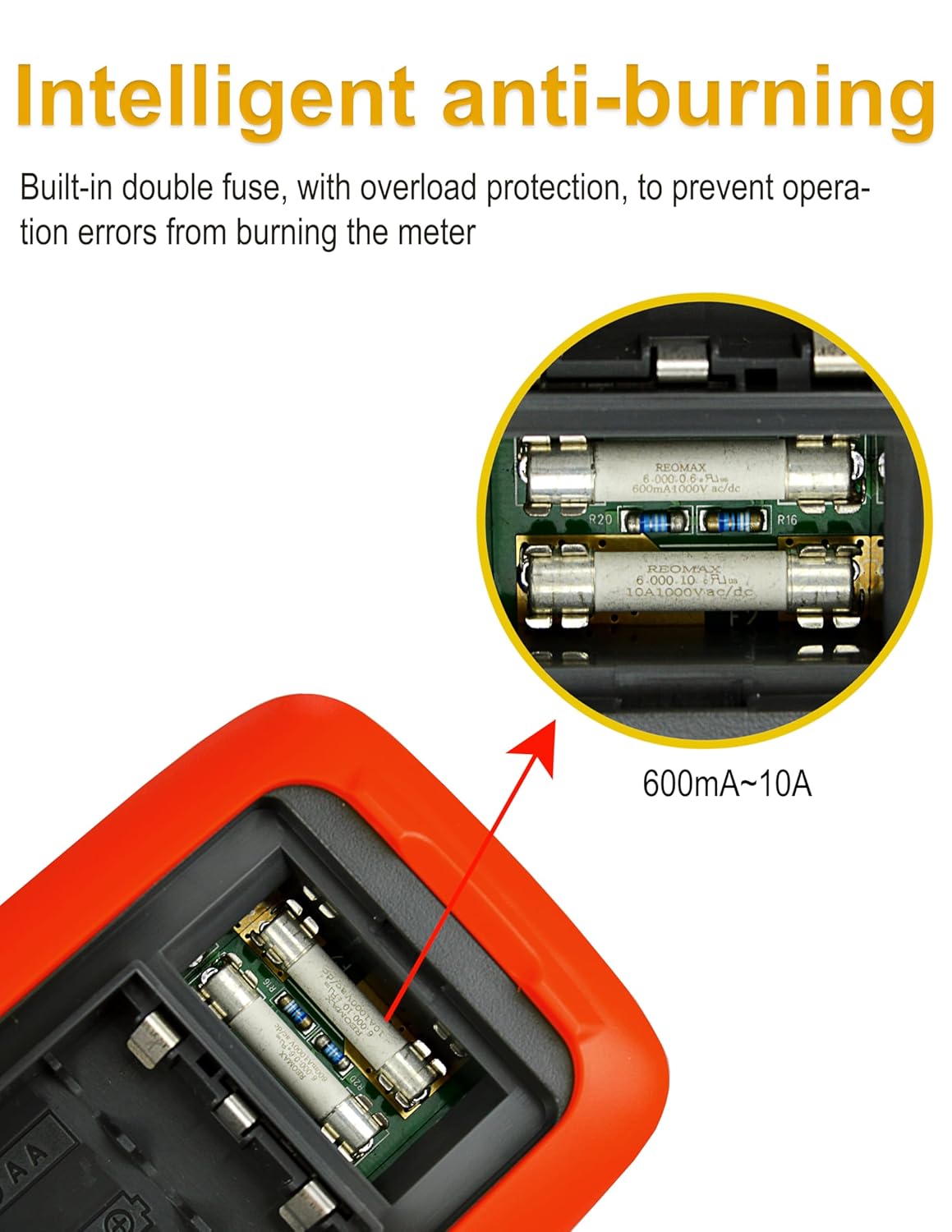
Gambar 5: Dalaman view highlighting the double fuse protection for safety and durability.
5.4 Penjagaan Plumbum Ujian
The test leads come with protective caps. Use these caps to protect the sharp tips when not in use or when measuring in situations where only a short tip is required. This helps prevent damage to the probes and ensures safety.
6. Penyelesaian masalah
If you encounter issues with your ZIBOO 15B PRO Digital Multimeter, refer to the following common troubleshooting steps:
- Tiada Paparan/Paparan Samar: Check battery levels and replace if necessary. Ensure the multimeter is powered on.
- Bacaan yang salah: Verify the test leads are correctly inserted into the appropriate jacks for the selected function. Ensure the rotary dial is set to the correct measurement type and range. Check for damaged test leads.
- Current Function Not Working: The internal fuse for current measurement may have blown due to an overload. Replace the fuse as described in Section 5.3.
- Buzzer Kesinambungan Tidak Berbunyi: Ensure the multimeter is in continuity mode. Check for open circuits or high resistance.
For persistent issues, consult the manufacturer's support resources.
7. Spesifikasi
| Ciri | Spesifikasi |
|---|---|
| Paparan | 6000 Counts, True RMS |
| DC Voltage (V) | 6V/60V/600V/1000V (±(0.5%+3)) |
| Vol. ACtage (V) | 6V/60V/600V/1000V (±(0.8%+5)) |
| VFD AC Voltage (V) | 600V (±(0.8%+5)) |
| Arus DC (A) | 600µA/6mA/60mA/600mA/6A/10A (±(0.8%+5) to ±(1.5%+5)) |
| AC Semasa (A) | 600µA/6mA/60mA/600mA/6A/10A (±(1.0%+5) to ±(1.8%+5)) |
| Rintangan (Ω) | 600Ω/6KΩ/60KΩ/600KΩ/6MΩ/60MΩ (±(0.8%+5) to ±(2.5%+5)) |
| Kapasitansi (F) | 60nF-60mF (±(3%+5) to ±(5%+5)) |
| Kekerapan (Hz) | 10Hz-20MHz (±(0.1%+5)) |
| Kitaran Tugas | 10%-90% (±(2%+5)) |
| Penilaian Keselamatan | CAT III 600V, CAT II 1000V |
| Sumber Kuasa | 3 x Bateri AA 1.5V |
| Dimensi Produk | 3.58 x 1.77 x 7.2 inci |
| Berat Produk | 1.19 Paun (402g) |
Note: Accuracy specifications are typical values and may vary slightly.

Figure 6: A detailed table outlining the technical specifications for the ZIBOO 15B PRO multimeter.
8. Waranti dan Sokongan
For warranty information and customer support, please refer to the official ZIBOO website or contact the seller directly through the platform where the product was purchased. Standard return policies typically apply (e.g., 30-day return window).


