
KLIW010
CS09 Ultra HD 4K Mini Camera User Manual
Model: KLIW010
1. Pengenalan
Thank you for choosing the CS09 Ultra HD 4K Mini Camera. This portable digital video recorder is designed for versatile use, functioning as a body cam, car driving recorder, or a general-purpose miniature camcorder. Its compact design, high-definition recording capabilities, and integrated features make it an ideal tool for capturing important moments.
Please read this manual thoroughly before operating the device to ensure proper usage and to maximize its performance.
2. Produk Lebihview
2.1 Ciri-ciri Utama
- Ultra HD 4K Video Recording
- One-Click Recording and Photography
- 180-Degree Rotating Camera Lens
- 150-Degree Ultra Wide Angle View
- Built-in WiFi Hotspot for Close-Range Connection (approx. 10 meters)
- Keupayaan Penglihatan Malam
- Simultaneous Recording and Charging
- Circular Recording (Loop Recording)
- Supports TF Cards from 8GB to 256GB
- Durable Plastic Shell

Imej: Selesaiview of the CS09 Mini Camera's powerful functionalities including 4K HD recording, one-click operation, 180-degree rotating lens, Hotspot WiFi, back clip design, HD display, sound playback, and LED fill light.
2.2 Senarai Bahagian
The following items are included with your CS09 Mini Camera:
- Main Engine (CS09 Mini Camera)
- Data Line (USB Type-C Cable)
- Stand Basikal
- Kotak Pembungkusan
- Manual Arahan (dokumen ini)

Image: Visual representation of the items included in the CS09 Mini Camera package.
2.3 Rajah Produk
Familiarize yourself with the various parts and controls of your CS09 Mini Camera:

Image: Detailed diagram showing the different components and buttons of the CS09 Mini Camera.
| Tidak. | Nama Bahagian | Tidak. | Nama Bahagian |
|---|---|---|---|
| 01 | Kanta HD | 11 | Lubang mikrofon |
| 02 | Isi cahaya | 12 | Butang video |
| 03 | Skrin paparan | 13 | Belat belakang |
| 04 | Upturn button | 14 | Photo/fill light button |
| 05 | Butang belakang | 15 | Power/screen sleep button |
| 06 | Butang album | 16 | Hidupkan/suis WiFi |
| 07 | Confirm (OK) button | 17 | Alur kad TF |
| 08 | Downturn button | 18 | Butang set semula |
| 09 | Pembesar suara | 19 | Data interface (Type-C) |
| 10 | Caj lamp |
3. Persediaan
3.1 Memasukkan Kad Memori
The CS09 Mini Camera requires a TF (microSD) card for storing recordings. The device supports cards from 8GB up to 256GB. A memory card is not included with the standard equipment.
- Locate the TF card groove (17) on the side of the camera.
- Gently insert the TF card into the slot with the gold contacts facing the back of the camera until it clicks into place.
- To remove the card, gently push it in again until it springs out.

Image: Illustration of the memory expansion feature, showing the TF card slot and support for up to 256GB TF cards.
3.2 Caj Permulaan
Before first use, fully charge the camera's internal battery.
- Connect the provided USB Type-C data line to the data interface (19) on the camera.
- Sambungkan hujung kabel USB yang satu lagi ke penyesuai kuasa USB (tidak disertakan) atau port USB komputer.
- Pertuduhan lamp (10) will indicate charging status. Refer to the camera's display for battery level.

Image: The CS09 Mini Camera connected via its Type-C charging interface, emphasizing fast charging and data transmission.
4. Arahan Operasi
4.1 Hidupkan/Mati Kuasa
- To power on, press and hold the Power/screen sleep button (15) until the display screen (03) illuminates.
- To power off, press and hold the Power/screen sleep button (15) again until the device shuts down.
4.2 Merakam Video
The CS09 Mini Camera supports one-click video recording and circular recording.
- Ensure a TF card is inserted and the device is powered on.
- Press the Video button (12) once to start recording. The recording indicator will light up.
- Press the Video button (12) again to stop recording.
4.3 Mengambil Foto
Capture still images with a single click.
- Pastikan peranti dihidupkan.
- Press the Photo/fill light button (14) once to take a photo.

Imej: Bahagian sisi view of the CS09 Mini Camera, highlighting the independent buttons for one-click recording and one-click photography.
4.4 Rotating Lens
The HD lens (01) can be manually rotated 180 degrees to capture footage from various angles.
- Gently rotate the lens module to your desired angle (0°, 90°, 180°).
- Ensure the lens is securely positioned before recording.
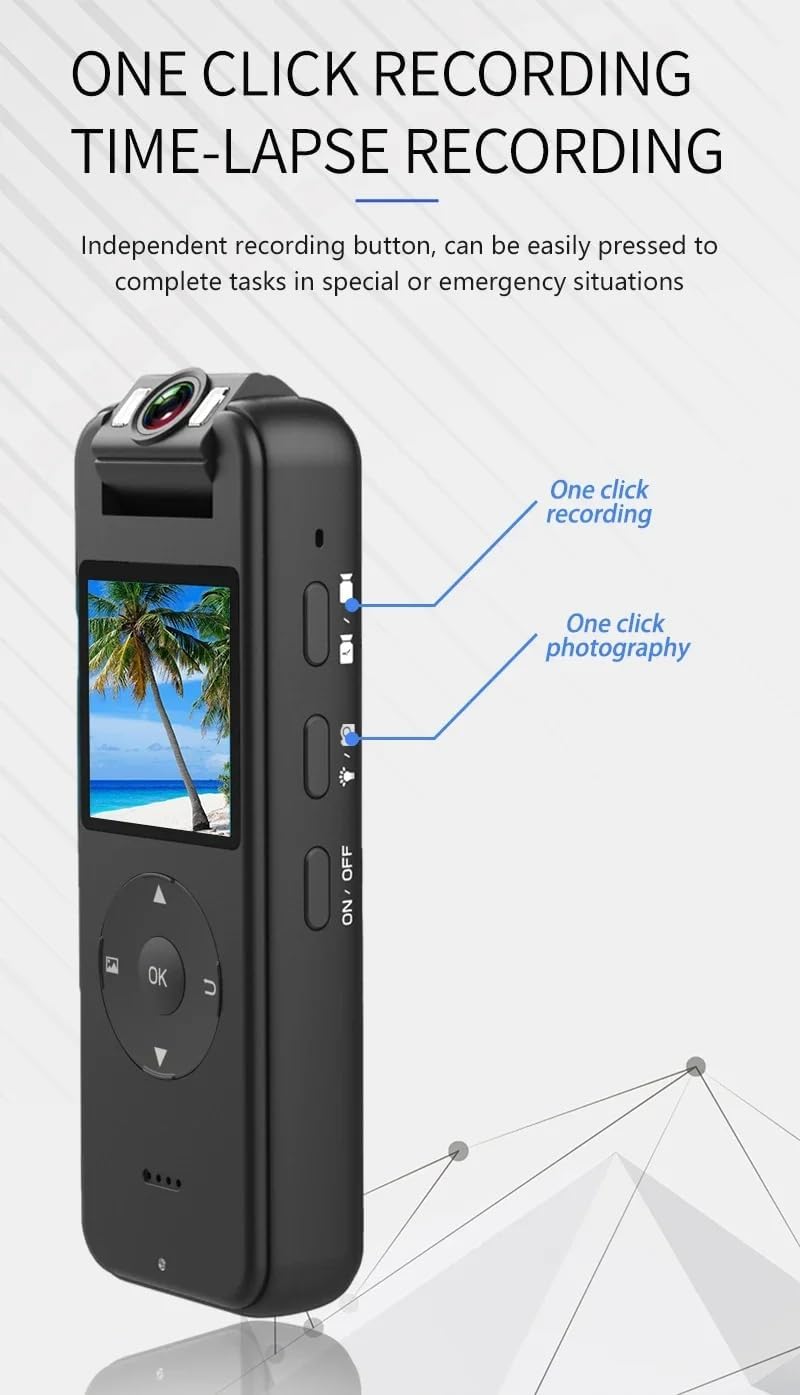
Image: Visual demonstration of the 180-degree adjustable rotating lens, showing 0°, 90°, and 180° positions.
4.5 Sambungan Hotspot WiFi
The camera features a built-in WiFi hotspot for close-range connection (approximately 10 meters) to a smartphone or tablet. This allows for live view, playback, and settings adjustment via a dedicated app (app name not specified, refer to product packaging or manufacturer's website for app details).
- Turn on the WiFi hotspot by using the Turn/WiFi switch (16).
- On your smartphone/tablet, go to WiFi settings and connect to the camera's WiFi network (SSID and password typically found on the device or in the app).
- Open the dedicated app to access camera functions.
5. Peluasan Ingatan
The CS09 Mini Camera supports TF (microSD) cards ranging from 8GB to 256GB. It features circular recording, which means when the memory card is full, the oldest files will be overwritten by new recordings, ensuring continuous operation without manual deletion.
Always ensure you have sufficient storage for your recording needs. For optimal performance, use a high-speed TF card (Class 10 or higher).
6. Mengecas
The CS09 Mini Camera is equipped with a Type-C charging interface (19) for fast and efficient charging. It supports simultaneous recording and charging, allowing for extended operation without interruption.
- Connect the camera to a power source using the provided Type-C USB cable.
- Pertuduhan lamp (10) indicates charging status.
- It is recommended to power off the device before disconnecting the power source to ensure all recorded data is saved and to prevent loss.
7. Spesifikasi
| Ciri | Spesifikasi |
|---|---|
| Nama Model | KLIW010 |
| Dimensi Produk | 1.57"D x 4.19"W x 2.36"H (4.0 x 10.6 x 6.0 cm) |
| Resolusi Tangkapan Video | 1080p (Supports 4K Ultra HD) |
| Teknologi Ketersambungan | Powerline, Wireless (WiFi Hotspot) |
| Kad Memori yang Disokong | TF Card (8GB to 256GB) |
| Putaran Kanta | 180 darjah |
| Sudut Lebar | 150 darjah |
| Pengeluar | BRONG RACING |
| warna | JKJUW010 (Specific color code) |
8. Penyelesaian masalah
If you encounter issues with your CS09 Mini Camera, please refer to the following common problems and solutions:
- Peranti tidak dihidupkan: Ensure the battery is charged. Connect the camera to a power source and try again. If unresponsive, press the Reset button (18) with a thin object (e.g., paperclip).
- Tidak boleh merakam: Verify that a TF card is properly inserted and has sufficient free space. If the card is full, circular recording should overwrite old files, but ensure it's functioning correctly. Format the TF card if issues persist (refer to camera settings for formatting option).
- Kualiti video yang lemah: Ensure the lens is clean and free from smudges. Check that the camera is set to the desired resolution in its settings. Ensure adequate lighting, especially for night vision.
- Isu sambungan WiFi: Ensure the WiFi hotspot is enabled on the camera. Check that your smartphone/tablet is within the 10-meter range. Restart both the camera and your connecting device.
- Kamera membeku atau menjadi tidak responsif: Press the Reset button (18) with a thin object to restart the device.
Nota Penting: The color of the item in the picture may appear slightly different from the real product due to lighting conditions and display variations.
9. Penyelenggaraan
To ensure the longevity and optimal performance of your CS09 Mini Camera, follow these maintenance guidelines:
- Pembersihan: Use a soft, dry cloth to clean the camera body. For the lens, use a specialized lens cleaning cloth and solution to avoid scratches. Do not use harsh chemicals or abrasive materials.
- Storan: Store the camera in a cool, dry place away from direct sunlight, extreme temperatures, and high humidity.
- Penjagaan Bateri: If storing for an extended period, charge the battery to about 50% every few months to prevent deep discharge and prolong battery life.
- Elakkan Titisan: The shell is made of plastic to prevent falling, but excessive impact can still cause damage. Handle the device with care.
10. Waranti dan Sokongan
For warranty information, technical support, or service inquiries, please refer to the documentation provided at the time of purchase or contact the seller/manufacturer directly. Keep your proof of purchase for any warranty claims.
Ask a question about this manual
Ask about setup, troubleshooting, compatibility, parts, safety, or missing instructions. Manuals+ will review the question and use this page’s manual context to help answer it.