1. Pengenalan dan Maklumat Keselamatan
This manual provides essential instructions for the safe and effective operation of your LVYUAN 12V/24V Smart Car Battery Charger, Model 30A-PRO. Please read all instructions carefully before use and retain this manual for future reference.
Amaran Keselamatan Penting:
- Sentiasa pakai pelindung mata dan pakaian pelindung apabila bekerja dengan bateri.
- Pastikan pengudaraan yang mencukupi semasa pengecasan untuk mengelakkan pengumpulan gas.
- Never smoke or allow sparks or flames near the battery or charger.
- Connect and disconnect output clips only after setting the charger to OFF.
- Elakkan mengecas bateri beku.
- Jauhkan daripada kanak-kanak.
- Jangan dedahkan pengecas kepada hujan atau kelembapan berlebihan.
- Jika kord kuasa rosak, ia mesti diganti oleh pengilang atau ejen perkhidmatan yang berkelayakan untuk mengelakkan bahaya.
2. Produk Lebihview
The LVYUAN 30A-PRO is an intelligent 12V/24V car battery charger designed for various battery types, offering multiple charging modes and safety features.
Ciri-ciri Utama:
- Arus Pengecasan Tinggi: 12V/30A and 24V/15A for faster charging compared to lower amperage chargers.
- Berbilang Stage Mengecas: Incorporates quick and trickle charging processes to protect batteries.
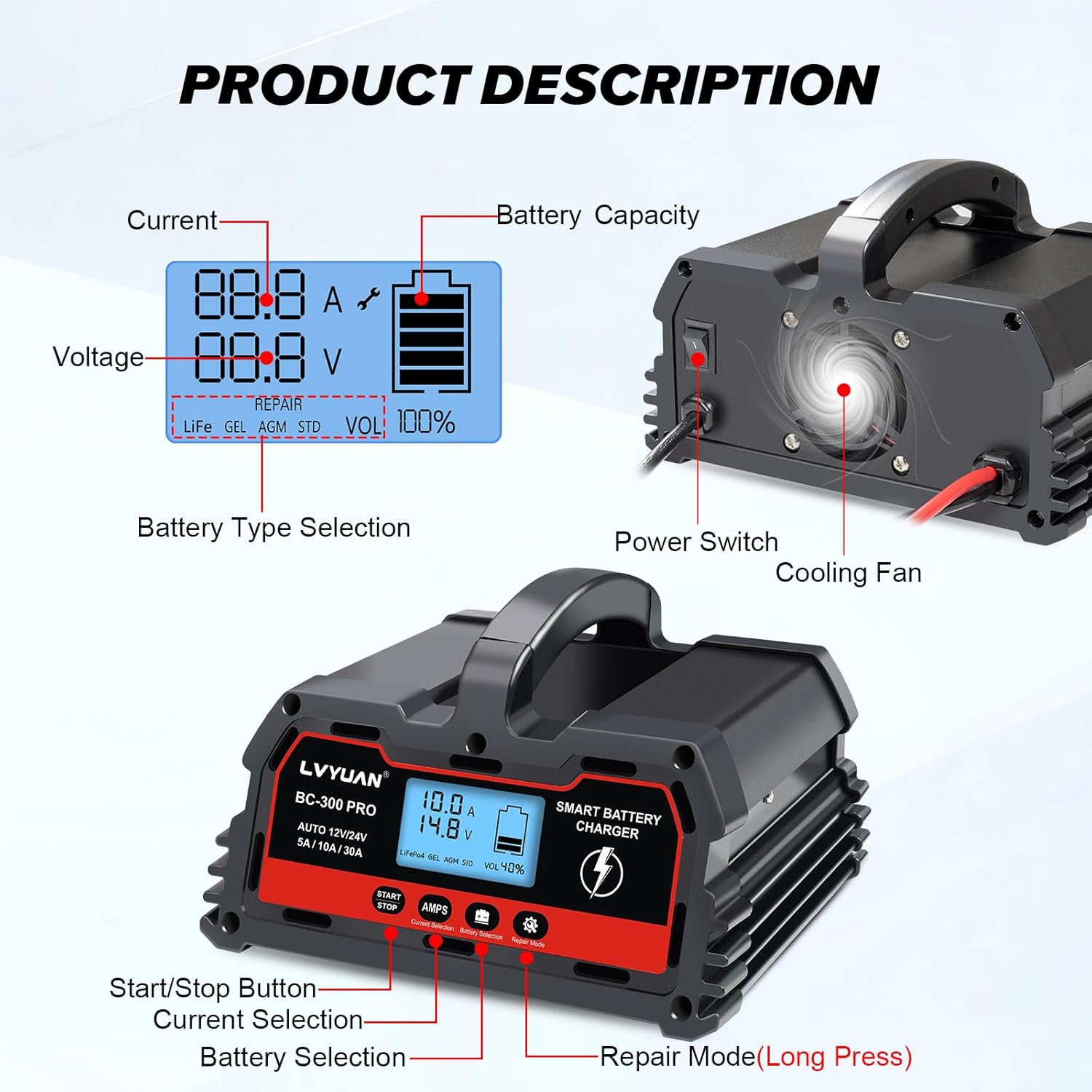
- Intelligent Digital LED Display: Shows ambient temperature, voltage, current, and remaining battery capacity.
- Pelbagai Fungsi Perlindungan: Includes short circuit, overcurrent, cooling system, and reverse polarity protection.
- Repair Function: Activates and repairs batteries that have been unused for extended periods, old batteries, or those unable to charge.
- 0V Start: Enables repair mode for deeply discharged batteries (down to 0V) to initiate charging.
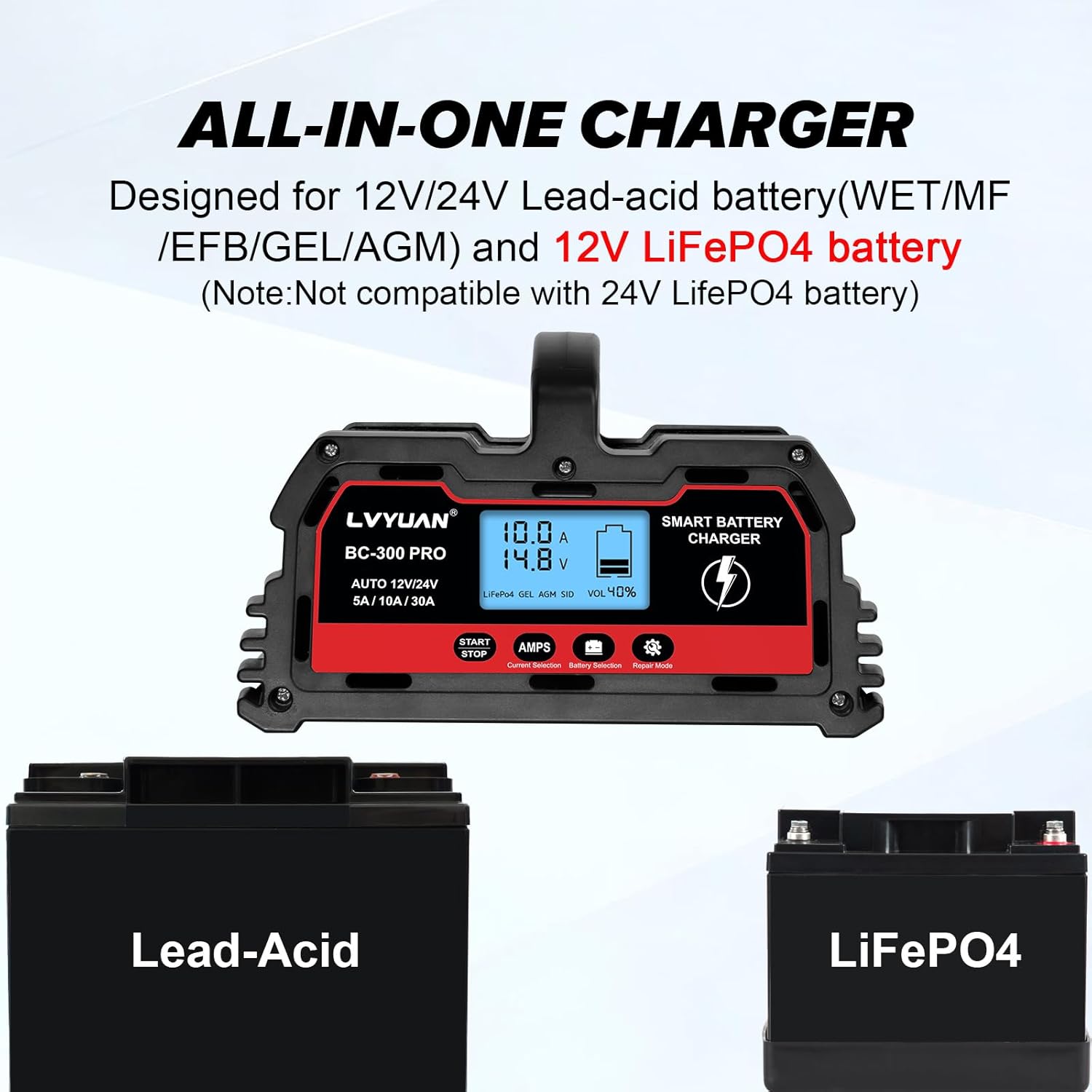
- Keserasian Bateri Luas: Suitable for 12V/24V 4Ah-300Ah lead-acid batteries (AGM, GEL, SLA, VRLA, Calcium, Wet) and 12V LiFePO4 batteries. Note: Not compatible with 24V LiFePO4 batteries.
- Matikan automatik: Charger automatically turns off when fully charged and restarts charging if the battery voltage drops below a set level.
Pengenalan Komponen:

Rajah 2.1: Depan view of the LVYUAN 30A-PRO Smart Battery Charger.
Rajah 2.2: Control panel with Start/Stop button, Current Selection, Battery Selection, and Repair Mode button.

Rajah 2.3: belakang view showing the Power Switch and Cooling Fan.
Rajah 2.4: Charger dimensions and cable lengths. Input power cord length: 52 inches (103 cm), Output clip cord length: 33 inches (83 cm).
3. Persediaan dan Sambungan
Follow these steps to safely set up and connect your LVYUAN 30A-PRO battery charger.
- Sambungkan Kuasa: Plug the charger's power cord into a suitable 110V AC outlet.
- Hidupkan kuasa: Locate the power switch on the rear of the charger and turn it ON. The digital display will illuminate.
- Sambung ke Bateri:
- Sambungkan MERAH positif (+) clamp ke terminal positif (+) bateri.
- Sambungkan HITAM negatif (-) clamp ke terminal negatif (-) bateri.
- Pastikan sambungan selamat.
- Select Battery Type and Current: Gunakan "AMPS" button to cycle through available charging currents (5A, 10A, 30A) and the "Battery Selection" button to choose the correct battery type (LiFePO4, GEL, AGM, STD).
- Mula Mengecas: Press the "START/STOP" button to begin the charging process. The display will show charging status.
Visual Guide for Setup:
Video 3.1: This video demonstrates the step-by-step process of connecting and starting the LVYUAN BC Series Battery Charger. It shows plugging in the power, turning on the unit, connecting the battery clamps, selecting charging parameters, and initiating the charge cycle.
4. Arahan Operasi
Proses Pengecasan:
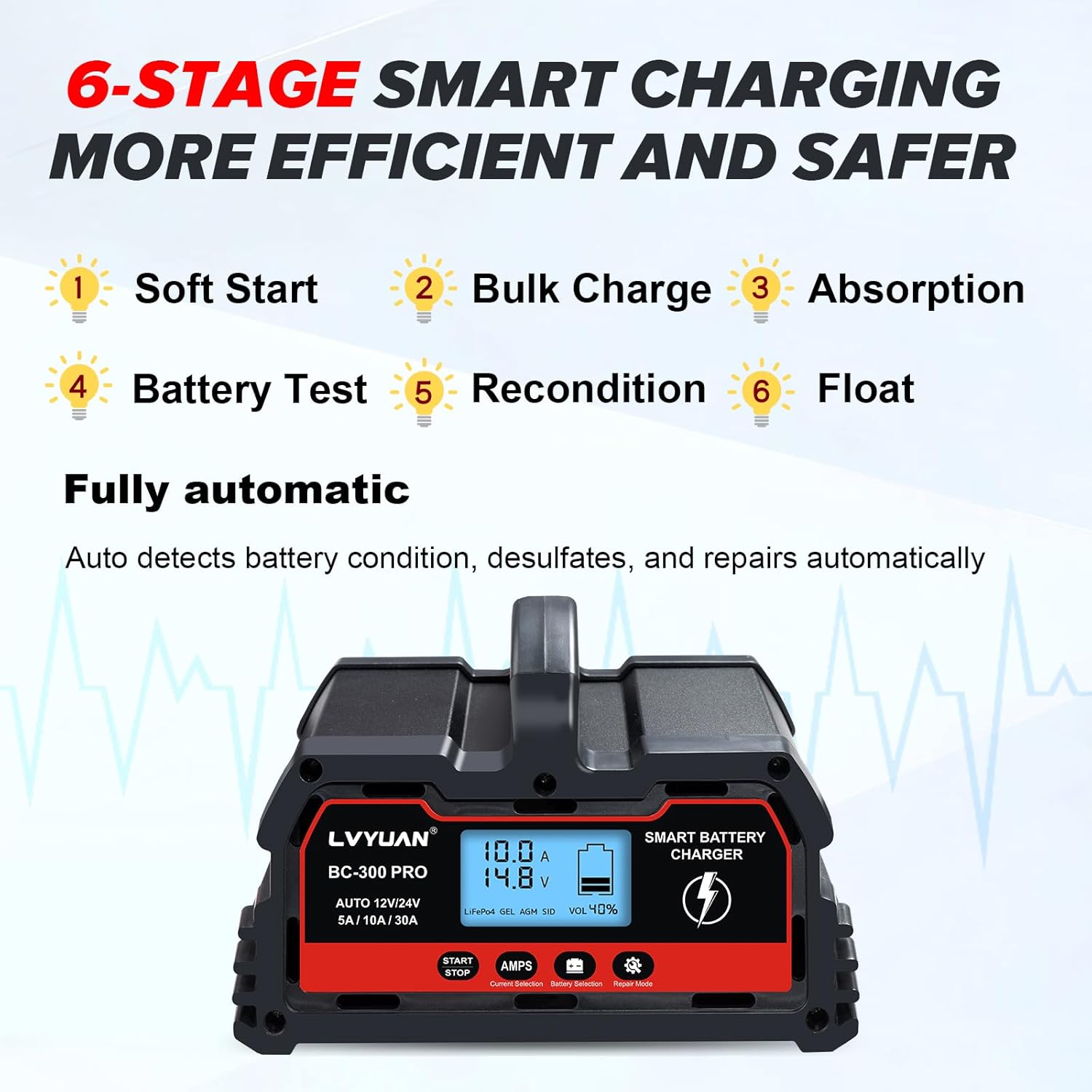
Pengecas menggunakan 6-stage smart charging process to optimize battery health and charging efficiency:
- Permulaan lembut: Memperkenalkan arus ke bateri dengan lembut.
- Caj Pukal: Charges the battery at its maximum rate.
- Penyerapan: Gradually reduces current as the battery approaches full charge.
- Ujian Bateri: Checks battery condition.
- Pemulihan: Addresses sulfation and stratification.
- Terapung: Maintains the battery at full charge without overcharging.

Rajah 4.1: Rajah yang menggambarkan 6-stage smart charging process for efficient and safe battery charging.
Digital Display Information:
The LED screen provides real-time data:
- Semasa (A): Displays the charging amppemadam.
- Voltage (V): Menunjukkan vol bateritage.
- Battery Capacity (%): Indicates the estimated remaining battery capacity.
- Suhu Ambien: Displays the surrounding temperature.
- Jenis Bateri: Shows the selected battery type (LiFe, GEL, AGM, STD).
- Repair Mode Indicator: Illuminates when repair mode is active.

Rajah 4.2: The intelligent digital LED display showing real-time charging information.
Mod Pembaikan:
To activate the repair function for deeply discharged or sulfated batteries, press and hold the "Repair Mode" button for 5 seconds. This mode can help restore batteries that have not been used for a long time or cannot be charged normally. The 0V start feature allows the charger to attempt repair on batteries with extremely low voltage.
Keserasian Bateri:
The charger is compatible with a wide range of 12V/24V batteries from 4Ah to 300Ah, including:
- Lead-Acid Batteries (AGM, GEL, SLA, VRLA, Calcium, Wet)
- Bateri LiFePO12 4V
Penting: Pengecas ini adalah tidak serasi with 24V LiFePO4 batteries.

Rajah 4.3: The charger supports various battery types, including Lead-Acid and 12V LiFePO4.
5. Penyelenggaraan
- Pembersihan: Disconnect the charger from power and battery before cleaning. Use a dry cloth to wipe the exterior. Do not use solvents or abrasive cleaners.
- Kipas Penyejuk: The charger features an intelligent cooling fan that activates when the internal temperature exceeds 114°F/45°C to dissipate heat. Ensure the fan vents are not obstructed.
- Storan: Simpan pengecas di tempat yang sejuk dan kering apabila tidak digunakan.

Rajah 5.1: The cooling fan automatically activates to maintain optimal operating temperature.
6. Penyelesaian masalah
| Masalah | Kemungkinan Punca | Penyelesaian |
|---|---|---|
| Pengecas tidak dihidupkan. | No power to the unit; power switch off. | Check power outlet, ensure power switch is ON. |
| Pengecas tidak dicas. | Incorrect battery connection; battery too damaged; incorrect mode selected. | Verify positive/negative connections; try Repair Mode for damaged batteries; ensure correct battery type and current are selected. |
| Display shows error/protection mode. | Short circuit, overcurrent, reverse polarity, over-voltage, vol-rendahtage, or over-temperature. | Disconnect charger, inspect connections and battery for faults, allow to cool if overheating, then reconnect. |
| Charging current fluctuates. | Normal operation for smart chargers. | This is normal. The charger adjusts current based on battery stage and power level to maintain battery life. |
Rajah 6.1: Icons representing the multiple protection features of the charger, including short-circuit, reverse-polarity, over-voltage, over-charge, low-voltage, dan perlindungan suhu berlebihan.
7. Spesifikasi
| Ciri | Perincian |
|---|---|
| Model | 30A-PRO |
| Input Voltage | 110V AC (Standard) |
| Keluaran Voltage | 12 Volts (DC) / 24 Volts (DC) |
| Mengecas Arus | 5A / 10A / 30A (for 12V), 5A / 10A / 15A (for 24V) |
| Julat Kapasiti Bateri | 4Ah - 300Ah |
| Jenis Bateri yang Serasi | Lead-Acid (AGM, GEL, SLA, VRLA, Calcium, Wet), 12V LiFePO4 |
| Dimensi Produk | 6.88 x 7.87 x 4.5 inci |
| Berat Barang | 3.7 paun |
| Sistem Penyejukan | Kipas Penyejuk Pintar |
| Ciri-ciri Perlindungan | Short circuit, overcurrent, reverse polarity, over-voltage, vol-rendahtage, over-temperature, over-charge. |
8. Waranti dan Sokongan
For warranty information or technical support, please refer to the contact details provided with your purchase or visit the official LVYUAN webtapak. Simpan resit pembelian anda sebagai bukti pembelian untuk tuntutan waranti.
Pengeluar: Guangzhou LVYUAN Technology Co., Ltd.