
Dr Trust 908 Air Purifier
Dr Trust USA Zurich 908 Portable Room Air Purifier Instruction Manual
Your guide to setting up, operating, and maintaining your Dr Trust Zurich 908 Air Purifier.
1. Pengenalan
Thank you for choosing the Dr Trust USA Zurich 908 Portable Room Air Purifier. This device is designed to improve your indoor air quality by effectively removing airborne pollutants. Please read this manual thoroughly before use to ensure proper operation and maintenance.
Ciri-ciri Utama:
- 360° Clean Airflow: Cylindrical design pulls air from all directions, covering up to 270 square feet with a Clean Air Delivery Rate (CADR) of 200 m³/h.
- 4-Layer Filtration + Filter Change Alert: Captures up to 99.97% of airborne particles as small as 0.3 microns, including dust, pollen, smoke, and pet dander. Features a pre-filter, True HEPA filter, activated carbon filter, and photocatalytic technology.
- Pemantauan Kualiti Udara Masa Nyata: PM2.5 air quality indicator with color-coded LED display (green, yellow, orange, red) and automatic fan speed adjustment in AUTO mode.
- Whisper-Quiet with Sleep Mode: Operates at just 50 dB, with a dedicated sleep mode for ultra-quiet operation.
- User-Friendly Design + UV-B Protection: Intuitive touch control panel for fan speeds, timers, and modes. Includes UV-B light technology to neutralize bacteria and viruses.

Imej: Depan view of the Dr Trust USA Zurich 908 Air Purifier.
2. Persediaan Awal
- Buka bungkusan Unit: Keluarkan penulen udara dengan berhati-hati daripada pembungkusnya.
- Keluarkan Pembungkusan Penapis: Before first use, open the bottom cover of the air purifier and remove the plastic packaging from the 4-layer filter.
- Pasang Penapis: Place the filter back into the unit and secure the bottom cover.
- Letakkan Penulen: Letakkan penulen udara di atas permukaan yang rata dan stabil di dalam bilik yang diingini. Pastikan terdapat ruang yang mencukupi di sekeliling unit untuk aliran udara yang optimum.
- Sambungkan Kuasa: Palamkan kord kuasa ke salur keluar elektrik yang sesuai.

Image: Dr Trust Zurich 908 Air Purifier highlighting its features and design.
3. Arahan Operasi
Panel Kawalan Terlaluview:
The Dr Trust Zurich 908 features an intuitive touch control panel located on the top of the unit. This panel allows you to manage all functions of the air purifier.
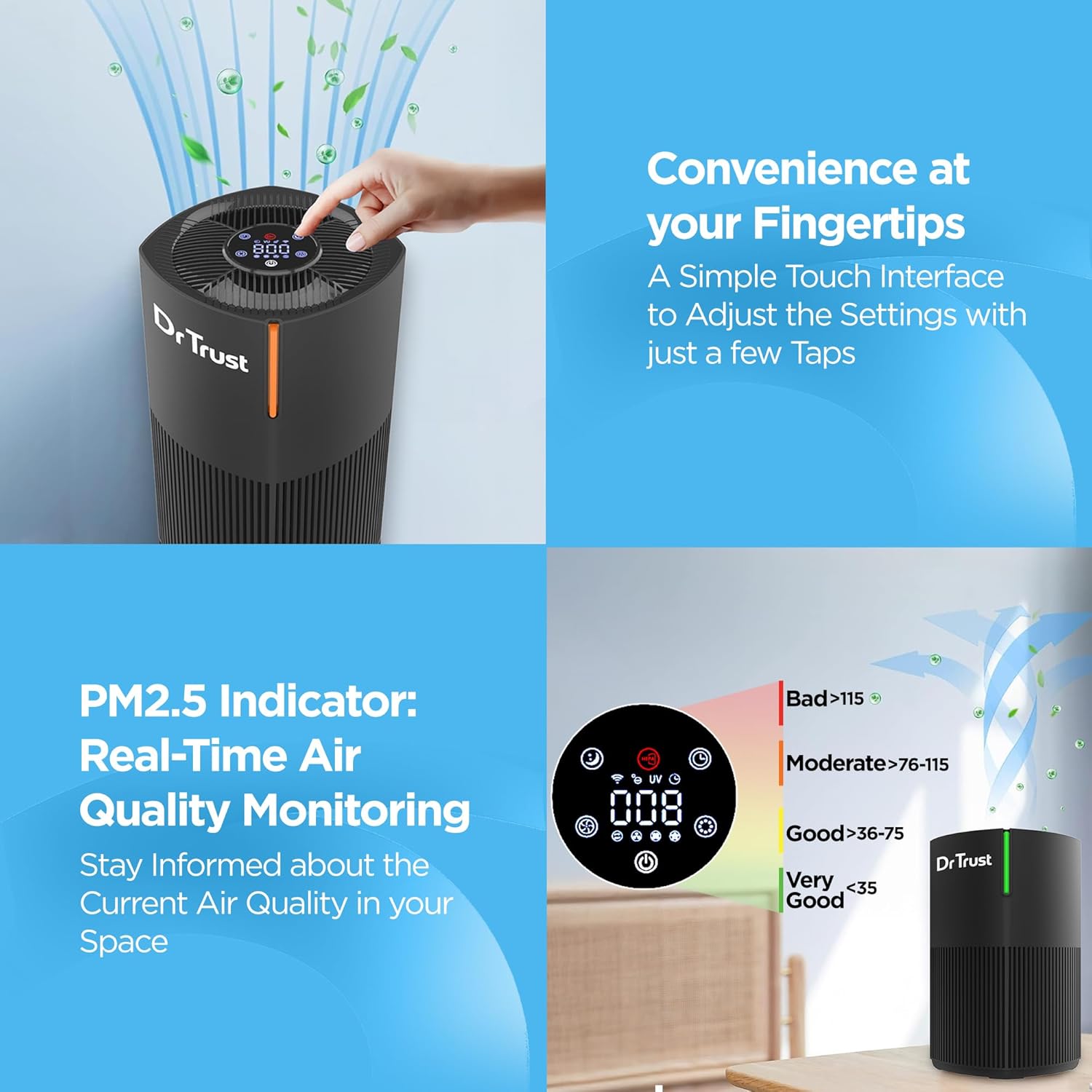
Image: Close-up of the air purifier's touch control panel.
Mod dan Tetapan:
- Hidupkan/Mati Kuasa: Touch the power icon to turn the unit on or off.
- Kelajuan Kipas: Select from 3 fan speeds to adjust the purification intensity.
- Mod tidur: Activate sleep mode for quiet operation, ideal for nighttime use. The display lights will dim or turn off.
- Pemasa: Set the operational timer for up to 12 hours. The unit will automatically turn off after the set time.
- Mod AUTO: In AUTO mode, the purifier automatically adjusts fan speed based on the detected air quality.
- UV-B Light: Activate the UV-B light function for enhanced sterilization.
Pemantauan Kualiti Udara:
The integrated PM2.5 indicator provides real-time air quality readings. The color-coded LED display on the unit indicates the current air quality:
- hijau: Kualiti Udara Sangat Baik
- Kuning: Kualiti Udara yang Baik
- Jingga: Kualiti Udara Sederhana
- merah: Kualiti Udara Buruk

Image: PM2.5 air quality indicator with corresponding color codes.
4. Penyelenggaraan
Penggantian Penapis:
The Dr Trust Zurich 908 features a 4-layer filtration system that requires periodic replacement to maintain optimal performance. A convenient filter change alert will notify you when it's time to replace the filter.
- Matikan: Pastikan penulen udara dimatikan dan dicabut daripada soket kuasa.
- Tanggalkan Penutup Bawah: Gently twist and remove the bottom cover of the unit.
- Keluarkan Penapis Lama: Carefully pull out the used 4-layer filter.
- Pasang Penapis Baharu: Insert a new Dr Trust Zurich 908 replacement filter, ensuring it is seated correctly.
- Gantikan Penutup: Securely reattach the bottom cover.
- Tetapkan Semula Amaran Penapis: Refer to the control panel instructions for resetting the filter change alert after replacement.

Image: Breakdown of the 4-layer filtration system.
Membersihkan Unit:
- Lap bahagian luar penulen udara dengan kain lembut dan kering.
- Jangan gunakan pembersih atau pelarut yang melelas.
- Pastikan tiada air memasuki unit.
5. Penyelesaian masalah
If you encounter any issues with your Dr Trust Zurich 908 Air Purifier, please refer to the following common troubleshooting steps:
- Unit Tidak Dihidupkan: Check if the power cord is securely plugged into the outlet and the unit. Ensure the filter is correctly installed and the bottom cover is closed.
- Reduced Airflow or Purification: The filter may be clogged. Check the filter change alert and replace the filter if necessary. Ensure the air inlet and outlet are not obstructed.
- Bunyi Luar Biasa: Check if the unit is placed on a stable surface. Ensure no foreign objects are obstructing the fan.
- Petunjuk Kualiti Udara Tidak Berubah: Ensure the sensor is clean and not obstructed. If the issue persists, contact customer support.
6. Spesifikasi Produk
| Spesifikasi | Perincian |
|---|---|
| Jenama | Dr Amanah |
| Nombor Model | 908 Pembersih Udara |
| warna | Hitam |
| Dimensi Produk | 22.9D x 22.9W x 34.4H Sentimeter |
| Liputan Keluasan Lantai | 270 Kaki Persegi |
| Tahap Kebisingan | 50 Desibel |
| Wattage | 22 Watt |
| Komponen yang Disertakan | 1 Piece Air Purifier |
| Pensijilan | CE Certified, ETL Certified, RoHS Certified, UL Certified |
| Negara Asal | China |
7. Waranti dan Sokongan Pelanggan
The Dr Trust USA Zurich 908 Portable Room Air Purifier comes with a Waranti 3 tahun, memastikan ketenangan fikiran mengenai pembelian anda.
For any product-related queries, technical assistance, or warranty claims, please contact Dr Trust customer support. Contact details can typically be found on the product packaging or the official Dr Trust webtapak.
Pengeluar: Nureca Limited, Office No. 101, 1st Floor, Udyog Bhavan Sonawala Lane, Goregaon East, Mumbai, Maharashtra - 400063
Ask a question about this manual
Ask about setup, troubleshooting, compatibility, parts, safety, or missing instructions. Manuals+ will review the question and use this page’s manual context to help answer it.