
1. Maklumat Keselamatan
Please read and understand all safety instructions before using the Alonefire SV119 UV LED Flashlight. Failure to follow these instructions may result in injury or damage to the product.
- UV Radiation Exposure: This flashlight emits powerful 365nm UV light. Avoid direct exposure of UV light to eyes and skin. Prolonged exposure can be harmful.
- Pakai Kacamata Pelindung: Always wear the provided UV protection glasses when operating the flashlight to shield your eyes from UV radiation.
- Permukaan panas: The flashlight head may become hot during extended use. Avoid touching the hot surface directly.
- Keselamatan Bateri: Use only the specified Lithium-ion battery. Do not attempt to disassemble, puncture, or expose the battery to extreme temperatures or fire.
- Kanak-kanak: Jauhkan lampu suluh daripada kanak-kanak.
2. Kandungan Pakej
Sahkan bahawa semua item terdapat dalam pakej:
- Alonefire SV119 UV LED Flashlight
- Kabel Pengecas USB-C
- UV Protection Glasses
- Rechargeable Lithium-ion Battery (pre-installed or separate)

Image: Contents of the Alonefire SV119 package, including the flashlight, USB-C cable, and yellow UV protection glasses.
3. Produk Lebihview
The Alonefire SV119 is a powerful 90W UV LED flashlight designed for various detection and curing applications. Its key features include:
- LED UV Berkualiti Tinggi: Equipped with 9 pieces of 4-core 365nm UV LEDs, providing up to 90W power consumption and 10000mW light output.
- Black Filter Lens: Features a hardened black optical filter lens to filter out ambient visible light, ensuring a purer and more powerful UV output.
- Pembinaan Tahan Lama: Made from high-quality aluminum alloy for enhanced heat dissipation and durability.
- USB-C boleh dicas semula: Convenient USB-C charging port for easy and versatile recharging.
- Paparan LCD Digital: An innovative LCD screen displays the battery power level numerically.
- Pengecasan Terbalik: Can function as a power bank to charge other devices via its USB-A output port.

Image: The Alonefire SV119 UV LED flashlight highlighting its 9-core 365nm UV LEDs and various detection and curing applications.

Image: A visual comparison demonstrating the effectiveness of 365nm UV light compared to 395nm UV light for mineral fluorescence.
4. Persediaan
4.1 Pemasangan Bateri
- Tanggalkan penutup ekor lampu suluh.
- If the battery is not pre-installed, insert the provided Lithium-ion battery with the positive (+) terminal facing towards the flashlight head.
- Penting: If there is a plastic insulating disc on the battery's positive or negative terminal, remove it before installation.
- Skru penutup ekor kembali dengan selamat.
4.2 Pengecasan Awal
Before first use, fully charge the flashlight battery.
- Cari port pengecasan USB-C pada badan lampu suluh.
- Connect the provided USB-C cable to the flashlight and plug the other end into a compatible USB power adapter (not included) or a computer USB port.
- The LCD display will show the charging progress. A full charge is indicated by '100%' on the display.
- Masa pengecasan adalah lebih kurang 7 jam untuk pengecasan penuh.

Image: The Alonefire SV119 flashlight being charged via its USB-C port, with the LCD screen displaying the battery charge level.
5. Arahan Operasi
5.1 Kuasa Hidup/Mati dan Pemilihan Mod
- Hidupkan kuasa: Press the power button located on the side of the flashlight.
- Pemilihan Mod: The flashlight typically has two brightness modes (strong and medium). Press the power button repeatedly to cycle through these modes.
- Matikan: Press and hold the power button for a few seconds until the light turns off.
5.2 Memahami Paparan LCD
The integrated LCD display provides real-time information about the battery status.
- When the flashlight is in use, the display shows the remaining battery percentage.
- During charging, it indicates the charging progress.
5.3 Fungsi Pengecasan Songsang
The SV119 can act as a portable power bank to charge other USB-powered devices.
- Locate the USB-A output port on the flashlight.
- Sambungkan kabel pengecas peranti anda ke port USB-A pada lampu suluh.
- Lampu suluh akan mula mengecas peranti anda.
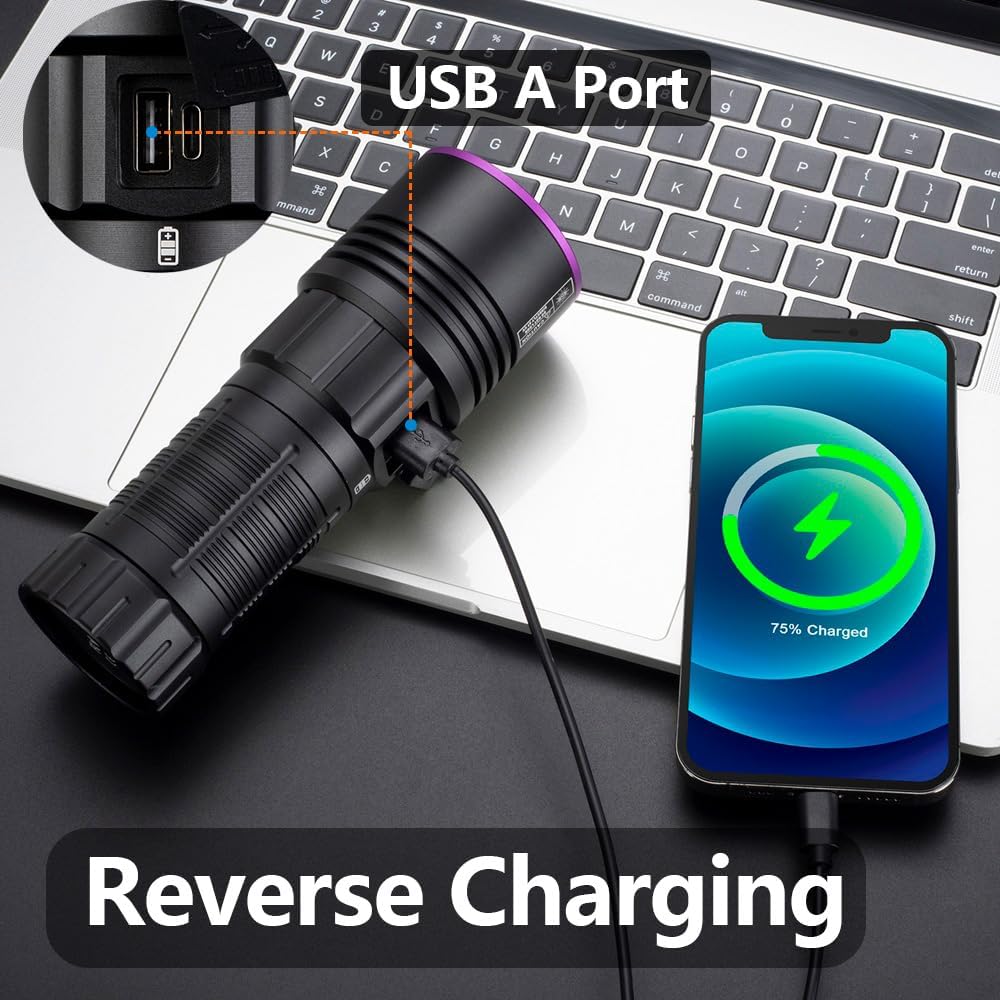
Image: The Alonefire SV119 flashlight demonstrating its reverse charging capability by powering a smartphone.
5.4 Aplikasi
The 365nm UV light is suitable for various applications:
- Pengesanan Noda Haiwan Kesayangan: Identify hidden pet urine, ringworm, and other biological stains on carpets, furniture, and floors.
- Pengesanan Scorpion: Scorpions fluoresce under 365nm UV light, making them easier to spot in dark environments.
- Mineral and Amber Identification: Many minerals and amber exhibit fluorescence under UV light, aiding in identification.
- Pengesahan Mata Wang dan Dokumen: Verify security features on banknotes, passports, and other official documents.
- Resin Curing: Accelerate the curing process of UV-sensitive resins.
- Pengesanan Kebocoran: Detect leaks in HVAC systems or automotive fluids when used with UV-sensitive dyes.

Image: A demonstration of the UV flashlight's ability to reveal hidden pet urine stains on a carpet, showing a 'before' view under normal light and an 'after' view under UV light.
6. Penyelenggaraan
6.1 Pembersihan
- Lap badan lampu suluh dengan lembut, damp kain.
- Untuk kanta, gunakan kain pembersih kanta dan larutan untuk mengelakkan calar.
- Jangan gunakan pembersih atau pelarut yang melelas.
6.2 Penjagaan dan Penyimpanan Bateri
- Recharge the battery regularly, even if not frequently used, to maintain its lifespan.
- Simpan lampu suluh di tempat yang sejuk dan kering jauh dari cahaya matahari langsung dan suhu yang melampau.
- Jika menyimpan untuk tempoh yang lama, cas bateri sehingga kapasiti lebih kurang 50%.
7. Penyelesaian masalah
- Lampu suluh tidak dihidupkan:
- Pastikan bateri dipasang dengan betul dan dicas sepenuhnya.
- Check if the plastic insulating disc has been removed from the battery terminals.
- Ketatkan penutup ekor dengan ketat.
- Bateri tidak dicas:
- Verify the USB-C cable is properly connected to both the flashlight and the power source.
- Cuba kabel USB-C atau penyesuai kuasa yang lain.
- Pastikan sumber kuasa berfungsi.
- Weak light output:
- Bateri mungkin rendah; cas semula.
- Pastikan kanta bersih dan bebas daripada sebarang halangan.
- LCD display not working or inaccurate:
- Isi semula bateri sepenuhnya.
- Jika masalah berterusan, hubungi sokongan pelanggan.
8. Spesifikasi
| Ciri | Spesifikasi |
|---|---|
| Jenama | Alonefire |
| Nombor Model | SV119 |
| Sumber Cahaya | 9x 4-core 365nm UV LED |
| kuasa | 90 Watt |
| Fluks Bercahaya | 10000 miliwatt |
| bahan | Aloi Aluminium |
| Jenis Bateri | 1x Lithium-ion (included) |
| Port Pengecasan | USB-C |
| Ciri Khas | Rechargeable, Digital Display, Reverse Charging |
| Berat badan | 580 g |
| Dimensi (Pakej) | 19.9 x 13.2 x 6.3 cm |
| Tahap Ketahanan Air | Bukan kalis air |
9. Waranti dan Sokongan
9.1 Maklumat Waranti
Specific warranty details for the Alonefire SV119 are not provided in this manual. Please refer to the retailer or manufacturer's official webtapak untuk polisi jaminan terkini.
9.2 Sokongan Pelanggan
For technical assistance, troubleshooting beyond this manual, or inquiries regarding your product, please contact Alonefire customer support through their official channels or the retailer where the product was purchased.