
pengenalan
Welcome to the GOBOULT Mirage Smart Watch user manual. This guide provides detailed instructions on how to set up, operate, and maintain your new smartwatch. Please read this manual thoroughly to ensure optimal performance and longevity of your device.
Produk Selesaiview
The GOBOULT Mirage Smart Watch is a feature-rich device designed to enhance your daily life with advanced health monitoring, communication, and fitness tracking capabilities. It features a vibrant 1.39-inch HD display, Bluetooth calling, and a durable zinc alloy frame.
Ciri-ciri Utama:
- Paparan HD 1.39-inci: Bright and clear screen with 500 nits brightness and 360x360 pixel resolution.
- Panggilan Bluetooth: Make and receive calls directly from your wrist with a built-in speaker and microphone.
- Pemantauan Kesihatan Komprehensif: Includes SpO2, heart rate, blood pressure, sleep tracking, breath training, and menstrual cycle tracking.
- 120+ Mod Sukan: Track a wide range of physical activities with detailed metrics.
- Pembantu Suara AI: Hands-free control and access to features.
- Tahan Air IP67: Designed to withstand splashes and dust.
- Muka Jam Boleh Disesuaikan: Over 300 cloud-based watch faces to personalize your device.
- Pemberitahuan Pintar: Terima makluman untuk panggilan, mesej dan pemberitahuan aplikasi.
- Hayat Bateri yang Panjang: Sehingga 7 hari penggunaan biasa.
Apa yang ada di dalam Kotak:
- GOBOULT Mirage Smart Watch (Coal Black)
- Kabel Pengecasan
- Manual Pengguna
- Kad Waranti

Imej: Selesaiview of the GOBOULT Mirage Smart Watch highlighting its main features.
Panduan Persediaan
1. Mengecas Jam Tangan Pintar
- Sambungkan kabel pengecas magnet ke pin pengecas di bahagian belakang jam tangan pintar anda.
- Palamkan hujung kabel USB ke dalam penyesuai kuasa USB standard (disyorkan 5V/1A) atau port USB komputer.
- The watch display will show a charging indicator. A full charge takes approximately 120 minutes.
- Pastikan pin pengecas bersih dan kering sebelum mengecas untuk mengelakkan kakisan.
2. Menghidupkan/Mematikan
- Hidupkan kuasa: Press and hold the side button (digital crown) for a few seconds until the GOBOULT logo appears.
- Matikan: From the watch face, swipe down to access quick settings, or navigate to the settings menu. Select "Power Off" and confirm. Alternatively, press and hold the side button until the power off option appears.
3. Berpasangan dengan Telefon Pintar Anda
- Download the official GOBOULT companion app from your smartphone's app store (available for iOS and Android).
- Pastikan Bluetooth didayakan pada telefon pintar anda.
- Open the GOBOULT app and follow the on-screen instructions to create an account or log in.
- In the app, select "Add Device" or a similar option to search for your smartwatch.
- Select "GOBOULT Mirage" from the list of available devices.
- Sahkan permintaan berpasangan pada telefon pintar anda dan jam tangan pintar.
- Once paired, the watch will synchronize data with your phone, and you can customize settings through the app.
Arahan Operasi
Navigasi Asas:
- Skrin sentuh: Leret ke kiri/kanan, ke atas/bawah untuk menavigasi menu dan pemberitahuan. Ketik untuk memilih item.
- Digital Crown (Side Button):
- Tekan sekali: Return to the watch face from any screen, or wake the screen.
- Tekan dan tahan: Power on/off, or access the AI Voice Assistant (configurable).
- Putar: Tatal melalui menu, senarai atau laraskan tetapan.
- Butang Pintasan: The second physical button on the side can be customized for quick access to specific functions, such as launching sports modes.

Image: Digital crown and button functionalities for navigation and quick access.
Pemantauan Kesihatan
The GOBOULT Mirage Smart Watch offers a comprehensive suite of health tracking features. For accurate readings, ensure the watch is worn snugly on your wrist, about one finger's width from your wrist bone.
- Pemantauan Denyut Jantung: Jam tangan ini sentiasa menjejaki kadar denyutan jantung anda. View data masa nyata pada jam tangan atau arah aliran terperinci dalam apl.
- Pemantauan SpO2 (Oksigen Darah): Measure your blood oxygen levels on demand. Navigate to the SpO2 function on your watch and remain still for accurate results.
- Pemantauan Tekanan Darah: Access the blood pressure feature on your watch for readings.
- Pemantauan Tidur: Wear your watch to bed to track your sleep patterns, including deep sleep, light sleep, and awake times. Data is available in the app.
- Breath Training Mode: Follow guided breathing exercises to help reduce stress and improve relaxation.
- Penjejakan Aktiviti: Memantau langkah, jarak dan kalori yang dibakar sepanjang hari.
- Peringatan Air Minum: Set reminders in the app to ensure you stay hydrated.
- Peringatan Sedentari: Receive alerts when you've been inactive for too long, encouraging you to move.
- Penjejakan Kitaran Haid: For female users, track and predict menstrual cycles through the companion app.

Image: The watch's health sensors and a summary of its health monitoring capabilities.
Mod Sukan
The GOBOULT Mirage Smart Watch supports over 120 sports modes to accurately track your workouts. From running to yoga, you can monitor your performance and progress.
Using Sports Modes:
- Access the sports mode menu from the watch's main interface or by using the dedicated shortcut button.
- Scroll through the list and select your desired activity (e.g., Running, Cycling, Yoga, Cricket, Badminton, Basketball).
- Tap to start the activity. The watch will begin recording data such as duration, heart rate, calories burned, and distance (where applicable).
- To pause or end an activity, swipe right or press the side button and follow the on-screen prompts.
- Review your workout summaries on the watch or in detail within the companion app.

Image: The watch interface showing various sports modes and quick access options.
Bluetooth Calling & Smart Notifications
With Bluetooth 5.3 connectivity, your GOBOULT Mirage Smart Watch allows you to manage calls and receive notifications directly on your wrist.
Panggilan Bluetooth:
- Ensure your watch is paired with your phone via Bluetooth.
- Membuat Panggilan: Akses pad dail atau senarai kenalan pada jam tangan anda untuk memulakan panggilan.
- Menerima Panggilan: When a call comes in, the watch will display the caller ID. You can answer or reject the call directly from your wrist using the built-in speaker and microphone.
- Penyegerakan Kenalan: Synchronize your phone contacts with the watch through the companion app for easy access.
Pemberitahuan Pintar:
- Enable app notifications in the GOBOULT companion app on your smartphone.
- Your watch will display incoming messages, social media alerts, and other app notifications.
- Leret ke atas atau ke bawah pada muka jam tangan untuk view sejarah pemberitahuan anda.

Image: Bluetooth calling features and interface on the smartwatch.

Image: Smart notifications and other quick access features like calculator and voice assistant.
Penyesuaian
Tonton Wajah:
Personalize your GOBOULT Mirage Smart Watch with over 300 cloud-based watch faces. You can change the watch face directly from the device or through the companion app.
- Pada Jam Tangan: From the watch face, press and hold the screen. Swipe left or right to browse available watch faces and tap to select.
- Melalui Apl: Open the GOBOULT app, navigate to the watch face section, and explore a wider selection of designs. Download and apply your preferred watch face.

Imej: Cthamples of customizable watch faces available for the smartwatch.
Ciri-ciri Tambahan
Pembantu Suara AI:
Activate the AI Voice Assistant (compatible with Hey Siri and Ok Google) by long-pressing the digital crown or through a dedicated menu option. Use voice commands to perform various tasks hands-free.
Cari Telefon Saya:
If your paired smartphone is misplaced, use the "Find My Phone" feature on your watch to make it ring or vibrate, helping you locate it quickly.
- Go to the watch menu.
- Select the "Find Phone" option.
- The connected phone will ring or vibrate.
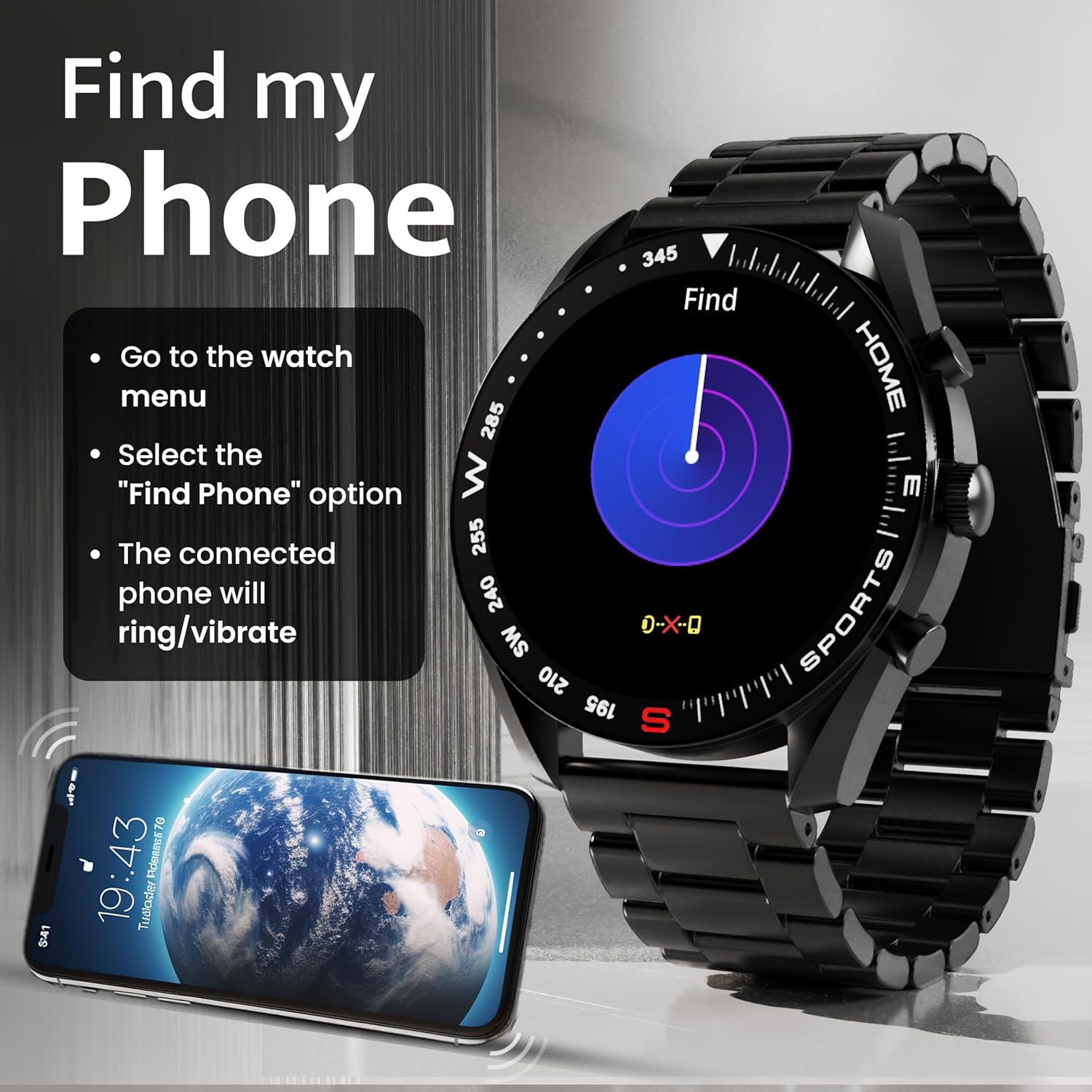
Image: How to use the 'Find My Phone' feature on the smartwatch.
Permainan Mini:
The watch includes several mini-games for entertainment, such as 2048, Battleship, Hamster, and Young Bird.

Imej: Cthamples of mini-games available on the smartwatch.
Penyelenggaraan
Cleaning Your Smart Watch:
- Lap skrin jam tangan dan badan dengan kain lembut dan tidak berbulu.
- Untuk kotoran degil, sedikit dampen kain dengan air. Elakkan menggunakan bahan kimia yang keras atau bahan yang melelas.
- Clean the charging pins regularly with a dry cloth or cotton swab to ensure proper charging.
Rintangan Air (IP67):
The GOBOULT Mirage Smart Watch is IP67 water-resistant, meaning it is protected against dust ingress and can withstand immersion in water up to 1 meter for up to 30 minutes. However, it is not suitable for swimming, showering with hot water, or diving. Avoid exposure to high-pressure water or corrosive liquids.

Image: Information regarding the IP67 water and dust resistance of the smartwatch.
Pelarasan Tali:
The watch comes with a metallic strap adjustment tool. Refer to the included instructions or a professional for adjusting the strap length to ensure a comfortable and secure fit.

Image: The watch's zinc alloy frame and the metallic strap adjustment tool.
Menyelesaikan masalah
- Tonton tidak dihidupkan: Pastikan jam tangan dicas sepenuhnya. Sambungkannya ke kabel pengecas dan biarkan ia dicas selama sekurang-kurangnya 30 minit sebelum cuba menghidupkannya semula.
- Tidak dapat dipasangkan dengan telefon:
- Pastikan Bluetooth didayakan pada telefon dan jam tangan anda.
- Ensure the watch is within the Bluetooth range (up to 10 meters).
- Mulakan semula kedua-dua telefon anda dan jam tangan pintar.
- Clear the Bluetooth cache on your phone or forget the device and try pairing again.
- Ensure the GOBOULT companion app is updated to the latest version.
- Data kesihatan tidak tepat: Ensure the watch is worn snugly on your wrist, not too tight or too loose. Clean the sensors on the back of the watch. Avoid excessive movement during measurements.
- Pemberitahuan tidak muncul:
- Check if notifications are enabled for the specific apps in the GOBOULT companion app.
- Ensure your phone's notification settings allow the GOBOULT app to display alerts.
- Sahkan bahawa jam tangan disambungkan dengan betul ke telefon anda melalui Bluetooth.
- Hayat bateri pendek: Reduce screen brightness, disable unnecessary features like continuous heart rate monitoring if not needed, and limit the number of active notifications. Ensure the watch is fully charged.
- Skrin sentuh tidak bertindak balas: Mulakan semula jam tangan. Jika masalah berterusan, pastikan skrin bersih dan kering.
Spesifikasi
| Ciri | Perincian |
|---|---|
| Nama Model | Mirage |
| Saiz Paparan | 1.39 inci HD |
| Resolusi Paparan | 360 x 360 piksel |
| Kecerahan | 500 Nits Peak Brightness |
| Ketersambungan | Bluetooth 5.3 |
| Tahan Air | IP67 |
| Bahan Bingkai | Aloi Zink |
| Jenis Bateri | Polimer Litium |
| Purata Hayat Bateri | Sehingga 7 Hari |
| Masa Mengecas | Lebih kurang 120 Minit |
| Keserasian Sistem Pengendalian | iOS, Android |
| Berat Barang | 106 g |
| Komponen yang Disertakan | Jam Tangan Pintar, Kabel Pengecasan, Manual Pengguna, Kad Waranti |
Waranti dan Sokongan
Maklumat Waranti:
Your GOBOULT Mirage Smart Watch comes with a manufacturer's warranty. Please refer to the included Warranty Card for specific terms, conditions, and duration of the warranty. Keep your purchase receipt as proof of purchase.
Sokongan Pelanggan:
If you encounter any issues or have questions not covered in this manual, please contact GOBOULT customer support. Contact details can typically be found on the Warranty Card or the official GOBOULT webtapak.