
1. Pengenalan
This manual provides detailed instructions for the FREEWOLF M68 60% Wireless Gaming Keyboard. Please read this manual carefully before using the product to ensure proper operation and longevity.

Figure 1: FREEWOLF M68 Wireless Gaming Keyboard (Shimmer color variant)
2. Produk Lebihview
Ciri-ciri Utama:
- Kesambungan Tri-Mod: Supports wired (USB-C), 2.4GHz wireless, and Bluetooth 5.0 connections.
- Keserasian Berbilang Peranti: Connects to Windows, Mac, Linux, PC, Laptop, iPad, iOS, and Android devices.
- Reka Letak 60% Padat: Features 67 keys, optimizing desktop space.
- Kekunci PBT: Durable Polybutylene Terephthalate keycaps with clear legends.
- Rainbow LED Backlighting: Offers constant and breathing modes with adjustable brightness and speed.
- Bateri Tahan Lama: Built-in 2000mAH battery provides extended usage.
- Reka bentuk ergonomik: Double leg braces allow for three adjustable typing angles.
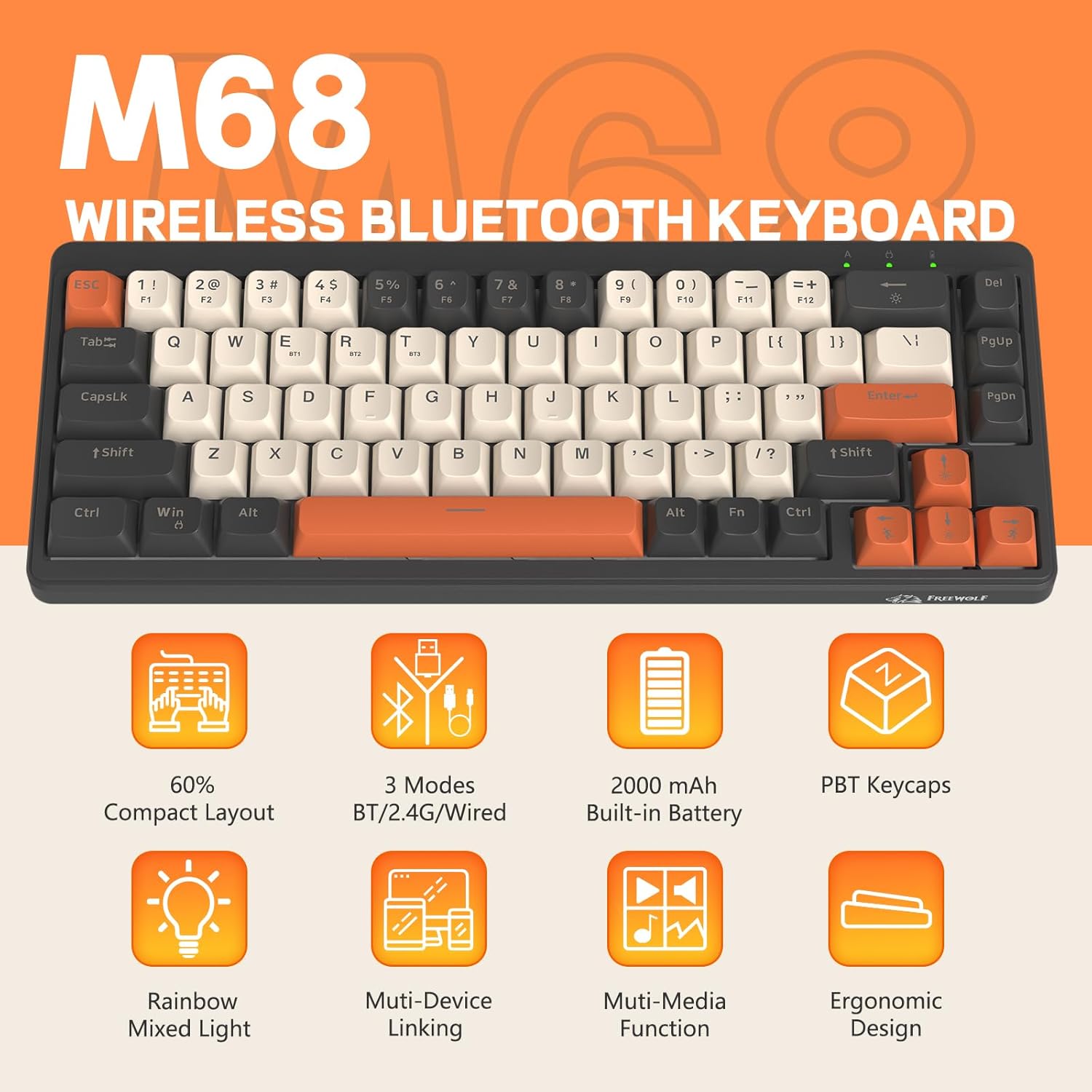
Gambar 2: Lebihview of FREEWOLF M68 key features.
3. Persediaan dan Sambungan
3.1. Tri-Mode Connection Overview
The M68 keyboard supports three connection methods: wired via USB-C, 2.4GHz wireless via a USB receiver, and Bluetooth 5.0. You can switch between these modes using the dedicated switch on the keyboard.

Rajah 3: Terperinci view of the 3-mode connection options.
3.2. Sambungan Berwayar
- Cari port USB-C pada papan kekunci.
- Connect the provided USB-C cable to the keyboard and the other end to your computer's USB port.
- Ensure the mode switch on the keyboard is set to the wired (USB) position.
- Papan kekunci akan dikenali secara automatik oleh sistem anda.
3.3. Sambungan Wayarles 2.4GHz
- Locate the 2.4GHz USB receiver (often stored in a compartment on the keyboard).
- Palamkan penerima USB ke dalam port USB yang tersedia pada komputer anda.
- Set the mode switch on the keyboard to the 2.4GHz wireless position.
- Papan kekunci sepatutnya bersambung secara automatik. Jika tidak, tekan FN + R untuk memulakan berpasangan.
3.4. Sambungan Bluetooth
The M68 can connect to up to three Bluetooth devices simultaneously.
- Set the mode switch on the keyboard to the Bluetooth position.
- To enter pairing mode for a specific channel (BT1, BT2, or BT3), press and hold FN+Q (untuk BT1), FN + W (untuk BT2), atau FN + E (for BT3) until the corresponding indicator light flashes rapidly.
- On your device (PC, laptop, tablet, phone), open Bluetooth settings and search for "FREEWOLF M68".
- Select the keyboard to pair. The indicator light will become solid once connected.
- Untuk bertukar antara peranti Bluetooth yang dipasangkan, tekan FN + Q/W/E secara ringkas.
4. Operasi
4.1. Kawalan Lampu Latar
The M68 features customizable rainbow LED backlighting.
- FN + Ruang Belakang: Toggle backlight on/off or switch between constant and breathing modes.
- FN + Anak Panah Kiri: Kurangkan kelajuan lampu latar.
- FN + Anak Panah Kanan: Tingkatkan kelajuan lampu latar.
- FN + Anak Panah Atas: Tingkatkan kecerahan lampu latar.
- FN + Anak Panah Bawah: Kurangkan kecerahan lampu latar.

Figure 4: Backlight adjustment key combinations.
4.2. Pelarasan Ergonomik
The keyboard includes double leg braces on the back to adjust the typing angle for comfort.
- Flip the keyboard over to access the leg braces.
- Adjust the two-stage leg braces to achieve your preferred typing angle (flat, one stage, or two stages).

Figure 5: Ergonomic angle adjustments.
4.3. Pengurusan Bateri
The keyboard has a built-in 2000mAH rechargeable battery.
- mengecas: Connect the keyboard via the USB-C cable to a power source (computer USB port or wall adapter). The charging indicator will show status.
- Hayat Bateri: Up to 60 hours with backlight on, and up to 200 hours with backlight off.
- Penjimatan Kuasa: The keyboard will enter sleep mode after a period of inactivity to conserve battery. Press any key to wake it up.

Figure 6: Battery capacity information.
5. Penyelenggaraan
- Pembersihan: Use a soft, dry cloth to clean the keyboard surface. For keycaps, you may use a slightly damp kain. Elakkan kelembapan berlebihan.
- Pembuangan Papan Kekunci: If necessary, use a keycap puller to carefully remove PBT keycaps for deeper cleaning or replacement.
- Storan: Simpan papan kekunci di tempat yang sejuk dan kering jauh dari cahaya matahari langsung dan suhu yang melampau.
- Elakkan Cecair: Do not expose the keyboard to liquids to prevent damage to internal components.
6. Penyelesaian masalah
| Masalah | Kemungkinan Punca | Penyelesaian |
|---|---|---|
| Papan kekunci tidak bertindak balas (Berwayar) | Sambungan kabel longgar, mod salah. | Ensure USB-C cable is securely connected. Check if the mode switch is set to wired. Try a different USB port. |
| Papan kekunci tidak bertindak balas (2.4GHz) | USB receiver not connected, incorrect mode, pairing issue. | Ensure USB receiver is plugged in. Set mode switch to 2.4GHz. Re-pair by pressing FN + R. Try a different USB port for the receiver. |
| Papan kekunci tidak bertindak balas (Bluetooth) | Not paired, incorrect mode, device Bluetooth off. | Ensure device Bluetooth is on. Set mode switch to Bluetooth. Enter pairing mode (FN + Q/W/E) and re-pair. Forget the device on your system and re-pair. |
| Lampu latar tidak berfungsi atau tersekat | Backlight off, low battery, software glitch. | Tekan FN + Ruang Belakang to toggle. Charge the keyboard. Try resetting the keyboard (refer to advanced functions if available, or disconnect/reconnect). |
| Kunci tidak mendaftar atau menaip dua kali | Dust/debris under keycap, switch issue. | Carefully remove keycap and clean. If issue persists, contact support. |
7. Spesifikasi
| Model | M68 |
| Jenama | FREEWOLF |
| Ketersambungan | Wired (USB-C), 2.4GHz Wireless, Bluetooth 5.0 |
| Reka Letak Kekunci | 60% (67 Kunci) |
| Bahan Kekunci | PBT (Polybutylene Terephthalate) |
| Pencahayaan latar | Rainbow LED (RGB) |
| Kapasiti Bateri | 2000mAH |
| Peranti Serasi | Laptop, PC, Tablet (Windows, Mac, Linux, iOS, Android) |
| Dimensi Produk | 32.51 x 12.5 x 3.99 cm |
| Berat badan | 600 g |
| Ciri Khas | Ergonomic (adjustable angles), Backlit |
8. Waranti dan Sokongan
For warranty information, technical support, or customer service inquiries, please refer to the contact information provided with your purchase or visit the official FREEWOLF webtapak.
Sila simpan bukti pembelian anda untuk sebarang tuntutan waranti.