
1. Pengenalan
This manual provides essential information for the safe and efficient operation of your DaranEner NEOZ 300W Portable Power Station. Please read this manual thoroughly before using the device and retain it for future reference.
The DaranEner NEOZ is a compact and versatile portable power station designed to provide reliable power for various electronic devices and small appliances. Featuring a durable LiFePO4 battery, multiple output ports, and flexible recharging options, it is suitable for outdoor activities, emergency backup, and general home use.
2. Maklumat Keselamatan
Sentiasa patuhi langkah berjaga-jaga keselamatan berikut untuk mengelakkan kecederaan atau kerosakan pada peranti:
- Jangan membongkar, memperbaiki atau mengubah unit.
- Do not expose the unit to fire, direct sunlight, or high temperatures.
- Avoid extreme temperatures and humidity. Store in a cool, dry place.
- Jauhkan daripada kanak-kanak dan haiwan peliharaan.
- Pastikan pengudaraan yang betul semasa penggunaan dan pengecasan.
- Do not use the unit if it is damaged or appears to be malfunctioning.
- Gunakan hanya aksesori dan kabel pengecas yang diluluskan.
- Elakkan daripada menjatuhkan atau menyebabkan unit terkena hentakan yang kuat.
- Jangan sekat bukaan pengudaraan.
3. Produk Lebihview

Rajah 1: Depan view of the DaranEner NEOZ Portable Power Station, showing the display, input/output ports, and controls.
3.1 Komponen dan Ciri
- Paparan Digital: Menunjukkan paras bateri, wat input/outputtage, baki masa jalan dan port aktif.
- Cawangan AC (x2): 110V, 300W continuous (600W surge) pure sine wave output for household appliances.
- USB-C PD (x1): 60W Power Delivery for fast charging compatible devices.
- USB-A QC3.0 (x2): 18W Quick Charge 3.0 for rapid charging of smartphones and tablets.
- Output DC (x1): 12V port for various DC-powered devices.
- Input/MPPT Port: For charging via AC wall adapter, solar panel, or car charger.
- Lampu suluh LED: Built-in light with multiple modes (Low, High, Strobe, SOS).
- Bateri LiFePO4: Long-lasting and safe battery technology with over 3,500 cycles.
- Sistem Pengurusan Bateri (BMS): Protects against overcurrent, overheat, and short circuits.
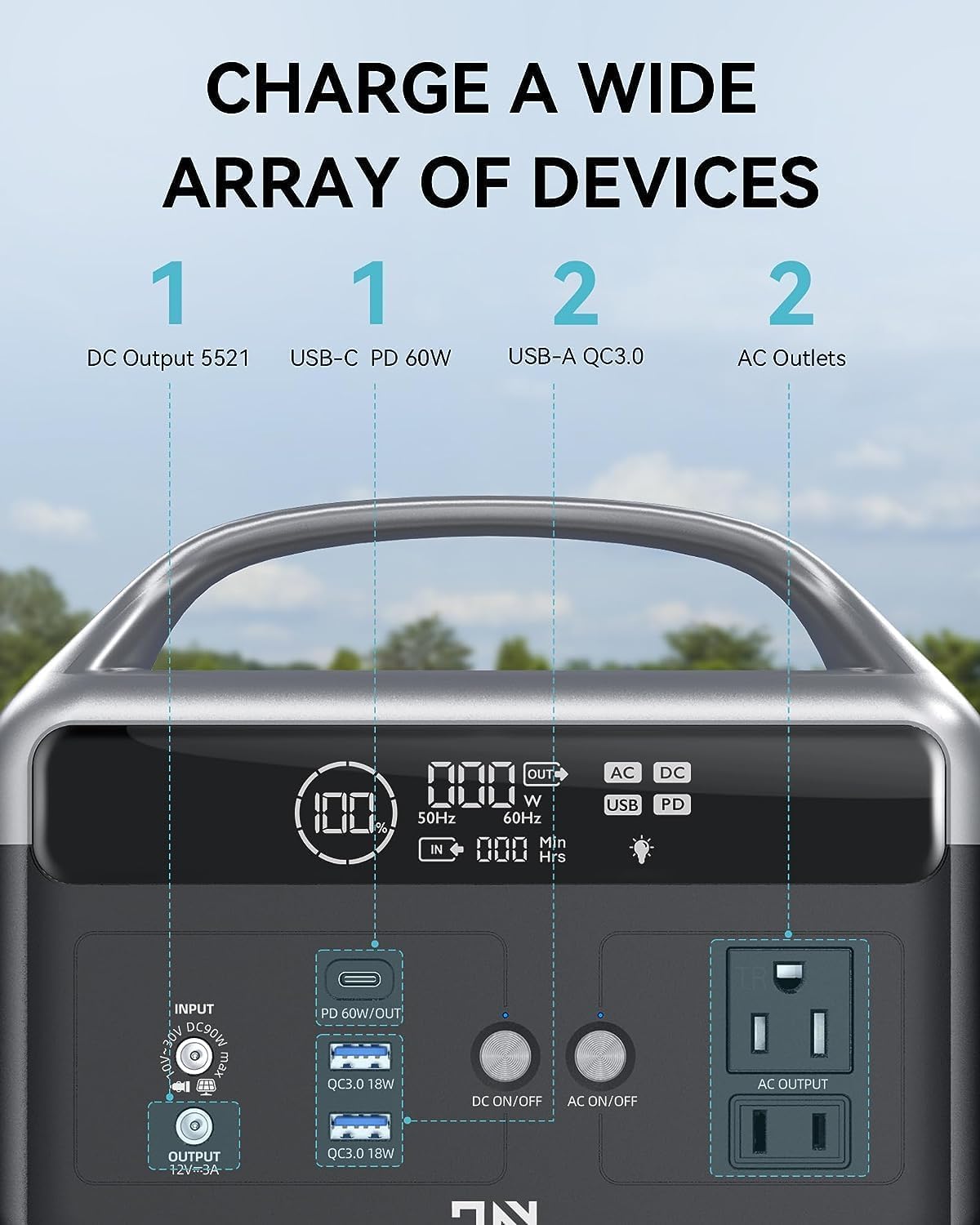
Figure 2: Detailed diagram of the DaranEner NEOZ control panel, highlighting each port and button.
4. Persediaan
4.1 Membuka Kotak dan Caj Permulaan
- Carefully remove the DaranEner NEOZ from its packaging.
- Periksa unit untuk sebarang tanda kerosakan. Jika rosak, jangan gunakan dan hubungi khidmat pelanggan.
- Before first use, fully charge the power station using the provided AC wall adapter. Plug the adapter into the Input/MPPT port and then into a standard wall outlet. The display will indicate charging status.

Figure 3: The DaranEner NEOZ can be recharged using an AC wall outlet, a solar panel (sold separately), or a car charger (sold separately).
5. Arahan Operasi
5.1 Menghidupkan/Mematikan
- To power on the unit, press and hold the main power button for 3 seconds. The digital display will illuminate.
- To power off the unit, press and hold the main power button for 3 seconds. The display will turn off.
5.2 Menggunakan Soket AC
- Pastikan stesen janakuasa dihidupkan.
- Press the "AC ON/OFF" button to activate the AC outlets. The AC indicator on the display will light up.
- Plug your AC-powered device into one of the 110V AC outlets.
- Monitor the display for real-time wattage output and estimated remaining runtime.
- After use, press the "AC ON/OFF" button again to turn off the AC outlets.
5.3 Using DC Ports (USB-C, USB-A, 12V)
- Pastikan stesen janakuasa dihidupkan.
- Press the "DC ON/OFF" button to activate the DC ports. The DC and USB indicators on the display will light up.
- Plug your USB or 12V DC-powered device into the appropriate port.
- Monitor the display for real-time wattage output and estimated remaining runtime.
- After use, press the "DC ON/OFF" button again to turn off the DC ports.
5.4 Mengecas Stesen Janakuasa
The DaranEner NEOZ offers three flexible charging methods:
- Pengecasan Dinding AC: Connect the provided AC wall adapter to the Input/MPPT port and a wall outlet. Fully charges in approximately 2 hours.
- Pengecasan Suria: Connect a compatible solar panel (up to 60W, sold separately) to the Input/MPPT port. The integrated MPPT controller optimizes charging efficiency.
- Pengecasan Kereta: Connect a compatible car charger (sold separately) to the Input/MPPT port and your vehicle's 12V cigarette lighter socket.
5.5 LED Flashlight Operation
- Press the LED button once for Low brightness mode.
- Tekan sekali lagi untuk mod Kecerahan Tinggi.
- Press a third time for Strobe mode.
- Press a fourth time for SOS mode.
- Press a fifth time to turn off the flashlight.

Figure 4: The built-in LED flashlight offers multiple lighting modes for various situations.
5.6 Paparan Maklumat
The digital display provides real-time operational data:
- Penunjuk Tahap Bateri: Shows remaining battery capacity as a percentage.
- Penunjuk Input: Displays incoming wattage semasa mengecas.
- Penunjuk Output: Shows outgoing wattage kepada peranti yang disambungkan.
- Time Unit Indicator: Displays estimated remaining runtime in hours or minutes.
- Petunjuk Penggera: Alerts to potential issues (e.g., overload, overheat).
- Petunjuk Pelabuhan: Icons for AC, DC, USB, and PD illuminate when active.

Figure 5: The digital display provides comprehensive information about the power station's status.
6. Penyelenggaraan
6.1 Penjagaan Bateri
- Untuk hayat bateri yang optimum, cas unit sepenuhnya setiap 3-6 bulan, walaupun tidak digunakan.
- Elakkan daripada mengalirkan bateri sepenuhnya dengan kerap.
- Simpan unit di tempat yang sejuk dan kering jauh dari cahaya matahari langsung dan suhu yang melampau.
6.2 Pembersihan
- Gunakan kain lembut dan kering untuk membersihkan bahagian luar stesen janakuasa.
- Jangan gunakan pembersih atau pelarut yang melelas.
- Pastikan port bebas daripada habuk dan serpihan.
7. Penyelesaian masalah
| Isu | Kemungkinan Punca | Penyelesaian |
|---|---|---|
| Unit tidak dihidupkan | Bateri telah kehabisan sepenuhnya. | Charge the unit using the AC wall adapter. |
| Tiada output daripada port AC/DC | AC/DC output not activated. Device power consumption exceeds limit. | Press the respective ON/OFF button. Check device wattage (maks 300W). |
| Pengecasan lambat atau tidak berfungsi | Incorrect charger/cable. Solar panel not receiving enough sunlight. | Ensure correct charger/cable. Reposition solar panel for direct sunlight. |
| Penunjuk penggera dihidupkan | Overload, overheat, or other internal error. | Disconnect devices, allow unit to cool down. If issue persists, contact support. |
8. Spesifikasi
| Ciri | Perincian |
|---|---|
| Nama Model | NEOZ |
| Jenis Bateri | LiFePO4 |
| Kapasiti | 192Wj |
| Output AC | 300W (600W Surge), 110V Pure Sine Wave |
| Output PD USB-C | 60W |
| Output QC3.0 USB-A | 18W (x2) |
| Keluaran DC | 12V/10A |
| Pengecasan Input AC | Up to 100W (approx. 2 hours to 100%) |
| Pengecasan Input Suria | Up to 60W (MPPT compatible) |
| Dimensi Produk | 7.1 x 8.6 x 5.1 inci |
| Berat Barang | 7.06 paun |
| Jangka hayat | 3,500+ cycles to ≥80% capacity |
9. Waranti dan Sokongan
DaranEner offers a 5-year service for this product. For any questions or support needs, please contact DaranEner customer service. They aim to respond within 24 hours.
For further assistance, please visit the official DaranEner store: DaranEner Store
10. Video Produk
Fast Charging Generator for Camping
Description: This video from DaranEner Direct demonstrates the fast charging capabilities of the portable power station, highlighting its use for camping dan aktiviti luar.
300W(600W Surge) Portable Power Station with Storage Bag
Description: An official video from DaranEner Direct showcasing the 300W portable power station, including its design and the convenience of an optional storage bag.
Portable Power Station 56,000mAh with Storage Bag
Description: This video from DaranEner Direct highlights the features of the portable power station, emphasizing its 56,000mAh capacity and the utility of its storage bag.