
pengenalan
Thank you for choosing the TECKNET TK-MS017 Ergonomic Wireless Vertical Mouse. This manual provides detailed instructions for setting up, operating, maintaining, and troubleshooting your new mouse. Designed for comfort and efficiency, this vertical mouse helps reduce wrist strain during prolonged use.

The TECKNET Ergonomic Vertical Mouse, designed for comfortable use.
Ciri-ciri Produk
- Reka Bentuk Menegak Ergonomik: Mimics a natural handshake posture to reduce wrist and arm pressure, preventing discomfort from prolonged use.
- DPI boleh laras: 5 levels of DPI (800/1600/2400/3200/4800) for precise tracking and adaptable sensitivity.
- Klik Senyap: 99% noise reduction for a quiet working environment. (Forward/Backward buttons are not silent).
- 6 Butang: Includes standard left/right click, scroll wheel, DPI switch, and convenient forward/backward buttons for web navigasi.
- Stable 2.4G Wireless Connection: Provides a reliable connection up to 10 meters with a plug-and-play USB receiver.
- Hayat Bateri yang Panjang: Features an independent power switch and automatic sleep function to conserve battery, offering up to 24 months of use.
- Keserasian Luas: Supports Windows 11/10/8/7/XP, Mac OS X10.4, Chrome OS, and Linux.

Comparison of vertical ergonomic grip and traditional mouse grip, highlighting reduced wrist tension with the vertical design.
Arahan Persediaan
- Pasang Bateri:
Locate the battery compartment on the underside of the mouse. Open the cover and insert two AA batteries (not included), ensuring correct polarity. Close the battery cover securely.

The underside of the mouse, illustrating the battery compartment and the storage slot for the USB receiver.
- Sambungkan Penerima USB:
Remove the USB receiver from its storage slot next to the battery compartment. Plug the receiver into an available USB port on your computer (PC, laptop, Mac, Chromebook, or tablet).
- Hidupkan kuasa:
Flip the ON/OFF switch on the bottom of the mouse to the "ON" position. The mouse should automatically connect to your device. No additional drivers are typically required for most operating systems.
Arahan Operasi
Fungsi Butang
- Klik Kiri: Pemilihan dan pengaktifan standard.
- Klik kanan: Membuka menu konteks.
- Roda Tatal: Skrol dokumen dan web pages vertically. Can also be pressed for middle-click functionality.
- Butang Suis DPI: Located near the scroll wheel. Press to cycle through DPI settings (800/1600/2400/3200/4800). The red indicator light will flash to confirm the change.
- Butang ke hadapan: Navigasi ke hadapan web pelayar atau file explorers. (Not supported on Mac OS).
- Butang ke belakang: Navigasi ke belakang web pelayar atau file explorers. (Not supported on Mac OS).
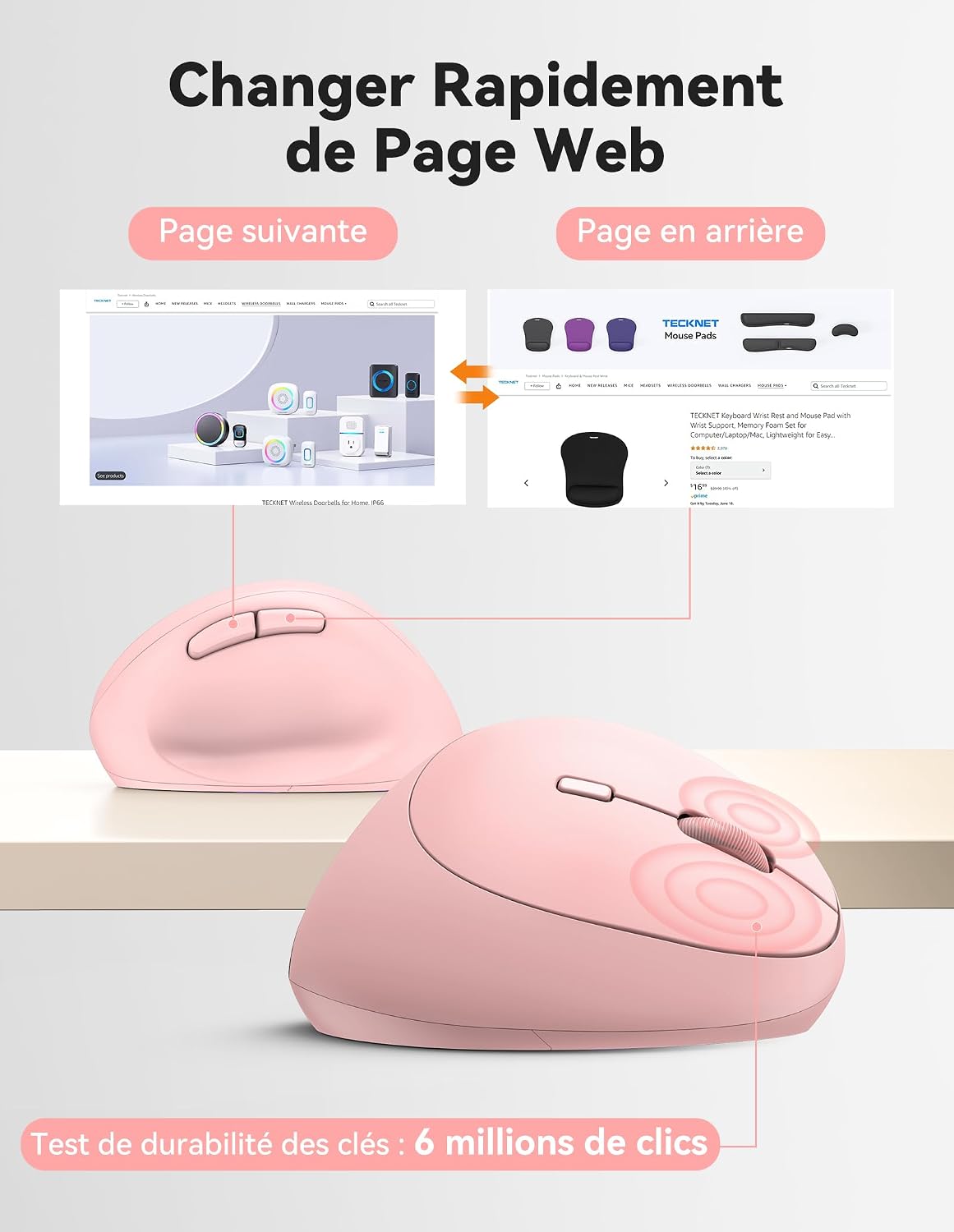
Diagram illustrating the location and function of each button on the TECKNET vertical mouse.
Pelarasan DPI
The mouse offers 5 adjustable DPI levels to suit various tasks and preferences. Press the DPI switch button to change the cursor speed. The red indicator light will flash a corresponding number of times to indicate the current DPI setting:
- Flash X1: 800 DPI (Web Navigation)
- Flash X2: 1600 DPI (Excel Editing)
- Flash X3: 2400 DPI (Video Editing)
- Flash X4: 3200 DPI (Photoshop)
- Flash X5: 4800 DPI (Gaming Track)

Visual representation of the 5 adjustable DPI levels for different usage scenarios.
Mod Penjimatan Kuasa
To conserve battery life, the mouse will automatically enter sleep mode after 8 minutes of inactivity. To wake it up, simply move the mouse or click any button.
Penyelenggaraan
- Pembersihan: Gunakan kain lembut dan kering untuk membersihkan tetikus. Elakkan menggunakan bahan kimia yang keras atau bahan yang melelas.
- Penggantian Bateri: When the mouse performance degrades or the cursor becomes erratic, it's time to replace the batteries. Ensure you use fresh AA batteries and dispose of old batteries responsibly.
- Storan: When not in use for extended periods, turn off the mouse using the ON/OFF switch to further conserve battery life. Store the USB receiver inside the mouse's battery compartment to prevent loss.
Menyelesaikan masalah
- Tetikus tidak bertindak balas:
- Pastikan tetikus dihidupkan.
- Periksa sama ada bateri dipasang dengan betul dan mempunyai cas yang mencukupi. Gantikan jika perlu.
- Pastikan penerima USB dipasang dengan kukuh ke port USB yang berfungsi. Cuba port USB yang lain.
- Gerakkan tetikus lebih dekat dengan penerima USB untuk menolak isu julat.
- Mulakan semula komputer anda.
- Pergerakan kursor tidak menentu:
- Bersihkan penderia optik di bahagian bawah tetikus.
- Ensure you are using the mouse on a suitable surface. The mouse is designed to track on various surfaces like resin, wood, fabric, paper, and metal. Avoid highly reflective or transparent surfaces.
- Laraskan tetapan DPI ke tahap yang lebih rendah jika kursor terlalu sensitif.
- Butang ke hadapan/undur tidak berfungsi pada Mac:
These side buttons are not supported by Mac OS. This is a system limitation, not a mouse malfunction.
Spesifikasi
| Jenama | TEKNET |
| Nombor Model | TK-MS017 |
| Teknologi Ketersambungan | 2.4G Wireless (Radio-frequency) |
| Teknologi Pengesanan Pergerakan | Optik |
| Tahap DPI | 800, 1600, 2400, 3200, 4800 |
| Bilangan Butang | 6 |
| Orientasi Tangan | Betul |
| Dimensi Produk | 10.5L x 6.5W sentimeter |
| Julat Tanpa Wayar | Sehingga 10 meter |
| Sumber Kuasa | 2 x Bateri AA (tidak termasuk) |
| Purata Hayat Bateri | Sehingga 24 bulan |
| Sistem Operasi yang Serasi | Windows 11/10/8/7/XP, macOS X10.4+, Chrome OS, Linux |
Waranti dan Sokongan
TECKNET provides a 36-month support period for registered products. If you encounter any issues during the use of this product, please contact the professional TECKNET customer service team for assistance.
For more information and support, please visit the official TECKNET webtapak atau hubungi perkhidmatan pelanggan mereka secara langsung.
Webtapak: Kedai TECKNET di Amazon