
DaranEner
Manual Pengguna Stesen Janakuasa Mudah Alih DaranEner NEO600
Model: NEO600
1. Produk Lebihview
The DaranEner NEO600 Portable Power Station is a versatile and robust power solution designed for various applications, including outdoor adventures, emergency backup, and home use. It features a high-capacity LiFePO4 battery, multiple output ports, and fast charging capabilities to keep your devices powered wherever you are.

Rajah 1.1: Depan view of the DaranEner NEO600 Portable Power Station.
2. Ciri-ciri Utama
- Kapasiti & Output Tinggi: 576Wh (180,000mAh) capacity with 600W AC output (1200W surge), capable of powering various appliances from laptops to small household devices.
- Bekalan Kuasa Tidak Terputus (UPS): Features a UPS function with a switching time of less than 10ms, protecting sensitive devices from data loss during power outages.
- Rapid AC Recharging: Recharges to full capacity in approximately 1 hour using a standard AC outlet, utilizing DaranEner's fast charging technology.
- Bateri LiFePO4 Tahan Lama: Equipped with LiFePO4 battery cells, offering over 3,500 charge cycles while maintaining over 70% of original capacity, ensuring a lifespan exceeding 10 years. Advanced BMS protection monitors voltage, arus dan suhu.
- Pelbagai Pilihan Output: Includes 1 AC outlet (600W), 1 cigarette lighter port (120W max), 2 USB-C ports (100W max), 1 USB-A port (18W max), 2 DC5521 outputs, and LED lights for versatile power needs.

Figure 2.1: The NEO600 can power a variety of devices, including mini-fridges, fans, and drones.

Figure 2.2: LiFePO4 battery technology ensures long-term durability and safety.
3. Komponen dan Pelabuhan Produk
The DaranEner NEO600 is equipped with a comprehensive set of input and output ports to meet diverse power requirements. Familiarize yourself with the layout and function of each component.

Gambar 3.1: Lebihview of the 7-in-1 power station ports.

Rajah 3.2: Terperinci view of ports and dimensions (12.13"L x 7.72"W x 9.72"H).
Perihalan Pelabuhan:
- Outlet AC: 1 x 600W (1200W surge) for standard household appliances.
- Soket Kereta: 1 x 120W max for automotive devices.
- Port USB-C: 2 x 100W max for fast charging compatible devices.
- Port USB-A: 1 x 18W max for standard USB charging.
- DC5521 Outputs: 2 ports for various DC-powered devices.
- Lampu LED: Integrated lighting for convenience.
4. Persediaan dan Pengecasan
Before first use, it is recommended to fully charge the DaranEner NEO600. The power station offers multiple charging methods.
4.1 Pengecasan Dinding AC
Connect the power station to a standard AC wall outlet using the provided AC charging cable. The unit supports fast charging, reaching 80% capacity in approximately 1 hour and full charge in about 1.3 hours.
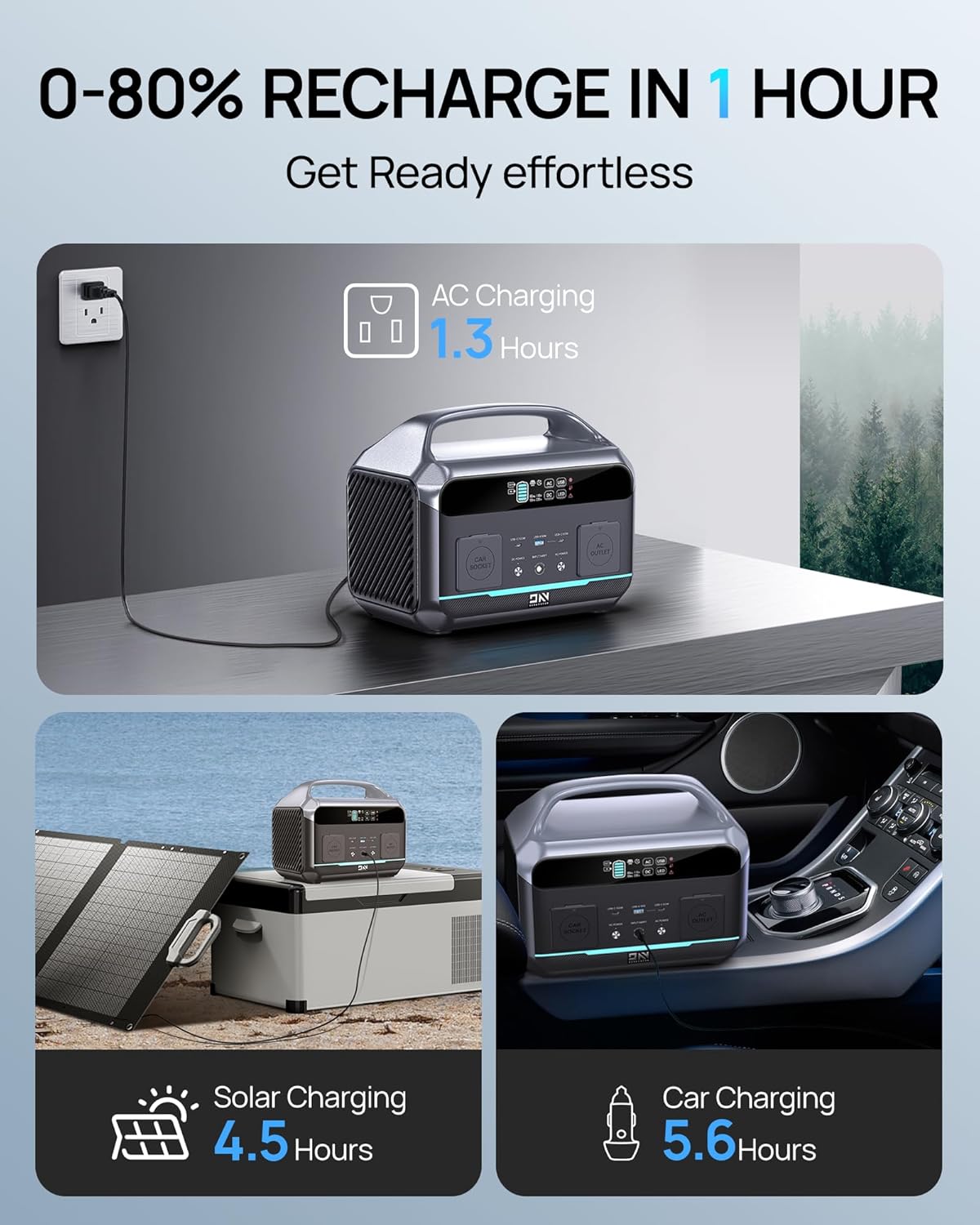
Figure 4.1: The NEO600 supports AC, Solar, and Car charging.
Video 4.1: Demonstrates the fast AC charging capability of the Portable Power Station 600W.
4.2 Pengecasan Suria (Pilihan)
For off-grid charging, connect a compatible solar panel (not included) to the power station's solar input port. Solar charging time is approximately 4.5 hours (depending on solar intensity and panel wattagdan).
4.3 Mengecas Kereta
The power station can be charged via your vehicle's 12V cigarette lighter socket. This method is convenient for charging while on the go, taking approximately 5.6 hours for a full charge.
5. Arahan Operasi
5.1 Menghidupkan/Mematikan
Press and hold the main power button to turn the unit on or off. The display screen will illuminate, showing battery status and output information.
5.2 Menggunakan Output AC/DC/USB
To activate specific output types (AC, DC, USB), press the corresponding button on the control panel. Ensure the indicator light for the desired output is on before connecting devices. Always check the power requirements of your devices to ensure they do not exceed the power station's output limits (600W AC, 120W car socket, 100W USB-C, 18W USB-A).
5.3 Fungsi Bekalan Kuasa Tidak Terganggu (UPS)
The NEO600 can function as an Uninterruptible Power Supply. When connected to an AC wall outlet and simultaneously powering devices, it will automatically switch to battery power within 10 milliseconds in the event of a power outage. This protects connected sensitive electronics like desktop PCs or CPAP machines from interruption.

Figure 5.1: The NEO600's UPS function provides reliable backup power.
5.4 Lampu LED
The integrated LED light can be activated by pressing the dedicated LED button. It typically offers multiple modes (e.g., low, high, SOS) for various situations.
Video 5.1: Demonstrates the Portable Power Station's use for camping, including powering devices and using the LED light.
Video 5.2: Pra ringkasview tayangan videocasing the portability and charging capabilities of the power station.
6. Penyelenggaraan dan Penyimpanan
Proper maintenance ensures the longevity and optimal performance of your DaranEner NEO600.
- Pengecasan Biasa: To maintain battery health, use and recharge the power station at least once every three months.
- Keadaan penyimpanan: Simpan unit di tempat yang sejuk dan kering jauh dari cahaya matahari langsung dan suhu yang melampau.
- Pembersihan: Gunakan kain kering dan lembut untuk membersihkan bahagian luar unit. Jangan gunakan pembersih yang melelas atau rendam unit di dalam air.
- Power Off AC Output: Always turn off the AC output when not in use, even without loads, to prevent battery drain.
7. Penyelesaian masalah
If you encounter issues with your DaranEner NEO600, please refer to the following common solutions:
| Masalah | Kemungkinan Punca | Penyelesaian |
|---|---|---|
| Unit tidak dihidupkan. | Bateri habis sepenuhnya; butang kuasa tidak ditekan dengan betul. | Charge the unit using an AC adapter. Ensure the power button is pressed and held for a few seconds. |
| Output AC tidak berfungsi. | AC output not activated; device exceeds 600W limit; unit is in protection mode. | Press the AC ON/OFF button. Verify device wattage. Restart the unit. |
| Pengecasan perlahan. | Using a non-fast charging method (e.g., car charger vs. AC); environmental factors. | Use the AC wall charger for fastest charging. Ensure proper ventilation and avoid extreme temperatures. |
| Paparan tidak berfungsi. | Unit is off; display malfunction. | Ensure the unit is powered on. If the issue persists, contact customer support. |
Untuk bantuan lanjut, sila rujuk bahagian Waranti & Sokongan.
8. Spesifikasi Teknikal
| Spesifikasi | Perincian |
|---|---|
| Nama Model | NEO600 |
| Jenis Bateri | LiFePO4 (Lithium-Phosphate) |
| Kapasiti | 576Wj (180,000mAh) |
| Output AC | 600W (lonjakan 1200W) |
| Voltage | 110 Volt |
| Output USB-C | 2 x 100W Maks |
| Keluaran USB-A | 1 x 18W Maks |
| Output Soket Kereta | 1 x 120W Maks |
| Output DC5521 | 2 pelabuhan |
| AC Recharge Time | Approx. 1 hour (to 80%) |
| Input Suria | Maksimum 150W |
| Dimensi (L x W x H) | 12.13" x 7.72" x 9.72" |
| Berat Barang | 6.6 paun |
9. Waranti dan Sokongan
DaranEner provides comprehensive support for its products.
9.1 Waranti Produk
The DaranEner NEO600 Portable Power Station comes with a Waranti 2 tahun dari tarikh pembelian. Waranti ini meliputi kecacatan pembuatan dan memastikan operasi yang boleh dipercayai di bawah keadaan penggunaan biasa.
9.2 Sokongan Pelanggan
For any questions, technical assistance, or warranty claims, please contact DaranEner customer service. Our team is dedicated to providing premium service and will respond to inquiries within 24 hours to ensure a worry-free experience.
Please visit the official DaranEner weblaman web atau rujuk dokumentasi pembelian anda untuk maklumat hubungan terkini.
10. Maklumat Keselamatan Penting
Please read and understand all safety warnings before operating the DaranEner NEO600.
- Do not use this power station to power devices with a rated power of more than 600 watts to avoid damage.
- Jangan membongkar, memperbaiki atau mengubah unit.
- Jauhkan unit ini daripada air, api dan suhu yang melampau.
- Pastikan pengudaraan yang betul semasa digunakan untuk mengelakkan terlalu panas.
- Jauhkan daripada kanak-kanak.
Ask a question about this manual
Ask about setup, troubleshooting, compatibility, parts, safety, or missing instructions. Manuals+ will review the question and use this page’s manual context to help answer it.