
SEUNKWANG x99
Manual Pengguna Papan Kekunci Mekanikal Tanpa Wayar EWEADN X99
Model: X99
1. Produk Lebihview
The EWEADN X99 is a versatile 99-key wireless mechanical keyboard designed for seamless connectivity and enhanced typing experience. It features three-mode connectivity (Bluetooth 5.0, 2.4GHz wireless, and USB Type-C wired), an 8000mAh long-lasting battery, hot-swappable PCB, gasket mount design, and PBT double-shot keycaps. The integrated control knob provides convenient access to system and volume adjustments.

Image 1.1: EWEADN X99 Wireless Mechanical Keyboard with included accessories.
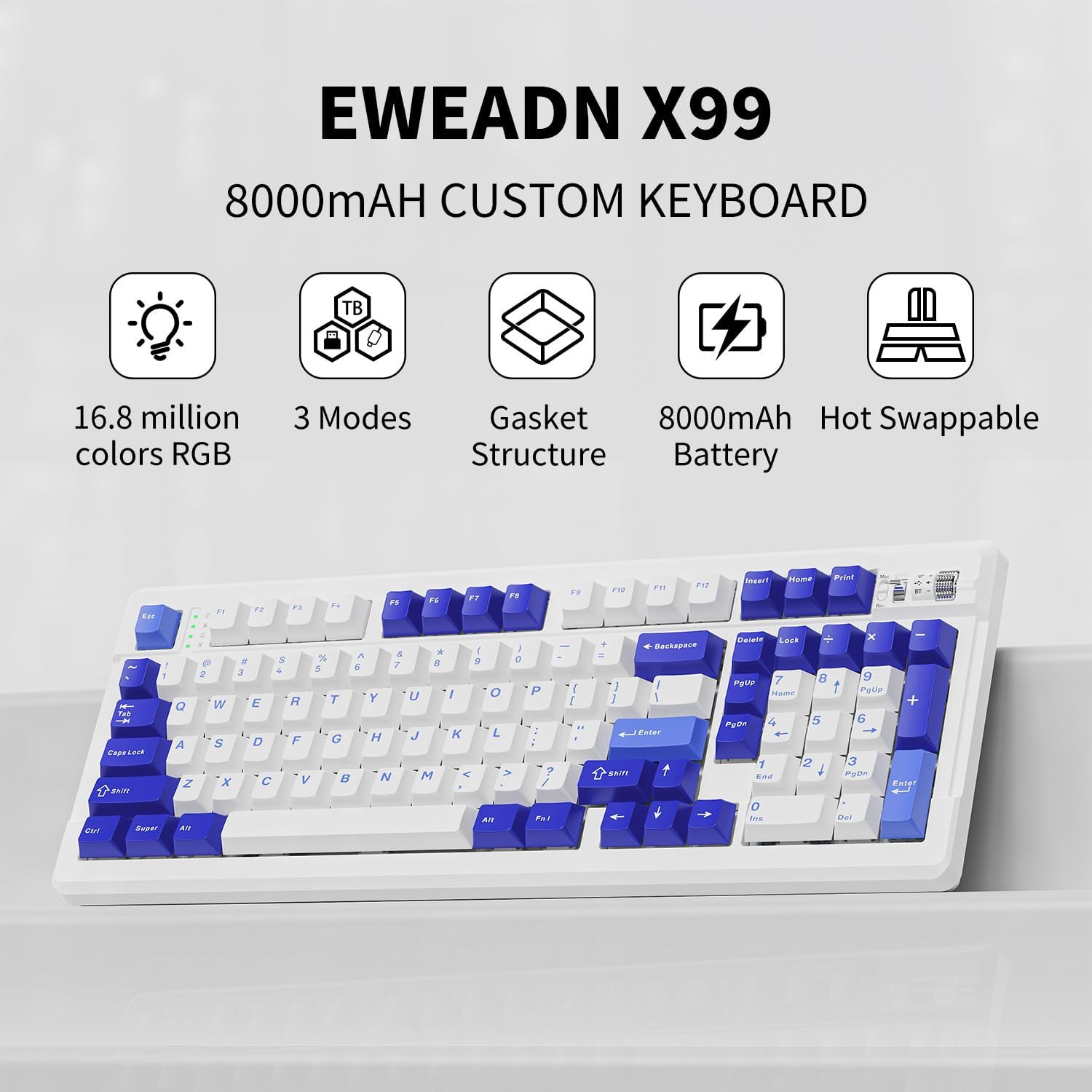
Image 1.2: Key features of the EWEADN X99 keyboard.
2. Apa yang ada di dalam Kotak
- EWEADN X99 Wireless Mechanical Keyboard
- Kabel Jenis-C USB
- 2.4GHz Wireless Receiver (USB Dongle)
- Kap kekunci dan Penarik Suis
- Suis Ganti
3. Persediaan
3.1 Mod Kesambungan
The EWEADN X99 supports three connection methods: Bluetooth 5.0, 2.4GHz wireless, and USB Type-C wired. You can switch between these modes using the integrated control knob or dedicated switches on the keyboard.

Image 3.1: Three-mode connection options for the EWEADN X99.
3.2 Wired Connection (USB Type-C)
- Sambungkan kabel USB Jenis-C yang disediakan ke port papan kekunci.
- Sambungkan hujung kabel yang lain ke port USB yang tersedia pada komputer anda.
- Papan kekunci akan dikenali secara automatik dan sedia untuk digunakan.
3.3 Sambungan Wayarles 2.4GHz
- Locate the 2.4GHz wireless receiver (USB dongle), typically stored under the left foot of the keyboard.
- Pasangkan dongle USB ke port USB yang tersedia pada komputer anda.
- Switch the keyboard's mode to 2.4GHz using the control knob or switch. The keyboard should connect automatically.
3.4 Sambungan Bluetooth
- Switch the keyboard's mode to Bluetooth using the control knob or switch.
- Pada peranti anda (komputer, tablet, dsb.), dayakan Bluetooth dan cari peranti baharu.
- Select "EWEADN X99" from the list of available devices to pair.
- The keyboard supports connecting to up to three Bluetooth devices simultaneously. Use the designated key combinations (e.g., Fn + 1, Fn + 2, Fn + 3) to switch between paired devices.
4. Arahan Operasi
4.1 Integrated Control Knob
The centralized knob in the top right corner allows for quick adjustments:
- Putar: Adjusts volume (clockwise to increase, counter-clockwise to decrease).
- Tekan: Redam/nyahredamkan audio.
- Tekan lama: Switches between system modes (e.g., Windows/Mac) or connection modes (Bluetooth/2.4GHz/Wired).
4.2 Kesan Pencahayaan RGB
The X99 features 16.8 million RGB lighting effects, including dynamic modes and music rhythm synchronization. You can customize these effects using the keyboard's function keys or the dedicated driver software.

Image 4.1: Custom software interface for lighting and macro programming.
For advanced customization, download the driver software from the official EWEADN website. This software allows you to remap keys, record macros, and fine-tune lighting effects.
4.3 Hot-Swappable Keys
The X99's hot-swappable PCB allows you to easily change 3-pin/5-pin mechanical switches without soldering. This feature enables full customization of your typing experience.
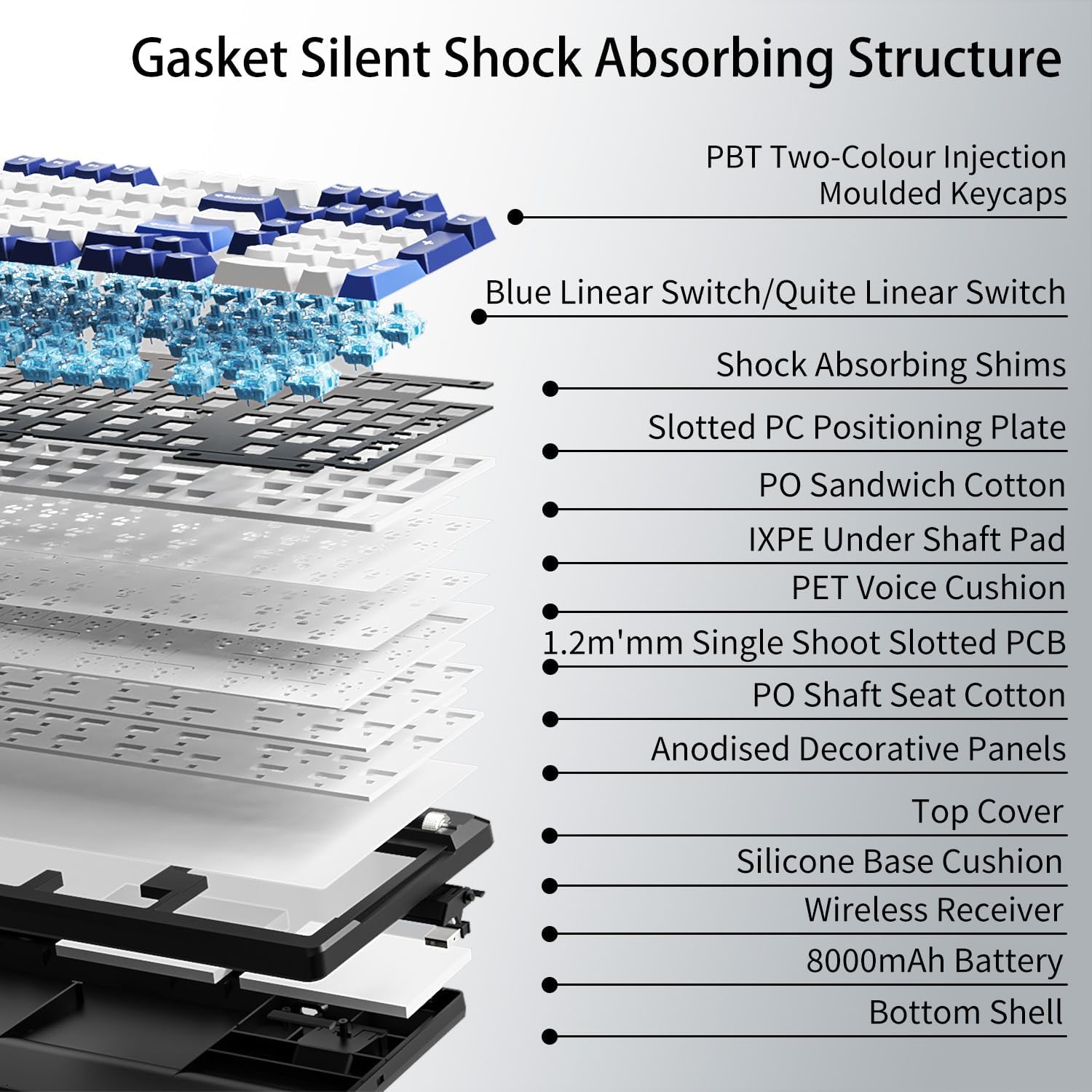
Image 4.2: Gasket mount and internal structure for enhanced typing comfort.

Image 4.3: Illustration of hot-swappable switch mechanism.
4.4 PBT Double-Shot Keycaps
The keyboard is equipped with durable PBT double-shot keycaps, ensuring legends remain crisp and resistant to wear and fading over time.

Image 4.4: Double-shot PBT keycaps for durability and clear legends.
4.5 Pengurusan Bateri
The 8000mAh battery provides extended wireless usage. To conserve battery, the keyboard will enter sleep mode after a period of inactivity. Recharge the keyboard using the provided USB Type-C cable.

Image 4.5: Battery capacity and usage details.
4.6 Video Produk Rasmi
Video 4.6.1: X99 Music Rhythm Showcase. This video demonstrates the dynamic RGB lighting effects of the keyboard, synchronized with music.
Video 4.6.2: X99 Blue Linear Switch Sound Test. Listen to the sound profile of the Blue Linear switches on the EWEADN X99 keyboard.
Video 4.6.3: X99 Gradient Side Printed Berry Pink Music Rhythm Showcase. Another demonstration of RGB lighting, this time on the Berry Pink variant.
Video 4.6.4: X99 Typing Sound Display. A general sound display of the keyboard while typing.
Video 4.6.5: EWEADN X99 Wireless Keyboard, Sound Showcase & RGB Showcase. A comprehensive showcase of both the sound and RGB lighting features.
Video 4.6.6: X99 Gradient Side Printed Gray Music Rhythm Showcase. RGB lighting demonstration on the Gray variant.
Video 4.6.7: X99 Introduction and Demonstration. A general introduction and demonstration of the keyboard's features and functionality.
5. Penyelenggaraan
- Pembersihan: Use a soft, dry cloth to wipe the keyboard surface. For deeper cleaning, use a can of compressed air to remove dust and debris from between keycaps.
- Pembuangan Papan Kekunci: Use the provided keycap puller to carefully remove keycaps for cleaning or switch replacement. Pull straight up to avoid damaging the switch stem.
- Penggantian Suis: Use the provided switch puller to gently remove switches. Align new switches carefully with the PCB pins and press down firmly until they click into place.
- Penjagaan Bateri: Avoid fully discharging the battery frequently. For long-term storage, charge the battery to around 50% and store in a cool, dry place.
6. Penyelesaian masalah
| Masalah | Kemungkinan Punca | Penyelesaian |
|---|---|---|
| Papan kekunci tidak bertindak balas (berwayar) | Loose cable connection, faulty USB port | Pastikan kabel USB-C disambungkan dengan selamat. Cuba port atau kabel USB yang lain. |
| Keyboard not connecting (2.4GHz wireless) | Dongle not plugged in, incorrect mode, low battery | Ensure 2.4GHz dongle is plugged in. Switch keyboard to 2.4GHz mode. Charge the keyboard. |
| Papan kekunci tidak bersambung (Bluetooth) | Bluetooth not enabled on device, not in pairing mode, interference, low battery | Ensure Bluetooth is enabled on your device. Put keyboard in Bluetooth pairing mode. Move closer to device. Charge the keyboard. |
| Kunci tidak mendaftar atau menaip dua kali | Dust/debris under keycap, faulty switch | Remove keycap and clean. If issue persists, replace the switch using the hot-swappable feature. |
| Pencahayaan RGB tidak berfungsi atau tidak betul | Software issue, incorrect setting | Check keyboard lighting settings via function keys. Reinstall or update driver software. |
| Bateri cepat habis | High brightness, frequent use, aging battery | Reduce RGB brightness. Ensure keyboard is off when not in use. |
7. Spesifikasi

Image 7.1: Product dimensions of the EWEADN X99 keyboard.
| Ciri | Perincian |
|---|---|
| Model | X99 |
| Ketersambungan | Bluetooth 5.0, Tanpa Wayar 2.4GHz, Berwayar USB Jenis-C |
| Bilangan Kunci | 99 |
| Kapasiti Bateri | 8000mAh |
| Bahan Kekunci | Pukulan Berganda PBT |
| Gaya Pemasangan | Gasket Mount with 5-layer Sound-DampStruktur Pembentukan |
| Suis | Hot-Swappable (3-pin/5-pin compatible) |
| Pencahayaan latar | 16.8 Million RGB Colors, Customizable Effects |
| Dimensi (L x W x H) | 16.22 x 6.10 x 1.33 inci (412 x 155 x 34 mm) |
| Berat Barang | 3.07 paun |
| Peranti Serasi | Laptop, PC, Gaming Console, Tablet, Mac |
8. Waranti dan Sokongan
EWEADN provides a 360-day manufacturer warranty for the X99 keyboard. For any questions or concerns regarding your product, please do not hesitate to contact the seller, Yiershi Store, directly through the Amazon platform. They are available to assist you and provide genuine brand support.

Image 8.1: EWEADN Brand Logo.

Image 8.2: EWEADN Brand Support details.
Ask a question about this manual
Ask about setup, troubleshooting, compatibility, parts, safety, or missing instructions. Manuals+ will review the question and use this page’s manual context to help answer it.