
pengenalan
Thank you for choosing the DSP Professional Cordless Hair Clipper. This manual provides essential information for the safe and effective use, maintenance, and care of your new hair clipper. Please read it thoroughly before first use and keep it for future reference.
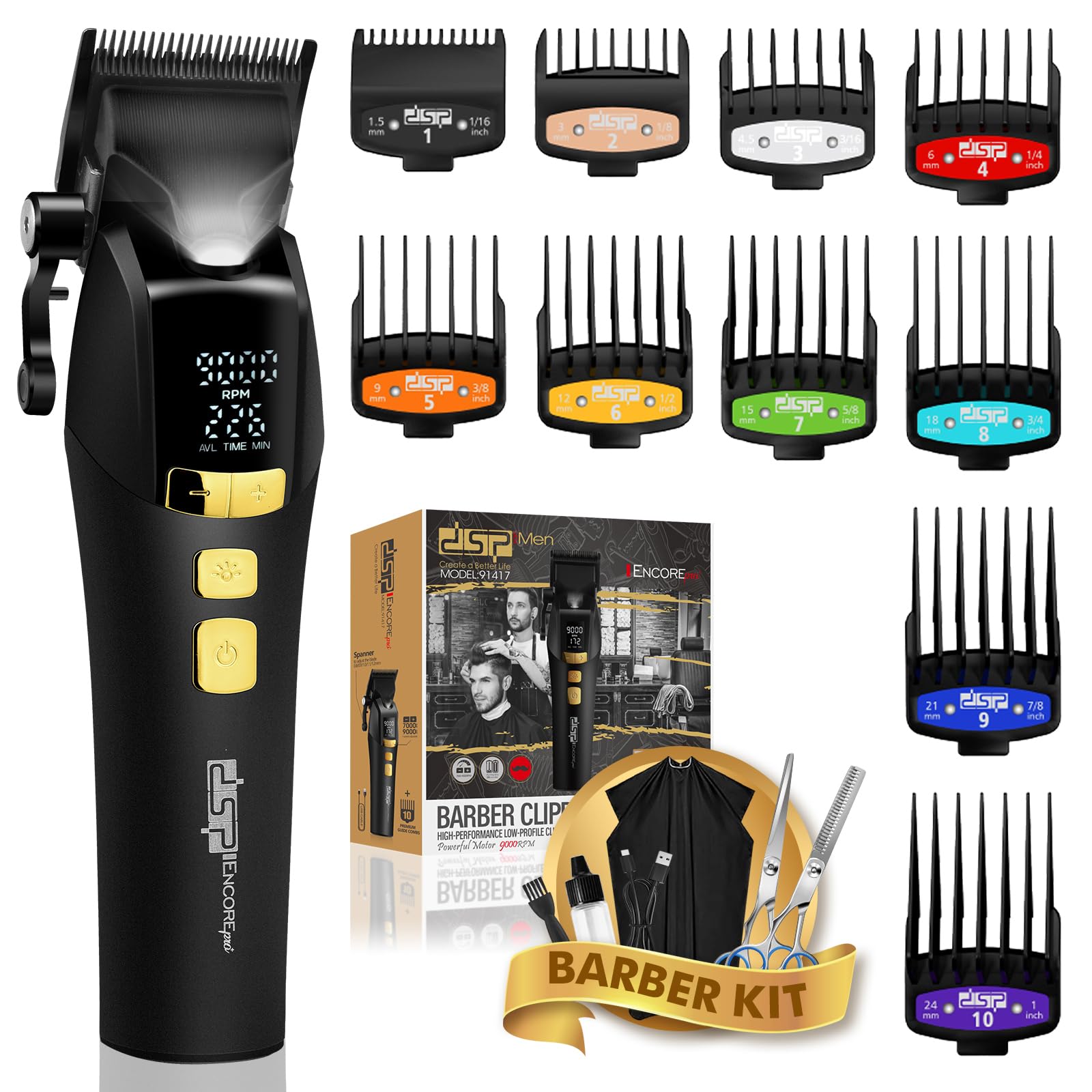
Image: The DSP Professional Cordless Hair Clipper, showcasing reka bentuk hitam anggun dan paparan digitalnya.
Arahan Keselamatan Penting
Untuk mengurangkan risiko kejutan elektrik, kecederaan atau kerosakan, sentiasa ikuti langkah berjaga-jaga keselamatan asas ini:
- Elakkan penggunaan berhampiran air: Jangan gunakan perkakas ini berhampiran tab mandi, pancuran mandian, basins, atau bekas lain yang mengandungi air.
- Keep blades clean and dry: Ensure blades are free from hair and debris after each use.
- Store out of reach of children: Perkakas ini bukan mainan dan harus dijauhkan daripada kanak-kanak.
- Sumber Kuasa: Gunakan hanya kabel Jenis-C yang disediakan untuk pengecasan.
- Penyelenggaraan: Do not attempt to disassemble or repair the appliance yourself. Refer to qualified service personnel.
Kandungan Pakej
Your DSP Professional Cordless Hair Clipper package includes the following items:
- 1 x DSP Professional Cordless Hair Clipper
- 10 x Quality Limit Combs (various sizes)
- 1 x Kabel Pengecas Jenis-C
- 1 x Berus Pembersih
- 1 x Minyak Pelincir
- 1 x Manual Pengguna
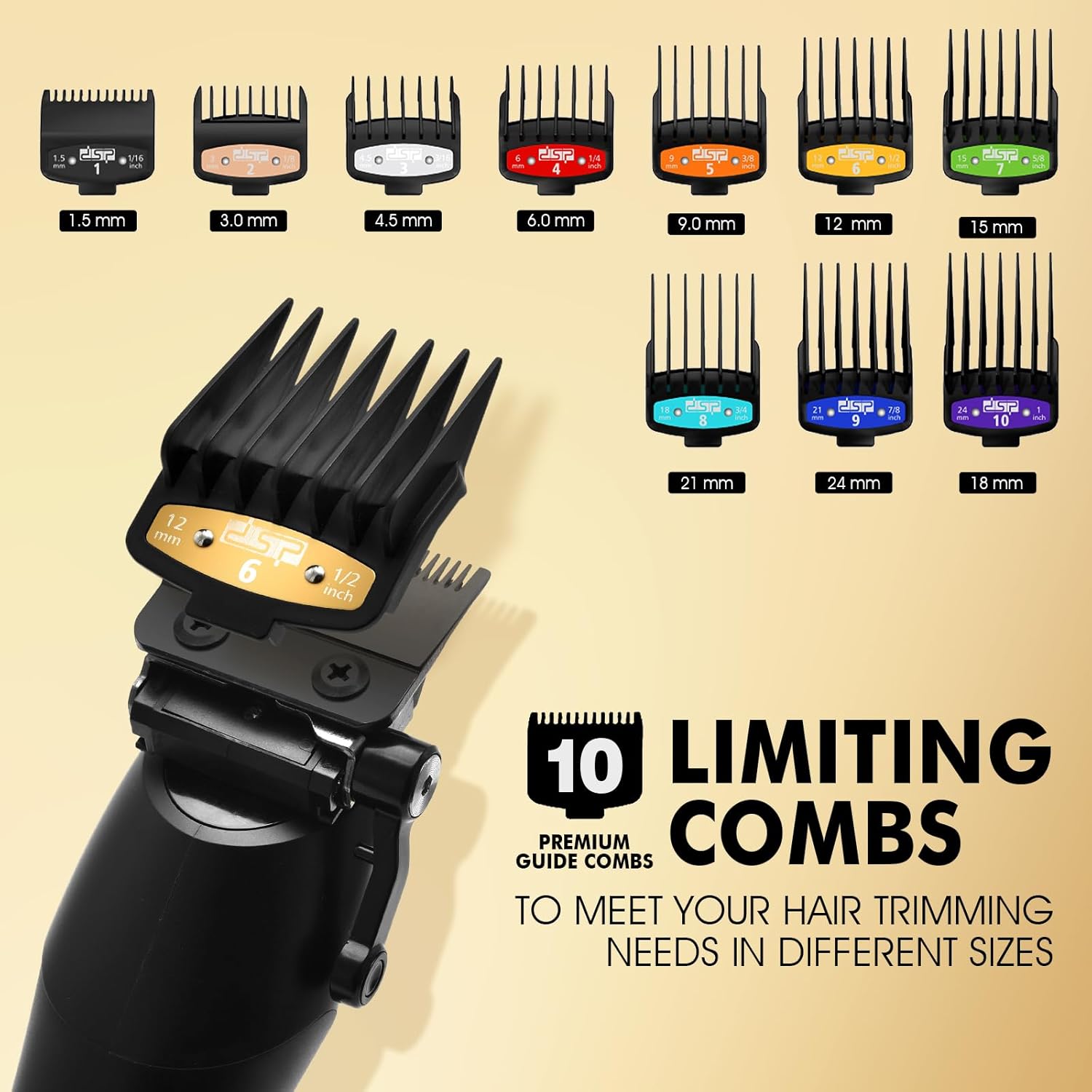
Image: A display of the DSP Hair Clipper along with the 10 included guide combs of various sizes.
Ciri-ciri Produk
The DSP Professional Cordless Hair Clipper is engineered with advanced features for precision grooming:
- Motor Berprestasi Tinggi: Equipped with a BFF390 motor, offering five-speed adjustable RPMs from 7000 to 9000 for various hair types.
- DLC Coated Ceramic Blade: Professional-grade blades ensure smooth, precise cuts without pulling or snagging.
- Operasi tanpa wayar: Powerful battery provides up to 260 minutes of runtime on a single charge.
- Paparan led: Integrated smart features include an LED display showing battery life and current RPM setting.
- Adjustable Blade Spacing: Blade length can be adjusted from 0.8mm to 1.2mm using the side lever.
- Lampu Penunjuk: Features a smart indicator light for operational status.

Image: The DSP Hair Clipper being used for beard trimming, haircutting, hair sculpting, and sideburn trimming.

Image: A close-up of the DSP Hair Clipper's LED display, showing the current RPM and available time in minutes, along with control buttons.
Persediaan
Before using your hair clipper for the first time, please follow these setup steps:
- Bongkar: Keluarkan semua komponen dari pembungkusan dengan berhati-hati.
- Caj Permulaan: Connect the Type-C charging cable to the clipper and a suitable power source (e.g., wall adapter, car charger, USB port). Allow the clipper to fully charge for approximately 4 hours before first use. The LED display will indicate charging status.
- Pelincir Bilah: Apply a few drops of the included lubricating oil to the blades. Turn on the clipper for a few seconds to distribute the oil, then wipe off any excess.
Arahan Operasi
Familiarize yourself with the clipper's controls and functions:
Hidupkan/Mati Kuasa
- Tekan ke Butang Kuasa (bottom button) to turn the clipper ON or OFF.
Adjusting Speed (RPM)
- With the clipper ON, press the Power +/- Button (top button) to cycle through the five-speed settings (7000, 7500, 8000, 8500, 9000 RPM). The current RPM will be displayed on the LED screen.
Melaraskan Panjang Bilah
- Use the side lever to adjust the blade length between 0.8mm, 0.9mm, 1.0mm, 1.1mm, and 1.2mm.
Using Guide Combs
- Select the desired guide comb size (1.5mm to 24mm) and securely attach it to the clipper blade. Ensure it clicks into place.
- Untuk mengeluarkan, perlahan-lahan tarik sikat dari bilah.
Fungsi Cahaya
- Tekan ke Butang Hidup/Mati Lampu (middle button) to activate or deactivate the integrated indicator light for improved visibility during use.
Video: An official product video demonstrating the features and operation of the DSP Hair Clipper for Men Professional.
Penyelenggaraan
Proper maintenance ensures the longevity and performance of your clipper:
- Bilah Pembersihan: After each use, turn off the clipper and remove any attached guide comb. Use the provided cleaning brush to remove loose hairs from the blades.
- Bilah Pelincir: Regularly apply a few drops of lubricating oil to the blades. This helps maintain cutting efficiency and prevents rust. Turn on the clipper for a few seconds to distribute the oil, then wipe off excess.
- Storan: Store the clipper in a dry, cool place, away from direct sunlight and moisture. Keep it in its original packaging or a protective case when not in use.
Mengecas
The DSP Hair Clipper features a long-lasting battery and convenient Type-C charging:
- Masa Pengecasan: Kira-kira 4 jam untuk cas penuh.
- Masa jalan: Up to 260 minutes of continuous use on a full charge.
- Penunjuk Pengecasan: The LED display shows the battery level and charging status.
- Kaedah Mengecas: Can be charged via home adapter, car charger, or any standard USB port using the Type-C cable.
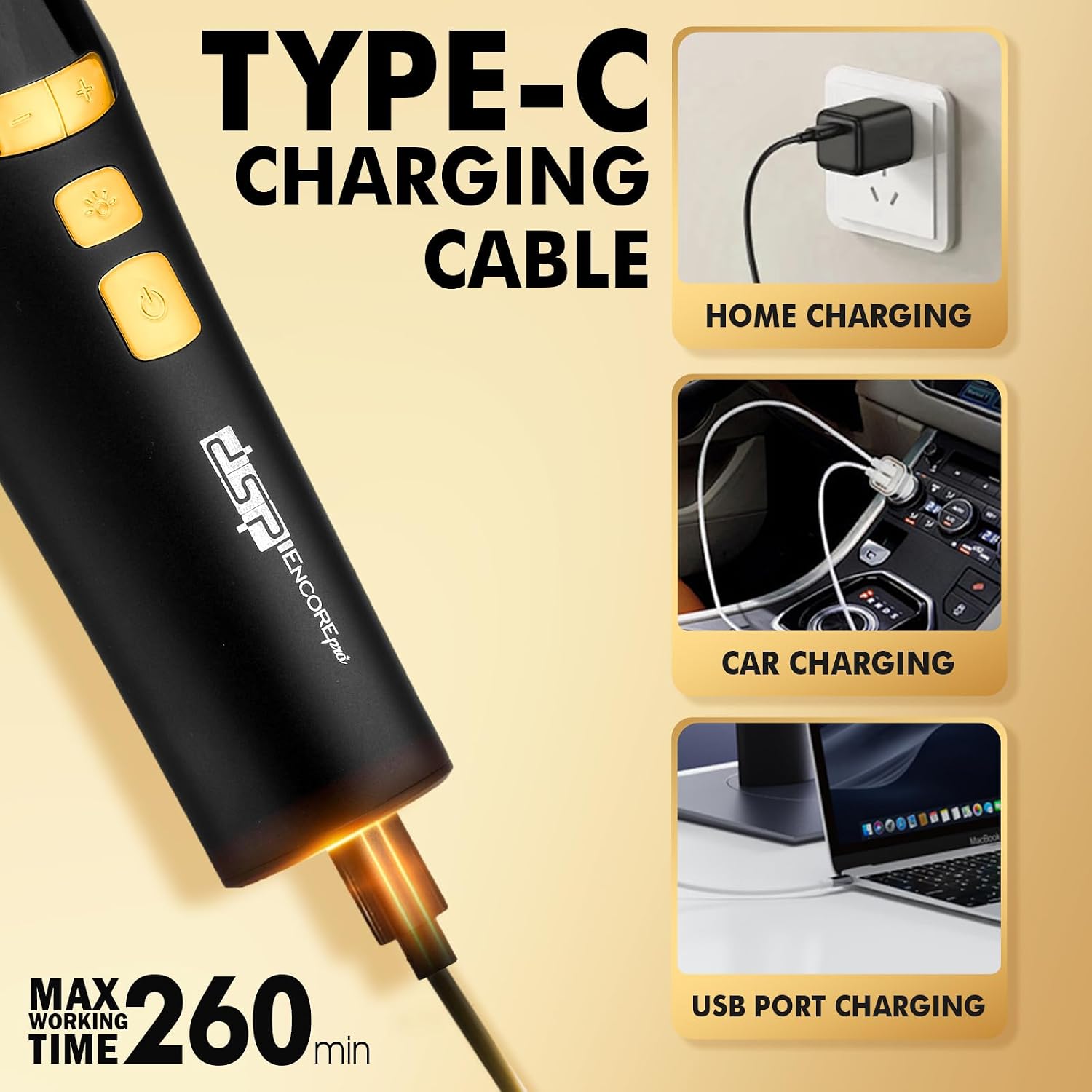
Image: The DSP Hair Clipper connected to a Type-C charging cable, illustrating home, car, and USB port charging options.
Menyelesaikan masalah
If you encounter any issues with your DSP Hair Clipper, refer to the table below for common problems and solutions:
| Masalah | Kemungkinan Punca | Penyelesaian |
|---|---|---|
| Clipper tidak dihidupkan. | Bateri lemah atau tiada cas. | Charge the clipper for 4 hours. Ensure the charging cable is properly connected. |
| Clipper menarik rambut atau memotong dengan buruk. | Bilah kusam, kotor atau tidak berminyak. | Bersihkan bilah dengan teliti dan sapukan minyak pelincir. Jika bilah tumpul, pertimbangkan untuk mengasah atau menggantikannya secara profesional. |
| Clipper mengeluarkan bunyi yang luar biasa. | Blades are misaligned or internal issue. | Ensure blades are correctly aligned. If the noise persists, contact customer support. |
| Paparan LED tidak berfungsi. | Clipper is off or a malfunction. | Turn on the clipper. If still not working, ensure it is charged. Contact customer support if the issue continues. |
Spesifikasi
Technical specifications for the DSP Professional Cordless Hair Clipper:
| Ciri | Perincian |
|---|---|
| Nombor Model | 91417 |
| Bahan Bilah | DLC Coated Ceramic |
| Kelajuan Motor | 7000-9000 RPM (Five-speed adjustable) |
| Jenis Bateri | Litium |
| Masa Mengecas | 4 jam |
| Masa jalan | 260 minit |
| Sumber Kuasa | Dikuasakan Bateri |
| Panjang Bilah Boleh Laras | 0.8mm, 0.9mm, 1.0mm, 1.1mm, 1.2mm |
| Included Guide Combs | 10 (1.5mm, 3.0mm, 4.5mm, 6.0mm, 9.0mm, 12mm, 15mm, 18mm, 21mm, 24mm) |
| Dimensi Pakej | 8.74 x 8.66 x 2.68 inci |
| Berat badan | 2.2 paun |
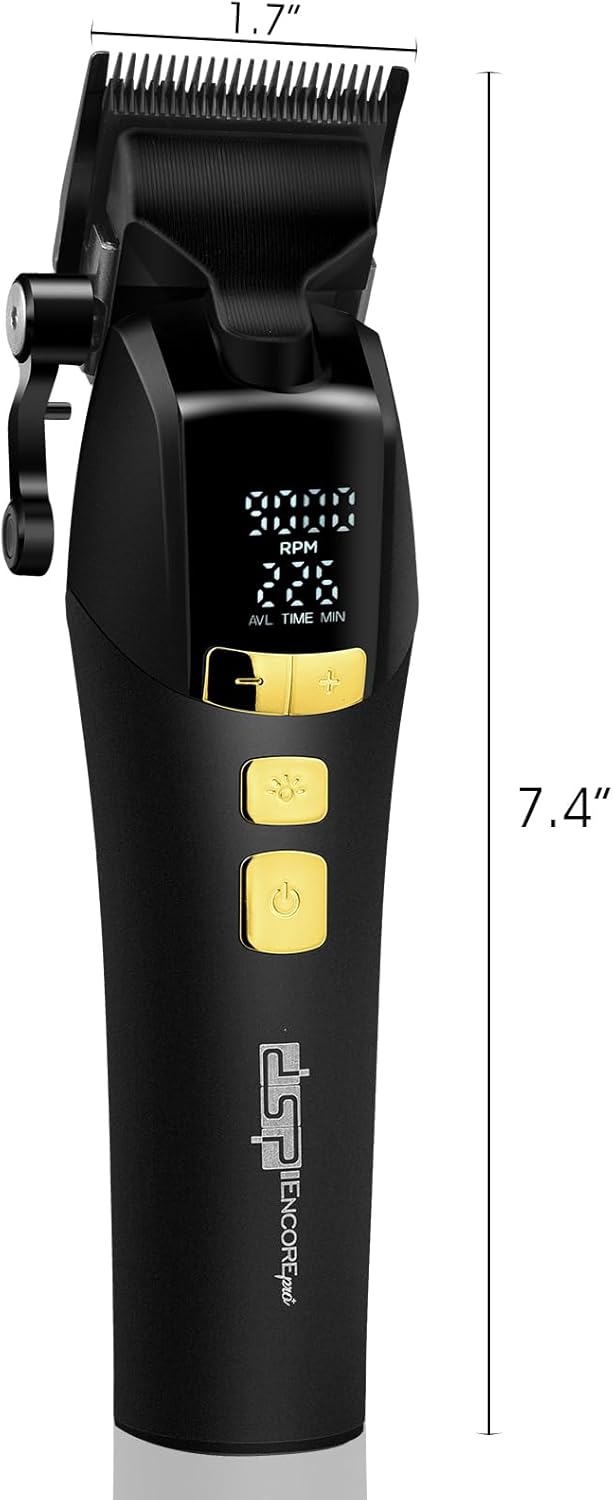
Image: A visual representation of the DSP Hair Clipper's dimensions, showing its length and blade width.
Waranti & Sokongan
DSP provides a Perkhidmatan selepas jualan 12 bulan for this product. If you have any questions, concerns, or require technical assistance, please contact DSP customer support through the retailer's platform or the official DSP webtapak. Sila simpan bukti pembelian anda untuk tuntutan waranti.