
1. Maklumat Keselamatan
Always follow the assembly instructions carefully to ensure stability. Be aware of potential pinch points during assembly, and handle slats with care. This bed frame is designed for a maximum weight capacity of 900 pounds, and exceeding this weight capacity could result in damage or injury. Always use caution when using this product, and consult the manufacturer for any additional safety information.
2. Kandungan Pakej
Before beginning assembly, ensure all parts are present and undamaged. Refer to the included parts list in your packaging. If any parts are missing or damaged, contact customer support.

Figure 2.1: Product dimensions and individual components of the bed frame.
3. Arahan Perhimpunan
Assembly is required. It is recommended to have two people for assembly. Follow the step-by-step instructions provided in your product packaging. Ensure all connections are secure before use.
3.1 Pemasangan Bingkai
- Buka bungkusan semua komponen dan letakkannya di atas permukaan yang bersih dan lembut untuk mengelakkan calar.
- Connect the main frame sections using the provided hardware. Ensure all bolts are tightened securely.
- Attach the headboard and footboard to the assembled frame.
- Install the heavy-duty metal slats. The bolt-free quick-lock assembly system ensures stability and ease of installation. Ensure slats are evenly spaced at 5.8 inches.

Figure 3.1: Illustration of the bolt-free quick-lock assembly for metal slats.
3.2 Headboard and Storage Shelf Installation
- Secure the upholstered headboard panels to the frame.
- Attach the storage shelf to the top of the headboard.

Rajah 3.2: Terperinci view of the headboard assembly.
3.3 Perhimpunan Laci
- Assemble the four storage drawers according to the instructions.
- Ensure the wheels are properly attached for smooth operation.
- Slide the assembled drawers under the bed frame.

Figure 3.3: Assembly steps for the storage drawers.
Video 3.1: This video demonstrates the assembly process for the bed frame, including the charging station and drawers. It provides a visual guide to complement the written instructions.
4. Arahan Operasi
4.1 Operasi Lampu LED
The headboard features RGB LED lights. The controller is integrated into the headboard for easy access.
- Butang Kuasa: Tekan untuk menghidupkan atau mematikan lampu LED.
- Mod Pemandangan: Cycle through 12 different scene modes to adjust the lighting ambiance.
- Pelarasan Kelajuan: Adjust the speed of dynamic light effects with 3 available levels.
- Kawalan Kecerahan: Select from 3 brightness modes to suit your preference.

Figure 4.1: The bed frame with its RGB LED lights active, showcasing pelbagai pilihan warna.

Figure 4.2: The control panel for the LED lights, located on the headboard for convenient access.
4.2 Penggunaan Stesen Pengecasan
The headboard includes a built-in charging station with 2 USB ports and 1 Type-C port.
- Connect your mobile devices (phone, tablet, etc.) to the available USB or Type-C ports.
- Ensure the bed frame is connected to a power source for the charging station to function.
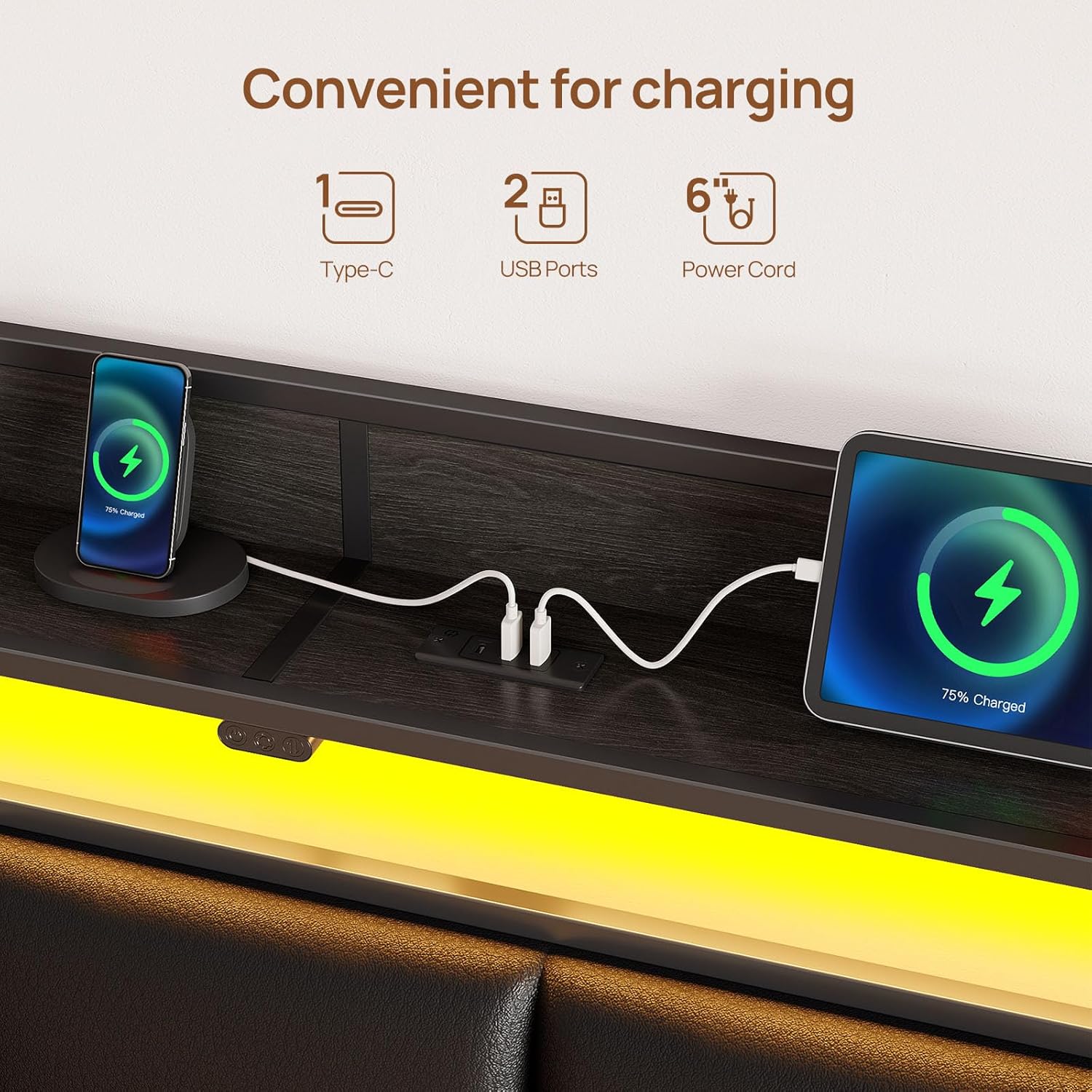
Figure 4.3: The integrated charging station with USB and Type-C ports, shown with devices charging.
Video 4.1: This short video demonstrates the functionality of the charging station and LED lights on the bed frame.
5. Penyelenggaraan
5.1 Pembersihan
- For general cleaning, wipe the bed frame surfaces with a damp kain.
- Avoid using harsh chemicals or abrasive cleaners, as these may damage the finish or upholstery.
- For the upholstered headboard, spot clean with a mild fabric cleaner if necessary.
5.2 Integriti Struktur
- Periksa semua bolt dan sambungan secara berkala untuk memastikan ia kekal ketat. Ketatkan semula jika perlu.
- Inspect the metal slats for any signs of damage or bending. Replace any damaged slats immediately to maintain structural support.
6. Penyelesaian masalah
6.1 Lampu LED Tidak Berfungsi
- Ensure the bed frame is properly plugged into a functional power outlet.
- Check the connection of the LED light strip to the control box and power source.
- Verify that the power button on the headboard controller is pressed.
6.2 Charging Station Not Functioning
- Confirm the bed frame is connected to a live power outlet.
- Test with different USB cables and devices to rule out cable or device issues.
- Ensure the charging station's internal connections are secure (if accessible and safe to check).
6.3 Drawers Difficult to Open/Close
- Check for obstructions under the bed or within the drawer mechanism.
- Ensure the drawer wheels are properly installed and not damaged.
- Verify that the mattress is not interfering with the drawer operation. Adjust mattress position if needed.
6.4 Bunyi Berdecit
- Tighten all bolts and screws on the frame, headboard, and footboard.
- Ensure all metal slats are properly seated and secured in their quick-lock positions.
7. Spesifikasi
| Ciri | Perincian |
|---|---|
| Saiz | kembar |
| bahan | Metal frame, Synthetic Leather headboard |
| Dimensi Produk (L x W x H) | 82.3" x 39.4" x 39.3" |
| Kapasiti Berat | 900 paun |
| Ciri Khas | RGB LED Lights (12 scene modes, 3 speed, 3 brightness), Charging Station (2 USB, 1 Type-C), Upholstered Storage Headboard, 4 Storage Drawers, Heavy Duty Metal Slats, No Box Spring Needed |
| Komponen yang Disertakan | Bed Frame, Headboard, 4 Drawers |
| Perhimpunan Diperlukan | ya |
| Arahan Penjagaan | Lap dengan Damp kain |
| Nombor Model | BF013-BK-T-RR-VC |
| UPC | 810142989824 |
8. Waranti dan Sokongan
For warranty information or technical support, please refer to the documentation included with your purchase or contact Rolanstar customer service directly. Keep your purchase receipt for warranty claims.
For further assistance, visit the official Rolanstar webtapak atau hubungi pasukan sokongan pelanggan mereka.